NiceHash Quick Miner — first-time impression notes
Below is my first-time thoughts on NiceHash Quick Miner. If you want to know why I picked NiceHash Quick Miner over the other NiceHash…
NiceHash Quick Miner — first-time impression notes
Below is my first-time thoughts on NiceHash Quick Miner. If you want to know why I picked NiceHash Quick Miner over the other NiceHash mining applications, please see my earlier post

Nice Hash Quick Miner Notes
- It is only mining 1 algorithm — Daggerhashimoto which is the most Profitable on the Ethereum blockchain. It cannot algorithm switch manually or automatically if this is not the most profitable algorithm
- It is a fully supported, secure stable application created by Nice Hash. In comparison to NiceHash Miner, it uses third party mining programming code so they do put a big disclaimer that they endorse it but can’t guarantee the security of your rig. Therefore NiceHash Quicker Miner is secure because it is fully created by them!
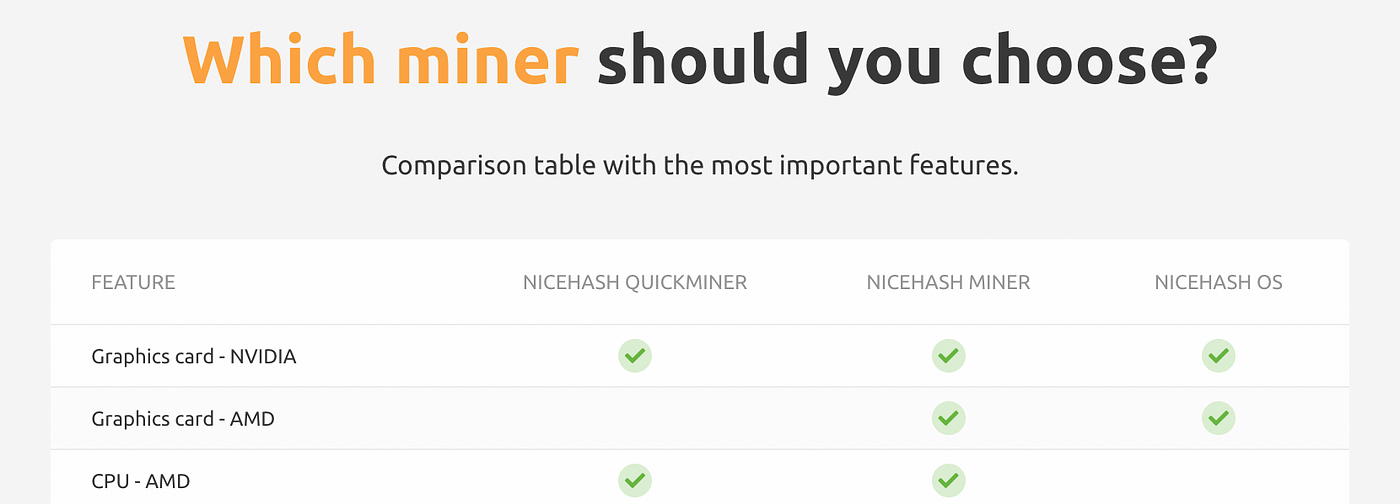
- NiceHash Quick Miner is built for NVIDIA GPU cards only
- You are able to monitor your rig remotely through their mobile app and via their website. You are able to change the mining speeds from lite, medium and high remotely which is a cool feature depending on your profitability desirability
- I am really impressed with their app for android so far no complaints.
- On the mobile app and website, you are able to get really good data like GPU temperature and power consumption. You can also get forecasted daily, weekly, monthly and yearly earnings. It also tells you how much was last paid into your wallet and the next payment time.
- It pays you in BTC every 4 hours, to a Nice Hash wallet. The process is seamless. I do trust the wallet but I have not been able to test transferring the BTC out of the Nice Hash wallet to my other wallets. This is because you need a minimum of $50 worth (NZD) to do a transfer. Will hopefully have that amount by the end of the month!
- Their blogs are really good and showed me how to boot a computer automatically in the event of unintended power cuts. It shows you here and involves diving into motherboard BIOS settings on the startup
- I was impressed with their support case response times, within 12 hours. I found a bug that meant when the rig was offline I did not receive a notification. This bug has since been squished!
메타데이터
- post_id
- e00f290ef5f1
- slug
- nicehash-quick-miner-first-time-impression-notes-e00f290ef5f1
- url
- https://medium.com/@liam-cole/nicehash-quick-miner-first-time-impression-notes-e00f290ef5f1
- canonical_url
- https://medium.com/@liam-cole/nicehash-quick-miner-first-time-impression-notes-e00f290ef5f1
- author_url
- https://medium.com/@liam-cole
- status
- ok
- fetched_at
- 2026-08-03 19:17:03