Running Apache Airflow on Azure Container Apps
Azure has no managed Airflow worth the name, so I self-hosted it on Container Apps with a CeleryExecutor and a swappable metadata database…
Running Apache Airflow on Azure Container Apps
Azure has no managed Airflow worth the name, so I self-hosted it on Container Apps with a CeleryExecutor and a swappable metadata database (Snowflake Postgres or Azure Postgres). Here’s the architecture, the cost, and the gotcha that ate an afternoon.
Running Apache Airflow on Azure Container Apps means self-hosting it, because Azure has no managed Airflow to match AWS MWAA or Google Cloud Composer. Mine runs on ACA compute with a CeleryExecutor, Redis as the broker, and a managed Postgres holding the metadata. It lands around $352 a month, and it took one stupid networking bug to get there.
On AWS you reach for MWAA, on Google Cloud for Composer, and you mostly don’t think about the scheduler, the workers, or the metadata database. Azure never had an equivalent worth the name. The closest was Workflow Orchestration Manager, the managed Airflow tucked inside Data Factory. It capped at 1000 DAGs on the large node, sat in preview for ages, and always read as a feature of ADF rather than a real orchestration product. Then Microsoft pulled the plug. Since January 1, 2026 you can’t create new instances, and existing workloads are being herded into Apache Airflow jobs inside Microsoft Fabric. Fine if you already live in Fabric. One more lock-in if you don’t.
So on Azure, if you want Airflow that’s scalable, reliable, and not welded to one vendor’s roadmap, you build the hosting yourself. That’s the starting condition, not a complaint.
That’s how I got here. With no managed option to lean on, I designed the hosting from the infra principles up. Scale horizontally before vertically. Keep the pieces separable so one failure doesn’t cascade into the others. Use managed building blocks where they’re cheap and proven, and write the rest yourself. Don’t marry the whole thing to a single vendor’s roadmap. What came out is Airflow self-hosted on Container Apps, with the metadata in a managed Postgres.
One housekeeping note before the details: every hostname, IP, account identifier, and credit rate below is a placeholder. Drop in your own.
What I built on Container Apps
The platform decision was the first fork. Run everything inside Snowflake through Snowpark Container Services, or self-host on ACA. SPCS keeps you on one platform but the compute costs more and the tooling is younger, so I went with Container Apps for the compute and treated everything else as a set of swappable building blocks bolted on.
Two of those blocks carry most of the design weight. The executor, where I chose CeleryExecutor for horizontal scaling. And the metadata database, which is the part this article keeps coming back to, because it’s the one piece you can change without touching anything else.
The architecture
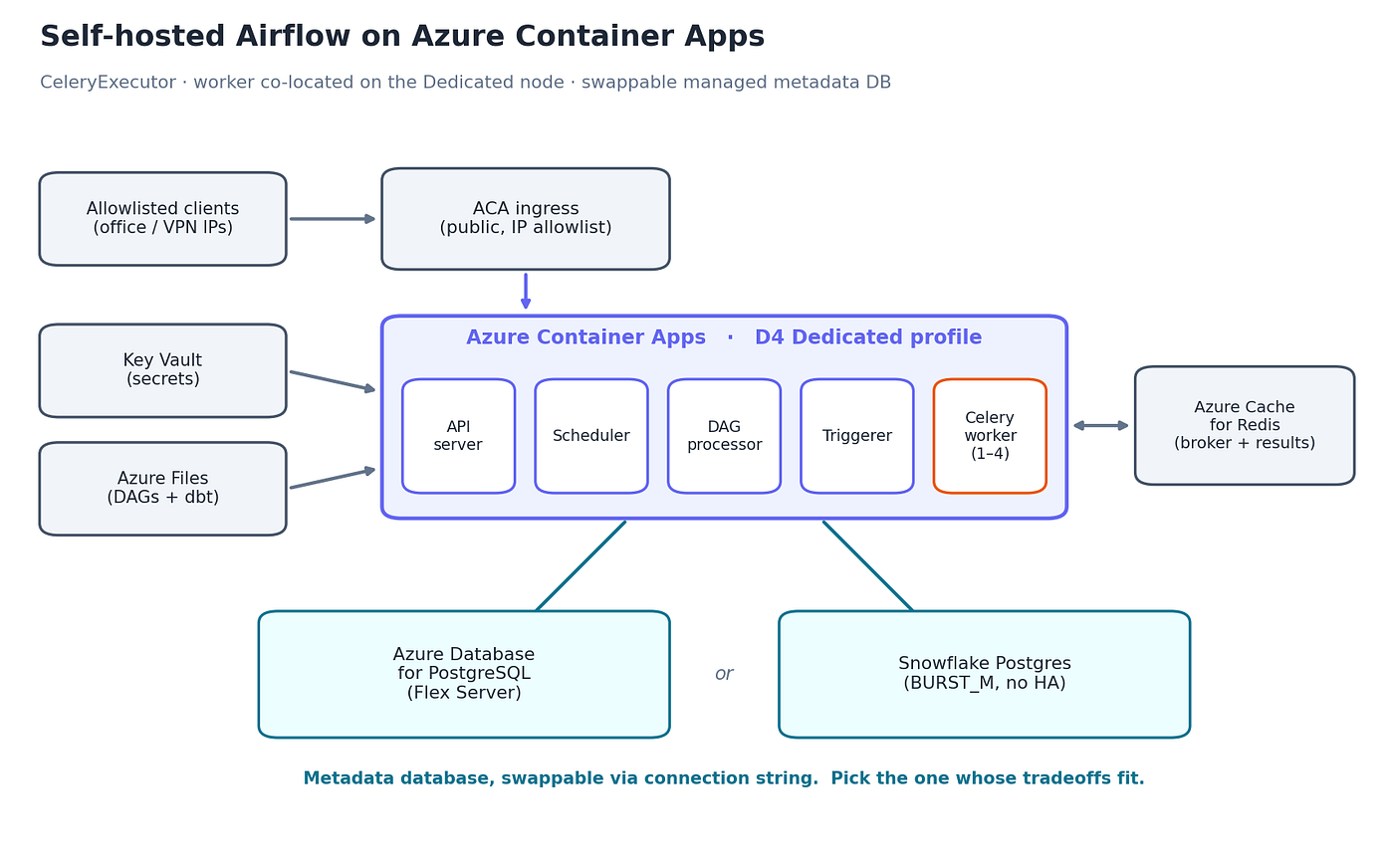
Self-hosted Airflow on Azure Container Apps architecture diagram
- Compute: Azure Container Apps, D4 Dedicated workload profile
- Executor: CeleryExecutor with KEDA autoscaling
- Workers: co-located on the D4 Dedicated profile, 1 to 4 replicas
- Metadata DB: Azure Database for PostgreSQL or Snowflake Postgres (see below)
- Broker + result backend: Azure Cache for Redis (broker on DB 0, results on DB 1)
- Ingress: public ACA endpoint with an IP allowlist
- User identity: FAB Auth Manager, users in the metadata DB (Entra SSO instead, if you can create an app registration)
- Secrets: Key Vault via the Airflow Secrets Backend
- DAGs and dbt: Azure Files share mounted into the containers
I picked CeleryExecutor over LocalExecutor because the workload is bursty. API-driven ingestion, quiet for stretches, then a pile of tasks all at once. With Celery the scheduler just drops work on a queue and the workers scale out on Redis queue depth (KEDA scaler, five tasks per worker). I would rather rent a few extra worker replicas for an hour than permanently oversize one node so it can survive its worst day. That’s the horizontal-before-vertical principle in practice.
The scheduler never runs tasks itself. Redis does double duty as broker and result backend, which keeps result writes off the metadata database whichever one you pick.
The relevant config, sanitized:
AIRFLOW__CORE__EXECUTOR              = CeleryExecutor
AIRFLOW__CORE__AUTH_MANAGER          = airflow.providers.fab.auth_manager.fab_auth_manager.FabAuthManager
AIRFLOW__DATABASE__SQL_ALCHEMY_CONN  = postgresql+psycopg2://airflow_meta:***@<your-postgres-host>:5432/airflow_metadata?sslmode=require
AIRFLOW__CELERY__BROKER_URL          = rediss://:<key>@<your-redis>.redis.cache.windows.net:6380/0?ssl_cert_reqs=CERT_REQUIRED
AIRFLOW__CELERY__RESULT_BACKEND      = rediss://:<key>@<your-redis>.redis.cache.windows.net:6380/1?ssl_cert_reqs=CERT_REQUIRED
AIRFLOW__SECRETS__BACKEND            = airflow.providers.microsoft.azure.secrets.key_vault.AzureKeyVaultBackend
AIRFLOW__WEBSERVER__ENABLE_PROXY_FIX = True
The metadata path is plain SQLAlchemy over TLS to the Postgres endpoint on 5432. We run Snowflake Enterprise, not Business Critical, so there’s no Private Link. The connection goes over the public endpoint with TLS 1.2+ and a network policy that allowlists known IPs. A dedicated airflow_meta role owns the airflow_metadata database, and its password lives in Key Vault.
The metadata database: two backends that both work
Airflow’s metadata database is just a Postgres endpoint behind a connection string. That makes it the one piece you can swap without rebuilding anything around it, and there are two managed options that both do the job. Here are the tradeoffs. The choice depends on what you’re optimizing for, so I’ll lay them out and leave the verdict to your constraints.
Azure Database for PostgreSQL (Flex Server). A managed Postgres that’s been generally available for years. You can inject it into your VNet and reach it over Private Link, so metadata traffic never crosses a public endpoint. Its failure domain is its own: if Snowflake has a bad day, your scheduler’s state isn’t part of it. You own the usual managed-Postgres operations like backups, version upgrades, and HA configuration. A small instance (D2ds_v5, 64 GiB) runs around $110 a month.
Snowflake Postgres (BURST_M, no HA). Snowflake’s managed Postgres, a newer offering that recently reached GA. It puts the metadata in the same account that already holds your warehouse, so there’s one fewer system to provision and monitor. On Snowflake Enterprise the connection goes over the public endpoint with an IP allowlist, since Private Link needs Business Critical. A BURST_M instance runs around $57 a month at an illustrative Enterprise credit rate, with storage billed separately.
Same SQLAlchemy connection string, same Postgres wire protocol, different tradeoffs around it. One keeps everything inside Azure with VNet-native networking and a failure domain separate from your data platform. The other consolidates the metadata into Snowflake at a lower monthly number, at the cost of a public-endpoint path and a shared blast radius with the warehouse. Neither is the right answer in the abstract. Pick the one whose tradeoffs match your situation, and remember you can move between them later by changing a connection string and running a migration.
For this deployment I went with Snowflake Postgres, mostly because the account was already there and the consolidation was worth it to me. The Azure-managed option would have been an equally defensible call, and on a different project I’d reach for it without hesitation.
The thing that actually bit me
This is the part I want you to remember, because it is stupid and it cost me real time. It applies to either metadata backend, since it’s about how the workers reach the API server.
On Azure Container Apps, outbound traffic from your containers leaves through a NAT gateway and re-enters through the public ingress. That includes calls between two services in the same environment. So when a Celery worker calls the Airflow Execution API, that call goes out to the NAT IP and tries to come back in the front door.
If your ingress has an IP allowlist, and it should, the NAT gateway’s own outbound IP has to be on it. Miss that, and the workers can’t reach the API server. You get a deployment that looks perfectly healthy and runs absolutely nothing.

Azure Container Apps NAT gateway loopback through public ingress allowlist
It feels wrong the first time. Two containers in one environment shouldn’t need a round trip through a public IP to talk. But that’s the ingress model, so you add the NAT IP to the allowlist and get on with your day.
What Airflow on Azure Container Apps costs
Most of the bill doesn’t move with the metadata choice. Here’s the fixed part, monthly, at list prices in one region:
- ACA D4 Dedicated profile (all-in incl. environment management fee; hosts the api-server, scheduler, dag-processor, triggerer, and the co-located Celery worker): ~$222
- Azure Cache for Redis C1 Standard (broker + results): ~$40
- Storage, ~500 GB: ~$8
- Log Analytics, ~15 GB/mo: ~$22
- Key Vault, standard: ~$3
- Fixed subtotal: ~$295
Then add whichever metadata backend you picked:
- Azure Database for PostgreSQL (Flex Server, D2ds_v5): +$110, total ~$405/mo
- Snowflake Postgres (BURST_M, no HA): +$57, total ~$352/mo

Monthly cost by metadata backend: Snowflake Postgres $352, Azure Postgres $405, SPCS $486
One line in the fixed part deserves a hard look, because it’s the one everybody underestimates and I did too. My first cut had the Dedicated D4 at $89. The real number, once you count the management fee Azure charges per Dedicated environment, is $221.71. Everything else on the bill rounds to noise next to it.
And the detail that makes Celery affordable here: the worker isn’t a separate node. It rides on the same D4 profile as the control plane, and ACA Dedicated bills per node, not per app. Co-locating the worker on a box I’m already paying for means the executor’s elasticity costs nothing at baseline. Push the autoscaler hard enough and ACA spins up a second Dedicated node, billed by the hour while it’s up, so budget for that if your bursts are big. Mine fit on the one node, so the bill stays flat.
Two reference points if you’re weighing the broader shape. Drop Celery for a LocalExecutor and you save the Redis line and lose horizontal scaling, since every task then runs on the scheduler node. Keep everything inside Snowflake on a small always-on Snowpark Container Services pool instead of ACA, and you’re looking at roughly $486 a month. Different shapes for different priorities.
One caveat on the Redis line. Azure is sunsetting Azure Cache for Redis: the Basic, Standard, and Premium tiers retire on September 30, 2028 (Enterprise earlier, in 2027), and Microsoft is steering new workloads to Azure Managed Redis. On a fresh build, price Azure Managed Redis instead. Same job, different SKU, slightly different math.
Risks I’m watching
No free lunch here, and the two metadata paths carry different risks, so weigh the set that applies to your pick.
The Snowflake-metadata path I shipped is new ground. Snowflake Postgres reached GA recently and I couldn’t find a public production reference using it this way, which is why I kept the Azure-managed Postgres documented as plan B. If the instance acts up, the swap is a connection string and a migration. Its latency over the public endpoint sits around 5 to 15 ms in-region, fine for a scheduler, but measure your own p95 and p99 before cutover and keep a bigger compute family ready if p99 drifts past 50 ms. And the metadata now shares a vendor with the warehouse, so a Snowflake outage takes out both at once.
The Azure-managed path trades those away for a different set. You own the operational surface, which means backups, version upgrades, and HA are yours to run. It costs more per month. In exchange you get VNet-native networking and a failure domain that’s independent of your data platform.
Common to both, and worth being honest about: I’m on FAB database auth, and not because I prefer it. Entra SSO needs an app registration in the tenant, and I don’t have rights to create one here, so FAB was the route that didn’t depend on someone else’s approval. The cost of that is no native MFA, which the IP allowlist covers for now. The Auth Manager is swappable, so the day an app registration lands, switching to Entra SSO is a config change rather than a rewrite.
Before going live
I wouldn’t cut over without walking these:
- Allowlist: an allowed IP succeeds, a blocked IP gets a 403.
- FAB login: make a test user, confirm the role survives a restart.
- Latency probe: a
psql SELECT 1loop for five minutes against your chosen backend, target p95 under 15 ms and p99 under 50 ms. - Dispatch benchmark: 50 DAGs by 20 tasks, confirm everything routes through Redis.
- Autoscale: flood the queue, watch the workers climb and settle back down.
- Smoke test: a handful of real DAGs end to end, XCom and downstream assets included.
- Fault injection: kill a worker mid-task, confirm a clean retry with no corrupted state.
- Let Log Analytics run two weeks, then size the real logging cost from data instead of a guess.
Would I do it again?
For this workload, yes. Azure didn’t hand me a managed Airflow, so the choice was build it deliberately or wedge myself into Fabric, and I’d rather own the hosting than rent the lock-in. The compute underneath is the boring, proven ACA one, and the executor scales horizontally the way the workload demands.
The metadata backend is the part I’d tell you to think about rather than copy. I picked Snowflake Postgres because the account was already there and the lower monthly number and consolidation fit my context. If you need VNet-native networking, an independent failure domain, or a backend with a longer production track record, Azure Database for PostgreSQL gets you there for a higher monthly cost. The architecture doesn’t care which you choose, and neither do I. That’s the whole point of keeping it swappable.
If you try it, measure the latency early and keep your fallback written down. That’s most of the distance between a clever architecture and a 2 a.m. page.
Do that and you should end up with a single-region Airflow you actually own, somewhere around $350 a month, with room to scale the workers when a burst lands. If you run something similar on Azure, or you’d have made a different call on the metadata database, tell me where and why. I write these up as I go.
메타데이터
- post_id
- e01d2e485f5d
- slug
- running-apache-airflow-on-azure-container-apps-e01d2e485f5d
- url
- https://medium.com/@lucashmuller/running-apache-airflow-on-azure-container-apps-e01d2e485f5d
- canonical_url
- https://medium.com/@lucashmuller/running-apache-airflow-on-azure-container-apps-e01d2e485f5d
- author_url
- https://medium.com/@lucashmuller
- status
- ok
- fetched_at
- 2026-06-11 21:11:36



