How I’d Design a Bulletproof SNS Alerting System for Data Pipelines
Imagine this: It’s 2 AM. Your data pipeline — the heartbeat of your company’s analytics — suddenly chokes on bad data. Millions in revenue…
How I’d Design a Bulletproof SNS Alerting System for Data Pipelines
Imagine this: It’s 2 AM. Your data pipeline — the heartbeat of your company’s analytics — suddenly chokes on bad data. Millions in revenue decisions hang in the balance, but you’re fast asleep. Sound familiar?
That’s where an SNS alerting system saves the day. In this guide, I’ll walk you through designing one step-by-step, like I’m prepping you for that big data engineering interview. Whether you’re building ETL pipelines on AWS or just curious, this SNS data pipeline alerting blueprint will make you the hero.
🎯 The Problem: Silent Pipeline Failures Kill Businesses
Data pipelines process terabytes daily — from user clicks to financial transactions. But here’s the kicker: 80% of failures go unnoticed for hours (or days), causing bad dashboards, wrong reports, and lost trust.
Why does this matter? In real-world scenarios like e-commerce, a failed inventory sync means oversold stock. In finance, delayed fraud detection costs millions. Without SNS alerting in data pipelines, you’re flying blind.
💡 Core Concepts: Breaking Down SNS Alerting
Let’s demystify SNS (Simple Notification Service) — AWS’s pub-sub messenger for alerts.
- SNS Topics: Central hubs where alerts are “published.” Think of it as a town crier shouting news.
- Subscriptions: Endpoints (email, SMS, Lambda, Slack) that “subscribe” to topics. One publish → many notifications.
- Triggers: CloudWatch alarms or EventBridge rules detect issues (e.g., pipeline failures) and publish to SNS.
- Fan-out: SNS blasts alerts to multiple subscribers instantly, scaling to millions.
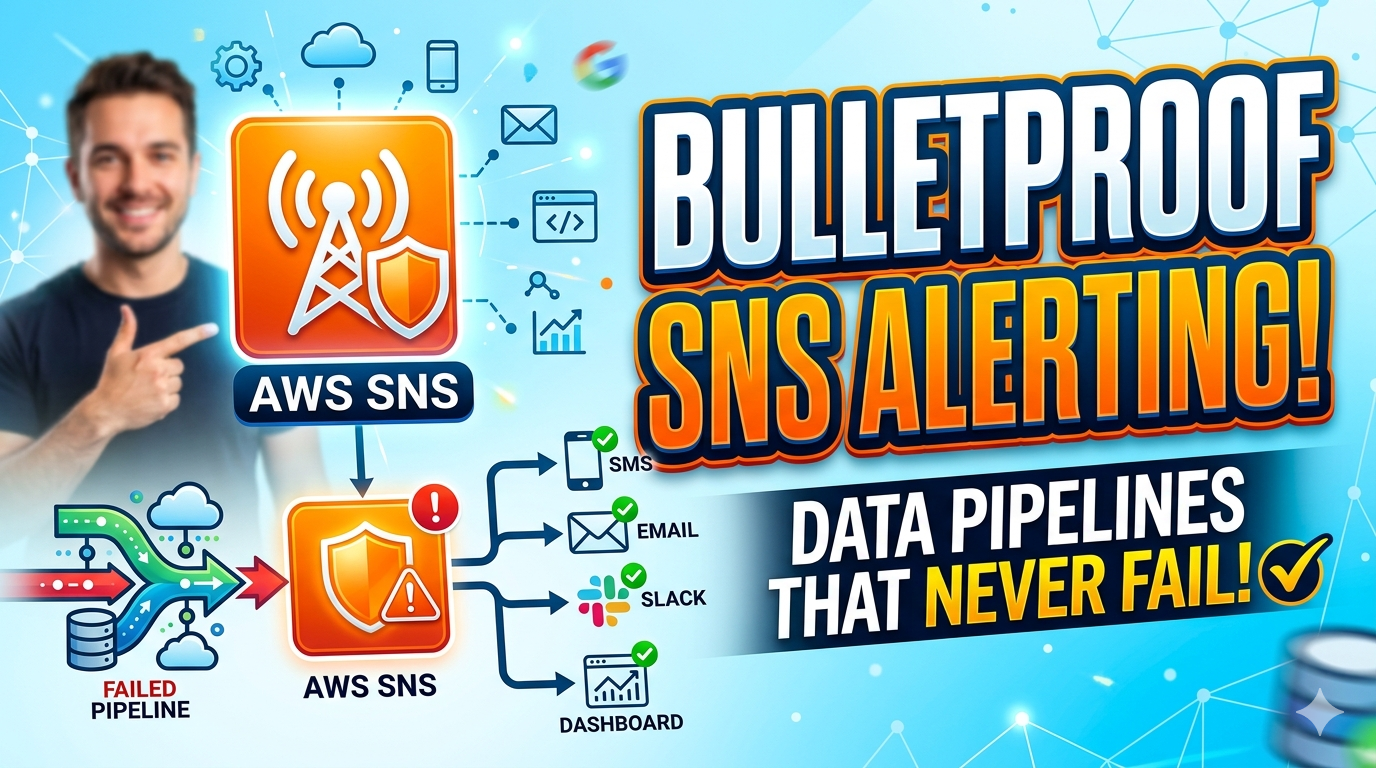
Integration flow: Data Pipeline (Glue/EMR) → CloudWatch Metrics/Logs → Alarms → SNS Topic → Notifications.
🧪 Practical Example: Step-by-Step Pipeline Alert
Let’s design alerting for a Glue ETL job processing sales data. We’ll catch failures, high latency, and data skew.
Step 1: Create SNS Topic
aws sns create-topic --name DataPipelineAlerts --tags Key=Project,Value=SalesETLThis sets up your alert hub.
Step 2: Add Subscribers
aws sns subscribe \
  --topic-arn arn:aws:sns:us-east-1:123456789012:DataPipelineAlerts \
  --protocol email \
  --notification-endpoint your-team@company.com

aws sns subscribe \
  --topic-arn arn:aws:sns:us-east-1:123456789012:DataPipelineAlerts \
  --protocol sms \
  --notification-endpoint +1234567890
Now emails and texts flow to your team.
Step 3: Set CloudWatch Alarm for Glue Job Failure
In AWS Console or CLI:
aws cloudwatch put-metric-alarm \
  --alarm-name GlueJobFailure \
  --metric-name FailedJobs --namespace AWS/Glue \
  --threshold 1 --comparison-operator GreaterThanThreshold \
  --period 300 --evaluation-periods 1 \
--alarm-actions arn:aws:sns:us-east-1:123456789012:DataPipelineAlertsLine-by-line: Monitors FailedJobs metric; if >0 in 5 mins, triggers SNS. Expected output: Alert like "🚨 Glue Job 'sales-etl' failed — check logs!"
Step 4: Send Custom Email/SMS with Python (Boto3)
In a Lambda, Glue script, or local Python (with AWS credentials):
import boto3
import json

sns = boto3.client('sns')
topic_arn = 'arn:aws:sns:us-east-1:123456789012:DataPipelineAlerts'

# Email-friendly message (Subject + HTML/text)
message = """
<html>
<head></head>
<body>
<h2>🚨 Data Pipeline Alert!</h2>
<p>Glue Job 'sales-etl' failed. Latency: 45 mins (threshold: 10 mins).</p>
<p>Check logs: <a href='https://console.aws.amazon.com/glue/...'>here</a></p>
</body>
</html>
"""
sns.publish(
    TopicArn=topic_arn,
    Subject='Critical: Sales ETL Pipeline Down!',
    Message=message,
    MessageStructure='html'  # For rich emails
)

# Direct SMS (no topic needed)
sns.publish(
    PhoneNumber='+1234567890',
    Message='🚨 Sales ETL failed! Latency 45m. Fix now!'
)Line-by-line:
boto3.client('sns'): AWS SDK client.publish()to topic: Sends to all subs (email/SMS).Subject&MessageStructure='html': Makes emails pretty/readable.- Direct
PhoneNumber: Instant SMS, E.164 format (+country code). Expected: Team gets formatted email + SMS ping. Test withpython script.py.
Full architecture: Glue → CloudWatch → SNS → PagerDuty/Slack.
⚠️ Common Mistakes Beginners Make
- Over-alerting: Alerting on every metric floods inboxes. Fix: Use thresholds (e.g., only >5% data loss).
- No deduplication: Same issue spams alerts. Why? Missing EventBridge for grouping.
- JSON-only messages: Raw CloudWatch JSON is unreadable. Customize with Lambda for human-friendly text.
- Public topics: Exposes alerts. Always add IAM policies for least-privilege.
These stem from rushing setup without testing alert volume.
🚀 Pro Tips for Production-Grade Alerting
- Smart filtering: Use EventBridge patterns for “job failed AND data volume < expected.”
- Escalation: Route critical alerts (e.g., full pipeline halt) to SMS; minor to Slack.
- Auto-remediation: Wire SNS to Lambda for self-healing (e.g., retry failed jobs).
- Cost optimization: Batch notifications; SNS is cheap (~$0.50/million publishes).
- Monitoring the monitor: Alert on SNS delivery failures via CloudWatch.
Actionable: Start with 3–5 key metrics: job status, runtime, row counts.
📌 Quick Recap
- Hook: SNS prevents silent failures with instant pub-sub alerts.
- Design: CloudWatch → SNS Topic → Multi-channel subs.
- Example: Glue alarms publish to SNS for failures/latency.
- Avoid: Over-alerting, poor formatting.
- Pro: EventBridge + Lambda for smarts.
- Impact: Used by Netflix/Amazon for mission-critical pipelines.
🚀 Level Up Your Career — Don’t Wait, Start NOW!
If you’re serious about growing in tech and staying ahead of the curve, this is your moment. No shortcuts — just real skills that actually make a difference.
🌐 Let’s Connect & Grow Together
Follow me for practical insights, real-world learning, and career tips:
🐦 Twitter: https://x.com/SriwWorld 📺 YouTube: https://www.youtube.com/@sriwworldofcoding?sub_confirmation=1 ✍️ Medium: https://medium.com/@sriwworldofcoding 🧵 Threads: https://www.threads.com/@sriwworldofcoding 📸 Instagram: https://www.instagram.com/sriwworldofcoding/ 📘 Facebook: https://www.facebook.com/profile.php?id=61576419014220 🌌 Bluesky: https://bsky.app/profile/sriwworldofcoding.bsky.social
🎯 Want Real Skills? Start With These Hands-On Courses
⚙️ Apache Airflow Bootcamp (Workflow Automation)
👉 https://www.udemy.com/course/apache-airflow-bootcamp-hands-on-workflow-automation/ 💡 Go from beginner to advanced — master DAGs, scheduling, operators, sensors, and build real production workflows.
🔥 PySpark for Data Engineers (Architecture + Interviews)
👉 https://www.udemy.com/course/pyspark-for-data-engineers-architecture-interviews/ 💡 Deep dive into Spark architecture, optimization, and performance tuning — plus crack interviews with confidence.
☁️ Crack Azure Data Engineer Interviews: The Ultimate Q&A Guide
👉 https://www.udemy.com/course/crack-azure-data-engineer-interviews-the-ultimate-qa-guide/ 💡 Get interview-ready with real-world questions on ADF, Synapse, Databricks, Event Hubs, Data Lake, Azure Functions & more.
💥 The difference between where you are and where you want to be? ACTION. Start learning today — your future self will thank you.
메타데이터
- post_id
- e02c55c561d6
- slug
- how-id-design-a-bulletproof-sns-alerting-system-for-data-pipelines-e02c55c561d6
- url
- https://medium.com/@sriwworldofcoding/how-id-design-a-bulletproof-sns-alerting-system-for-data-pipelines-e02c55c561d6
- canonical_url
- https://medium.com/@sriwworldofcoding/how-id-design-a-bulletproof-sns-alerting-system-for-data-pipelines-e02c55c561d6
- author_url
- https://medium.com/@sriwworldofcoding
- status
- ok
- fetched_at
- 2026-06-09 15:37:30