Process Builder, Trigger & SOQL Queries — Flow to
Process Builder is a point-and-click tool that lets you easily automate if/then business processes and see a graphical representation of…
Process Builder, Trigger & SOQL Queries — Headless Flows

A sample process builder that shows immediate and scheduled actions
Process Builder is a point-and-click tool that lets you easily automate if/then business processes. Until Process Builder was introduced, Salesforce had Workflow Rules for this purpose. Here’s the breakdown of all the features and actions that are supported in each of our automation tools. Use it to figure out which tool is best for your business needs.
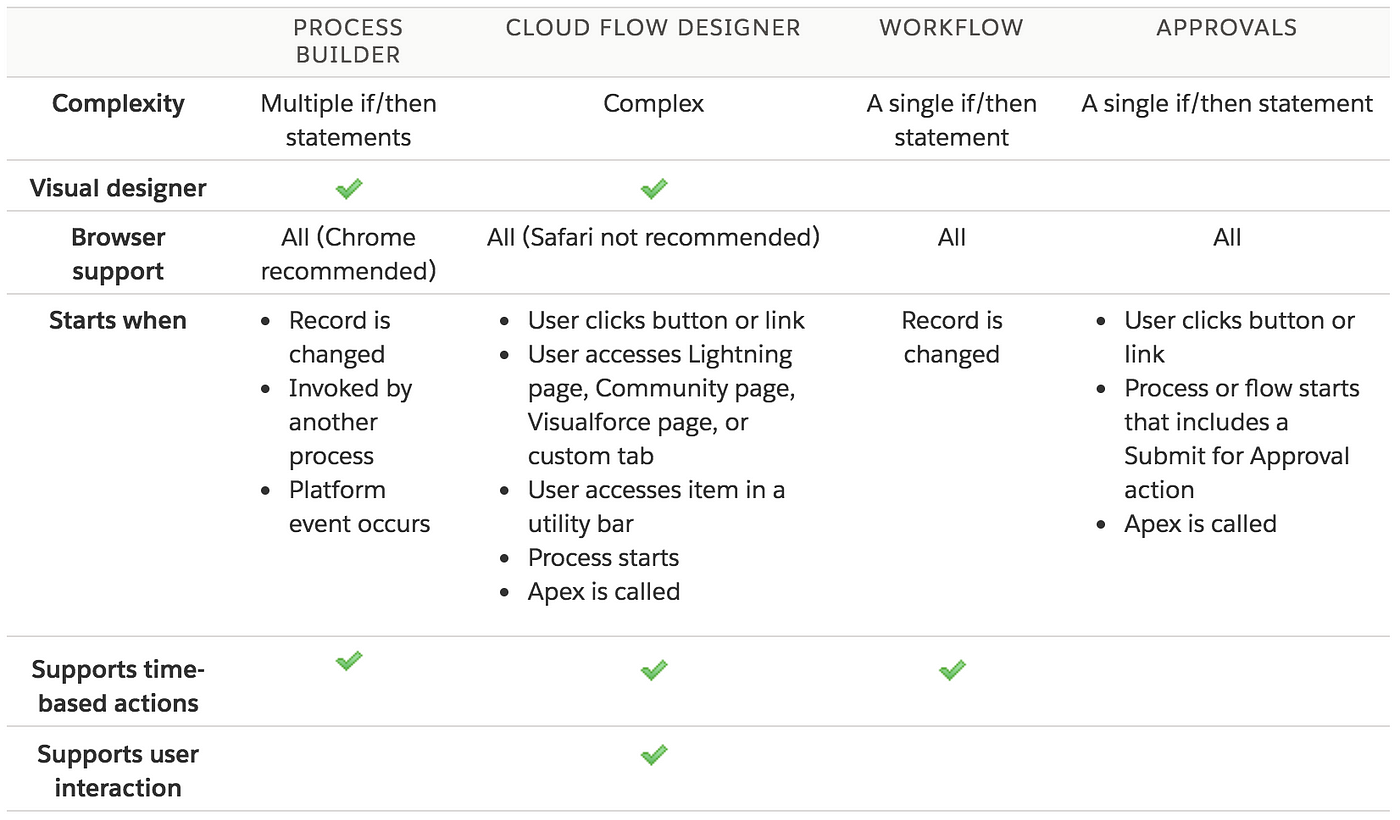
Now lets come to the title of this post, you might wonder what does a configuration capability like Process Builder have to do with a customization component like Triggers and SOQL.
Let's look at a simple process builder on the Lead object that makes an update to two fields ‘Title’ and ‘Website’.

A simple and innocent Process Builder
As you can see in the definition of the process builder, there are two field updates which cause two separate update transactions. This is different in Workflow Field Updates, where all the field updates are grouped into one update transaction while in Process Builder, each field update is treated as a separate transaction of its own. This is usually fine in less complex orgs but in enterprise customers with complex logic, you will start to see many governor limits being exceeded. If a typical Lead update has 30 queries then because of the Process Builder, your transaction’s total queries will be 60 since there are two. As soon as you have more than 3 field updates, you will cross the governor limit of 100 soql queries in one transaction which becomes a big problem.
We addressed this by replacing Process Builder with Headless Flows. Similar to Process Builder, you can write conditional logic and do more advanced concepts in Flows. The ability to input a record into flow and get the modified record as an output allows you to convert all the field updates in your process builder into assignment elements in visual flows.
Below code shows invoking the flow from the Trigger and since we are modifying field values, the flows are invoked from BEFORE UPDATE event. The sequence is as follows Trigger => Pass trigger new variable to Flows => Business logic in Flow and Assignment element to assign values to fields on the record => Collect trigger record variable from Flow => Assign it to trigger map collection.

Trigger passing variables back and forth to Flows
In the above trigger code, the trigger collection is passed to the Flow in the variable ‘AllLeads’, this variable name should match the name of the variable defined in the Flow as an input variable.

Flow with all the variables

Input variable

Output variable
After the flow completes, the output of the flow is retrieved from a Flow variable called ‘UpdatedLeads’ and assigned back to trigger newMap collection.
That is it! The advantage of this approach is that since you are assigning the field values from Flow as part of the BEFORE UPDATE event, there are no additional field updates on the object and it doesn’t affect your governor limits. It also helps with the overall execution time of your triggers. Hope this was helpful.
Side Note: If one of the fields being assigned is picklist then you need to be aware of the flow picklist data type which is not explained clearly. I happen to stumble on a weird ‘Illegal Arguments’ error while assigning a picklist value.

메타데이터
- post_id
- e0e4aec3769
- slug
- process-builder-trigger-soql-queries-flow-to-e0e4aec3769
- url
- https://medium.com/@deepuchacko/process-builder-trigger-soql-queries-flow-to-e0e4aec3769
- canonical_url
- https://medium.com/@deepuchacko/process-builder-trigger-soql-queries-flow-to-e0e4aec3769
- author_url
- https://medium.com/@deepuchacko
- status
- ok
- fetched_at
- 2026-06-21 09:28:28




