🔐 TCP Wrappers in Linux: Complete Security Guide (2026)
Master Host-Based Access Control with TCP Wrappers (Deep Dive + Examples)
🔐 TCP Wrappers in Linux: Complete Security Guide (2026)
Master Host-Based Access Control with TCP Wrappers (Deep Dive + Examples)
📌 Introduction: Why TCP Wrappers Still Matter

In the modern era of cloud-native infrastructure, Kubernetes, and zero-trust security, tools like firewalls and IAM dominate discussions. However, TCP Wrappers remain a powerful and lightweight layer of security — especially for legacy systems, minimal servers, and hardened Linux environments.
Originally developed in the 1990s, TCP Wrappers introduced a simple yet effective host-based access control mechanism. Even today, it provides fine-grained control at the application layer, something traditional network firewalls often cannot achieve — especially for encrypted traffic.
👉 This guide will walk you through everything — from fundamentals to advanced configurations — with real-world examples.
🎯 Goal of This Guide
By the end of this article, you will:
- Understand how TCP Wrappers work internally
- Configure
/etc/hosts.allowand/etc/hosts.denyeffectively - Implement real-world security policies
- Validate configurations using built-in tools
- Compare TCP Wrappers with modern firewall solutions
- Apply best practices in production environments
🧠 What is TCP Wrappers?
TCP Wrappers is a host-based access control system that restricts access to network services based on:
- IP address
- Hostname
- Domain
- Patterns / Wildcards
It works through the libwrap library, which is linked with supported network services like:
- SSH (
sshd) - FTP (
ftpd) - Telnet
- POP3 / IMAP
- Sendmail
👉 Instead of filtering packets (like a firewall), TCP Wrappers filters service-level access requests.
Key Advantages
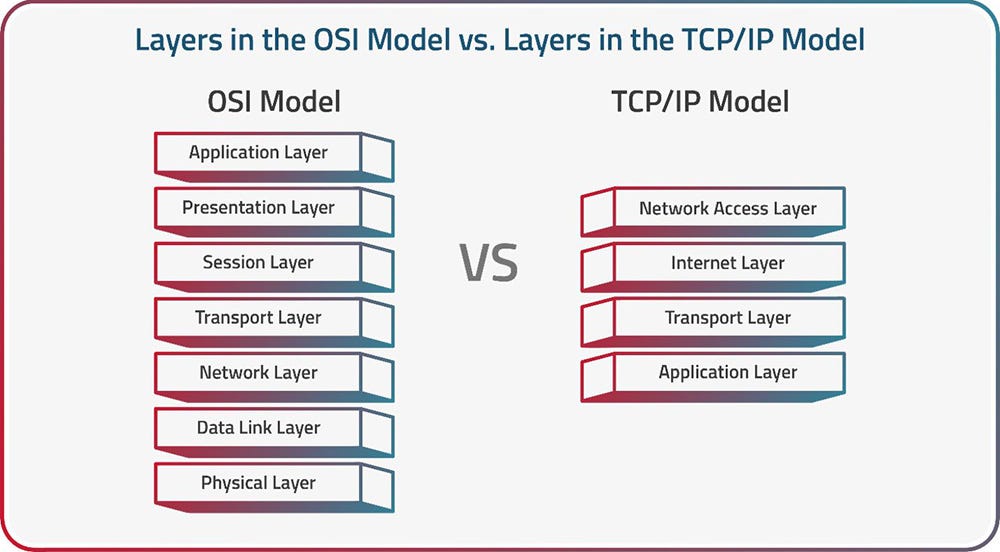
- Works at the application layer, meaning it can filter encrypted connections that firewalls cannot inspect.
- Provides logging via the syslog facility.
- Offers host name verification and spoofing protection.
- Supports simple pattern-based access control, including the ability to trigger shell commands on a match.
Key Disadvantages
- Applications must be compiled with libwrap to support it.
- Does not work with RPC services over TCP.
- The username lookup feature (via identd) is disabled by default due to performance issues under heavy load.
⚙️ How TCP Wrappers Work
When a client tries to connect:
- Request hits a service (e.g., SSH)
- Service checks if compiled with
libwrap tcpdevaluates rules:
/etc/hosts.allow→ FIRST priority/etc/hosts.deny→ SECOND priority
- Decision:
- Allow ✅
- Deny ❌
- Log event 📜
📂 Key Configuration Files
| ------------------ | ---------------------- |
| File               | Purpose                |
| ------------------ | ---------------------- |
| `/etc/hosts.allow` | Allowed hosts/services |
| `/etc/hosts.deny`  | Denied hosts/services  |
| `/usr/sbin/tcpd`   | Wrapper daemon         |
| `libwrap.so`       | Core library           |
| ------------------ | ---------------------- |
🔑 Rule Priority
- If present in both →
hosts.allowwins - Only in allow → access granted
- Only in deny → access denied
- Not listed → depends on default policy
🧾 Syntax Explained
daemon_list : client_list [ : shell_command ]Example:
sshd : 192.168.1.10✔ Allows SSH access from a specific IP
🌍 Wildcards You Must Know
| ---------- | ------------------------------------ |
| Keyword    | Meaning                              |
| ---------- | ------------------------------------ |
| `ALL`      | Matches everything                   |
| `LOCAL`    | Hosts without dots (local network)   |
| `KNOWN`    | Valid hostname + IP                  |
| `UNKNOWN`  | Unknown host/user                    |
| `PARANOID` | Hostname mismatch (spoof protection) |
| ---------- | ------------------------------------ |
⚠️ Use UNKNOWN and KNOWN carefully due to DNS issues.
🔍 How to Check if a Service Supports TCP Wrappers
ldd /usr/sbin/sshd | grep libwrap✔ If output shows libwrap.so → Supported
❌ If not → Not supported
⚙️ Typical Configuration Pattern
Default-deny policy — deny everything in hosts.deny, then selectively allow in hosts.allow:
# /etc/hosts.deny
ALL: ALL

# /etc/hosts.allow
sshd : 192.168.1.2 172.16.23.12
popd : 192.168.1.200 192.168.1.104
ALL  : LOCAL @devels
You can also log and deny with a shell command spawn:
ALL : .crackers.com \
    : spawn (/bin/echo %a from %h attempted to access %d >> /var/log/connections.log) \
    : deny
🛡️ Real-World Configuration Examples
1️⃣ Default Deny Policy (Highly Recommended)
# /etc/hosts.deny
ALL: ALL
# /etc/hosts.allow
ALL: LOCAL
ALL: .yourdomain.com2️⃣ Allow SSH for Specific IPs Only
# /etc/hosts.allow
sshd : 192.168.1.2 172.16.23.12
# /etc/hosts.deny
ALL : ALL3️⃣ LAN-Only Access Setup
pop3d : 192.168.1.0/255.255.255.0
imapd : 192.168.1.0/255.255.255.0
sendmail : 192.168.1.0/255.255.255.0
4️⃣ Logging + Blocking Attackers (Advanced)
ALL : .crackers.com \
: spawn (/bin/echo %a from %h tried %d >> /var/log/tcpd.log) \
: deny
✔ Logs malicious attempts ✔ Denies access simultaneously
🔎 Testing & Debugging Tools
Predict Access Behavior
tcpdmatch sshd 192.168.1.5Validate Configurations
tcpdchk
tcpdchk -v
📊 Logging Locations by OS
| ------- | --------------------- |
| OS      | Log File              |
| ------- | --------------------- |
| Linux   | `/var/log/messages`   |
| macOS   | `/var/log/system.log` |
| Solaris | `/var/log/syslog`     |
| BSD     | `/var/log/messages`   |
| ------- | --------------------- |
Monitor Logs
tail -f /var/log/messages⚖️ TCP Wrappers vs Firewall (iptables / nftables)
| ----------------- | ------------ | ----------------- |
| Feature           | TCP Wrappers | Firewall          |
| ----------------- | ------------ | ----------------- |
| Layer             | Application  | Network           |
| Encrypted Traffic | ✔ Can filter | ❌ Cannot inspect |
| Performance       | Lightweight  | High throughput   |
| Scope             | Per service  | Entire system     |
| ----------------- | ------------ | ----------------- |
👉 Best Practice: Use BOTH together.
⚠️ Limitations of TCP Wrappers
- Requires services compiled with
libwrap - No support for modern RPC services
- Relies on DNS (can be unreliable)
- Not suitable as a standalone security solution
🔐 Best Practices
- Always use default deny policy
- Combine with iptables / nftables firewall
- Avoid using DNS-based rules where possible
- Monitor logs continuously
- Apply on all Linux/Unix servers (except firewall nodes)
🚀 When Should You Use TCP Wrappers Today?
✔ Legacy systems ✔ Lightweight servers ✔ Additional security layer ✔ Internal network segmentation ✔ SSH hardening
🧩 Final Thoughts
TCP Wrappers may be old, but it’s far from obsolete. When combined with modern tools, it adds a strong application-layer defense — especially valuable in layered security architectures.
Think of it as:
🔐 “Your last line of defense at the service level.”
🙌 Thank You..! 😊👏
If you found this article helpful: 👉 Click the clap button 👉 Drop a comment with your questions 👉 Follow for more DevOps, Linux & Cloud tutorials
메타데이터
- post_id
- e130af3972f1
- slug
- tcp-wrappers-in-linux-complete-security-guide-2026-e130af3972f1
- url
- https://blog.devops.dev/tcp-wrappers-in-linux-complete-security-guide-2026-e130af3972f1
- canonical_url
- https://blog.devops.dev/tcp-wrappers-in-linux-complete-security-guide-2026-e130af3972f1
- author_url
- https://medium.com/@tushar.jadhav29
- status
- ok
- fetched_at
- 2026-06-26 06:47:43