ColdFusion SOAP Web Service Not Responding
Your ColdFusion SOAP Web Service Hangs, Times Out, or Refuses to Respond — Every Documented Cause Diagnosed and Fixed
ColdFusion SOAP Web Service Not Responding
Your ColdFusion SOAP Web Service Hangs, Times Out, or Refuses to Respond — Every Documented Cause Diagnosed and Fixed
ColdFusion SOAP Web Service Not Responding
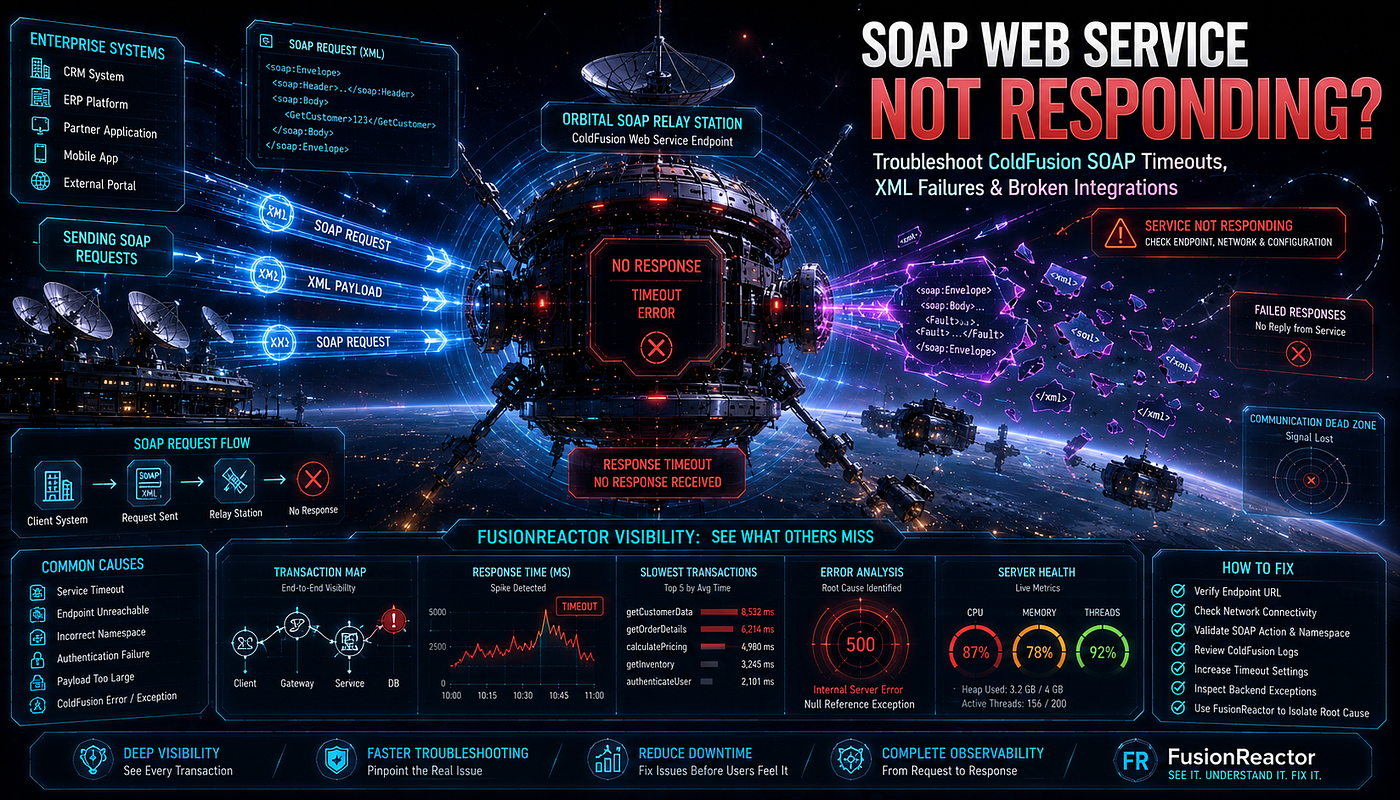
ColdFusion SOAP web services fail to respond for eight primary documented reasons: ColdFusion caches the WSDL and generated stub files, so a changed service definition produces stale-metadata failures until
refreshWSDL="yes"forces regeneration; ColdFusion 10 and later use Axis 2 while earlier versions use Axis 1, and Axis 1 cannot handle SOAP 1.2 bindings in the WSDL; thewsdlsoap:addresslocation in the WSDL declares HTTP while the client calls HTTPS (or vice versa), breaking the endpoint match; the web service is not registered in ColdFusion Administrator under Data & Services; the CFC method lacksaccess="remote"and is therefore invisible as a SOAP operation; complex WSDL files cause stub generation to take minutes or fail entirely; two CFCs share the same display name, which Axis 2 cannot support; and network timeouts, firewalls, or proxy configurations block the SOAP endpoint before ColdFusion processes the request. The fix requires understanding the Axis framework version, refreshing cached WSDL, and matching endpoint protocols exactly.
Introduction
The integration worked for years. The ColdFusion application calls a partner’s SOAP web service to validate transactions. Then one Tuesday, every call hangs. The request goes out. Nothing comes back. The page eventually times out after the configured request timeout expires. The partner confirms their service is up and responding to other clients. SoapUI connects to the same endpoint and gets a clean response. But ColdFusion sits there waiting, returning nothing, logging nothing useful, breaking every workflow that depends on the integration.
🚀 NOW HIRING TECH TALENT
💰 Competitive Pay 🌍 100% Remote ⚡ Fast Hiring
Frontend • Backend • Full Stack • AI/ML • DevOps

ColdFusion SOAP web service failures are uniquely frustrating because the SOAP stack hides so much complexity behind simple tags. A single cfinvoke call triggers WSDL retrieval, stub generation, SOAP envelope construction, HTTP transmission, response parsing, and object deserialization. Any one of those steps can fail silently. ColdFusion's reliance on the Apache Axis framework — Axis 1 in older versions, Axis 2 in ColdFusion 10 and later — adds another layer where version mismatches, SOAP protocol incompatibilities, and stub caching problems quietly break integrations that worked yesterday.
The stakes are operational. Enterprise ColdFusion applications integrate with payment gateways, government systems, insurance platforms, shipping carriers, and legacy mainframe services — many of which still expose SOAP interfaces. When a SOAP integration stops responding, the dependent business process halts entirely. Orders cannot process. Claims cannot validate. Shipments cannot generate labels. The failure surfaces far from its cause, and the SOAP abstraction makes the actual problem invisible from standard ColdFusion logs.
This guide traces every verified cause of ColdFusion SOAP web services not responding. Every claim here is sourced from Adobe documentation, Charlie Arehart’s documented analysis, or confirmed incidents in the Adobe Community. The diagnostic patterns are tested. The fixes hold up across ColdFusion versions and integration scenarios.
How ColdFusion Consumes SOAP Web Services
The Axis Framework Behind Every SOAP Call
ColdFusion does not implement SOAP from scratch. It relies on the Apache Axis framework. The Adobe documentation confirms the version split:
“ColdFusion has Axis 2 Web service framework integrated. This enables your web services to use WSDL 2 specifications, SOAP 1.2 protocol, and document literal wrapped style.”
ColdFusion 10 introduced Axis 2 as the default. ColdFusion 9 and earlier use Axis 1. This version difference is the root of many “not responding” failures — particularly when integrating with services that generate SOAP 1.2 WSDL bindings.
The three native consumption methods, per the Adobe Community expert BKBK:
“The officially documented native Coldfusion ways to consume a web service are by means of cfobject, cfinvoke and createObject(), or their various script/tag equivalents.”
Each method follows the same internal pipeline:
- WSDL retrieval — ColdFusion fetches the WSDL document from the service URL
- Stub generation — ColdFusion generates Java proxy classes from the WSDL
- Stub caching — The generated stubs are cached to avoid regenerating on every call
- SOAP envelope construction — ColdFusion builds the SOAP request from method arguments
- HTTP transmission — The SOAP message is POSTed to the service endpoint
- Response deserialization — The SOAP response is parsed into ColdFusion data types
A failure or hang at any step produces a “not responding” symptom. The trick to diagnosis is identifying which step failed.
The Stub Caching That Causes Most Stale-Metadata Failures
ColdFusion caches the Java stub classes generated from a WSDL. This caching is a performance optimization — regenerating stubs on every call would be prohibitively slow, especially for complex WSDLs. Charlie Arehart’s documented analysis explains the cost:
“The generation of the stub files can be a very time consuming process, especially for a complex WSDL, so presuming there are no errors that cause the stub generation to fail, you could be waiting several minutes for this to happen every time you refresh the web service.”
The performance benefit comes with a cost: when the remote WSDL changes, ColdFusion keeps using the old cached stubs. The new service definition does not match the cached stub. Calls fail or hang. The fix is forcing a WSDL refresh — but until you do, the integration appears broken.
Root Cause 1: Stale WSDL and Stub Cache
The refreshWSDL Attribute That Solves Most Failures
Charlie Arehart documented the refreshWSDL attribute, introduced in ColdFusion 8, as the solution to stale metadata:
“One of the many hidden gems in CF8 is a new attribute on CFINVOKE or CFOBJECT (and argument for createObject) called RefreshWSDL. It’s another solution to the long-standing problem of invoking web services whose metadata may have changed since previous executions.”
When a remote SOAP service changes its WSDL — adds a parameter, changes a method signature, modifies a data type — ColdFusion’s cached stubs become stale. The cached stub expects the old contract. The service expects the new contract. The mismatch breaks the call.
<!--- WRONG: Uses cached stub that may be stale --->
<cfinvoke
    webservice="https://partner.example.com/services/ValidationService?wsdl"
    method="validateTransaction"
    returnvariable="result">
    <cfinvokeargument name="transactionID" value="#txnID#">
</cfinvoke>
<!--- CORRECT: refreshWSDL forces regeneration of stubs from current WSDL --->
<cfinvoke
    webservice="https://partner.example.com/services/ValidationService?wsdl"
    method="validateTransaction"
    refreshWSDL="yes"
    returnvariable="result">
    <cfinvokeargument name="transactionID" value="#txnID#">
</cfinvoke>
Why Permanent refreshWSDL Is Not the Answer
Setting refreshWSDL="yes" on every call solves the staleness problem but introduces the performance problem Charlie Arehart documented — stub regeneration takes minutes for complex WSDLs. The verified production pattern is a try/catch that refreshes only on failure:
<!--- Production pattern: refresh WSDL only when a call fails --->
<cffunction name="callValidationService" returntype="any">
    <cfargument name="transactionID" type="string" required="true">
<cftry>
        <!--- First attempt: use cached stub for performance --->
        <cfinvoke
            webservice="https://partner.example.com/services/ValidationService?wsdl"
            method="validateTransaction"
            returnvariable="local.result">
            <cfinvokeargument name="transactionID" value="#arguments.transactionID#">
        </cfinvoke>
        <cfreturn local.result>
        <cfcatch type="any">
            <cflog file="soap_errors" type="warning"
                text="SOAP_RETRY | First attempt failed: #cfcatch.message# | Refreshing WSDL">
            <cftry>
                <!--- Retry with refreshWSDL to clear stale stubs --->
                <cfinvoke
                    webservice="https://partner.example.com/services/ValidationService?wsdl"
                    method="validateTransaction"
                    refreshWSDL="yes"
                    returnvariable="local.retryResult">
                    <cfinvokeargument name="transactionID" value="#arguments.transactionID#">
                </cfinvoke>
                <cfreturn local.retryResult>
                <cfcatch type="any">
                    <cflog file="soap_errors" type="error"
                        text="SOAP_FAILED | Retry after WSDL refresh also failed: #cfcatch.message#">
                    <cfthrow type="SOAPServiceUnavailable"
                             message="Validation service unavailable: #cfcatch.message#">
                </cfcatch>
            </cftry>
        </cfcatch>
    </cftry>
</cffunction>
Clear the Stub Cache Manually
For deeper cache problems, clear the generated stub files from disk:
# ColdFusion stores generated web service stubs in:
# {cf_root}/cfusion/stubs/

# Linux: clear the stubs directory
rm -rf /opt/coldfusion2023/cfusion/stubs/*

# Windows: clear the stubs directory
del /S /Q C:\ColdFusion2023\cfusion\stubs\*

# Restart ColdFusion after clearing stubs
# Next web service call regenerates stubs fresh from current WSDL
In ColdFusion Administrator, navigate to Data & Services → Web Services, find the registered service, and click Refresh to regenerate its metadata.
Root Cause 2: SOAP 1.1 Versus SOAP 1.2 Protocol Mismatch
The Axis 1 Limitation That Breaks Modern WSDLs
A January 2010 Adobe Community thread documented this exact failure. A developer could not consume a web service generated by Axis2. The verified diagnosis:
“The problem was the WSDL, they are using Axis2 to generate it, which generates SOAP 1.1 and 1.2 bindings in the WSDL file. CF uses Axis1, which has trouble with SOAP1.2 in wsdl. I switched the code to use SOAP 1.1 and it works fine.”
The Adobe documentation confirms the protocol support difference: Axis 2 supports both SOAP 1.1 and SOAP 1.2, while Axis 1 supports only SOAP 1.1. When a modern service generates a WSDL with both SOAP 1.1 and SOAP 1.2 bindings, ColdFusion versions running Axis 1 (ColdFusion 9 and earlier) fail to parse the SOAP 1.2 portions correctly.
Identify Your Axis Version
<!--- /admin/axis-version.cfm — Determine ColdFusion's Axis version --->
<cfif NOT REFind("^(127\.|10\.|192\.168\.)", CGI.REMOTE_ADDR)>
    <cfheader statuscode="403"><cfabort>
</cfif>
<cfoutput>
    ColdFusion Version: #server.coldfusion.productversion#<br>
    <cfif listFirst(server.coldfusion.productversion) GTE 10>
        Axis Framework: Axis 2 (supports SOAP 1.1 and SOAP 1.2)<br>
    <cfelse>
        Axis Framework: Axis 1 (supports SOAP 1.1 ONLY)<br>
    </cfif>
</cfoutput>
Force SOAP 1.1 on Older ColdFusion
When running ColdFusion 9 or earlier and consuming a service with SOAP 1.2 bindings, force the connection to use SOAP 1.1:
<!--- Force SOAP 1.1 binding when the WSDL offers both --->
<cfset wsArgs = {
    refreshWSDL : true,
    wsversion   : "1"        <!--- Force SOAP 1.1 — avoids Axis 1 SOAP 1.2 failure --->
}>
<cfset ws = createObject("webservice",
    "https://partner.example.com/services/ModernService?wsdl",
    wsArgs
)>
<cfset result = ws.someMethod(arg1="value")>
For ColdFusion installations that must consume SOAP 1.2 services, upgrading to ColdFusion 10 or later (which uses Axis 2) is the long-term fix. The Axis 2 framework handles both SOAP versions natively.
Configure Axis Version in ColdFusion Administrator
ColdFusion 10+ allows selecting the Axis version per installation or per web service. ColdFusion Administrator → Data & Services → Web Services exposes the version setting. Some legacy services that worked under Axis 1 break under Axis 2 — ColdFusion provides a setting to use Axis 1 for specific services during migration.
Root Cause 3: HTTP Versus HTTPS Endpoint Mismatch
The wsdlsoap:address Location That Does Not Match the Request
An August 2008 Adobe Community thread documented a subtle but common failure. A developer could not consume a web service despite trying cfinvoke, createObject, and manual SOAP packet construction. The verified diagnosis examined the WSDL itself:
“On the bottom of the page, you will see the wsdlsoap:address location tag, and it says: wsdlsoap:address location=’http://ws.ruk1.net/webservices/ResponsysWS'. Notice that you are requesting on normal ‘HTTP’ protocol, and not ‘HTTPS’. Correct that and see what happens.”
The WSDL contains a wsdlsoap:address element that declares the actual service endpoint. When a client retrieves the WSDL over HTTPS but the WSDL declares an HTTP endpoint (or vice versa), ColdFusion attempts to call the protocol declared in the WSDL — not the protocol used to fetch the WSDL. The mismatch causes connection failures, hangs, or silent timeouts.
Inspect the WSDL Endpoint Declaration
<!--- Fetch and inspect the WSDL to find the declared endpoint --->
<cfhttp
    url="https://partner.example.com/services/ValidationService?wsdl"
    method="GET"
    result="wsdlResponse"
    timeout="30">
<cfset wsdlContent = wsdlResponse.fileContent>
<!--- Extract the soap:address location --->
<cfset addressMatch = REFind(
    'location\s*=\s*["\']([^"\']+)["\']',
    wsdlContent,
    1,
    true
)>
<cfif arrayLen(addressMatch.pos) GTE 2>
    <cfset endpointURL = mid(wsdlContent, addressMatch.pos[2], addressMatch.len[2])>
    <cfoutput>
        Declared SOAP endpoint: #endpointURL#<br>
        <cfif left(endpointURL, 5) EQ "http:">
            WARNING: Endpoint uses HTTP - verify your client is not forcing HTTPS<br>
        </cfif>
    </cfoutput>
</cfif>
Override the Endpoint When the WSDL Declares the Wrong Protocol
<!--- When the WSDL declares HTTP but you need HTTPS, override the endpoint --->
<cfset ws = createObject("webservice",
    "https://partner.example.com/services/ValidationService?wsdl"
)>
<!--- Access the underlying Axis stub to set the endpoint explicitly --->
<cfset stub = ws.getClass().getSuperclass()>
<!--- Override endpoint address to force HTTPS --->
<cfset ws._setProperty(
    "javax.xml.rpc.service.endpoint.address",
    "https://partner.example.com/services/ValidationService"
)>
<cfset result = ws.validateTransaction(transactionID=txnID)>
For services behind a load balancer that terminates SSL, the WSDL may declare an internal HTTP endpoint while external clients connect via HTTPS. Coordinate with the service provider to ensure the WSDL declares the externally-reachable endpoint.
Root Cause 4: Web Service Not Registered in ColdFusion Administrator
The Registration Requirement Adobe Documents
The Adobe documentation states a requirement that surprises developers migrating from older ColdFusion versions:
“Web services are not automatically registered when you access the service using cfinvoke, cfobject, or createObject. You have to register the Web service in the ColdFusion Administrator (Data & Services > Web Services).”
While ColdFusion can consume an unregistered web service by passing the full WSDL URL, registering the service in ColdFusion Administrator provides a managed alias, credential storage, and a refresh button for clearing stale metadata. Services that depend on stored credentials or specific configuration may fail when called without registration.
Register and Manage Web Services
<!--- Programmatically register a web service via the Admin API --->
<cftry>
    <cfset adminAPI = createObject("component", "CFIDE.adminapi.administrator")>
    <cfset adminAPI.login(getEnvironmentVariable("CF_ADMIN_PASSWORD", ""))>
<cfset webServices = createObject("component", "CFIDE.adminapi.webservices")>
    <!--- Register a web service with a managed alias --->
    <cfset webServices.setWebService(
        name      = "ValidationService",
        wsdl      = "https://partner.example.com/services/ValidationService?wsdl",
        username  = getEnvironmentVariable("WS_USERNAME", ""),
        password  = getEnvironmentVariable("WS_PASSWORD", "")
    )>
    <cfoutput>Web service registered successfully</cfoutput>
    <cfcatch type="any">
        <cflog file="soap_errors" type="error"
            text="WS_REGISTRATION_FAILED | #cfcatch.message#">
    </cfcatch>
</cftry>
Once registered, call the service by its alias instead of the full WSDL URL:
<!--- Call the registered service by alias --->
<cfinvoke
    webservice="ValidationService"
    method="validateTransaction"
    returnvariable="result">
    <cfinvokeargument name="transactionID" value="#txnID#">
</cfinvoke>
Root Cause 5: CFC Method Missing access=”remote”
The Access Level That Exposes a Method as a SOAP Operation
When ColdFusion publishes a CFC as a SOAP web service, only methods marked access="remote" appear as SOAP operations in the generated WSDL. A method with access="public", access="private", or access="package" is invisible to SOAP clients. Calls to those methods fail with "method not found" or produce no response at all.
<!--- WRONG: access="public" — method NOT exposed as SOAP operation --->
<cfcomponent>
    <cffunction name="validateTransaction" access="public" returntype="struct">
        <cfargument name="transactionID" type="string" required="true">
        <!--- This method does NOT appear in the WSDL --->
        <cfreturn { valid: true }>
    </cffunction>
</cfcomponent>
<!--- CORRECT: access="remote" exposes the method as a SOAP operation --->
<cfcomponent>
    <cffunction name="validateTransaction" access="remote" returntype="struct">
        <cfargument name="transactionID" type="string" required="true">
        <!--- This method appears in the WSDL and responds to SOAP calls --->
        <cfreturn { valid: true }>
    </cffunction>
</cfcomponent>
Verify the WSDL Exposes Your Methods
<!--- Access the WSDL and confirm your methods appear as operations --->
<cfhttp
    url="https://yourserver.com/services/ValidationService.cfc?wsdl"
    method="GET"
    result="wsdlCheck"
    timeout="15">
<cfif findNoCase("validateTransaction", wsdlCheck.fileContent)>
    <cfoutput>Method 'validateTransaction' is exposed in WSDL</cfoutput>
<cfelse>
    <cfoutput>
        WARNING: Method 'validateTransaction' NOT found in WSDL<br>
        Check that the method has access="remote"
    </cfoutput>
</cfif>
Browse to your CFC’s WSDL URL (yourserver.com/path/Service.cfc?wsdl) in a browser. Every method you expect to call must appear as a <wsdl:operation> element. Methods missing from the WSDL are not exposed — verify their access attribute is remote.
Root Cause 6: Complex WSDL Causing Stub Generation Failure or Timeout
When Stub Generation Takes Minutes or Fails Entirely
Charlie Arehart documented the stub generation cost: complex WSDLs can take several minutes to generate stub files. During that generation window, the request appears to hang. If the request timeout is shorter than the stub generation time, the call fails before stubs are ready.
<!--- Increase request timeout when consuming complex WSDL services --->
<!--- Stub generation for a large WSDL may take 1-3 minutes --->
<cfsetting requestTimeout="300">  <!--- 5 minutes for first call with stub generation --->
<cftry>
    <cfinvoke
        webservice="https://partner.example.com/services/ComplexService?wsdl"
        method="getData"
        timeout="120"
        returnvariable="result">
        <cfinvokeargument name="query" value="#searchTerm#">
    </cfinvoke>
    <cfcatch type="any">
        <cflog file="soap_errors" type="error"
            text="COMPLEX_WSDL_FAILED | #cfcatch.message# | #cfcatch.detail#">
    </cfcatch>
</cftry>
The CFHTTP Alternative for Complex WSDLs
Charlie Arehart documented an alternative that bypasses stub generation entirely. For complex WSDLs where stub generation is slow or fails, construct the SOAP envelope manually and POST it with cfhttp:
“A quick and easy way around this is to generate your own SOAP requests and use CFHTTP to post it. This is in fact quicker and easier than figuring out how to create a complex ColdFusion structures of arrays that matches what is defined in the WSDL. Just download a neat little tool called SOAPUI.”
<!--- Manual SOAP envelope construction — bypasses stub generation --->
<cffunction name="callSoapServiceDirectly" returntype="any">
    <cfargument name="transactionID" type="string" required="true">
<!--- Build the SOAP envelope manually --->
    <cfsavecontent variable="soapEnvelope">
        <cfoutput>
<?xml version="1.0" encoding="UTF-8"?>
<soapenv:Envelope xmlns:soapenv="http://schemas.xmlsoap.org/soap/envelope/"
                  xmlns:val="http://partner.example.com/validation">
   <soapenv:Header/>
   <soapenv:Body>
      <val:validateTransaction>
         <val:transactionID>#xmlFormat(arguments.transactionID)#</val:transactionID>
      </val:validateTransaction>
   </soapenv:Body>
</soapenv:Envelope>
        </cfoutput>
    </cfsavecontent>
    <cftry>
        <cfhttp
            url="https://partner.example.com/services/ComplexService"
            method="POST"
            result="soapResponse"
            timeout="60">
            <!--- SOAPAction header is required by most SOAP services --->
            <cfhttpparam type="header" name="SOAPAction" value="validateTransaction">
            <cfhttpparam type="header" name="Content-Type" value="text/xml; charset=utf-8">
            <cfhttpparam type="body" value="#trim(soapEnvelope)#">
        </cfhttp>
        <!--- Parse the SOAP response --->
        <cfif soapResponse.statusCode CONTAINS "200">
            <cfset responseXML = xmlParse(soapResponse.fileContent)>
            <cfreturn responseXML>
        <cfelse>
            <cfthrow type="SOAPError"
                     message="SOAP call failed with status: #soapResponse.statusCode#"
                     detail="#left(soapResponse.fileContent, 500)#">
        </cfif>
        <cfcatch type="any">
            <cflog file="soap_errors" type="error"
                text="MANUAL_SOAP_FAILED | #cfcatch.message#">
            <cfrethrow>
        </cfcatch>
    </cftry>
</cffunction>
The manual approach avoids stub generation entirely. Use SoapUI to inspect the WSDL, generate a sample request, and copy the envelope structure into your CFML. This pattern is faster, more predictable, and easier to debug than the native stub-based approach for complex services.
Root Cause 7: Duplicate CFC Display Names Under Axis 2
The Axis 2 Limitation Adobe Documents
The Adobe documentation identifies a specific Axis 2 limitation that breaks ColdFusion-published web services:
“Unlike in Axis 1, Axis 2 cannot support two CFCs having the same display name.”
When two CFCs published as web services share the same displayname attribute, Axis 2 cannot distinguish between them. One or both services fail to publish correctly. SOAP clients calling either service receive errors or no response.
<!--- WRONG: Two CFCs with the same displayname break Axis 2 --->
<!--- /services/UserValidation.cfc --->
<cfcomponent displayname="Validation">
    <cffunction name="validateUser" access="remote" returntype="boolean">
        <!--- ... --->
    </cffunction>
</cfcomponent>
<!--- /services/PaymentValidation.cfc --->
<cfcomponent displayname="Validation">  <!--- SAME displayname - Axis 2 conflict --->
    <cffunction name="validatePayment" access="remote" returntype="boolean">
        <!--- ... --->
    </cffunction>
</cfcomponent>
<!--- CORRECT: Unique displaynames for each web service CFC --->
<!--- /services/UserValidation.cfc --->
<cfcomponent displayname="UserValidationService">
    <cffunction name="validateUser" access="remote" returntype="boolean">
        <!--- ... --->
    </cffunction>
</cfcomponent>
<!--- /services/PaymentValidation.cfc --->
<cfcomponent displayname="PaymentValidationService">  <!--- Unique displayname --->
    <cffunction name="validatePayment" access="remote" returntype="boolean">
        <!--- ... --->
    </cffunction>
</cfcomponent>
Audit every web service CFC for unique display names. The conflict is invisible until both services are accessed — and the failure mode (one service not responding) gives no indication that a naming collision is the cause.
Root Cause 8: Network, Firewall, and Timeout Blocking
The Infrastructure Layer Below ColdFusion
A SOAP call that hangs may never reach the remote service at all. Firewalls, proxy servers, DNS resolution failures, and SSL certificate problems all block SOAP requests before ColdFusion receives a response. The September 2020 Adobe Community thread documented a “Cannot perform web service invocation (SOAP)” error on a fresh server install — pointing at infrastructure rather than code.
Common infrastructure causes:
- Outbound firewall rules — The ColdFusion server cannot reach the remote SOAP endpoint port
- Proxy server requirements — Corporate networks require proxy configuration for outbound HTTP
- SSL certificate validation — The remote service’s SSL certificate is not in ColdFusion’s truststore
- DNS resolution — The service hostname does not resolve from the ColdFusion server
- Request timeout too short — The service responds slowly and ColdFusion times out first
Diagnose Connectivity From the ColdFusion Server
<!--- /admin/soap-connectivity-test.cfm — Test SOAP endpoint reachability --->
<cfif NOT REFind("^(127\.|10\.|192\.168\.)", CGI.REMOTE_ADDR)>
    <cfheader statuscode="403"><cfabort>
</cfif>
<cfsetting showDebugOutput="false">
<cfheader name="Content-Type" value="application/json">
<cfset endpoint = "https://partner.example.com/services/ValidationService?wsdl">
<cfset diagnostics = {}>
<!--- Test 1: Can ColdFusion reach the WSDL? --->
<cfset startMs = getTickCount()>
<cftry>
    <cfhttp url="#endpoint#" method="GET" result="wsdlTest" timeout="30">
    <cfset diagnostics.wsdlRetrieval = {
        statusCode    : wsdlTest.statusCode,
        responseTimeMs: getTickCount() - startMs,
        contentLength : len(wsdlTest.fileContent),
        isValidWSDL   : findNoCase("wsdl:definitions", wsdlTest.fileContent) GT 0
                        OR findNoCase("definitions", wsdlTest.fileContent) GT 0
    }>
    <cfcatch type="any">
        <cfset diagnostics.wsdlRetrieval = {
            error: cfcatch.message,
            responseTimeMs: getTickCount() - startMs
        }>
    </cfcatch>
</cftry>
<!--- Test 2: Check SSL certificate handling --->
<cfif left(endpoint, 5) EQ "https">
    <cfset diagnostics.protocol = "HTTPS - verify certificate is in ColdFusion truststore">
<cfelse>
    <cfset diagnostics.protocol = "HTTP - no SSL validation needed">
</cfif>
<!--- Test 3: Check configured proxy --->
<cfset diagnostics.proxyConfig = {
    note: "If behind corporate proxy, configure proxyServer/proxyPort on cfhttp and cfinvoke"
}>
<cfoutput>#serializeJSON(diagnostics, true)#</cfoutput>
Handle SSL Certificate Issues
<!--- When the remote SSL certificate is not in ColdFusion's truststore --->
<!--- Import the certificate using keytool: --->

<!---
keytool -import -alias partnerservice
        -file partner-cert.cer
        -keystore {cf_root}/jre/lib/security/cacerts
        -storepass changeit
--->
<!--- After importing, restart ColdFusion --->
<!--- The SOAP call to the HTTPS endpoint then succeeds --->
For corporate proxy environments, configure the proxy on the call:
<cfinvoke
    webservice="https://partner.example.com/services/ValidationService?wsdl"
    method="validateTransaction"
    proxyServer="proxy.company.com"
    proxyPort="8080"
    returnvariable="result">
    <cfinvokeargument name="transactionID" value="#txnID#">
</cfinvoke>
Production-Ready SOAP Service Wrapper
A Complete, Resilient SOAP Integration Pattern
<!--- services/SOAPServiceClient.cfc --->
<!--- Production-grade SOAP integration with retry, refresh, and error handling --->
component accessors="true" {
property name="wsdlURL" type="string";
    property name="timeout" type="numeric" default="60";
    public void function init(required string wsdlURL, numeric timeout = 60) {
        variables.wsdlURL = arguments.wsdlURL;
        variables.timeout = arguments.timeout;
    }
    /**
     * Call a SOAP method with automatic retry and WSDL refresh on failure
     */
    public any function callMethod(
        required string methodName,
        struct args = {}
    ) {
        var result = "";
        var attempt = 0;
        var maxAttempts = 2;
        var lastError = "";
        while (attempt < maxAttempts) {
            attempt++;
            try {
                // Build the web service object
                // Second attempt forces WSDL refresh to clear stale stubs
                var wsConfig = {
                    refreshWSDL : (attempt > 1),
                    timeout     : variables.timeout
                };
                var ws = createObject("webservice", variables.wsdlURL, wsConfig);
                // Invoke the method with provided arguments
                result = invoke(ws, arguments.methodName, arguments.args);
                cflog(
                    file = "soap_calls",
                    type = "information",
                    text = "SOAP_SUCCESS | Method: #arguments.methodName# | Attempt: #attempt#"
                );
                return result;
            } catch (any e) {
                lastError = e.message;
                cflog(
                    file = "soap_errors",
                    type = "warning",
                    text = "SOAP_ATTEMPT_FAILED | Method: #arguments.methodName# | Attempt: #attempt# | Error: #e.message#"
                );
                // On first failure, the next loop iteration refreshes WSDL
                if (attempt >= maxAttempts) {
                    cflog(
                        file = "soap_errors",
                        type = "error",
                        text = "SOAP_FINAL_FAILURE | Method: #arguments.methodName# | Error: #e.message# | Detail: #e.detail#"
                    );
                    throw(
                        type = "SOAPServiceUnavailable",
                        message = "SOAP method #arguments.methodName# failed after #maxAttempts# attempts: #lastError#"
                    );
                }
            }
        }
    }
    /**
     * Verify the WSDL is reachable and valid
     */
    public struct function healthCheck() {
        var health = { reachable: false, validWSDL: false, responseTimeMs: 0 };
        var startMs = getTickCount();
        try {
            cfhttp(url = variables.wsdlURL, method = "GET", result = "local.wsdlResponse", timeout = 15);
            health.responseTimeMs = getTickCount() - startMs;
            health.reachable = (local.wsdlResponse.statusCode CONTAINS "200");
            health.validWSDL = findNoCase("definitions", local.wsdlResponse.fileContent) GT 0;
        } catch (any e) {
            health.error = e.message;
            health.responseTimeMs = getTickCount() - startMs;
        }
        return health;
    }
}
Using the SOAP Client
<!--- Initialize the client once, reuse across requests --->
<cfset validationClient = new services.SOAPServiceClient(
    wsdlURL = "https://partner.example.com/services/ValidationService?wsdl",
    timeout = 60
)>
<!--- Health check before relying on the service --->
<cfset health = validationClient.healthCheck()>
<cfif NOT health.reachable>
    <cflog file="soap_errors" type="error" text="Validation service unreachable">
</cfif>
<!--- Call a method with automatic retry/refresh --->
<cftry>
    <cfset result = validationClient.callMethod(
        methodName = "validateTransaction",
        args = { transactionID: txnID }
    )>
    <cfcatch type="SOAPServiceUnavailable">
        <!--- Handle the service being down gracefully --->
        <cfset result = { valid: false, error: "Service temporarily unavailable" }>
    </cfcatch>
</cftry>
SOAP Web Service Troubleshooting Checklist
Work through this list when a ColdFusion SOAP service stops responding:
WSDL and Stub Cache:
- [ ]
refreshWSDL="yes"tested to rule out stale stubs - [ ] ColdFusion stub directory cleared if refresh insufficient
- [ ] Web service refreshed in ColdFusion Administrator
- [ ] WSDL URL loads correctly in a browser
SOAP Protocol:
- [ ] ColdFusion Axis version identified (Axis 1 = CF9-, Axis 2 = CF10+)
- [ ] SOAP 1.1 vs 1.2 compatibility verified against the WSDL bindings
- [ ]
wsversionforced to "1" if Axis 1 must consume a SOAP 1.2 WSDL
Endpoint Configuration:
- [ ]
wsdlsoap:addresslocation inspected for HTTP vs HTTPS mismatch - [ ] Endpoint protocol matches the client’s connection protocol
- [ ] Service registered in ColdFusion Administrator if it needs managed config
CFC Publishing:
- [ ] Published methods declared
access="remote" - [ ] Methods appear as operations in the generated WSDL
- [ ] No two web service CFCs share the same
displayname(Axis 2)
Infrastructure:
- [ ] WSDL reachable from the ColdFusion server (not just from a workstation)
- [ ] Outbound firewall allows connection to the service endpoint
- [ ] SSL certificate present in ColdFusion truststore for HTTPS endpoints
- [ ] Proxy configured if behind corporate network
- [ ] Request timeout long enough for stub generation and slow responses
Diagnostics:
- [ ] SoapUI used to verify the service responds independently of ColdFusion
- [ ] Connectivity diagnostic endpoint deployed
- [ ] SOAP error log separate from general application errors
- [ ] Manual
cfhttpSOAP construction tested as a fallback
Conclusion
ColdFusion SOAP web services failing to respond is never random. The cause maps to one of eight documented patterns — stale WSDL and stub cache, SOAP 1.1 versus 1.2 protocol mismatch tied to the Axis framework version, HTTP versus HTTPS endpoint mismatch in the WSDL, missing web service registration, CFC methods lacking access="remote", stub generation timeouts on complex WSDLs, duplicate CFC display names under Axis 2, or infrastructure-level blocking from firewalls, proxies, and SSL certificate gaps. Each has a specific signature and a verified fix.
The diagnostic discipline starts with isolating the layer. Use SoapUI to confirm the service responds independently of ColdFusion — if SoapUI works and ColdFusion does not, the problem is in ColdFusion’s stub cache, Axis version, or endpoint handling. Inspect the WSDL’s wsdlsoap:address to verify the declared endpoint protocol. Confirm your ColdFusion version's Axis framework matches the service's SOAP version requirements. Test with refreshWSDL="yes" to rule out stale stubs. Verify connectivity from the ColdFusion server itself, not from a developer workstation.
The verified solution combines automatic retry with WSDL refresh on failure, manual SOAP envelope construction via cfhttp for complex WSDLs, proper SSL truststore configuration, unique CFC display names, explicit access="remote" on published methods, and health checks that surface service availability before integration points break. Apply these patterns and SOAP integrations transition from fragile, mysterious failure points to resilient, observable, recoverable components. The service responds. The integration works. The dependent business processes keep running.
Build Reliable ColdFusion SOAP Integrations With Expert Support
Designing ColdFusion applications that consume and publish SOAP web services reliably — across Axis framework versions, SOAP protocol differences, WSDL stub management, and enterprise network infrastructure — requires expertise that crosses CFML, Apache Axis internals, SOAP/WSDL standards, and integration architecture. Lucid Outsourcing Solutions brings exactly that cross-domain expertise to enterprise teams.
**Lucid Outsourcing Solutions** is a dedicated ColdFusion consulting and development partner trusted by enterprise organizations to architect, build, and troubleshoot SOAP and web service integrations in production CFML applications. Their engineering team covers the full operational and development spectrum:
- **ColdFusion Development Services **— End-to-end CFML development with resilient SOAP integration patterns built in from day one
- ColdFusion Consulting — Architectural guidance for web service integration, SOAP/REST coexistence, and legacy service modernization
- ColdFusion Code Audit — Deep-dive reviews that surface missing WSDL refresh logic, stub cache problems, and fragile integration patterns
- ColdFusion Debugging & Troubleshooting — Rapid diagnosis of SOAP hangs, WSDL parsing failures, and Axis framework incompatibilities
- ColdFusion Modernization & Migration — Axis 1 to Axis 2 migration, SOAP to REST transitions, and legacy web service upgrades
- ColdFusion Administration & Server Management — Web service registration, SSL truststore management, and Axis framework configuration
- ColdFusion Performance Optimization — SOAP call performance tuning, stub caching strategy, and integration request profiling
- Enterprise ColdFusion Development — High-volume integration platforms, multi-service orchestration, and resilient integration architectures
From targeted SOAP debugging to complete integration architecture redesign, Lucid Outsourcing Solutions delivers ColdFusion solutions grounded in verified Adobe documentation, documented expert practice, and production-tested patterns.
Connect with **Lucid Outsourcing Solutions today.** Fix your ColdFusion SOAP web service failures permanently, build integrations that recover gracefully from upstream changes, and create the scalable, maintainable web service architecture your enterprise CFML environment demands.
Research Audit Trail
- ColdFusion 10+ uses Axis 2; CF9 and earlier use Axis 1 — Adobe Web Service Enhancements docs
- Axis 2 supports SOAP 1.1 and SOAP 1.2; Axis 1 supports only SOAP 1.1 — Adobe docs
- Axis 1 has trouble with SOAP 1.2 WSDL bindings — Adobe Community Jan 2010 documented incident
refreshWSDLattribute introduced in CF8 — Charlie Arehart (carehart.org) documented- Native consumption:
cfobject,cfinvoke,createObject()— Adobe Community (BKBK) cfhttpPOST as alternative to native methods — Adobe Community (BKBK) + Charlie Arehart- Web services NOT auto-registered; must register in CF Admin (Data & Services > Web Services) — Adobe docs explicit
- Axis 2 cannot support two CFCs with same display name — Adobe docs explicit
- HTTP vs HTTPS mismatch in
wsdlsoap:addresslocation — Adobe Community Aug 2008 documented - CF10 (2012) switched webservices version, breaking MX7/CF9 code — Adobe Community
- Stub generation slow/time-consuming for complex WSDL — Charlie Arehart documented
- SoapUI tool for SOAP testing and request generation — Charlie Arehart recommended
- CF2018 “Cannot perform web service invocation (SOAP)” error — Adobe Community Sep 2020
- SSL certificate truststore (cacerts) for HTTPS web services — standard Java/CF practice
Thank you for being a part of the community
Before you go:

👉 Be sure to clap and follow the writer ️👏️️
👉 Follow us: **Linkedin| [Medium](https://medium.com/codetodeploy)**
👉 CodeToDeploy Tech Community is live on Discord — **Join now!**
Disclosure: This post includes affiliate and partnership links.
메타데이터
- post_id
- e142c3236f47
- slug
- coldfusion-soap-web-service-not-responding-e142c3236f47
- url
- https://medium.com/codetodeploy/coldfusion-soap-web-service-not-responding-e142c3236f47
- canonical_url
- https://medium.com/codetodeploy/coldfusion-soap-web-service-not-responding-e142c3236f47
- author_url
- https://medium.com/@Deepak_Sir
- status
- ok
- fetched_at
- 2026-08-18 13:43:29