How to Generate an API Key in Cloud Pak for Data
If you’re working with IBM’s Cloud Pak for Data, you’ll often need an API key to authenticate and interact with its services…
How to Generate an API Key in Cloud Pak for Data
If you’re working with IBM’s Cloud Pak for Data, you’ll often need an API key to authenticate and interact with its services programmatically. Generating an API key is a straightforward process. This guide will walk you through the steps.
Steps to Generate an API Key
Log in to your Cloud Pak for Data account.
Click your profile avatar (top-right corner).
Select Profile and settings from the menu.
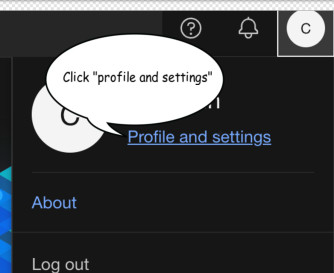
Find the API key section and click Generate API key.

Copy and save the API key securely. It will only be shown once.
메타데이터
- post_id
- e1bf36653739
- slug
- how-to-generate-an-api-key-in-cloud-pak-for-data-e1bf36653739
- url
- https://medium.com/@farsin28/how-to-generate-an-api-key-in-cloud-pak-for-data-e1bf36653739
- canonical_url
- https://medium.com/@farsin28/how-to-generate-an-api-key-in-cloud-pak-for-data-e1bf36653739
- author_url
- https://medium.com/@farsin28
- status
- ok
- fetched_at
- 2026-07-21 20:08:30