SAP BTP Basics — Complete Beginner to Intermediate Guide
SAP BTP (Business Technology Platform) Overview
SAP BTP Basics — Complete Beginner to Intermediate Guide
SAP BTP (Business Technology Platform) Overview
SAP BTP is SAP’s cloud platform that provides services for:
- Application Development
- Integration
- API Management
- Database & Data Management
- Analytics
- Artificial Intelligence
- Automation
Think of SAP BTP as the AWS/Azure platform for SAP workloads, where you can build, run, extend, and integrate applications.
Understanding the BTP Hierarchy
Global Account
    |
    +-- Subaccount
            |
            +-- Entitlements
            |
            +-- Environment
                    |
                    +-- Spaces
                            |
                            +-- Applications
+-- Service Instances- Global Account
What is it?
A Global Account is the top-level container in SAP BTP.
When a company purchases SAP BTP, SAP provides a Global Account.
Responsibilities
- Manage overall BTP landscape
- Allocate services to subaccounts
- Manage quotas
- User administration
- Monitoring usage
Example
Imagine Any XYZ Company purchases SAP BTP.
Global Account
= XYZ-Tech-BTP
Under this, different teams or projects can create subaccounts.
Real-Life Analogy
Think of a Global Account as an entire apartment building.
2. Subaccount
What is it?
A Subaccount is a logical partition inside the Global Account.
Subaccounts help separate:
- Development
- Testing
- Production
- Different Business Units
Example
Global Account
|
+-- Dev Subaccount
|
+-- Test Subaccount
|
+-- Prod Subaccount
Each subaccount has:
- Region
- Cloud Provider
- Services
- Applications
- Security configuration
Example Configuration
Subaccount Name: ERP-DEV
Region: India (Mumbai)
Cloud Provider: AWS
Real-Life Analogy
A Subaccount is an apartment within the building.
3. Spaces
What is a Space?
A Space exists inside the Cloud Foundry Environment.
It is used to organize applications and services.
Structure
Subaccount
    |
    +-- Cloud Foundry Org
            |
            +-- Space A
            +-- Space B
Example
ERP-DEV
|
+-- Backend-Space
|
+-- Frontend-Space
|
+-- Integration-Space
Why Spaces?
They help separate:
- Developers
- Teams
- Applications
- Resources
Real-Life Analogy
In an apartment:
Apartment = Subaccount

Living Room = Space 1
Kitchen = Space 2
Bedroom = Space 3
4. Entitlements
What are Entitlements?
Entitlements determine:
Which services can be used and how much of each service can be consumed.
Without entitlement, a subaccount cannot create services.
Example
Global Account buys:
API Management = 5 Units

Integration Suite = 10 Units

HANA Cloud = 2 Instances
The administrator distributes these to subaccounts.
Example Allocation
Dev Subaccount

API Management = 1
Integration Suite = 2

Prod Subaccount

API Management = 4
Integration Suite = 8
Real-Life Analogy
Think of entitlements as the budget allocated to each apartment.
5. Service Instances
What is a Service Instance?
A Service Instance is an actual running instance of a BTP service.
Once entitlement is available:
- Choose service
- Create service instance
- Consume the service
Example
Entitled Service:
SAP HANA CloudCreate Instance:
hana-db-devNow applications can use:
hana-db-devdatabase.
Example
Service Available:
API ManagementCreate Instance:
api-management-devNow APIs can be published through it.
Relationship Between Entitlement and Service Instance
Entitlement
     |
     v
Permission to Use Service

Service Instance
     |
     v
Actual Running Service
Complete Flow
Global Account
|
+-- Subaccount (DEV)
        |
        +-- Entitlement
                |
                +-- API Management
                |
                +-- HANA Cloud
        |
        +-- Cloud Foundry
                |
                +-- Backend Space
                |
                +-- Frontend Space
        |
        +-- Service Instances
                |
                +-- hana-dev
                |
                +-- api-mgmt-dev
How SAP API Management (APIM) Fits Into BTP
This is one of the most common interview questions.
What is APIM?
SAP API Management is part of:
SAP Integration SuiteIt helps:
- Expose APIs
- Secure APIs
- Monitor APIs
- Throttle traffic
- Apply policies
- Manage API lifecycle
APIM Position in BTP
SAP BTP
|
+-- Subaccount
        |
        +-- Integration Suite
                |
                +-- API Management
Typical APIM Flow
Client App
     |
     v
API Management
     |
     v
Backend System
Example:
Mobile App
      |
      v
SAP API Management
      |
      v
S/4HANA System
APIM acts as a gateway.
Why Use APIM?
Without APIM:
Mobile App
      |
      +----> S/4HANA
Problems:
- No Security
- No Rate Limiting
- No Monitoring
- No Analytics
With APIM:
Mobile App
        |
        v
SAP API Management
        |
        v
S/4HANA
Benefits:
✅ Authentication
✅ Authorization
✅ Rate Limiting
✅ API Analytics
✅ API Security
✅ API Monitoring
✅ Centralized Management
APIM Deployment in BTP
Step 1
Global Admin assigns entitlement.
Global Account
     |
     +-- Integration Suite Entitlement
Step 2
Assign entitlement to Subaccount.
DEV SubaccountStep 3
Create Integration Suite Subscription.
Integration SuiteStep 4
Enable API Management capability.
Integration Suite
        |
        +-- API Management
Step 5
Create and Publish APIs.
API Proxies
Products
Applications
Policies
Developers
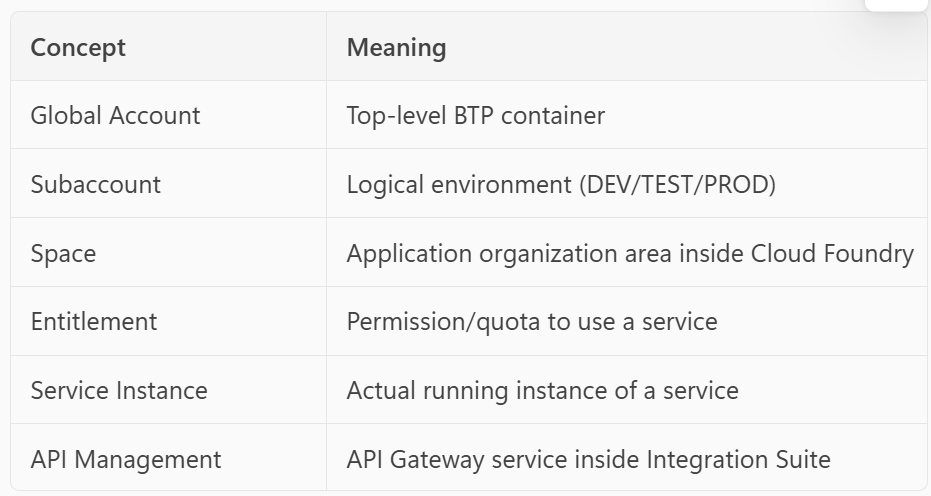
Interview-Friendly Summary
One-Line Memory Trick
Global Account
   ↓
Subaccount
   ↓
Entitlements
   ↓
Create Service Instances
   ↓
Deploy Apps into Spaces
   ↓
Use APIM to securely expose APIs
메타데이터
- post_id
- e1bfbda953bd
- slug
- sap-btp-basics-complete-beginner-to-intermediate-guide-e1bfbda953bd
- url
- https://medium.com/@rahul.bobadi/sap-btp-basics-complete-beginner-to-intermediate-guide-e1bfbda953bd
- canonical_url
- https://medium.com/@rahul.bobadi/sap-btp-basics-complete-beginner-to-intermediate-guide-e1bfbda953bd
- author_url
- https://medium.com/@rahul.bobadi
- status
- ok
- fetched_at
- 2026-07-27 12:02:22