My Logseq Daily Journal Workflow
A look into how I use Logseq as a second brain to keep track of my life
My Logseq Daily Journal Workflow
A look into how I use Logseq as a second brain to keep track of my life
For a long time my daily journal in Logseq was used as a dump, a place I can write down anything without any order or flow.
What changed everything was a small shift in how I think about the daily note. It isn’t a diary but a capture surface. I throw things onto it as they happen: tasks, a workout, this week’s net worth. And because Logseq links and tags everything automatically, those scattered notes quietly assemble themselves into trackers I can actually use later.
Here’s the exact workflow I use, and you can copy the whole thing in about ten minutes.
The journal is the only place I write
Every day, Logseq opens straight to that day’s journal page. That’s deliberate. I don’t hunt for the “right” page to put something in. Whatever it is: a task, a note, a number, it goes on today’s journal as a bullet, and I let tags and links sort out where it belongs.

My first page as I open Logseq from my laptop
This one habit is the foundation for everything below.
Stop deciding where notes go. Dump everything on the daily note and let queries pull it back out.
Friday: planning the weekend with task states
My weekends used to evaporate. I’d get to Sunday night with a vague sense that I’d been busy and nothing to show for it. So now, every Friday, I open the journal and write out what I actually want to get done over the weekend as a simple TODO list.
- ## Weekend
- TODO Grocery shopping
- TODO Call Mum
- TODO Laundry
- TODO Run 10k
In Logseq, typing TODO at the start of a bullet turns it into a checkbox task. But the part that makes this work for me isn't the checkbox — it's the states. Clicking the marker cycles a task through TODO, DOING, and DONE. (You can also type the state directly.)
So across the weekend, the list becomes a live picture of what I’m doing:
- ## Weekend
- DONE Grocery shopping
- TODO Call Mum
- DOING Laundry
- DONE Run 10k
DOING is the state I underrated for years. Seeing that one thing is in progress keeps me from that scattered feeling of half-starting five things at once. It's a tiny bit of structure that makes the weekend feel intentional instead of accidental.
On Sunday evening I glance back at the list. Anything still sitting in TODO either gets carried into next week or honestly admitted as something I was never really going to do. That thirty-second review is the whole "weekend planning system." It's not fancy. It just works because it lives in the journal I already open every day.
What I find important is small, doable tasks with a clear action or target.
For example: a task called “reading” would be too vague but “reading 100 pages” would set a clear target to follow and accomplish.
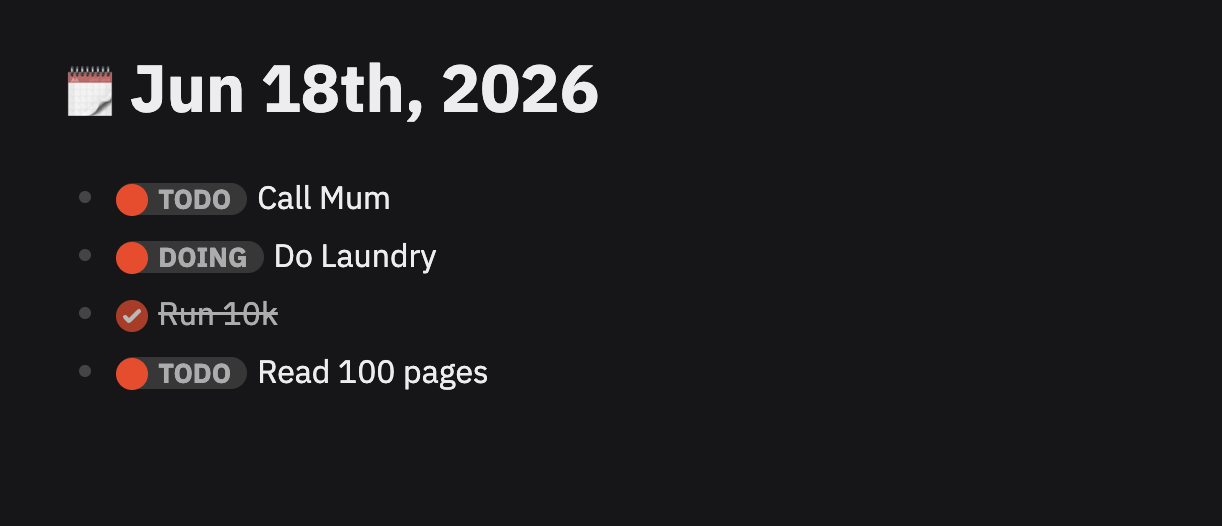
An example of a To-Do list in Logseq
#portfolio-update: tracking net worth weekly
Once a week — usually Sunday — I check my finance app, grab my current net worth, and drop a single line on the journal:
- Net worth this week: €52,400 #portfolio-updateThat’s it. One tag. The magic is that #portfolio-update is itself a page in Logseq, and its Linked References automatically collect every block I've ever tagged with it. So that page becomes a running history of my net worth over time, in chronological order, without me ever building a spreadsheet or maintaining a separate tracker.
When I want to see the trend, I open the #portfolio-update page and there it is every weekly snapshot, dated, in one place. Because each entry is on a journal page, every figure is automatically stamped with the day I recorded it.
The reason I do this in Logseq rather than just trusting my finance app is context. Next to last week’s number I’ll often jot why it moved — a bonus landed, markets dipped, I made a big purchase. Six months later that running commentary is far more useful than a bare number, and it’s all sitting on one tag page.
#gym: a workout log that builds itself
Same idea, different tag. After a workout, I add a line to the day’s journal:
- Push day: bench, overhead press, dips #gym
- Easy 5k, felt good #gym
I keep it casual on purpose. If logging a workout felt like data entry, I’d stop doing it. A quick human sentence plus #gym is enough.
And again, the #gym page collects all of it. Open it and I get my entire training history — every session, every date, scrollable in one view. The thing this is really good at isn't analysis, it's consistency. When I open #gym and see a two-week gap, that gap is impossible to rationalize away. The tag page holds me accountable in a way a vague memory never could.
Why plain hashtags, and nothing fancier
You might notice I’m not using properties, custom queries, or any of Logseq’s heavier machinery here. That’s a choice, not a limitation I haven’t gotten to yet.
The whole system survives because every step is frictionless. Tagging a block with #gym costs nothing in the moment, so I actually do it, every time. The second logging becomes a chore, the data stops flowing and a tracker with gaps is worse than no tracker at all. Plain hashtags keep the capture cost as close to zero as possible, and Logseq's automatic linked references do the organizing for free.
Could I add properties to make these queryable as sortable tables with running totals? Absolutely, and one day I might. But I’d only earn that by first proving I’ll keep up the simple version. Start frictionless. Add structure later, if the habit sticks.
The whole thing, in one place
Step back and look at what’s happening. I open one page a day. On Fridays I list what I want from my weekend and watch it move through DOING to DONE. Once a week I log a number with #portfolio-update. After workouts I log a line with #gym. That's the entire workflow.
But because everything lands on dated journal pages and carries a tag, I end up with three trackers I never actually built a weekend accountability loop, a net-worth history with commentary, and a training log — all maintained as a side effect of just writing in my journal every day.
That’s the part I love about Logseq. You don’t set up systems. You build small habits, attach a tag, and the systems assemble themselves.
If you’re starting from scratch, do this: open today’s journal, write one line about something you did, and put a # in front of a word that matters. Tomorrow, do it again. In a month you'll have a tracker, and you'll barely remember building it.
메타데이터
- post_id
- e1e6b209a4d8
- slug
- my-logseq-daily-journal-workflow-e1e6b209a4d8
- url
- https://medium.com/@christiangrech/my-logseq-daily-journal-workflow-e1e6b209a4d8
- canonical_url
- https://medium.com/@christiangrech/my-logseq-daily-journal-workflow-e1e6b209a4d8
- author_url
- https://medium.com/@christiangrech
- status
- ok
- fetched_at
- 2026-07-11 08:08:22