Claude Code vs. Gemini CLI: What I Use Each One For
Last week I was pairing on a messy refactor with two terminal coding assistants open side by side. One session was Claude Code. The other…
Claude Code vs. Gemini CLI: What I Use Each One For
Last week I was pairing on a messy refactor with two terminal coding assistants open side by side. One session was Claude Code. The other was Gemini CLI. I gave both the same task: read a small service, explain the data flow, then change one API path without breaking tests.
The interesting part was not which one “won.” They behaved differently enough that I stopped thinking of them as interchangeable coding tools.
Gemini CLI was fast and comfortable with a lot of context. Claude Code was more cautious and better at preserving intent during multi-step edits. Both were useful. Both also made mistakes I would not want merged without review.
Here is how I now think about the tradeoff.
The terminal is becoming the AI workspace
I used to treat AI coding assistants as IDE add-ons: highlight a function, ask for a rewrite, inspect the diff. That is still useful, but terminal-native tools changed the workflow.
When an assistant runs from the project root, it can inspect files, run commands, read tests, and keep a conversation around the actual repo. That matters because coding work is rarely about one file. It is usually about cross-file relationships:
• where a handler is registered
• which schema controls validation
• which test fixture hides the failing assumption
• which config value changes behavior in staging
Natural language becomes less like autocomplete and more like a control plane for a local development loop.
That does not mean I trust the assistant blindly. I treat it like a junior pair who can read quickly, draft changes, and run checks, but still needs clear constraints.
What Gemini CLI is good at
Gemini CLI’s biggest advantage is the amount of context it can comfortably take in. The source article describes Gemini CLI as offering a 1 million token context window during preview, with a generous free tier for individual Google accounts. In practice, that makes it useful when I want broad repo understanding before I know exactly where the bug lives.
I reach for it when I need:
• a first-pass map of an unfamiliar codebase
• a summary of how modules relate to each other
• quick generation of scripts or test scaffolding
• multimodal inputs like screenshots or design docs
• experiments where cost matters more than precision
For onboarding a repo, my prompt is usually boring and specific:
Read this repository from the current directory. Explain the request path for POST /documents. List the files involved, the validation layer, and the storage layer. Do not propose changes yet.
That last sentence is important. If I do not say “do not propose changes yet,” many agents jump straight into implementation before they understand the architecture.
What Claude Code is good at
Claude Code feels stronger when the task requires careful edits over several steps. I have had better results asking it to plan a refactor, update tests, run them, and then explain the diff.
The source article frames Claude Code as the more production-oriented option: paid access, stronger focus on quality, and better fit when code correctness matters more than cost. That lines up with my experience, although I would still avoid turning that into a universal rule.
I use Claude Code when:
• the change touches a critical path
• I need a conservative diff
• tests are part of the loop
• the repo has subtle conventions
• I want better error handling and rollback thinking
The prompt style that works best for me is closer to how I would brief another engineer:
We need to replace the legacy document parser.
First inspect the current parser and tests.
Then propose a minimal migration plan.
Only edit files after the plan is clear.
Keep the public API stable.
The more I specify constraints, the less cleanup I have to do later.
The comparison that matters to me
Here is the practical version of the comparison I keep in my notes.
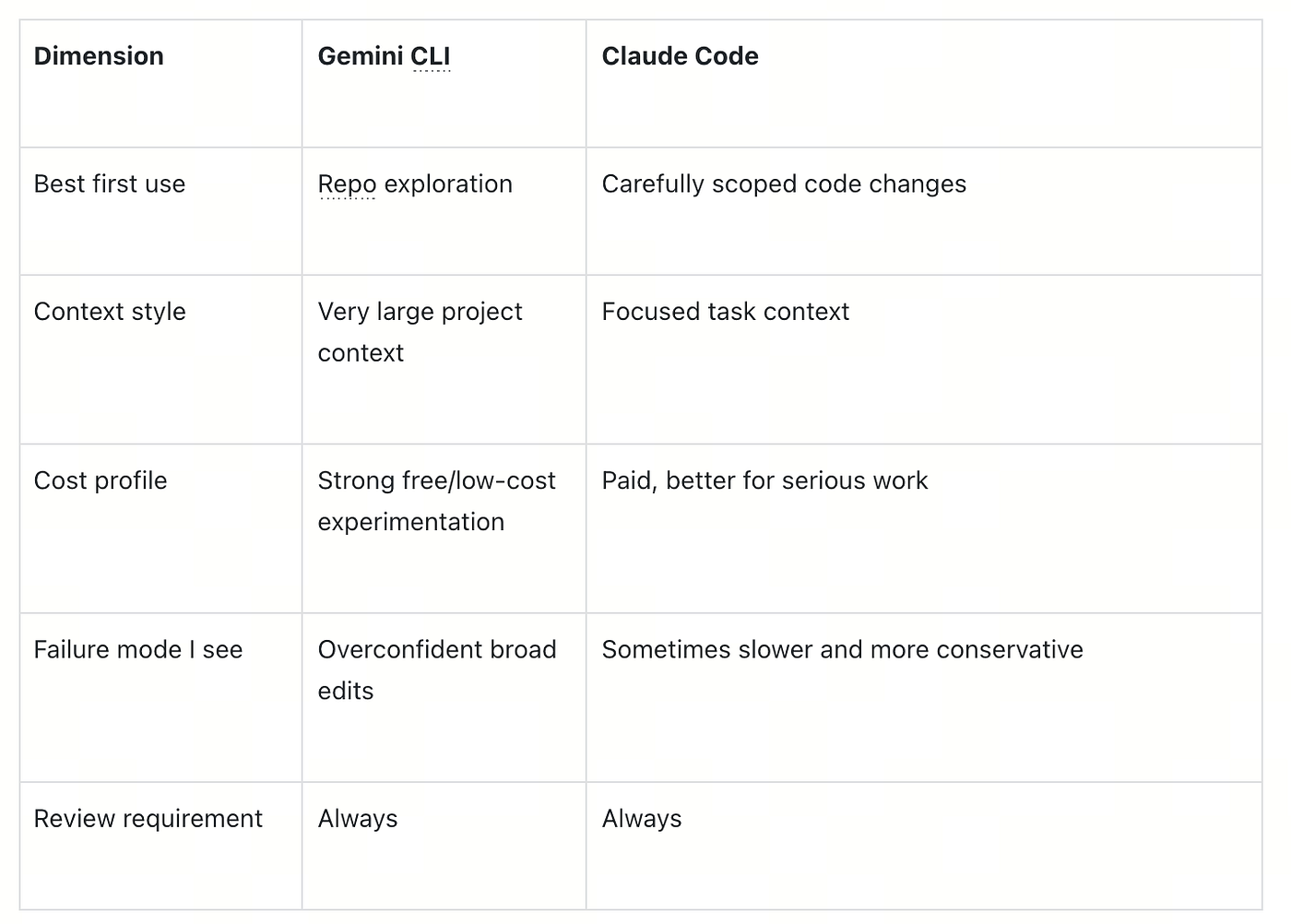
The lesson is not “choose one.” The lesson is to match the assistant to the job.
If I am trying to understand a new service, I prefer the tool that can swallow more context. If I already know the bug and need a careful patch, I prefer the tool that behaves more like a cautious pair programmer.
The stale-docs problem
The biggest problem with both tools is not syntax. It is freshness.
Models can produce code that was correct last year and wrong today. The source article gives a simple example from the Milvus Python API: older snippets may still show connections.connect(...), while newer code often uses MilvusClient. The same thing happens with OpenAI SDK examples, LangChain imports, cloud APIs, and almost every fast-moving AI library.
This is where retrieval augmented generation becomes useful for developer tooling. Instead of relying only on whatever the model learned during training, give the assistant current docs, local examples, and version-specific API references.
The architecture is straightforward:
-
Crawl or export the docs you trust.
-
Split them into chunks.
-
Store vector embeddings with source URLs and version metadata.
-
At question time, retrieve the most relevant chunks.
-
Inject those chunks into the assistant prompt.
Here is a tiny version of the retrieval step:
from pymilvus import MilvusClient

client = MilvusClient("http://localhost:19530")

def retrieve_docs(query_vector, limit=5):
    return client.search(
        collection_name="developer_docs",
        data=[query_vector],
        anns_field="embedding",
        limit=limit,
        output_fields=["title", "url", "version", "text"],
    )[0]
I care a lot about the metadata here. If the assistant is answering a question about version 2.6, I want it retrieving version 2.6 docs, not a blog post from two years ago.
How I use both without making a mess
My workflow now looks like this:
-
Use Gemini CLI for broad orientation if the repo is unfamiliar.
-
Ask it for files, flows, and risks, not code changes.
-
Use Claude Code for the actual patch when the task is precise.
-
Run tests locally.
-
Review every diff like a human wrote it on a tired Friday.
-
For fast-moving APIs, attach current docs through retrieval.
That last step is the one most teams skip. They compare models, but leave both assistants disconnected from the documentation that would make them reliable.
One thing I learned the hard way: a larger context window does not automatically mean better context. If you dump a whole repo plus stale docs plus old examples into the session, the assistant may confidently pick the wrong source. Retrieval needs ranking, version filters, and clear instructions about source priority.
Production considerations
If you are using these tools inside a company, treat them like part of your engineering environment:
• Decide which repos are allowed.
• Review data retention settings.
• Keep secrets out of prompts and logs.
• Prefer local command execution with explicit approval.
• Add docs retrieval for internal APIs.
• Track whether generated code changes test coverage.
For my own work, I do not measure these tools by how impressive the demo feels. I measure them by how many clean, reviewed, tested changes they help me ship without increasing incident risk.
Claude Code and Gemini CLI both earn a place in that workflow. I just do not ask them to do the same job.
메타데이터
- post_id
- e1ebe4c8015d
- slug
- claude-code-vs-gemini-cli-what-i-use-each-one-for-e1ebe4c8015d
- url
- https://medium.com/@PriyaSingh325/claude-code-vs-gemini-cli-what-i-use-each-one-for-e1ebe4c8015d
- canonical_url
- https://medium.com/@PriyaSingh325/claude-code-vs-gemini-cli-what-i-use-each-one-for-e1ebe4c8015d
- author_url
- https://medium.com/@PriyaSingh325
- status
- ok
- fetched_at
- 2026-07-16 19:16:03