A Downloads Folder Organizer in just 15 lines of code #python
We are living in the “Golder Era of the Internet” and we download stuff. Most of us have that built-in browser setting which saves the…
A Downloads Folder Organizer in just 15 lines of code #python
We are living in the “Golder Era of the Internet” and we download stuff. Most of us have that built-in browser setting which saves the downloaded files in a folder called “Downloads”, irrespective of the OS, be it a ‘nix based or windows based OS.
There used to be a time in 2000s when we have various tools called download managers. Most famous one was the “Internet Download Manager” (the tool is still alive though not popular among gen z).
The tool had a feature that segregates the downloaded files into it’s respective folder according to it’s type. For example — PDFs, DOCs in a folder called “Documents”, etc.
Our program code does not completely mimic this behavior. However, it does something similar. It moves the downloaded files into it’s separate folders based on it’s file extension.
So let’s get into code —
Import the libraries —
import os
import shutil
import sys
python’s in-built os, shutil and sys is all we are going to need for our project.
- os is a library for working operating system’s commands with python
- shutil is a high level file manipulation library. Especially used for copying and moving large files.
- sys is used to various system tasks such as passing command line arguments to code.
Next what we are going to do is create a base_path variable which stores the path of our Downloads folder. I’ve set it to C:/Users/djang/Downloads/ and also check if a command line argument is passed, then change it to that argument value —
# You can set the path of your downloads folder passing it as
# command line argument -
base_path = str(sys.argv[1]) if len(sys.argv)>1 else "C:/Users/djang/Downloads/"Now the main part of the code is below —
files = [f for f in os.listdir(base_path) if os.path.isfile(os.path.join(base_path, f))]for f in files:
ext = f.split(“.”)[-1]
print(f”ext:{ext}, path: {os.path.join(base_path, f)}, base_path: {base_path}”)
if os.path.exists(os.path.join(base_path, ext)):
shutil.move(os.path.join(base_path, f), os.path.join(base_path, ext, f))
else:
os.mkdir(os.path.join(base_path, ext))
shutil.move(os.path.join(base_path, f), os.path.join(base_path, ext, f))The above code block is explained as following —
- We created a list of all the files in our Downloads folder
- We iterated the
fileslist - We got the extension and saved in
extvariable - Finally in the if condition we are checking if the folder to that extension already exists.
- If yes, we simply move the file to that folder
- Else, we create the extension’s folder first and then move the file.
- The result will look something like this —
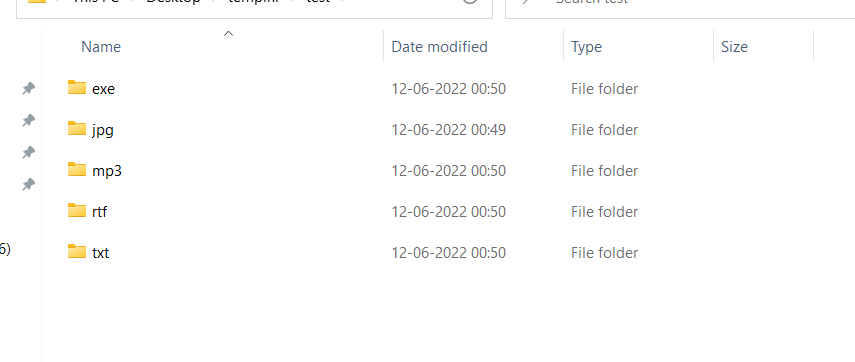
Result of the above code on our target folder.

A picture of the complete code
메타데이터
- post_id
- e1f62cc63a34
- slug
- a-downloads-folder-organizer-in-just-15-lines-of-code-python-e1f62cc63a34
- url
- https://medium.com/@tejaskjaiswal/a-downloads-folder-organizer-in-just-15-lines-of-code-python-e1f62cc63a34
- canonical_url
- https://medium.com/@tejaskjaiswal/a-downloads-folder-organizer-in-just-15-lines-of-code-python-e1f62cc63a34
- author_url
- https://medium.com/@tejaskjaiswal
- status
- ok
- fetched_at
- 2026-07-27 00:19:47



