Azure Vwan routing 2: route harder
Hi kids, let’s talk some more about Azure vwan, in my other vwan article I mainly went into how vwan hubs work (or at least are supposed to…
Azure Vwan routing 2: route harder

it’s just here because it’s cute
Hi kids, let’s talk some more about Azure vwan, in my other vwan article I mainly went into how vwan hubs work (or at least are supposed to work). This time I want to go through a scenario and layout you might be needing to use that is a bit more off the beaten path.
Let’s look at forcing traffic through a spoke NVA. Why? Because you might feel the need to. And there’s nothing wrong with that, maybe you don’t want to be limited to the NVA’s that you can put in the vhub, maybe you want to challenge yourself and buck the system. I say “Good for you”, folks like yourself keep Azure support in business (just joking). And now:

I mentioned in other articles that the Azure route server does not pass traffic but the route service in vwan hubs does, this is 100% true but it’s also important to know when the route service is in the path and when it’s not. Okay, maybe not important but at least cool to know. The route service is the beating heart of routing in the vhub, at least usually. Let’s keep things simple, no firewall, no routing intent, just a vanilla vhub with some vnets connected and maybe a vpn or expressroute in the hub as well. Any vnet to vnet traffic will go through the route service, be it in a local hub or even a remote one (for remote it would go through the local then to the remote route service). But VPN traffic does not and goes directly to and from the gateway. Something like this:

You can check out my Expressroute article but the routing is similar to VPN but only uses the gateway for inbound traffic, direct to msee router for outbound. Enough about that though, you want to route stuff to a spoke, hub be damned! You want do this:
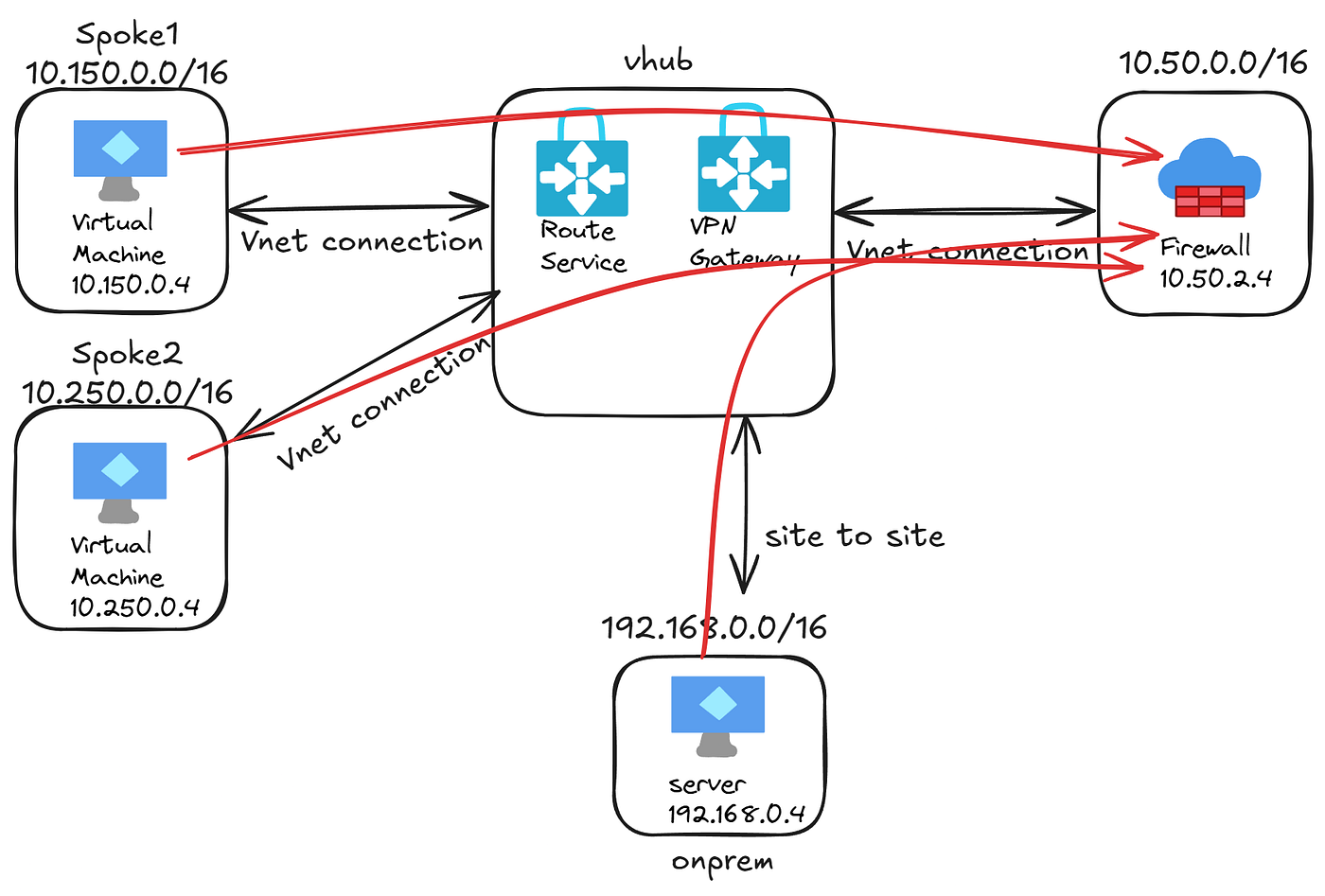
Send everything to the spoke firewall and then have it send traffic on it’s way. “Super easy” you think, “I’ll just put static routes on the default table sending 0.0.0.0/0, 10.150.0.0/16, 10.250.0.0/16 and 192.168.0.0/16 to the firewall 10.50.2.4”. You go through that, configure the next hop ip on the vnet connection and all looks right…but nothing works, nothing seems to be able to reach anything else.

Well let’s see, looking at the spoke1 vnic effective routes:

example of the routes on spoke1 vnic
that looks ok, everything going to the route service, this is normal since any static route in the default table will look like this on the vnic. Looking at the routes on the fw vnet we see:

Still looks right, the only reason this one doesn’t have the 0.0.0.0/0 route is because the vnet connection is set to not propagate the default route so the fw will go direct to the internet.

This my friends is the crux of the problem, spoke1 vm (10.150.0.4) goes to the hub needing to reach spoke2 vm (10.250.0.4), hub says “ok go the fw vnet to ip 10.50.0.2 to reach that”. Fw vm get’s the traffic, then says “Oh you need to go to the hub to get to 10.250.0.4”…guess what, hub still says “ok go the fw vnet to ip 10.50.0.2 to reach that” and the looping continues.
How do we fix this? Ok, let’s first get the spoke vnets off of the default route table and give them there own table to use. Something like this:

Pretty much just like what we had on the default table, but on this custom one (for this example I called it vnetRT), we want to associate it (have them use these routes) with the spokes only but not the FW vnet and we want the spoke vnets to propagate (send their routes) to the none table. This is to keep the VPN and FW vnet from learning the spoke ranges from the hub. We need to go ahead and remove the vpn route (192.168.0.0/16) from the default table. Also on the vnetRT, you don’t need next hop ip’s for anything other than the 0.0.0.0/0, this will mean that anything going to that FW vnet connection will go through the firewall via the 0.0.0.0/0 route on the connection. Like so:


Last piece of this puzzle is to peer FW vnet to spoke1 and spoke2 vnets directly. After this the spoke1 vnic effective routes look like this:

The only change is the FW vnet range is now showing that it’s learned from peering rather from the hub. The new layout will end up like this:

Technically, yes, this is asymmetric but only in that the same path isn’t taken to and from the firewall. This is fine since it’s still reaches and leaves the firewall itself and the source and destination don’t change. The path will be like this mess of spaghetti shows:

Vpn traffic goes through the gateway in both directions, but spoke vnet outbound goes through the hub to reach the firewall and inbound comes directly to the vnet from the firewall. And that should do it.

Whew! And that’s how to force traffic through a spoke NVA from a vhub. Thanks for making it all the way through that, and I hope it helps you if you’re wanting to try this. I have this scenario in my github here or without a vpn here. See ya next time!

메타데이터
- post_id
- e1f82eda8b5a
- slug
- azure-vwan-routing-2-route-harder-e1f82eda8b5a
- url
- https://aws.plainenglish.io/azure-vwan-routing-2-route-harder-e1f82eda8b5a
- canonical_url
- https://aws.plainenglish.io/azure-vwan-routing-2-route-harder-e1f82eda8b5a
- author_url
- https://medium.com/@sunaj10
- status
- ok
- fetched_at
- 2026-06-26 21:52:29