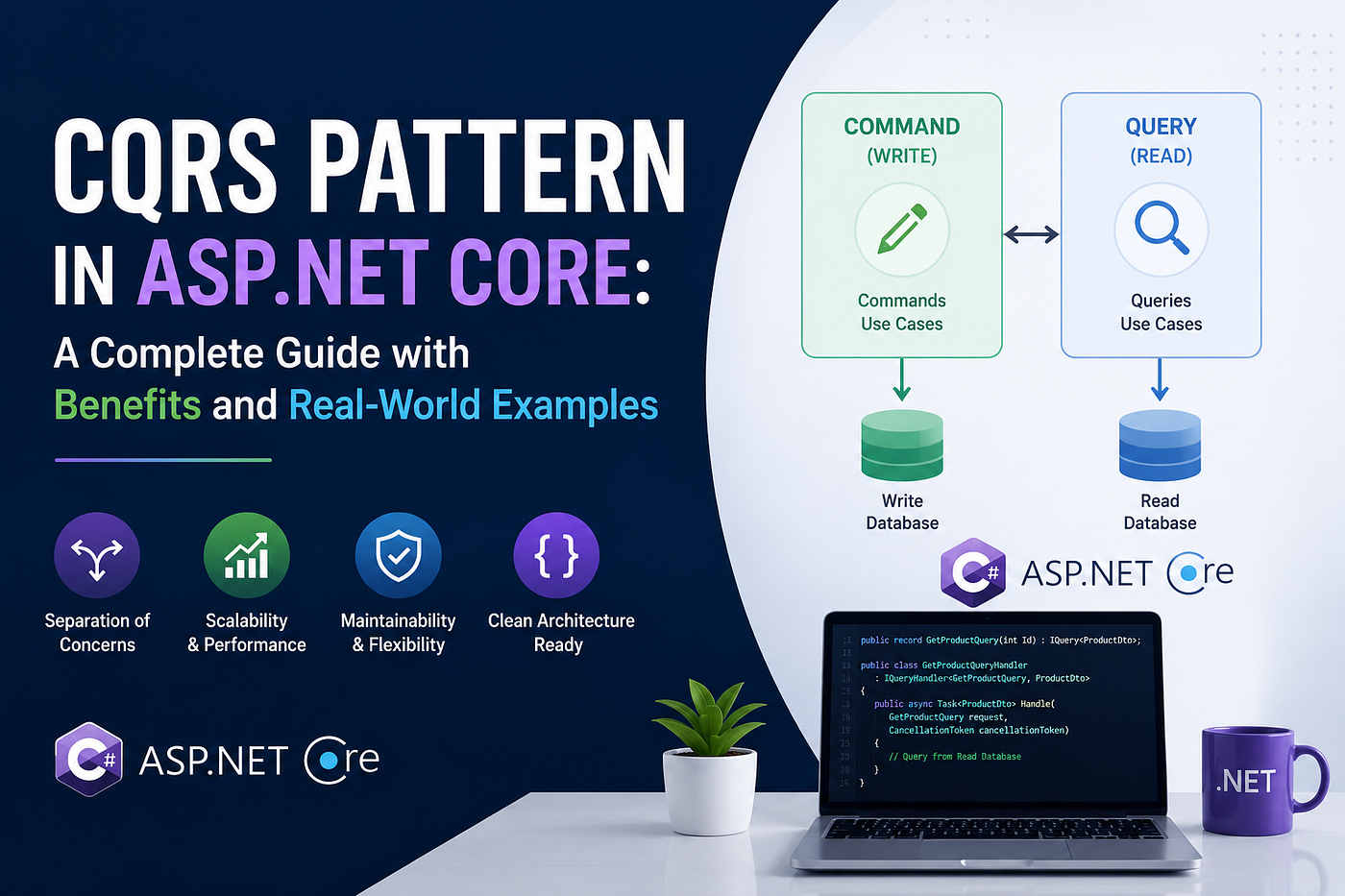
CQRS Pattern in ASP.NET Core: A Complete Guide with Benefits and Real-World Examples
Introduction
CQRS Pattern in ASP.NET Core: A Complete Guide with Benefits and Real-World Examples
Introduction
When you start building a new ASP.NET Core application, everything feels manageable. You have a few controllers, some services, and a database. But as the application grows — more features, more developers, higher traffic — things start getting messy. A single service class does too many things. The same model is used for displaying data on screen and saving data to the database. Read and write operations fight over the same database connection pool. Tests become harder to write.
This is the point where many teams discover CQRS.
CQRS, which stands for Command Query Responsibility Segregation, is a pattern that separates your application’s read operations from its write operations at the model and responsibility level. It sounds simple on the surface, but the implications are significant. Once you apply CQRS to your codebase, you get cleaner code, better scalability, easier testing, and a natural foundation for building complex business applications.
This article walks you through everything you need to understand CQRS — where it comes from, why it matters, how to implement it in ASP.NET Core using MediatR, and how it behaves in a real production-style example.
The Origin of CQRS
To understand CQRS, you first need to understand Command Query Separation (CQS), a principle introduced by Bertrand Meyer in his 1988 book “Object-Oriented Software Construction.” The core idea of CQS is this: every method in an object should either be a command that performs an action, or a query that returns data — but never both.
Greg Young took this principle further and applied it at the architectural level. Instead of just separating methods on an object, he proposed separating the entire model. The write side of your application gets its own model, objects, and logic. The read side gets its own separate model, objects, and logic. This became CQRS.
This is a key shift in thinking. In a traditional architecture, you define a Product entity and use it both when saving a product to the database and when fetching product details for a list view. With CQRS, those two concerns live in completely different places and can evolve independently.
The Problem CQRS Solves
Before diving into implementation, it helps to understand the pain that CQRS is designed to address.
Imagine a typical e-commerce application. You have an OrderService class that handles everything related to orders — placing an order, cancelling an order, getting order history for a user, getting order details for an invoice, getting a summary of today's orders for the admin dashboard. Over time, this class grows to hundreds of lines. Methods that should be simple start pulling in dependencies they do not need. A query method that only reads data gets entangled with transaction management meant for writes.
On the database side, you have one connection string and one database handling both heavy write operations (placing orders, updating stock) and heavy read operations (listing products, generating reports). These two types of workloads have very different performance profiles and competing demands.
Testing also becomes painful. To unit test a simple “get order by ID” query, you suddenly need to mock a dozen dependencies that are only there for write operations.
CQRS draws a hard line between these two worlds. Commands handle writes. Queries handle reads. Neither side knows about the other. The complexity on each side drops dramatically because each side only carries what it actually needs.
Core Concepts
Commands
A command is a message that says “do something.” It represents an intent to change the state of the system. Commands are named as actions — CreateProductCommand, UpdateOrderStatusCommand, DeleteCustomerCommand. A command typically does not return data. At most it returns a confirmation or an identifier for the newly created resource.
Commands go through validation, business rule enforcement, and then persist the result. If any of these steps fail, the command fails and the state does not change.
Queries
A query is a message that says “give me something.” It reads data from the system without changing anything. Queries are named as questions — GetProductByIdQuery, GetOrderHistoryQuery, GetTopSellingProductsQuery. A query always returns data.
Because queries never modify state, they can be heavily optimized. You can use read replicas, caching, denormalized views, or a completely different database on the query side without affecting the write side at all.
Handlers
Each command and each query has exactly one handler. The handler contains the logic for processing that specific request. A command handler for CreateProductCommand knows how to validate the product, create the domain object, and save it. A query handler for GetProductByIdQuery knows exactly which fields to fetch and how to format the response. Nothing else. One handler, one responsibility.
The MediatR Pipeline
In ASP.NET Core, the glue that connects commands and queries to their handlers is MediatR. MediatR is an in-process mediator. When you call _mediator.Send(command), MediatR finds the registered handler for that command type and invokes it. You never call handlers directly. The controller only knows about MediatR, not about individual handlers. This keeps the controller completely thin and decoupled from business logic.
Benefits of CQRS in Detail
Separation of Concerns
The most immediate benefit is a cleaner codebase. Every operation — every command and every query — lives in its own small class. A developer working on the “cancel order” feature touches only CancelOrderCommand and CancelOrderHandler. They do not need to understand or risk breaking the "get order history" feature. Features are isolated by design.
This becomes especially valuable in a team environment. Multiple developers can work on different features simultaneously with very low risk of merge conflicts because each feature is fully encapsulated in its own files.
Independent Scalability
In most applications, reads vastly outnumber writes. An e-commerce site might have thousands of users browsing products for every one user placing an order. With CQRS, you can scale the read side independently. You can add read replicas for your query database, introduce a Redis cache for frequently accessed queries, or even move the read side to a completely different data store optimized for reads — like Elasticsearch for full-text search — without any impact on the write side.
Optimized Data Models
On the write side, you want a normalized, consistent domain model that enforces business rules. On the read side, you want a flat, denormalized model that is fast and easy to display. Without CQRS, you are constantly trying to serve both needs with one model, and you always compromise somewhere.
With CQRS, query handlers can return lightweight DTOs (Data Transfer Objects) that contain exactly what the UI needs — nothing more, nothing less. No lazy loading surprises. No accidentally serializing entire object graphs. The read model is designed purely for consumption.
Easier Testing
Because each command and query handler is a small, focused class with a clear input and output, they are extremely easy to unit test. You mock the database context or repository, pass in a command or query, and assert on the result. There are no hidden dependencies, no shared state, no side effects from other operations. Testing becomes fast and reliable.
Pipeline Behaviors for Cross-Cutting Concerns
MediatR supports pipeline behaviors — middleware that wraps every request before it reaches the handler. This is where you put cross-cutting concerns: validation, logging, authorization checks, performance monitoring, caching. You write the behavior once and it applies to every command or query automatically. The handlers themselves stay clean. They contain only the code that is specific to that operation.
Foundation for Advanced Architecture
CQRS is not just a standalone pattern. It is a foundation for more advanced architectural decisions. Once you have CQRS in place, adding Event Sourcing becomes natural. Instead of saving the current state of an entity, you save every command as an event. The current state is rebuilt by replaying events. This gives you a complete audit history, time travel debugging, and the ability to project events into multiple different read models.
Implementing CQRS in ASP.NET Core
Now let’s build a real example. We will create a product management feature for a small e-commerce API.
Prerequisites
Make sure you have the following NuGet packages installed:
dotnet add package MediatR
dotnet add package MediatR.Extensions.Microsoft.DependencyInjection
dotnet add package FluentValidation
dotnet add package FluentValidation.DependencyInjectionExtensions
dotnet add package Microsoft.EntityFrameworkCore.SqlServer
Project Structure
Organize your project by feature, not by layer. This is called vertical slice architecture and it pairs perfectly with CQRS.
/Features
  /Products
    /Commands
      CreateProductCommand.cs
      CreateProductHandler.cs
      UpdateProductCommand.cs
      UpdateProductHandler.cs
      DeleteProductCommand.cs
      DeleteProductHandler.cs
    /Queries
      GetProductByIdQuery.cs
      GetProductByIdHandler.cs
      GetAllProductsQuery.cs
      GetAllProductsHandler.cs
    /Validators
      CreateProductValidator.cs
      UpdateProductValidator.cs
    ProductDto.cs
/Domain
  Product.cs
/Infrastructure
  AppDbContext.cs
/Behaviors
  ValidationBehavior.cs
  LoggingBehavior.cs
Each feature folder is self-contained. Everything related to products is inside /Features/Products. A new developer can open that folder and immediately understand the full scope of the product feature.
Domain Entity
public class Product
{
    public int Id { get; set; }
    public string Name { get; set; }
    public string Description { get; set; }
    public decimal Price { get; set; }
    public int Stock { get; set; }
    public string Category { get; set; }
    public bool IsActive { get; set; }
    public DateTime CreatedAt { get; set; }
    public DateTime? UpdatedAt { get; set; }
}
Data Transfer Object
The DTO is what the read side returns. Notice it is flat and simple — exactly what a client needs to display product information.
public class ProductDto
{
    public int Id { get; set; }
    public string Name { get; set; }
    public string Description { get; set; }
    public decimal Price { get; set; }
    public int Stock { get; set; }
    public string Category { get; set; }
    public bool IsActive { get; set; }
    public string StockStatus => Stock > 0 ? "In Stock" : "Out of Stock";
}
Database Context
public class AppDbContext : DbContext
{
    public AppDbContext(DbContextOptions<AppDbContext> options) : base(options) { }
    public DbSet<Product> Products { get; set; }
    protected override void OnModelCreating(ModelBuilder modelBuilder)
    {
        modelBuilder.Entity<Product>(entity =>
        {
            entity.HasKey(p => p.Id);
            entity.Property(p => p.Name).IsRequired().HasMaxLength(100);
            entity.Property(p => p.Price).HasPrecision(18, 2);
        });
    }
}
Commands — The Write Side
Create Product Command
public class CreateProductCommand : IRequest<int>
{
    public string Name { get; set; }
    public string Description { get; set; }
    public decimal Price { get; set; }
    public int Stock { get; set; }
    public string Category { get; set; }
}
The command implements IRequest<int>, which means it will return an int — the ID of the newly created product. The command is just a data carrier. No logic, no methods. Pure data.
Create Product Handler
public class CreateProductHandler : IRequestHandler<CreateProductCommand, int>
{
    private readonly AppDbContext _context;
    public CreateProductHandler(AppDbContext context)
    {
        _context = context;
    }
    public async Task<int> Handle(CreateProductCommand request, CancellationToken cancellationToken)
    {
        var product = new Product
        {
            Name = request.Name,
            Description = request.Description,
            Price = request.Price,
            Stock = request.Stock,
            Category = request.Category,
            IsActive = true,
            CreatedAt = DateTime.UtcNow
        };
        _context.Products.Add(product);
        await _context.SaveChangesAsync(cancellationToken);
        return product.Id;
    }
}
The handler is responsible for one thing: creating a product and returning its ID. It sets IsActive = true and CreatedAt = DateTime.UtcNow as default values. Business logic like this belongs here, not in the controller.
Update Product Command
public class UpdateProductCommand : IRequest<bool>
{
    public int Id { get; set; }
    public string Name { get; set; }
    public string Description { get; set; }
    public decimal Price { get; set; }
    public int Stock { get; set; }
}
Update Product Handler
public class UpdateProductHandler : IRequestHandler<UpdateProductCommand, bool>
{
    private readonly AppDbContext _context;
    public UpdateProductHandler(AppDbContext context)
    {
        _context = context;
    }
    public async Task<bool> Handle(UpdateProductCommand request, CancellationToken cancellationToken)
    {
        var product = await _context.Products
            .FirstOrDefaultAsync(p => p.Id == request.Id, cancellationToken);
        if (product == null)
            return false;
        product.Name = request.Name;
        product.Description = request.Description;
        product.Price = request.Price;
        product.Stock = request.Stock;
        product.UpdatedAt = DateTime.UtcNow;
        await _context.SaveChangesAsync(cancellationToken);
        return true;
    }
}
Delete Product Command
public class DeleteProductCommand : IRequest<bool>
{
    public int Id { get; set; }
}
Delete Product Handler
public class DeleteProductHandler : IRequestHandler<DeleteProductCommand, bool>
{
    private readonly AppDbContext _context;
    public DeleteProductHandler(AppDbContext context)
    {
        _context = context;
    }
    public async Task<bool> Handle(DeleteProductCommand request, CancellationToken cancellationToken)
    {
        var product = await _context.Products
            .FirstOrDefaultAsync(p => p.Id == request.Id, cancellationToken);
        if (product == null)
            return false;
        // Soft delete - preserve the record but mark it inactive
        product.IsActive = false;
        product.UpdatedAt = DateTime.UtcNow;
        await _context.SaveChangesAsync(cancellationToken);
        return true;
    }
}
Notice this handler uses a soft delete approach. Instead of removing the record from the database, it marks it as inactive. This is a common business requirement — you rarely want to permanently lose data. The decision lives in the handler, not scattered across services.
Queries — The Read Side
Get Product By ID Query
public class GetProductByIdQuery : IRequest<ProductDto>
{
    public int Id { get; set; }
}
Get Product By ID Handler
public class GetProductByIdHandler : IRequestHandler<GetProductByIdQuery, ProductDto>
{
    private readonly AppDbContext _context;
    public GetProductByIdHandler(AppDbContext context)
    {
        _context = context;
    }
    public async Task<ProductDto> Handle(GetProductByIdQuery request, CancellationToken cancellationToken)
    {
        var product = await _context.Products
            .AsNoTracking()
            .Where(p => p.Id == request.Id && p.IsActive)
            .Select(p => new ProductDto
            {
                Id = p.Id,
                Name = p.Name,
                Description = p.Description,
                Price = p.Price,
                Stock = p.Stock,
                Category = p.Category,
                IsActive = p.IsActive
            })
            .FirstOrDefaultAsync(cancellationToken);
        return product;
    }
}
Two things to note here. First, AsNoTracking() tells Entity Framework not to track this entity in the change tracker. Since this is a read operation, there is no reason to track it, and skipping tracking improves performance noticeably at scale. Second, .Select() projects directly to the DTO in the SQL query, which means only the columns you need are fetched from the database. No over-fetching.
Get All Products Query with Filtering and Pagination
Real applications need filtering and pagination. Here is how you handle that properly.
public class GetAllProductsQuery : IRequest<PagedResult<ProductDto>>
{
    public string Category { get; set; }
    public string SearchTerm { get; set; }
    public decimal? MinPrice { get; set; }
    public decimal? MaxPrice { get; set; }
    public int PageNumber { get; set; } = 1;
    public int PageSize { get; set; } = 20;
}
public class PagedResult<T>
{
    public List<T> Items { get; set; }
    public int TotalCount { get; set; }
    public int PageNumber { get; set; }
    public int PageSize { get; set; }
    public int TotalPages => (int)Math.Ceiling((double)TotalCount / PageSize);
    public bool HasNextPage => PageNumber < TotalPages;
    public bool HasPreviousPage => PageNumber > 1;
}
Get All Products Handler
public class GetAllProductsHandler : IRequestHandler<GetAllProductsQuery, PagedResult<ProductDto>>
{
    private readonly AppDbContext _context;
    public GetAllProductsHandler(AppDbContext context)
    {
        _context = context;
    }
    public async Task<PagedResult<ProductDto>> Handle(GetAllProductsQuery request, CancellationToken cancellationToken)
    {
        var query = _context.Products
            .AsNoTracking()
            .Where(p => p.IsActive);
        // Apply filters dynamically
        if (!string.IsNullOrWhiteSpace(request.Category))
            query = query.Where(p => p.Category == request.Category);
        if (!string.IsNullOrWhiteSpace(request.SearchTerm))
            query = query.Where(p => p.Name.Contains(request.SearchTerm) ||
                                     p.Description.Contains(request.SearchTerm));
        if (request.MinPrice.HasValue)
            query = query.Where(p => p.Price >= request.MinPrice.Value);
        if (request.MaxPrice.HasValue)
            query = query.Where(p => p.Price <= request.MaxPrice.Value);
        var totalCount = await query.CountAsync(cancellationToken);
        var items = await query
            .OrderBy(p => p.Name)
            .Skip((request.PageNumber - 1) * request.PageSize)
            .Take(request.PageSize)
            .Select(p => new ProductDto
            {
                Id = p.Id,
                Name = p.Name,
                Description = p.Description,
                Price = p.Price,
                Stock = p.Stock,
                Category = p.Category,
                IsActive = p.IsActive
            })
            .ToListAsync(cancellationToken);
        return new PagedResult<ProductDto>
        {
            Items = items,
            TotalCount = totalCount,
            PageNumber = request.PageNumber,
            PageSize = request.PageSize
        };
    }
}
This handler builds the query dynamically based on which filters are provided. The query is only executed once — counting and fetching are done in two separate database calls, which is the standard approach for pagination. Everything is strongly typed and fully testable.
Pipeline Behaviors
Pipeline behaviors are one of the most powerful features in the CQRS + MediatR setup. They let you define logic that runs around every command or query without touching the handlers themselves.
Validation Behavior
public class ValidationBehavior<TRequest, TResponse> : IPipelineBehavior<TRequest, TResponse>
    where TRequest : notnull
{
    private readonly IEnumerable<IValidator<TRequest>> _validators;
    public ValidationBehavior(IEnumerable<IValidator<TRequest>> validators)
    {
        _validators = validators;
    }
    public async Task<TResponse> Handle(
        TRequest request,
        RequestHandlerDelegate<TResponse> next,
        CancellationToken cancellationToken)
    {
        if (!_validators.Any())
            return await next();
        var context = new ValidationContext<TRequest>(request);
        var failures = _validators
            .Select(v => v.Validate(context))
            .SelectMany(result => result.Errors)
            .Where(f => f != null)
            .ToList();
        if (failures.Any())
            throw new ValidationException(failures);
        return await next();
    }
}
Logging Behavior
public class LoggingBehavior<TRequest, TResponse> : IPipelineBehavior<TRequest, TResponse>
    where TRequest : notnull
{
    private readonly ILogger<LoggingBehavior<TRequest, TResponse>> _logger;
    public LoggingBehavior(ILogger<LoggingBehavior<TRequest, TResponse>> logger)
    {
        _logger = logger;
    }
    public async Task<TResponse> Handle(
        TRequest request,
        RequestHandlerDelegate<TResponse> next,
        CancellationToken cancellationToken)
    {
        var requestName = typeof(TRequest).Name;
        _logger.LogInformation("Handling {RequestName}: {@Request}", requestName, request);
        var stopwatch = Stopwatch.StartNew();
        var response = await next();
        stopwatch.Stop();
        _logger.LogInformation(
            "Handled {RequestName} in {ElapsedMilliseconds}ms",
            requestName,
            stopwatch.ElapsedMilliseconds);
        return response;
    }
}
Every single command and query is now automatically logged with its name, its input data, and how long it took to execute. This is invaluable in production for debugging performance issues.
Validators
public class CreateProductValidator : AbstractValidator<CreateProductCommand>
{
    public CreateProductValidator()
    {
        RuleFor(x => x.Name)
            .NotEmpty().WithMessage("Product name is required.")
            .MaximumLength(100).WithMessage("Product name cannot exceed 100 characters.");
        RuleFor(x => x.Description)
            .MaximumLength(500).WithMessage("Description cannot exceed 500 characters.");
        RuleFor(x => x.Price)
            .GreaterThan(0).WithMessage("Price must be greater than zero.");
        RuleFor(x => x.Stock)
            .GreaterThanOrEqualTo(0).WithMessage("Stock cannot be negative.");
        RuleFor(x => x.Category)
            .NotEmpty().WithMessage("Category is required.");
    }
}
public class UpdateProductValidator : AbstractValidator<UpdateProductCommand>
{
    public UpdateProductValidator()
    {
        RuleFor(x => x.Id)
            .GreaterThan(0).WithMessage("A valid product ID is required.");
        RuleFor(x => x.Name)
            .NotEmpty().WithMessage("Product name is required.")
            .MaximumLength(100);
        RuleFor(x => x.Price)
            .GreaterThan(0).WithMessage("Price must be greater than zero.");
        RuleFor(x => x.Stock)
            .GreaterThanOrEqualTo(0).WithMessage("Stock cannot be negative.");
    }
}
The Controller
With CQRS fully in place, the controller becomes extremely thin. It has no business logic. It just receives HTTP requests, builds the appropriate command or query, sends it through MediatR, and returns the result.
[ApiController]
[Route("api/[controller]")]
public class ProductsController : ControllerBase
{
    private readonly IMediator _mediator;
    public ProductsController(IMediator mediator)
    {
        _mediator = mediator;
    }
    [HttpPost]
    public async Task<IActionResult> Create([FromBody] CreateProductCommand command)
    {
        var productId = await _mediator.Send(command);
        return CreatedAtAction(nameof(GetById), new { id = productId }, new { id = productId });
    }
    [HttpGet("{id:int}")]
    public async Task<IActionResult> GetById(int id)
    {
        var result = await _mediator.Send(new GetProductByIdQuery { Id = id });
        if (result == null)
            return NotFound(new { message = $"Product with ID {id} was not found." });
        return Ok(result);
    }
    [HttpGet]
    public async Task<IActionResult> GetAll([FromQuery] GetAllProductsQuery query)
    {
        var result = await _mediator.Send(query);
        return Ok(result);
    }
    [HttpPut("{id:int}")]
    public async Task<IActionResult> Update(int id, [FromBody] UpdateProductCommand command)
    {
        command.Id = id;
        var success = await _mediator.Send(command);
        if (!success)
            return NotFound(new { message = $"Product with ID {id} was not found." });
        return NoContent();
    }
    [HttpDelete("{id:int}")]
    public async Task<IActionResult> Delete(int id)
    {
        var success = await _mediator.Send(new DeleteProductCommand { Id = id });
        if (!success)
            return NotFound(new { message = $"Product with ID {id} was not found." });
        return NoContent();
    }
}
Registering Everything in Program.cs
var builder = WebApplication.CreateBuilder(args);
// Database
builder.Services.AddDbContext<AppDbContext>(options =>
    options.UseSqlServer(builder.Configuration.GetConnectionString("DefaultConnection")));
// MediatR - scans the assembly for all handlers
builder.Services.AddMediatR(cfg =>
    cfg.RegisterServicesFromAssembly(Assembly.GetExecutingAssembly()));
// FluentValidation - scans the assembly for all validators
builder.Services.AddValidatorsFromAssembly(Assembly.GetExecutingAssembly());
// Pipeline behaviors - order matters, validation runs before logging
builder.Services.AddTransient(typeof(IPipelineBehavior<,>), typeof(ValidationBehavior<,>));
builder.Services.AddTransient(typeof(IPipelineBehavior<,>), typeof(LoggingBehavior<,>));
builder.Services.AddControllers();
builder.Services.AddEndpointsApiExplorer();
builder.Services.AddSwaggerGen();
var app = builder.Build();
app.UseSwagger();
app.UseSwaggerUI();
app.MapControllers();
app.Run();
How the Request Flow Works End to End
It helps to trace exactly what happens when a client sends a POST request to create a product.
- The HTTP request arrives at the
ProductsController.Createaction. - ASP.NET Core model binding deserializes the JSON body into a
CreateProductCommandobject. - The controller calls
_mediator.Send(command). - MediatR finds the registered pipeline behaviors and the handler for
CreateProductCommand. - The
LoggingBehaviorruns first and logs the incoming request. - The
ValidationBehaviorruns next. It finds the registeredCreateProductValidatorand validates the command. If validation fails, aValidationExceptionis thrown and the request stops here — the handler never runs. - If validation passes, MediatR calls
CreateProductHandler.Handle(). - The handler creates the domain entity, saves it to the database, and returns the new product ID.
- Control returns up through the pipeline behaviors.
- The
LoggingBehaviorlogs how long the entire operation took. - The controller receives the product ID and returns a
201 Createdresponse.
The controller knows nothing about validation. The handler knows nothing about logging. The pipeline behaviors know nothing about products. Everything is decoupled and focused.
Global Exception Handling
When the ValidationBehavior throws a ValidationException, you need to catch it and return a proper HTTP response. Add a global exception handler middleware.
public class GlobalExceptionMiddleware
{
    private readonly RequestDelegate _next;
    private readonly ILogger<GlobalExceptionMiddleware> _logger;
    public GlobalExceptionMiddleware(RequestDelegate next, ILogger<GlobalExceptionMiddleware> logger)
    {
        _next = next;
        _logger = logger;
    }
    public async Task InvokeAsync(HttpContext context)
    {
        try
        {
            await _next(context);
        }
        catch (ValidationException ex)
        {
            _logger.LogWarning("Validation failed: {Errors}", ex.Errors);
            context.Response.StatusCode = 400;
            context.Response.ContentType = "application/json";
            var errors = ex.Errors
                .GroupBy(e => e.PropertyName)
                .ToDictionary(
                    g => g.Key,
                    g => g.Select(e => e.ErrorMessage).ToArray()
                );
            await context.Response.WriteAsJsonAsync(new
            {
                title = "Validation failed",
                status = 400,
                errors
            });
        }
        catch (Exception ex)
        {
            _logger.LogError(ex, "An unexpected error occurred.");
            context.Response.StatusCode = 500;
            context.Response.ContentType = "application/json";
            await context.Response.WriteAsJsonAsync(new
            {
                title = "An unexpected error occurred",
                status = 500
            });
        }
    }
}
Register it in Program.cs before app.MapControllers():
app.UseMiddleware<GlobalExceptionMiddleware>();Now your API returns clean, structured error responses without any try/catch blocks in your handlers or controller.
Testing CQRS Handlers
One of the biggest practical advantages of CQRS is how easy testing becomes. Here is how to unit test both a command handler and a query handler using xUnit and Moq.
Testing the Create Product Handler
public class CreateProductHandlerTests
{
    private readonly AppDbContext _context;
    private readonly CreateProductHandler _handler;
    public CreateProductHandlerTests()
    {
        var options = new DbContextOptionsBuilder<AppDbContext>()
            .UseInMemoryDatabase(databaseName: Guid.NewGuid().ToString())
            .Options;
        _context = new AppDbContext(options);
        _handler = new CreateProductHandler(_context);
    }
    [Fact]
    public async Task Handle_ValidCommand_ReturnsNewProductId()
    {
        var command = new CreateProductCommand
        {
            Name = "Laptop",
            Description = "A powerful laptop",
            Price = 999.99m,
            Stock = 50,
            Category = "Electronics"
        };
        var result = await _handler.Handle(command, CancellationToken.None);
        Assert.True(result > 0);
        var savedProduct = await _context.Products.FindAsync(result);
        Assert.NotNull(savedProduct);
        Assert.Equal("Laptop", savedProduct.Name);
        Assert.Equal(999.99m, savedProduct.Price);
        Assert.True(savedProduct.IsActive);
    }
}
Testing the Get All Products Handler
public class GetAllProductsHandlerTests
{
    private readonly AppDbContext _context;
    private readonly GetAllProductsHandler _handler;
    public GetAllProductsHandlerTests()
    {
        var options = new DbContextOptionsBuilder<AppDbContext>()
            .UseInMemoryDatabase(databaseName: Guid.NewGuid().ToString())
            .Options;
        _context = new AppDbContext(options);
        _handler = new GetAllProductsHandler(_context);
        // Seed test data
        _context.Products.AddRange(
            new Product { Name = "Laptop", Category = "Electronics", Price = 999m, Stock = 10, IsActive = true, CreatedAt = DateTime.UtcNow },
            new Product { Name = "Phone", Category = "Electronics", Price = 699m, Stock = 25, IsActive = true, CreatedAt = DateTime.UtcNow },
            new Product { Name = "Desk", Category = "Furniture", Price = 299m, Stock = 5, IsActive = true, CreatedAt = DateTime.UtcNow },
            new Product { Name = "Old Item", Category = "Electronics", Price = 100m, Stock = 0, IsActive = false, CreatedAt = DateTime.UtcNow }
        );
        _context.SaveChanges();
    }
    [Fact]
    public async Task Handle_FilterByCategory_ReturnsOnlyMatchingProducts()
    {
        var query = new GetAllProductsQuery { Category = "Electronics", PageNumber = 1, PageSize = 20 };
        var result = await _handler.Handle(query, CancellationToken.None);
        Assert.Equal(2, result.TotalCount); // Excludes inactive product
        Assert.All(result.Items, item => Assert.Equal("Electronics", item.Category));
    }
    [Fact]
    public async Task Handle_PaginationApplied_ReturnsCorrectPage()
    {
        var query = new GetAllProductsQuery { PageNumber = 1, PageSize = 2 };
        var result = await _handler.Handle(query, CancellationToken.None);
        Assert.Equal(2, result.Items.Count);
        Assert.Equal(3, result.TotalCount);
        Assert.True(result.HasNextPage);
    }
}
Each test is completely self-contained. It sets up its own in-memory database, seeds exactly the data it needs, and tests exactly one behavior. No shared state between tests, no integration dependencies, no flaky tests.
CQRS Without Event Sourcing vs. With Event Sourcing
It is worth clarifying that CQRS does not require Event Sourcing. They work well together, but you can use CQRS with a standard relational database, as shown throughout this article. Many teams start with simple CQRS — commands write to one database, queries read from the same database — and only introduce Event Sourcing later if the business requirements call for it.
When you do add Event Sourcing, command handlers start publishing domain events instead of directly updating the database. A separate event processor consumes these events and updates the read model. The read model can then be optimized entirely for fast querying. This is the full CQRS + Event Sourcing architecture that systems like financial platforms and reservation systems often use.
Common Mistakes to Avoid
Putting business logic in the command or query class. Commands and queries are data carriers. They should have properties and nothing else. All logic belongs in the handler.
Sharing models between commands and queries. The whole point of CQRS is separation. If your command handler and query handler both return the same model object, you are coupling them unnecessarily. Use DTOs on the read side.
Making queries too fat. A query that joins ten tables, applies five filters, and returns hundreds of columns defeats the purpose of the pattern. Keep queries focused. If the UI needs different data in different places, create different queries.
Forgetting AsNoTracking() on queries. If you forget this, Entity Framework will track every entity you read. In a query that returns a list of 500 products, that is 500 tracked objects consuming memory for no reason.
Over-applying CQRS. Not every application needs CQRS. A simple internal admin tool or a small API with a handful of endpoints does not benefit from this level of structure. Apply CQRS where the codebase is complex enough that the separation genuinely reduces confusion.
When to Use CQRS
CQRS is worth considering when your application has complex read requirements that differ significantly from write requirements, when your team is large enough that feature isolation has real value, when you need to scale reads and writes independently, or when your domain has rich business rules that deserve their own focused handlers.
It is probably not the right choice when you are building a simple CRUD application with minimal business logic, when you are alone or in a very small team and the extra structure slows you down more than it helps, or when you are in the early stages of a project and requirements are still changing rapidly.
Summary
CQRS is a mature, battle-tested pattern that brings real, practical benefits to ASP.NET Core applications. The separation between commands and queries gives you isolated business logic, optimized data models, and handlers that are small enough to test thoroughly. MediatR makes the implementation clean and removes the coupling between your controllers and your business logic. Pipeline behaviors handle cross-cutting concerns centrally so your handlers stay pure.
The pattern does add structure. There are more files, more classes, and more pieces to understand upfront. But for any application beyond a basic CRUD service, that structure pays back quickly in maintainability, testability, and the confidence that comes from knowing each piece of the system has exactly one job.
Start with one feature. Write the command, the handler, the query, and the handler. Watch how clean it feels when a bug report comes in and you know exactly which handler to open.
Written for developers building production-grade ASP.NET Core applications.
메타데이터
- post_id
- e21cfa970b76
- slug
- cqrs-pattern-in-asp-net-core-a-complete-guide-with-benefits-and-real-world-examples-e21cfa970b76
- url
- https://medium.com/@Rajdip27/cqrs-pattern-in-asp-net-core-a-complete-guide-with-benefits-and-real-world-examples-e21cfa970b76
- canonical_url
- https://medium.com/@Rajdip27/cqrs-pattern-in-asp-net-core-a-complete-guide-with-benefits-and-real-world-examples-e21cfa970b76
- author_url
- https://medium.com/@Rajdip27
- status
- ok
- fetched_at
- 2026-06-26 03:39:16