Sharing state between siblings via a common parent, callbacks as props.
When two sibling components need the same data, you don’t try to sync them directly. You lift the state up to their common parent, then…
Sharing state between siblings via a common parent, callbacks as props.
When two sibling components need the same data, you don’t try to sync them directly. You lift the state up to their common parent, then pass it down via props. If a child needs to update that state, the parent gives it a callback function as a prop.
🔹 Concept in One Line
- Parent owns state
- Children read via props
- Children update via callbacks
📁 Structure
src/
 ├── App.js
 ├── components/
 │    ├── Parent.js
 │    ├── ChildA.js
 │    └── ChildB.js
🔹 1. Parent (Shared State Owner)
// components/Parent.js
import { useState } from "react";
import ChildA from "./ChildA";
import ChildB from "./ChildB";

export default function Parent() {
  const [count, setCount] = useState(0);

  // callback function passed to children
  const handleIncrement = () => {
    setCount(prev => prev + 1);
  };

  return (
    <div>
      <h2>Parent Component</h2>
      <p>Shared Count: {count}</p>

      <ChildA count={count} onIncrement={handleIncrement} />
      <ChildB count={count} />
    </div>
  );
}
🔹 2. Child A (Updates State)
// components/ChildA.js
export default function ChildA({ count, onIncrement }) {
  return (
    <div>
      <h3>Child A</h3>
      <p>Count: {count}</p>

      <button onClick={onIncrement}>
        Increment from Child A
      </button>
    </div>
  );
}
🔹 3. Child B (Reads State Only)
// components/ChildB.js
export default function ChildB({ count }) {
  return (
    <div>
      <h3>Child B</h3>
      <p>Count: {count}</p>
    </div>
  );
}
🔹 4. App File
// App.js
import Parent from "./components/Parent";

function App() {
  return (
    <div style={{ padding: "20px" }}>
      <Parent />
    </div>
  );
}
export default App;
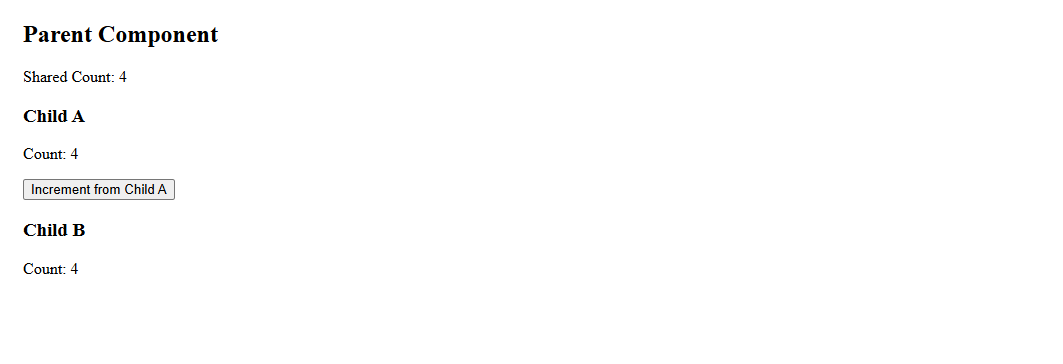
🔹 What Happens Here
Parentholds the single source of truth (count)ChildA:
- Reads
count - Calls
onIncrement()→ updates parent state
3. ChildB:
- Just reads
count
- When state updates → both children re-render automatically
🔹 Key Pattern (Very Important)
<ChildA data={state} onAction={callback} />data→ down (props)action→ up (callback)
🔹 Why This Matters
- Prevents inconsistent data
- Keeps logic centralized
- Scales cleanly in real apps (forms, dashboards, APIs)
🔹 Real-World Example
Think like:
- Cart page:
- ItemList (child) → updates quantity
- CartSummary (child) → shows total
- Cart (parent) → holds state
Two components that share selected item state via parent.
https://github.com/Gautammak/Learn-React-Js/tree/Lifting-State-Up/src/components/lifting-state-up
메타데이터
- post_id
- e23bfc306cb7
- slug
- sharing-state-between-siblings-via-a-common-parent-callbacks-as-props-e23bfc306cb7
- url
- https://medium.com/@gm962460/sharing-state-between-siblings-via-a-common-parent-callbacks-as-props-e23bfc306cb7
- canonical_url
- https://medium.com/@gm962460/sharing-state-between-siblings-via-a-common-parent-callbacks-as-props-e23bfc306cb7
- author_url
- https://medium.com/@gm962460
- status
- ok
- fetched_at
- 2026-06-20 20:29:01




