Reverse-Engineering AI Art
Learning to Read Images Instead of Guessing Prompts
Reverse-Engineering AI Art
Learning to Read Images Instead of Guessing Prompts
My interest in figuring things out led me to reverse-engineering AI images to understand how they’re made and how their effects can be reproduced. Not duplicated, but understood.
I’ve been using and studying AI tools for almost a year. I’m interested in what they can produce, without making broader claims about their impact.
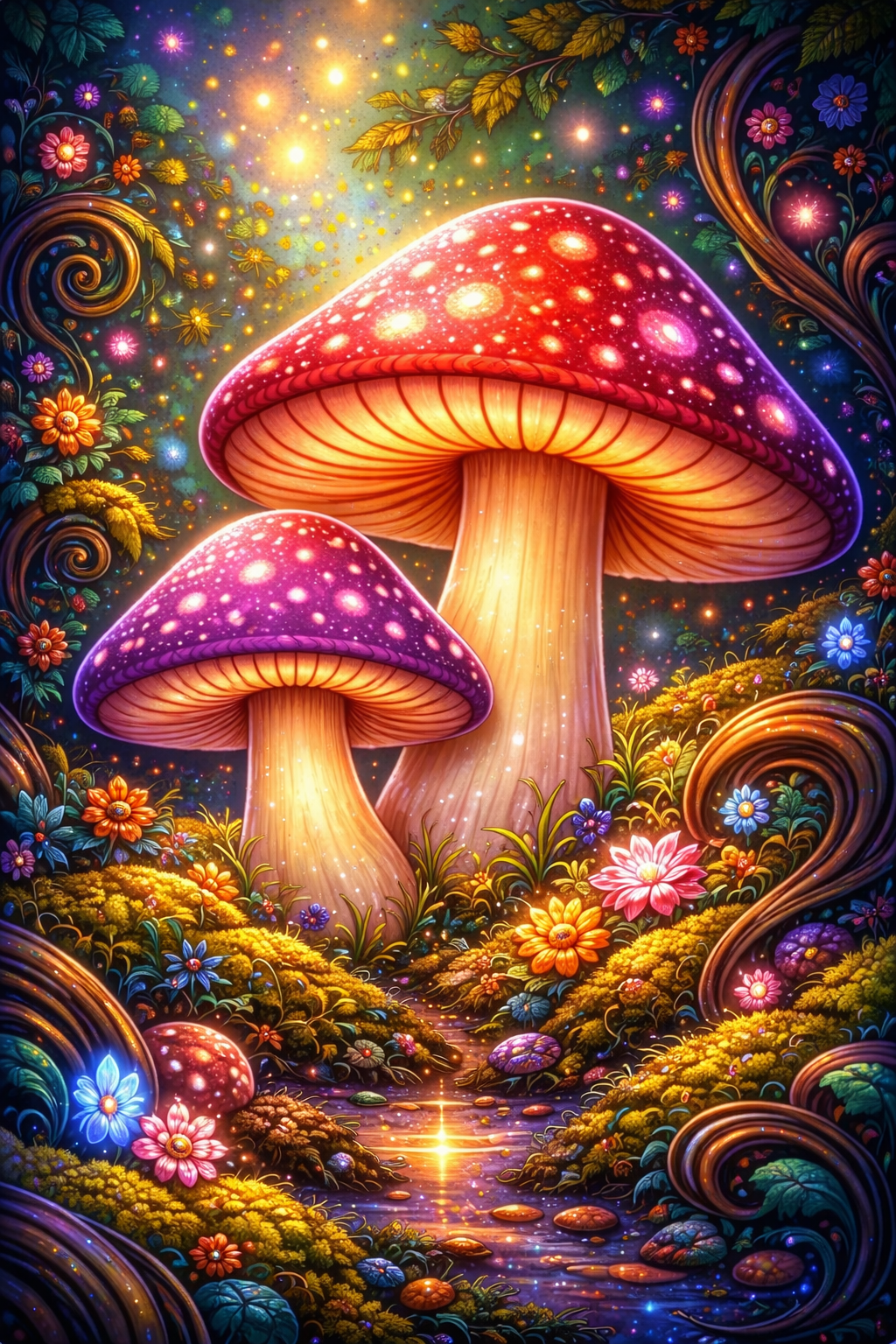
Recently, I built a meta GPT to create subject-specific learning GPTs. One of them is Prompt Anatomy Pro. In it, I use images I’ve generated and break them down to understand how similar effects might be achieved again. The goal isn’t identical results. It’s reproducing the effect, not the image.
What Does It Mean to Reverse-Engineer AI Art?
Reverse-engineering AI art means analyzing a generated image to infer how it was made: the visual decisions, stylistic conventions, and prompt structures that shaped the result.
This isn’t about guessing prompts. It’s about reading images the way painters, photographers, and cinematographers do by observing light, color, composition, mood, and subject treatment.
The goal is visual literacy: understanding the systems behind an image.
Step 1: Observation Before Interpretation
Reverse-engineering starts with slowing down. Observation comes before prompting.
You look at the image and ask what made it look this way. Artists examine:
- Lighting direction and quality
- Color palette
- Camera logic
- Composition
- Surface detail
This mirrors how traditional artists study master works by understanding construction before reproduction.
Step 2: Identifying Artistic Influences
Most AI images draw from recognizable visual traditions. A single image may reference cinematic lighting, classical portraiture, editorial photography, concept art, or specific genre aesthetics.
Naming these influences gives you leverage. Instead of vague prompts like “beautiful portrait,” you start thinking in structured terms such as low-key cinematic lighting or painterly texture with photographic realism.
Early on, you may not know how to identify influences. That’s fine. You can ask ChatGPT to analyze what it sees.
In the image I use here, the lighting reads as motivated fantasy lighting. Multiple light sources are implied: glowing mushrooms, fairy lights, soft ground reflections. The model appears to treat the mushrooms as light-emitting objects rather than passive surfaces.
The primary influence is fantasy illustration and storybook art, visible in the colors and exaggerated forms. Secondary influence comes from psychedelic art. Decorative Art Nouveau elements appear as a tertiary influence. A fourth influence is post-2015 digital fantasy concept art: smooth gradients, glow effects, painterly textures paired with digital precision, and lighting that feels cinematic rather than natural.
None of this means the original prompt named these styles. The image may have started simply. But reverse-engineering requires inferring artistic lineage from the image alone.
The light reads as very soft. There are no sharp shadows. Edges glow and feather outward. Highlights bloom. Prompt language that aligns with this includes soft diffuse glow, ethereal lighting, volumetric light, dreamlike illumination.
Direction still matters. Even in diffuse scenes, light usually comes from somewhere. Supporting phrasing might include multiple internal glow sources, warm luminous highlights, low shadow harshness, and an ethereal atmosphere.
Step 3: Translating Visual Cues into Prompt Language
Once visual elements are identified, they’re translated into prompt components:
- Subject descriptors
- Lighting terms
- Style or medium references
- Mood and atmosphere
- Technical cues
Effective prompting isn’t about hidden keywords. It’s about accurate visual description.
Step 4: Iteration and Refinement
The final step is testing assumptions. Generate variations. Change one variable at a time. Compare results.
Over time, you stop guessing and start predicting how changes in lighting, composition, or wording affect output. This is where reverse-engineering becomes a skill rather than a trick.
Why This Process Matters
As AI image tools improve, access matters less than understanding.
Reverse-engineering helps artists create consistent results, diagnose why an image feels off, communicate visual ideas clearly, and develop a personal aesthetic instead of relying on presets.
It shifts AI image generation from trial-and-error toward deliberate construction.
Don’t expect to get it right the first time. That likely would never happen.
Alternatively, you can ask ChatGPT to analyze the image and generate a prompt. I created a GPT, of course, to make sure that the quality of prompt was higher. Here is the prompt that Image Prompt Cataloger came up with.
A pair of giant enchanted mushrooms with glowing red and violet caps speckled with bioluminescent dots rise from a mossy forest floor, surrounded by colorful fantasy flowers, curling vines, and golden foliage. A narrow reflective stream runs between them, catching warm light like liquid starlight. The scene feels whimsical and magical, evoking a fairy-tale dreamscape. Rendered as ultra-detailed digital illustration with saturated colors, soft painterly textures, and glowing particles floating in the air. Cinematic fantasy lighting, warm highlights and cool shadows, shallow depth of field, storybook composition, high contrast, mystical atmosphere.
Using Custom GPTs
- You need to have ChatGPT Pro or Plus. That is where you can find custom GPTs and there are literally hundreds or even thousands of them.
- If you try it out, I would love to hear about your results. Use my image and check it out or use one of your own.
메타데이터
- post_id
- e24d18b3e245
- slug
- reverse-engineering-ai-art-e24d18b3e245
- url
- https://medium.com/creating-custom-gpts/reverse-engineering-ai-art-e24d18b3e245
- canonical_url
- https://medium.com/creating-custom-gpts/reverse-engineering-ai-art-e24d18b3e245
- author_url
- https://medium.com/@ttrimm
- status
- ok
- fetched_at
- 2026-06-21 12:17:11