Mobile Midsommer Madness
Now you can play Midsommer Madness on the Go! This article covers the refactoring of a Node.js app to a full Android deployment.
Mobile Midsommer Madness
Now you can play Midsommer Madness on the Go! This article covers the refactoring of a Node.js app to a full Android deployment.
Midsommer Madness now in an an Android APK!
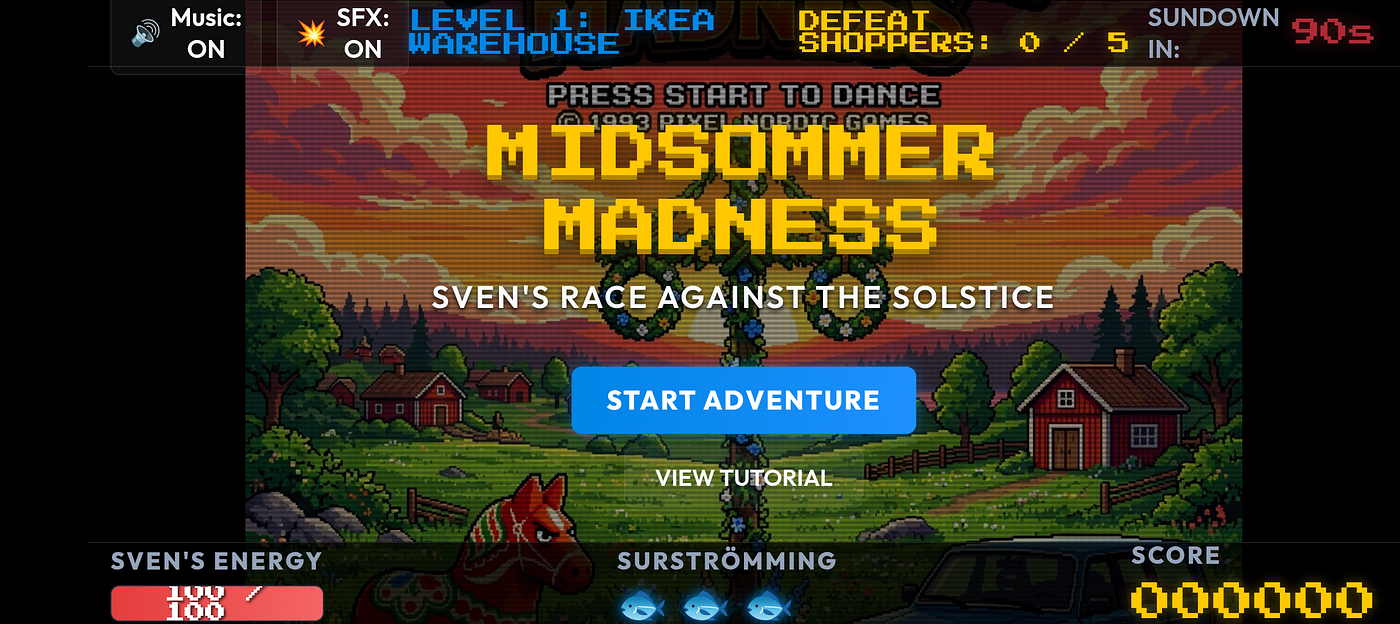
What I Built
When it comes to Summar Solstace — the place to be is Sweden. It is one of the highlights of the calendar.
This project aimed to recreate some of the mystique around the event- just in time for some fresh surestromming!
Code
GitHub repo is here:
https://github.com/xbill9/midsommer-android
Midsommer Madness Android wrapper & web game assets.
Title ScreenGame Over ScreenVictory Screen


- IKEA Warehouse: Battle crowded, flatpack-carrying shoppers who throw box projectiles at you.
- Systembolaget: The state-owned liquor shop crowded with drunk Swedes stumbling and lobbing green beer bottles.
- Lördagsgodis: Sugar rush Saturday! Dodge hyperactive, strung-out Swedish kids throwing sweet candy projectiles.
- The Swedish Pub: Sing along with Frank Zappa fans singing “Bobby Brown” (shouting and firing glowing letters
B,O,B,B,Y). - Volvo Highway: A survival lane-crossing level where…
My Lingonberries are ripening- get to work!
Antigravity CLI was used for a project deep dive:
 Clarifying Project Architecture
  The Midsommer Madness project runs on Android using a hybrid wrapper architecture. The game itself is implemented
  using standard web technologies (HTML5 Canvas, CSS, and Vanilla JavaScript) and is rendered inside a full-screen,
  hardware-accelerated Android  WebView .
  ──────
  ### 1. The Build & Synchronization Pipeline

  Before the Android application compiles, the game's web assets must be packaged into the app's local directory.

  • Task Automation: In build.gradle, a custom Gradle task called build.gradle copies the source files:
      • index.html
      • game.js
      • index.css
      • Graphic assets ( *.png )
  • Build Integration: This task hooks into the Android  preBuild  lifecycle, syncing assets from the project root
  into  app/src/main/assets  before compilation.
  • Makefile Helpers: In the Makefile, targets such as  make build-apk  compile the application, while  make
  install-apk  compiles and deploys it to a connected device or emulator.
  ──────
  ### 2. The Native Android Wrapper

  The Android wrapper is defined inside the class MainActivity.kt within MainActivity.kt.

  • Immersive Fullscreen Mode: Inside MainActivity.kt and  onWindowFocusChanged , the application calls
  MainActivity.kt to hide the system status bar and navigation drawer. This enables Immersive Sticky Mode so the
  game utilizes 100% of the screen.
  • WebView Configuration: The  WebView  settings are optimized for game execution:
      •  settings.javaScriptEnabled = true  enables the game engine.
      •  settings.domStorageEnabled = true  and  settings.databaseEnabled = true  permit local storage of game
      progress.
      •  settings.mediaPlaybackRequiresUserGesture = false  allows the procedural Web Audio synthesizer to play
      sounds automatically without requiring a pre-existing user tap inside the web container.
      •  webView.loadUrl("file:///android_asset/index.html")  loads the synced HTML application directly from local
      assets.

  ──────
  ### 3. CSS Adaptation & UI Hooking

  To separate desktop-web browser rendering from native mobile application layouts, the MainActivity.kt class
  registers a  WebViewClient  callback.

  • Injecting the Hook: When the web page finishes loading inside the  WebView , MainActivity.kt executes:
    webView.evaluateJavascript("document.documentElement.classList.add('android-app');", null)

  • Styling Adaptations: In index.css, selectors prefixing  .android-app  toggle specific UI adjustments for
  mobile device screens:
      • Desktop-only chrome elements (header, footer, sidebars) are hidden ( display: none !important ).
      • The central container expands to cover  100vw / 100vh  in full-bleed mode.
      • Overlay HUD elements (top bar and stats panel) are absolute-positioned to float on top of the Canvas.
      • The touchscreen joystick overlay ( .mobile-controls ) is displayed and scaled dynamically.

  ──────
  ### 4. Input & Audio in Game Logic

  • Touch Interaction: In game.js, the game handles touchscreen events to simulate a virtual analog
  joystick on the left side of the screen and interactive action buttons on the right side of the screen.
  • Audio Resuming: Although  mediaPlaybackRequiresUserGesture  is disabled in the wrapper, game.js safely
  manages  AudioContext  suspension, ensuring audio state resumes properly on the user's first window interaction.
Tack so Mycket!
How do you deploy this?
xbill@penguin:~/midsommer-android$ make help
========================================================================
🇸🇪  Midsommer Madness Build & Development Controls  🇸🇪
========================================================================
Available commands:
  make dev          - Start the local web server for browser play
  make setup-sdk    - Download/configure Android SDK & cmdline-tools
  make build-apk    - Compile the Android App and build Debug APK
  make install-apk  - Install the compiled debug APK on a connected device/emulator
  make clean        - Clean Gradle build outputs and temporary caches
  make logcat       - Monitor application logs from connected Android device
========================================================================
xbill@penguin:~/midsommer-android$
This is Fun! How do I add my own levels?
> add a godis level where strung out kids throw lordagsgodis ▸ Thought for 2s, 525 tokens Considering Level Placement I will search for level ID checks referencing level 9 in game.js to prepare for adding a 10th level. ● Search(Search for lvl.id === 9 checks) (ctrl+o to expand) I will view lines 495 to 585 in game.js to inspect the current level configurations. ● Read(/home/xbill/midsommer-madness/game.js) (ctrl+o to expand) ▸ Thought for 2s, 1.8k tokens Sequencing the Levels I will view the setLevelAudioMode method in game.js to prepare for adding Level 3 "Lördagsgodis". ● Read(/home/xbill/midsommer-madness/game.js) (ctrl+o to expand) I will update the setLevelAudioMode method in game.js to map the scales and tempos for the 10-level layout. ● Edit(/home/xbill/midsommer-madness/game.js) (ctrl+o to expand) I will view the current level checks in tickSequencer inside game.js to prepare the next set of replacements. ● Read(/home/xbill/midsommer-madness/game.js) (ctrl+o to expand) I will shift the level conditionals in the music sequencer tickSequencer method to accommodate the 10-level progression. ● Edit(/home/xbill/midsommer-madness/game.js) (ctrl+o to expand) I will view lines 920 to 935 of game.js to locate the exact Maypole check in initLevel . ● Read(/home/xbill/midsommer-madness/game.js) (ctrl+o to expand) I will view lines 1060 to 1070 of game.js. ● Read(/home/xbill/midsommer-madness/game.js) (ctrl+o to expand) I will view lines 1290 to 1300 of game.js. ● Read(/home/xbill/midsommer-madness/game.js) (ctrl+o to expand) I will view lines 1360 to 1375 of game.js. ● Read(/home/xbill/midsommer-madness/game.js) (ctrl+o to expand) I will view lines 1370 to 1385 of game.js. ● Read(/home/xbill/midsommer-madness/game.js) (ctrl+o to expand) I will view lines 1460 to 1475 of game.js. ● Read(/home/xbill/midsommer-madness/game.js) (ctrl+o to expand) I will update the level ID checks for the final Maypole level from 9 to 10 and register the candy-throwing kids target name in the HUD. ● Edit(/home/xbill/midsommer-madness/game.js) (ctrl+o to expand) I will view the start of the levels array in game.js to prepare the level insertion edit. ● Read(/home/xbill/midsommer-madness/game.js) (ctrl+o to expand) I will view lines 545 to 585 of game.js. ● Read(/home/xbill/midsommer-madness/game.js) (ctrl+o to expand) ▸ Thought for 3s, 1.2k tokens Refining The Level Design I will update the levels array in game.js to insert Lördagsgodis as Level 3, shift subsequent level IDs, and re-calculate scores. ● Edit(/home/xbill/midsommer-madness/game.js) (ctrl+o to expand) I will view lines 950 to 985 of game.js to locate the spawnEnemy switch statement. ● Read(/home/xbill/midsommer-madness/game.js) (ctrl+o to expand) I will view lines 985 to 1010 of game.js. ● Read(/home/xbill/midsommer-madness/game.js) (ctrl+o to expand) I will add the "kid" case to the spawnEnemy switch block. ● Edit(/home/xbill/midsommer-madness/game.js) (ctrl+o to expand) ▸ Thought for 3s, 2.1k tokens Considering Projectile Design I will search for class ZappaFan in game.js to locate a suitable place to insert CandyKid and Lordagsgodis . ● Search(Search for ZappaFan in game.js) (ctrl+o to expand) I will view lines 2120 to 2145 in game.js. ● Read(/home/xbill/midsommer-madness/game.js) (ctrl+o to expand) I will insert the CandyKid and Lordagsgodis class definitions in game.js right after the Drunkard class. ● Edit(/home/xbill/midsommer-madness/game.js) (ctrl+o to expand) I will view lines 275 to 325 of index.html. ● Read(/home/xbill/midsommer-madness/index.html) (ctrl+o to expand) I will update index.html to add Level 3 Lördagsgodis to the sidebar levels tracker and update levels 4 through 10. ● Edit(/home/xbill/midsommer-madness/index.html) (ctrl+o to expand) I will run a syntax check on game.js using node to ensure the new classes and level configurations are syntax-error free. ● Bash(node -c game.js) (ctrl+o to expand) I will view lines 20 to 45 of game_overview.md to inspect the levels sequence list. ● Read(/home/xbill/.gemini/antigravity-cli/brain/a...2ba-4622-b252-003672e1b73f/game_overview.md) (ctrl+o to expand) I will update game_overview.md to describe the 10-level layout including Lördagsgodis. ● Edit(/home/xbill/.gemini/antigravity-cli/brain/a...2ba-4622-b252-003672e1b73f/game_overview.md) (ctrl+o to expand) I have successfully added the Lördagsgodis level to Midsommer Madness, featuring hyperactive, sugar-rushed children throwing Saturday candy at Sven!

### Summary of Changes
Level Setup ( game.js ): * Inserted Lördagsgodis as game.js in the levels array, shifting following levels up to Level 10 (ABBA Disco). * Updated all final-level check logic throughout game.js from Level 9 to Level 10.
Added CandyKid & Lordagsgodis Classes ( game.js ):
 * Defined game.js and game.js right after the Drunkard class.
 * Behavior:
 * CandyKid has high speed (1.8), low health (35), and throws sweets rapidly.
 * Kids shiver/vibrate rapidly on screen to depict their extreme sugar rush.
 * Lordagsgodis are fast-moving candy projectiles (round jelly drops, square sweet gel blocks, and candy
 star crosses) that rotate in flight and come in a variety of bright colors.

Music & Audio:
 * Modified game.js to include a happy, hyperactive 150 BPM C Major chiptune track for Level 3
 (Lördagsgodis).
 * Shifted level conditions in game.js to map Levels 8, 9, and 10 to their respective custom chiptune
 hooks.

UI & Documentation:
 * renumerated the sidebar tracker list in index.html to show the 10-level layout.
 * Updated the level progression descriptions in game_overview.md.
How I Built It
First — let’s give Antigravity CLI some skills:
npx antigravity-awesome-skills #Antigravity CLI slash commands (agy): ~/.gemini/antigravity-cli/skills/<skill>/SKILL.md npx antigravity-awesome-skills --agy Need to install the following packages: antigravity-awesome-skills@12.1.0 Ok to proceed? (y) Cloning repository... Cloning repository at v12.1.0... Cloning into '/tmp/ag-skills-smWfsY'... remote: Enumerating objects: 7516, done. remote: Counting objects: 100% (7516/7516), done. remote: Compressing objects: 100% (5375/5375), done. remote: Total 7516 (delta 694), reused 5837 (delta 675), pack-reused 0 (from 0) Receiving objects: 100% (7516/7516), 33.68 MiB | 51.63 MiB/s, done. Resolving deltas: 100% (694/694), done. Note: switching to '43af20cbe0dc298c40ff709993d8b4f7b4a274b6'. You are in 'detached HEAD' state. You can look around, make experimental changes and commit them, and you can discard any commits you make in this state without impacting any branches by switching back to a branch. If you want to create a new branch to retain commits you create, you may do so (now or later) by using -c with the switch command. Example: git switch -c <new-branch-name> Or undo this operation with: git switch - Turn off this advice by setting config variable advice.detachedHead to false Installing for 1 target(s): Antigravity: Updating existing install at /home/xbill/.agents/skills... ✓ Installed to /home/xbill/.agents/skills Pick a bundle in docs/users/bundles.md and use @skill-name in your AI assistant. If Antigravity hits context/truncation limits, see docs/users/agent-overload-recovery.md For the agy CLI slash-command menu, install the Antigravity CLI layout with --agy. For clone-based installs, use scripts/activate-skills.sh or scripts/activate-skills.bat For Antigravity 2.0, OpenCode, or other .agents/skills installs, prefer a reduced install with --risk, --category, or --tags to avoid context overload. Example: npx antigravity-awesome-skills --path .agents/skills --category development,backend --risk safe,none Cloning repository... Cloning repository at v12.1.0... Cloning into '/tmp/ag-skills-Qc4vHc'... remote: Enumerating objects: 7516, done. remote: Counting objects: 100% (7516/7516), done. remote: Compressing objects: 100% (5375/5375), done. remote: Total 7516 (delta 694), reused 5837 (delta 675), pack-reused 0 (from 0) Receiving objects: 100% (7516/7516), 33.68 MiB | 37.49 MiB/s, done. Resolving deltas: 100% (694/694), done. Note: switching to '43af20cbe0dc298c40ff709993d8b4f7b4a274b6'. You are in 'detached HEAD' state. You can look around, make experimental changes and commit them, and you can discard any commits you make in this state without impacting any branches by switching back to a branch. If you want to create a new branch to retain commits you create, you may do so (now or later) by using -c with the switch command. Example: git switch -c <new-branch-name> Or undo this operation with: git switch - Turn off this advice by setting config variable advice.detachedHead to false Installing for 1 target(s): Antigravity CLI: ✓ Installed to /home/xbill/.gemini/antigravity-cli/skills Pick a bundle in docs/users/bundles.md and use @skill-name in your AI assistant. Restart agy and type /skills or /<skill-name>to load installed Antigravity CLI skills.Is that It?
Tack so Mycket!
Originally published at https://dev.to on June 8, 2026.
메타데이터
- post_id
- e2a07ce95cac
- slug
- mobile-midsommer-madness-e2a07ce95cac
- url
- https://medium.com/@xbill999/mobile-midsommer-madness-e2a07ce95cac
- canonical_url
- https://medium.com/@xbill999/mobile-midsommer-madness-e2a07ce95cac
- author_url
- https://medium.com/@xbill999
- status
- ok
- fetched_at
- 2026-06-17 10:49:34