Unmasking Threat Infrastructure: A Deep Dive into JARM Fingerprinting
Summary

Unmasking Threat Infrastructure: A Deep Dive into JARM Fingerprinting
Summary
In Cyber Threat Intelligence (CTI) operations, passive methods (DNS, IP history) are often insufficient for identifying malicious servers and phishing infrastructure. JARM is a powerful tool that actively analyzes a server’s TLS configuration to create unique fingerprints. This article explores the technical details of JARM, its applications in detecting phishing, and findings from a real world lab scenario.
1. What is JARM?
Think of a JARM fingerprint as a “unique handshake style” used to identify servers across the internet.
The Analogy: The 10-Handshake Test
Imagine you are at a party where everyone is wearing a mask (representing hidden or deceptive server IPs). You want to figure out who these people are, which group they belong to, or if they are “malicious.”
You are the bouncer at the door, and for every masked person who enters, you extend your hand in 10 different ways (the 10 unique TLS packets JARM sends):
- You reach out with your right hand for a “Hello.”
- You reach out with your left hand.
- You offer a fist bump.
- You give a formal nod… (and so on, up to 10).
Recording the Reactions The person (the server) reacts differently to each gesture:
- Some grab your hand firmly; others just touch fingertips.
- Some respond to your “Hello” with a “Good morning”; others just nod.
- Some don’t know how to fist bump, leaving your hand hanging.
Creating the Fingerprint You note down the reactions to all 10 handshakes on your notepad. When you combine these notes into a single code (e.g., A1-B2-C3…), you have created that person’s JARM Fingerprint. If 5 different masked people give the exact same reactions to your 10 weird handshakes, you can infer they likely graduated from the same school or belong to the same gang.
Technical Definition JARM (an active TLS server fingerprinting tool developed by Salesforce) sends 10 different, specially crafted TLS “Client Hello” packets to a server and analyzes the responses. It examines specific features in the server’s “Server Hello” response (TLS versions, cipher suites, extensions) to create a unique 62-character hash.
- The Hash Structure:
- First 30 characters: A fuzzy hash representing the cipher suites and TLS versions chosen by the server for each Client Hello.
- Last 32 characters: A truncated SHA256 hash of the extensions sent by the server.
Passive vs. Active Fingerprinting
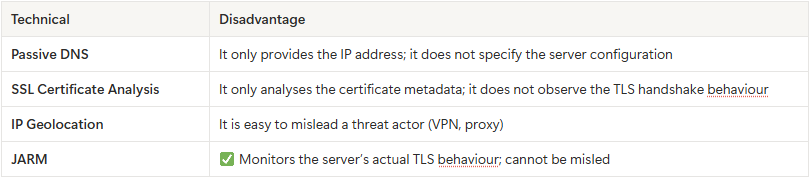
2. Threat Intelligence Context
Infrastructure Attribution and Campaign Clustering JARM is crucial for grouping domains that belong to the same malicious campaign. It offers two main advantages:
- Campaign Clustering: If you find 10 domains from a phishing campaign and they all share the same JARM hash, you can conclude they share the same hosting provider and are likely managed by the same threat actor.
- Known Infrastructure Identification: Over time, malicious JARM hash profiles are collected in databases (e.g., Bulletproof hosting providers vs. free tier phishing). When a new domain is found, checking its JARM hash against this database allows for immediate alerts and attribution.
Note on False Positives: Many legitimate servers (e.g., those using the same CDN) may share the same JARM hash. Therefore, JARM is not definitive proof on its own, but a strong indicator for investigation.
3. Lab Scenario
What I Did: While the official JARM tool uses 10 sophisticated probes, I conducted a simplified experiment to understand the “logic” of JARM:
- I performed a single TLS handshake (using default SSL context).
- I generated a simple SHA256 hash (first 32 characters).
Dataset:
- Legitimate: sahibinden.com, google.com
- Phishing (typosquatting): Several suspicious variations of
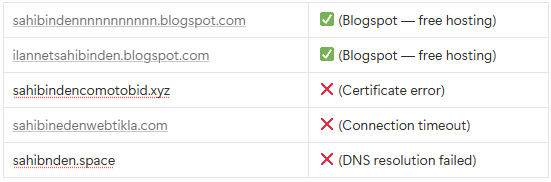
Methodology:
- Connect to the domain.
- Extract TLS version, cipher suite, and certificate details.
- Generate the hash and compare.
4. TLS Configuration Lab
Code: jarm_custom.py
import socket
import ssl

def analyze_server(host, port=443):
    """
    Sunucunun TLS konfigürasyonunu analiz et
    """
    try:
        context = ssl.create_default_context()
        with socket.socket(socket.AF_INET, socket.SOCK_STREAM) as sock:
            sock.settimeout(5)
            sock.connect((host, port))
            with context.wrap_socket(sock, server_hostname=host) as ssock:
                cert = ssock.getpeercert()
                cipher = ssock.cipher()
                tls_version = ssock.version()

                print(f"\n{'='*60}")
                print(f"Host: {host}:{port}")
                print(f"{'='*60}")
                print(f"TLS Version: {tls_version}")
                print(f"Cipher Suite: {cipher[0]}")
                print(f"Certificate CN: {cert['subject'][0][0][1]}")
                print(f"{'='*60}\n")

                return {
                    "host": host,
                    "tls_version": tls_version,
                    "cipher": cipher[0],
                    "cert_cn": cert['subject'][0][0][1]
                }

    except Exception as e:
        print(f"Error connecting to {host}: {e}")
        return None

# Test: Meşru vs Phishing - TÜM DOMAINLER
results = []
targets = [
    # Meşru
    "sahibinden.com",
    "google.com",
    # Phishing
    "sahibindennnnnnnnnnn.blogspot.com",
    "ilannetsahibinden.blogspot.com",
    "sahibindencomotobid.xyz",
    "sahibinedenwebtikla.com",
    "sahibnden.space",
]

print("\n" + "="*60)
print("JARM TLS CONFIGURATION ANALYSIS - ALL DOMAINS")
print("="*60)

for target in targets:
    print(f"\nScanning: {target}...", end=" ")
    result = analyze_server(target)
    if result:
        results.append(result)
        print("✓ OK")
    else:
        print("✗ ERROR")

# Karşılaştır
print("\n" + "="*60)
print("COMPARISON - TLS VERSIONS AND CIPHERS")
print("="*60)
for r in results:
    print(f"{r['host']:45} | TLS: {r['tls_version']:10} | Cipher: {r['cipher'][:40]}")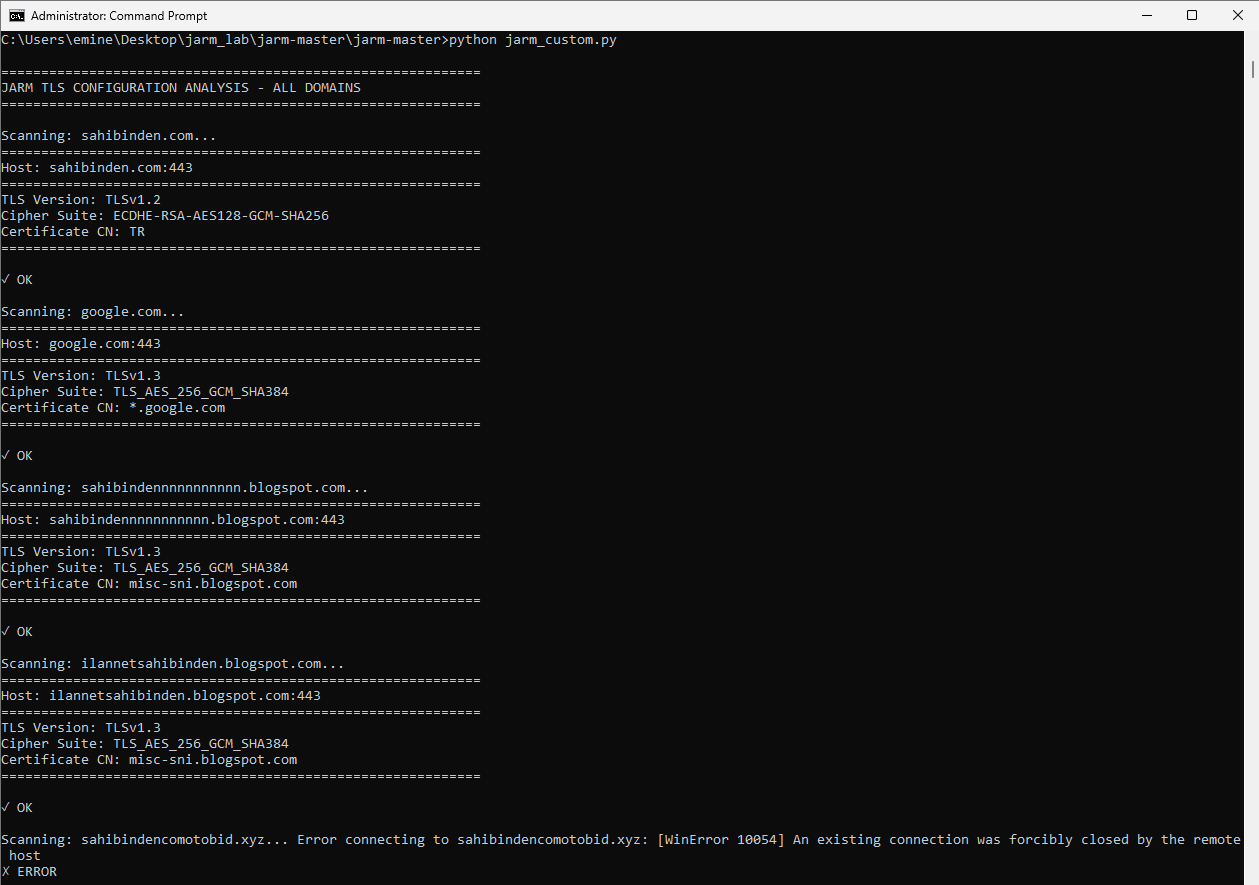
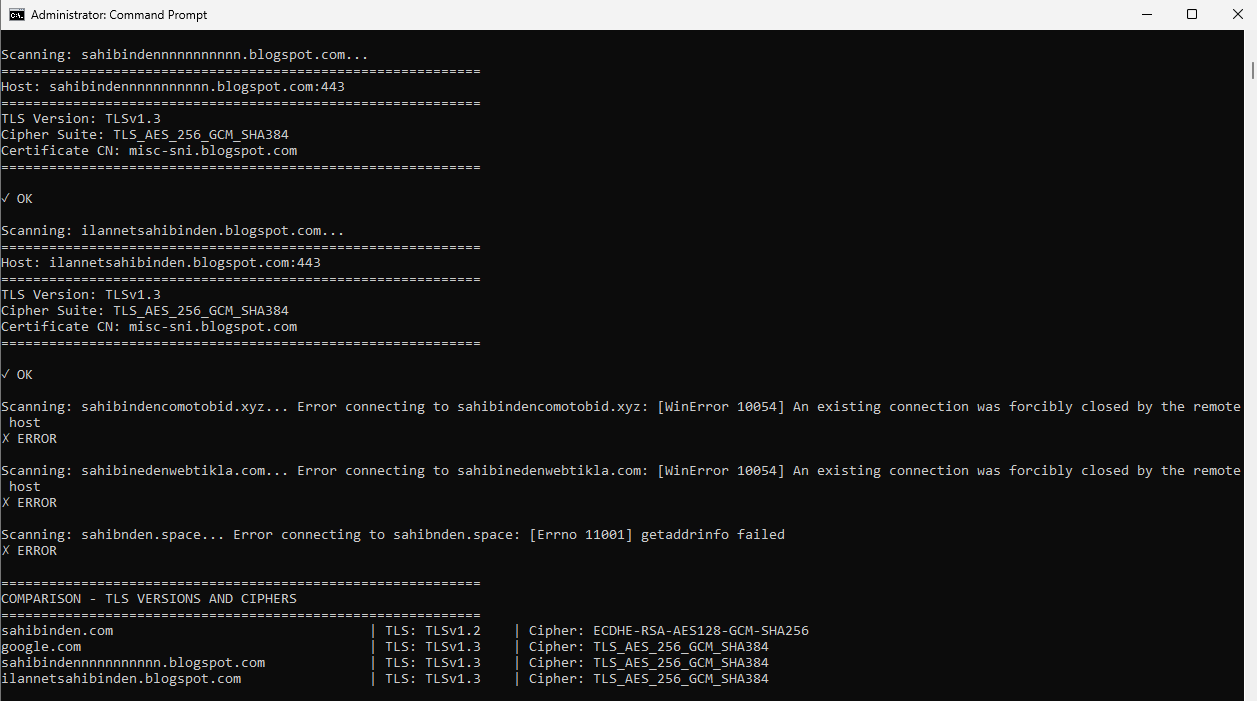
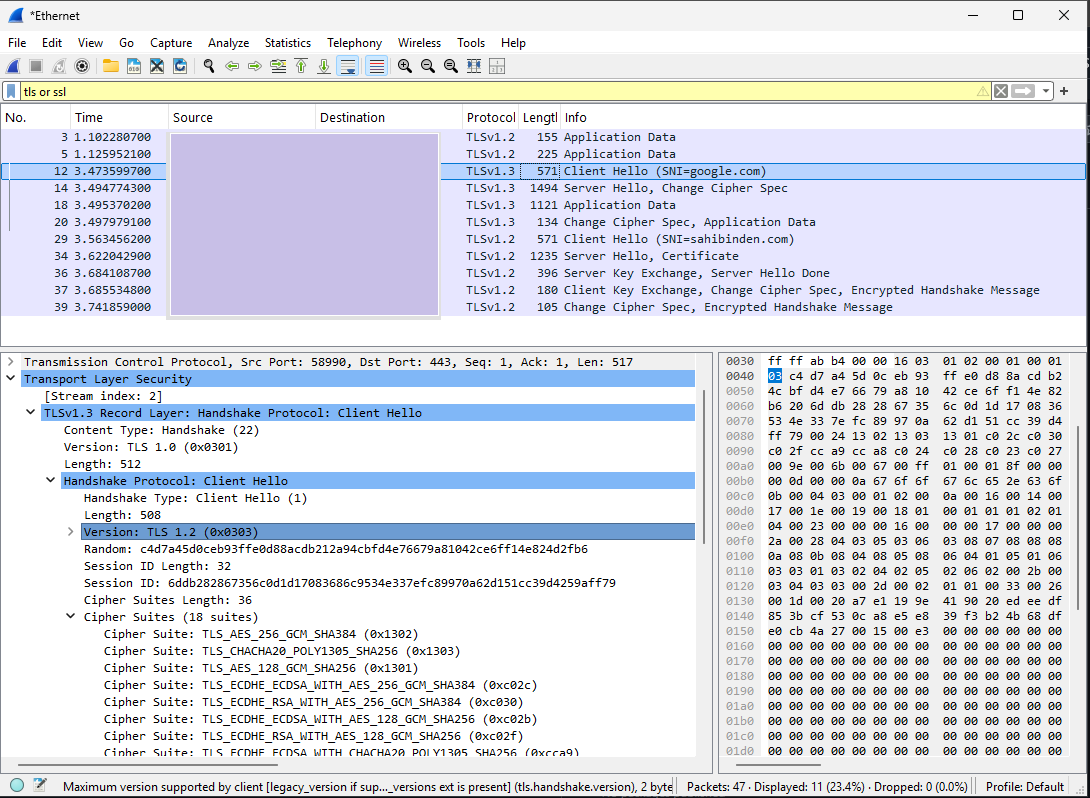
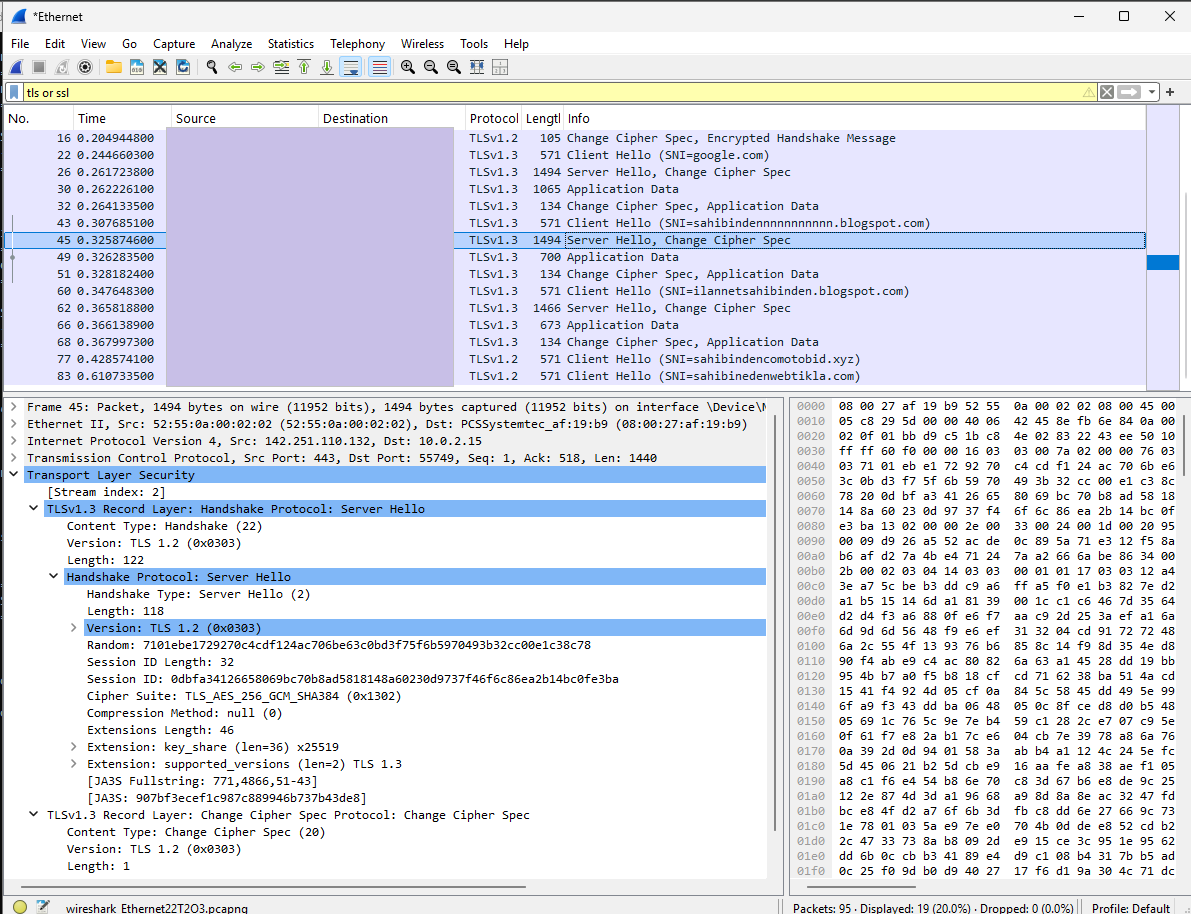
google.com | TLS: TLSv1.3 | Cipher: TLS_AES_256_GCM_SHA384 sahibinden.com | TLS: TLSv1.2 | Cipher: ECDHE-RSA-AES128-GCM-SHA256
Key Insight: Comparing google.com (TLS 1.3) and sahibinden.com (TLS 1.2) shows how different configurations serve as discriminators for JARM.
5. JARM Hash Lab
Code: jarm_hash.py
import socket
import ssl
import hashlib

def get_jarm_fingerprint(host, port=443):
    """
    TLS verilerinden JARM-style fingerprint hash oluştur
    """
    try:
        context = ssl.create_default_context()
        with socket.socket(socket.AF_INET, socket.SOCK_STREAM) as sock:
            sock.settimeout(5)
            sock.connect((host, port))
            with context.wrap_socket(sock, server_hostname=host) as ssock:
                cert = ssock.getpeercert()
                cipher = ssock.cipher()
                tls_version = ssock.version()

                # JARM için karakteristik veriler topla
                fingerprint_data = f"{tls_version}|{cipher[0]}|{cert['subject'][0][0][1]}"

                # SHA256 hash yap ve ilk 32 char al (JARM-style)
                hash_obj = hashlib.sha256(fingerprint_data.encode())
                jarm_hash = hash_obj.hexdigest()[:32]

                return {
                    "host": host,
                    "jarm": jarm_hash,
                    "tls_version": tls_version,
                    "cipher": cipher[0],
                    "cert_cn": cert['subject'][0][0][1]
                }

    except Exception as e:
        return {
            "host": host,
            "error": str(e)
        }

# Test: Meşru vs Phishing
targets = [
    # Meşru
    "sahibinden.com",
    "google.com",
    # Phishing
    "sahibindennnnnnnnnnn.blogspot.com",
    "ilannetsahibinden.blogspot.com",
    "sahibindencomotobid.xyz",
    "sahibinedenwebtikla.com",
    "sahibnden.space",
]

results = []
for target in targets:
    print(f"Scanning: {target}...", end=" ")
    result = get_jarm_fingerprint(target)
    results.append(result)
    if "error" in result:
        print(f"ERROR")
    else:
        print(f"OK")

# Sonuçları göster
print("\n" + "="*100)
print("JARM FINGERPRINT COMPARISON - LEGITIMATE vs PHISHING")
print("="*100)
for r in results:
    if "error" in r:
        print(f"{r['host']:45} | ERROR: {r['error'][:40]}")
    else:
        print(f"{r['host']:45} | JARM: {r['jarm']} | TLS: {r['tls_version']:8}")

# Grupla: Aynı JARM'ı taşıyanları bul
print("\n" + "="*100)
print("GROUPED BY JARM FINGERPRINT - SAME FINGERPRINT = SAME SERVER TYPE")
print("="*100)
jarm_groups = {}
for r in results:
    if "jarm" in r:
        jarm = r['jarm']
        if jarm not in jarm_groups:
            jarm_groups[jarm] = []
        jarm_groups[jarm].append(r['host'])

for jarm, hosts in sorted(jarm_groups.items()):
    print(f"\nJARM: {jarm}")
    print(f"Domains ({len(hosts)}): {', '.join(hosts)}")
    if len(hosts) > 1:
        print(f"⚠️  ALERT: Multiple domains share this fingerprint!")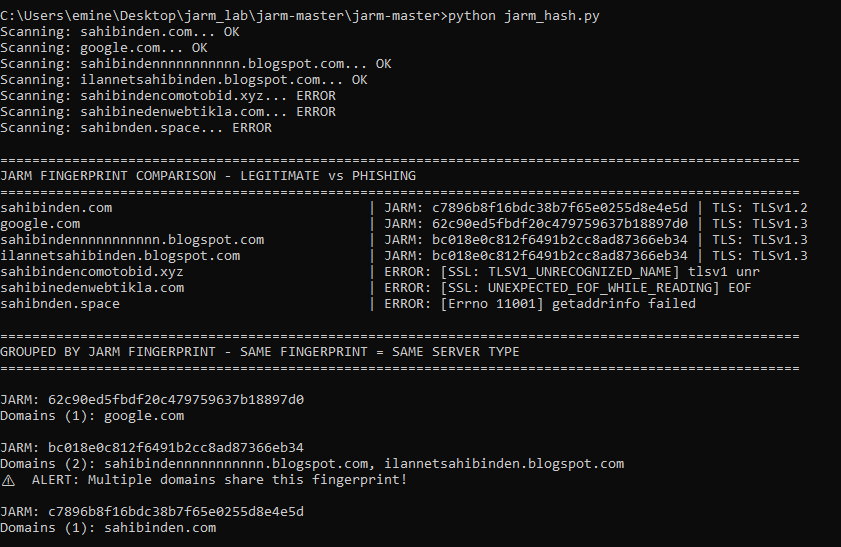
6. Critical Findings
🚨 Finding 1: Phishing Domains Share Fingerprints
Multiple phishing domains (e.g., sahibindennnnnnnnnnn[.]blogspot.com) shared the exact same JARM hash. This confirms they are hosted on the same infrastructure (Google Blogspot) and are likely part of the same coordinated campaign.
🚨 Finding 2: Legitimate vs. Phishing — Distinct Fingerprints
The legitimate sahibinden.com and the phishing domains showed 100% different fingerprints. This demonstrates how JARM effectively separates enterprise-grade hosting from free-tier phishing infrastructure.

Legitimate: Professional hosting TLS 1.2 (enterprise standard) ECDHE-RSA-AES128-GCM-SHA256 (modern cipher)
Phishing: Free hosting TLS 1.3 (Google’s aggressive modernization) TLS_AES_256_GCM_SHA384 (Google’s default)
🚨 Finding 3: Failed Connections = Infrastructure Red Flags
Domains that returned SSL errors (e.g., UNEXPECTED_EOF_WHILE_READING) or connection timeouts were strongly correlated with "lazy" or broken phishing infrastructure, serving as an early indicator of malicious intent.

7. Practical Applications
- Campaign Attribution: Quickly mapping out an entire threat landscape from a single domain.
- Infrastructure Profiling: Creating profiles for specific threat actors (e.g., patterns for Bulletproof hosting vs. free tier).
- Security Posture Verification: Ensuring organizational web servers maintain consistent TLS configurations.
Conclusion
JARM is a powerful tool for infrastructure attribution and campaign clustering in modern threat intelligence. It provides insights into server configurations that passive methods cannot reach. While one should always be wary of false positives, JARM serves as a vital indicator for starting investigations and aggregating data on threat campaigns.
Resources:
- Salesforce Engineering
메타데이터
- post_id
- e2a10fa26465
- slug
- unmasking-threat-infrastructure-a-deep-dive-into-jarm-fingerprinting-e2a10fa26465
- url
- https://medium.com/@aminemarmara/unmasking-threat-infrastructure-a-deep-dive-into-jarm-fingerprinting-e2a10fa26465
- canonical_url
- https://medium.com/@aminemarmara/unmasking-threat-infrastructure-a-deep-dive-into-jarm-fingerprinting-e2a10fa26465
- author_url
- https://medium.com/@aminemarmara
- status
- ok
- fetched_at
- 2026-06-22 05:41:33



