Confidential Containers: Securing GenAI Workloads with EKS and Nitro Enclaves
You have locked down your data at rest. You have secured it in transit. But the moment your LLM inference pipeline touches sensitive data…
Confidential Containers: Securing GenAI Workloads with EKS and Nitro Enclaves
You have locked down your data at rest. You have secured it in transit. But the moment your LLM inference pipeline touches sensitive data in memory, that protection disappears. Your PII becomes exposed at its most vulnerable point. This is the blind spot most teams overlook. Confidential containers are designed to eliminate it by extending encryption into runtime, finally closing the gap where breaches are most likely to happen.
The problem with GenAI and data trust
In a standard EKS setup, a privileged DaemonSet running on the same node can read inference request payloads directly from /proc/<pid>/mem. This is because standard EKS pods share a kernel, share memory pages, and trust the operator by default. That trust model breaks when running multi-tenant GenAI inference, and that is precisely why confidential computing matters for these workloads.
The exposure is concrete:
- Shared kernel: A privileged process on the host can read enclave memory via /proc or ptrace.
- Operator access: Cloud provider employees with hypervisor access can, in theory, inspect running memory.
- No attestation: Nothing proves the container image running inference is the one you built and signed.
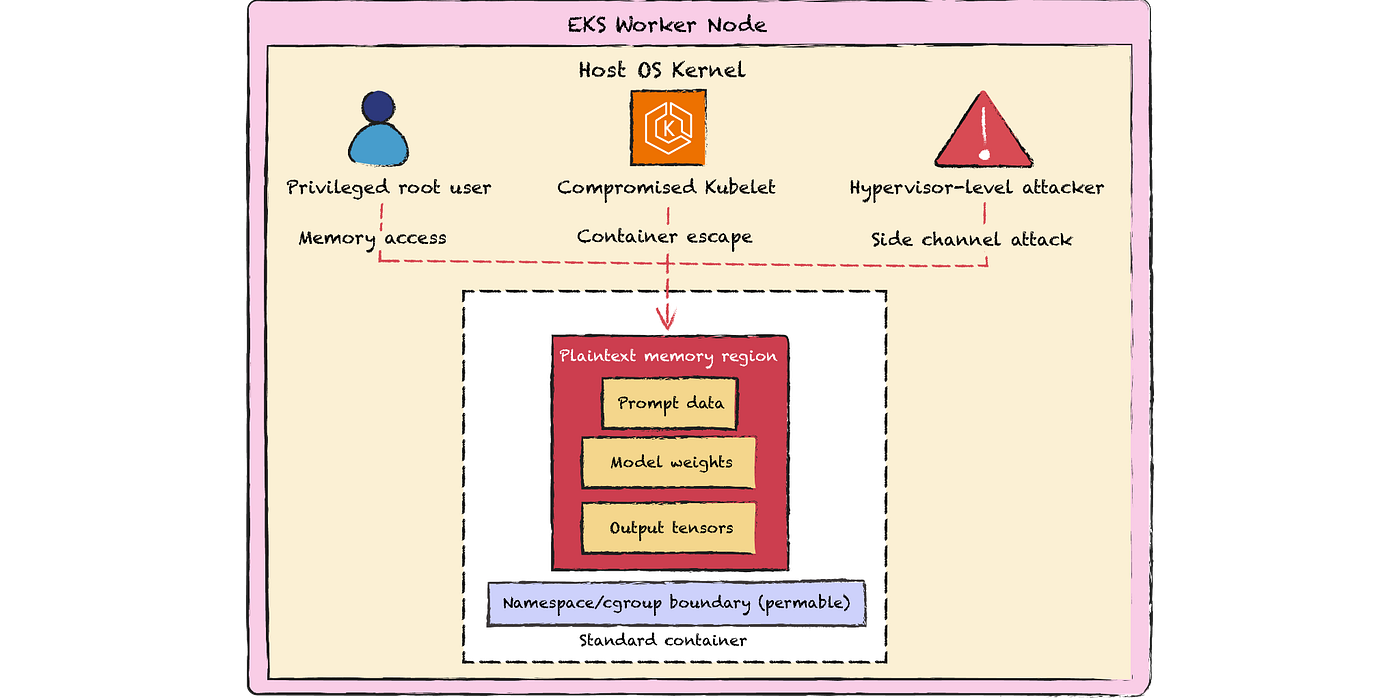
EKS worker node threat model with permeable container boundary
The AWS Nitro System changes the equation. It strips hypervisor and operator access at the hardware level: no SSH, no API, no debug port. Confidential computing on AWS Nitro Enclave extends this by carving out an isolated VM from the parent EC2 instance with its own kernel, memory, and CPU.
This post walks you through exactly how confidential containers work, how to wire them into EKS, what breaks along the way, and what the attestation flow looks like when you need to prove a container image is untampered before it decrypts a single token of PII.
How Nitro Enclaves create isolated EC2 environments to process confidential data
The Nitro Enclave is a lightweight VM created by the Nitro Hypervisor using the nitro-cli tool. CPU and memory are hard-partitioned from the parent instance, not shared, not overcommitted.
The enclave gets no external network interface and no disk. Communication happens exclusively over vsock (AF_VSOCK), a host-guest socket interface with no IP stack and no routing, just a direct channel between the parent instance and the enclave.
The architecture diagram below shows exactly how the VSOCK channel and memory boundaries are structured.

Nitro Enclave hardware isolation with VSOCK-only communication
For Amazon EKS specifically, AWS provides a Kubernetes device plugin that exposes /dev/nitro_enclaves to pods. You run the enclave inside a privileged pod on a Nitro-capable instance. The pod manages the enclave life cycle (create, run, terminate) via nitro-cli.
Re-architecting for confidential containers requires splitting your workload. An untrusted parent pod handles general routing and orchestration, while a highly secure Nitro Enclave executes sensitive decryption and model inference via a local vsock connection. This separation delivers absolute zero-trust guarantees, as detailed below.

Standard EKS Pod vs. Nitro Enclave-backed Pod Comparison
Deploying enclaves on EKS with the device plugin
AWS ships the Nitro Enclaves Kubernetes Device Plugin as a DaemonSet that exposes enclave capacity as a schedulable resource, specifically aws.ec2.nitro/nitro_enclaves. Pods request enclave access in their resource manifests the same way they request GPU or memory. The plugin manages the full enclave life cycle: launching the EIF when the pod starts, tearing it down on termination.
The deployment pattern I recommend follows three steps:
- Provision a managed node group using Nitro-compatible instance types (m5, c5, r5 families) with enclave support enabled at launch. Label those nodes explicitly.
- Install the DaemonSet via Helm, targeting only the labeled node group.
- Specify aws.ec2.nitro/nitro_enclaves: 1 in the inference pod’s resources.limits so the Kubernetes scheduler only places the workload on nodes with available enclave capacity.
Practical tip: Enable enclave support at instance launch using the — enclave-options Enabled=true flag in your launch template. You cannot enable it on a running instance.
Remove complexity from the operator’s path. The device plugin turns a hardware isolation primitive into a standard Kubernetes scheduling decision. If you want deeper context on the scheduling and resource model that makes this work. The YAML below gives you a concrete starting point.
apiVersion: v1
kind: Pod
metadata:
  name: llm-inference-enclave
  labels:
    app: llm-inference
spec:
  nodeSelector:
    aws-nitro-enclaves-k8s-dp: "enabled"

  volumes:
    - name: eif-volume
      hostPath:
        path: /opt/enclaves/llm_model.eif
        type: File

  containers:
    - name: enclave-runner
      image: public.ecr.aws/your-org/nitro-enclave-runner:latest
      securityContext:
        privileged: true
      command: ["nitro-cli", "run-enclave"]
      args:
        - "--eif-path=/enclaves/llm_model.eif"
        - "--memory=8192"
        - "--cpu-count=2"
        - "--enclave-cid=16"
      resources:
        limits:
          aws.ec2.nitro/nitro_enclaves: "1"
          hugepages-1Gi: "8Gi"
          cpu: "4"
          memory: "16Gi"
        requests:
          aws.ec2.nitro/nitro_enclaves: "1"
          hugepages-1Gi: "8Gi"
          cpu: "2"
          memory: "8Gi"
      volumeMounts:
        - name: eif-volume
          mountPath: /enclaves/llm_model.eif
          readOnly: true

    - name: vsock-proxy
      image: public.ecr.aws/your-org/vsock-proxy:latest
      command: ["vsock-proxy"]
      args:
        - "--local-port=8080"
        - "--remote-cid=16"
        - "--remote-port=5000"
      ports:
        - containerPort: 8080
          name: http-proxy
      resources:
        limits:
          cpu: "500m"
          memory: "256Mi"

---

daemonset:
  nodeSelector:
    node.kubernetes.io/instance-type: "m5.xlarge"
    eks.amazonaws.com/nodegroup: "enclave-nodegroup"

  tolerations:
    - key: "aws-nitro-enclaves"
      operator: "Exists"
      effect: "NoSchedule"

  devicePluginResourceName: "aws.ec2.nitro/nitro_enclaves"

  image:
    repository: public.ecr.aws/aws-nitro-enclaves/aws-nitro-enclaves-k8s-device-plugin
    tag: "v1.0.0"
    pullPolicy: IfNotPresent

  hostDevicePath: /dev/nitro_enclaves
DaemonSet configurations for Kubernetes pod spec and Helm values
Verifying container integrity through attestation
Hardware isolation is necessary but not sufficient. You also need cryptographic proof that the code running inside the enclave is exactly the code you approved. Most teams underestimate this step, and that gap is where compliance audits fail.
Before an enclave decrypts a KMS data key and begins processing PII, the Nitro Hypervisor generates an attestation document: a signed certificate containing PCR (Platform Configuration Register) values that uniquely fingerprint the enclave image.
- PCR0 hashes the EIF itself, the most critical value for image integrity.
- PCR1 hashes the Linux kernel loaded inside the enclave.
- PCR2 hashes the application binary.
An AWS KMS key policy grants kms:Decrypt only when the presented attestation document matches a pre-approved PCR0 hash. In practice, your CI/CD pipeline builds the EIF using the Nitro CLI’s build-enclave command, records the PCR0 value as a pipeline artifact, and writes that value into the KMS key policy.
Any tampered or substituted container image produces a mismatched PCR0. KMS denies the decryption request. The enclave never accesses the sensitive inference payload.
PCR values are deterministic only if your EIF build is reproducible. Non-deterministic build steps like embedded timestamps or random UUIDs baked into the image will produce different PCR0 values on each build and break your KMS policy. Pin your base image by digest rather than tag, and set SOURCE_DATE_EPOCH in your build environment to eliminate timestamp variance.
I have wired this into admission controllers so a pod cannot start if the EIF hash is not registered. Automate the fix; do not rely on humans to verify image integrity. The table below maps each attestation checkpoint to its failure behavior and automation method.
Attestation solves the integrity problem. It does not solve the hardware constraints, and those matter more than most teams realize before they commit to this pattern.
Performance cost you must measure
Nitro Enclaves introduce real overhead: higher latency and reduced available resources. Enclave initialization takes seconds because it involves booting a VM, allocating memory, loading the EIF, and starting a kernel.
For LLM inference, cold starts are costly. In our tests, total cold start time is ~4.1s (EIF load ~1.2s, kernel boot ~0.8s, app ready ~2.1s). If you create a new enclave per request, you will not meet latency SLAs. The viable pattern is long-running enclaves with the parent pod routing requests over vsock.
Memory is the harder constraint
Enclave memory is carved out of the parent instance. A 7B FP16 model requires ~14GB; with kernel overhead, expect 16GB+.
On an m5.2xlarge (32GB total), that leaves ~16GB for the OS, Kubernetes, and orchestration, tight enough to risk OOM kills. This is a common failure point, especially on instances smaller than m5.4xlarge.
What to measure and fix
- Right-size instances: Benchmark memory before selecting instance types
- Measure vsock throughput: Can bottleneck large payloads (~2.5 GB/s observed)
- Benchmark init time: Establish a cold start baseline before optimizing
Frameworks like Anjuna can abstract enclave lifecycle management, but add dependency overhead. So you need to understand the raw constraints first.
Operational patterns for production
Once you establish a performance baseline, these patterns determine whether your system holds up in production. Missteps here lead to silent failures and deployment outages.
- Security policy exceptions: Pods require CAP_SYS_ADMIN (or privileged access) to manage enclave lifecycle via the device plugin, which conflicts with Pod Security Admissions or OPA Gatekeeper. These exceptions must be explicitly scoped.
- Enclave lifecycle management: Use a sidecar pattern, one container runs nitro-cli, the other handles app logic and vsock communication. Since Kubernetes can’t detect enclave failures, the sidecar must poll (nitro-cli describe-enclaves) and restart enclaves without killing the pod.
- Log forwarding: Enclaves lack stdout. Build a vsock log forwarder into the base image to route logs to the parent pod and into your observability pipeline.
- Automated CI/CD for EIF artifacts: The EIF file is the deployable unit, and manual PCR management doesn’t scale. Your pipeline must:
- Build the EIF and capture PCR0, PCR1, PCR2
- Update the KMS key policy with the new PCR0 before deployment
- Push the EIF to S3 or ECR-adjacent storage for node retrieval

When to use this and when not to
Confidential containers with Nitro Enclaves are not the default. They are the right choice only if three conditions hold: you are processing PII, you must definitively prove to auditors that operator access is impossible, and your team can tolerate the operational complexity. If your GenAI workload processes only public data, standard EKS with IAM and network policies is sufficient, do not add enclave complexity just for compliance theater.
If you need hardware-level trust but cannot re-architect your application for vsock, look at NitroTPM and measured boot instead. It offers less isolation, but significantly less friction.
The architecture described here works, but the key lesson is simple: remove complexity where you can, but never compromise on isolation where you must. Measure your performance, automate your attestation flows, and ship with cryptographic proof, not promises.
메타데이터
- post_id
- e2bd163e4b60
- slug
- confidential-containers-securing-genai-workloads-with-eks-and-nitro-enclaves-e2bd163e4b60
- url
- https://medium.com/@naeemulhaq/confidential-containers-securing-genai-workloads-with-eks-and-nitro-enclaves-e2bd163e4b60
- canonical_url
- https://medium.com/@naeemulhaq/confidential-containers-securing-genai-workloads-with-eks-and-nitro-enclaves-e2bd163e4b60
- author_url
- https://medium.com/@naeemulhaq
- status
- ok
- fetched_at
- 2026-07-10 20:20:52