pip, Poetry, uv, and Friends: The Only Python Package Manager Guide You’ll Ever Need
A casual, no-fluff breakdown of every tool you’ll fight with as a Python developer
pip, Poetry, uv, and Friends: The Only Python Package Manager Guide You’ll Ever Need
A casual, no-fluff breakdown of every tool you’ll fight with as a Python developer
Hi guys, long time no see 😄, Let me make this very clear, for what kind of people is this article for?
Anyone who has ever typed
pip installand later whispered "why is nothing working" into the void.
Wait, Why Are We Even Talking About This?
Picture this: you clone a cool Python project from GitHub, run pip install -r requirements.txt, and everything seems fine. You run the script. It crashes immediately with some cryptic error about a library version conflict. You spend two hours Googling. You eventually nuke your entire Python installation and start fresh. We've all been there. Don't lie.
If you are not a member, here is a gift for you, have fun, clap if you can and follow me if you liked this.
The truth is, Python’s packaging story has been… let’s call it chaotic. For years, the community had no real consensus on how to manage dependencies, virtual environments, or even which Python version to use. Different tools solved different parts of the problem, and now we have a whole ecosystem of package managers, each with their own fans, their own quirks, and their own way of making your life slightly better or slightly worse.
In this post, we’re going to cover:
- Package managers — pip, pipenv, Poetry, conda, and the new kid uv
- Python version managers — pyenv, asdf, and how uv is eating everyone’s lunch
- A decision guide so you can stop overthinking and just pick one
- And a few jokes to get through it all, because honestly, we need them
Let’s go.
First, Let’s Understand the Problem
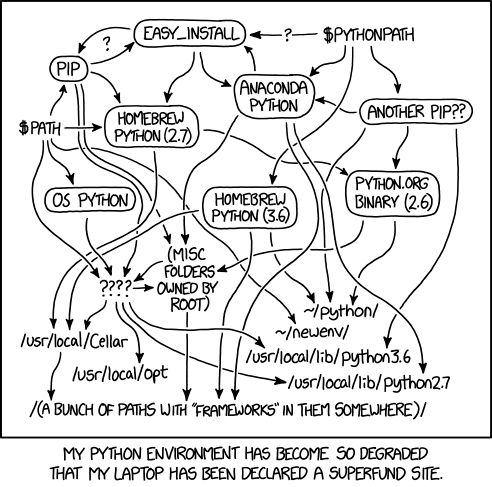
Before we dive into tools, let’s make sure we’re on the same page about what problem we’re actually solving.
Your System Python is Sacred. Don’t Touch It.
Your operating system almost certainly ships with a version of Python. On macOS or Linux, a ton of system utilities secretly depend on it. If you start installing random packages into your system Python, you’re one bad pip install away from breaking something important. So the first rule of Python packaging: leave your system Python alone.
Global vs. Virtual Environments
A virtual environment is just an isolated Python installation for your project. Think of it like a separate room where your project’s packages live, completely independent of everything else on your machine. Your project’s dependencies don’t bleed into other projects. Beautiful.
# The classic way — built right into Python 3
python -m venv myenv
source myenv/bin/activate  # On Windows: myenv\Scripts\activate

# Now you're "inside" the virtual environment
pip install requests  # This only installs for THIS project
A package manager handles downloading, installing, and tracking what libraries your project needs. Simple enough. But the complications start when you need to:
- Reproduce the exact same environment on another machine (hello, deployment nightmares 👋)
- Separate your dev dependencies (like
pytest) from production ones - Share your project with other devs without saying “idk just install stuff until it works”
That’s where the different tools come in.
What’s a Version Manager?
A Python version manager is a completely different beast. It helps you install and switch between multiple Python versions on the same machine. Need Python 3.9 for one legacy project and Python 3.13 for a new one? A version manager handles that. Think of it as a TV remote for your Python installations.
1. pip — The OG, the Classic, the One That Started It All

If you’ve written even ten lines of Python, you know pip. It’s the default package manager bundled with Python since version 3.4, and it’s the first thing everyone learns.
pip install requests
pip install django==4.2
pip uninstall pandas
pip freeze > requirements.txt  # Save your dependencies
pip install -r requirements.txt  # Restore them
The requirements.txt file is how pip-based projects share dependencies. It looks something like this:
requests==2.31.0
django==4.2.1
numpy==1.26.0
The problem? pip has no real dependency resolver (well, it got a better one in 2020, but still). If package A needs requests>=2.0 and package B needs requests==1.2, pip will just... try its best and sometimes lose. There's also no native lock file concept, no separation between dev and production dependencies, and no virtual environment management — you have to handle that separately.
pip is like that reliable old car that gets you from A to B, but has no GPS, no AC, and sometimes the check engine light comes on for no reason.
When to use pip:
- Simple scripts or one-off experiments
- When you’re learning Python and just want to install something
- When you’re in a project that already uses it and it ain’t broken
2. pipenv — The First "Modern" Attempt
Around 2017, pipenv showed up and tried to fix everything pip got wrong in one shot. It combined virtual environment management with dependency tracking using two new files: Pipfile and Pipfile.lock.
pip install pipenv  # Install pipenv itself
pipenv install requests  # Creates a virtualenv + adds to Pipfile
pipenv install pytest --dev  # Dev-only dependency!
pipenv shell  # Activate the environment
pipenv run python app.py  # Or run directly without activating
Your Pipfile looks clean and readable:
[[source]]
url = "https://pypi.org/simple"
verify_ssl = true

[packages]
requests = "*"
django = ">=4.0"

[dev-packages]
pytest = "*"
black = "*"
And the Pipfile.lock pins every single dependency to exact versions, so your teammate's machine is guaranteed to have the exact same packages as yours. That's huge.
But here’s where the honeymoon ended. Pipenv got a reputation for being slow — like, painfully slow. Dependency resolution could take minutes. The project also went quiet for a while with slow maintenance, and the community started looking for alternatives.
It’s still maintained and totally usable, but the buzz has moved elsewhere.
When to use pipenv:
- Teams already using it with no reason to migrate
- When you want a simple upgrade from bare pip + venv
3. Poetry — The Developer Darling
If you ask most Python developers in 2024 what they use, a huge chunk will say Poetry. It’s polished, opinionated, and it just works in a way that makes you feel like things are under control.
Poetry uses pyproject.toml (the modern Python standard for project configuration) for everything — dependencies, project metadata, scripts, build settings. It's a lot like what package.json does for Node.js.
# Install Poetry (they recommend this installer)
curl -sSL https://install.python-poetry.org | python3 -

# Start a new project
poetry new my-awesome-project

# Or initialize in an existing project
poetry init

# Add dependencies
poetry add requests
poetry add pytest --group dev  # Dev group

# Install everything from poetry.lock
poetry install

# Run your code
poetry run python main.py

# Activate the shell
poetry shell
Your pyproject.toml ends up looking like this:
[tool.poetry]
name = "my-awesome-project"
version = "0.1.0"
description = "A project that definitely works"

[tool.poetry.dependencies]
python = "^3.11"
requests = "^2.31.0"
django = "^4.2"

[tool.poetry.group.dev.dependencies]
pytest = "^7.4"
black = "^23.0"
mypy = "^1.0"
Poetry also handles publishing to PyPI directly, which is a huge deal if you’re building libraries:
poetry build   # Build the package
poetry publish # Push to PyPI
The catch? Poetry manages its own virtual environments in a way that can sometimes confuse Docker setups or CI systems. Also, it’s not always perfectly compatible with projects that use raw pip or setuptools. But honestly? For most people, these are minor annoyances.
When to use Poetry:
- New Python projects — this is my recommendation
- Libraries you want to publish to PyPI
- Teams that want clean, reproducible environments
4. conda — The Data Science Power Tool
If you work in data science, machine learning, or scientific computing, you’ve definitely heard of conda. It ships with Anaconda (the big distribution) and Miniconda (the lighter version), and it’s a completely different kind of tool.
Here’s the thing about data science libraries like NumPy, SciPy, or PyTorch — they often depend on compiled C/C++/Fortran code underneath. pip handles Python packages. conda handles everything, including those binary, non-Python dependencies. It’s like pip that can also install CUDA, MKL, and all the complicated stuff your GPU needs to do matrix math at speed.
# Create a new conda environment
conda create --name ml-project python=3.11

# Activate it
conda activate ml-project

# Install packages (from the conda ecosystem)
conda install numpy pandas scikit-learn

# You can still use pip inside conda for packages not in conda-forge
pip install some-niche-library

# Save and recreate environments
conda env export > environment.yml
conda env create -f environment.yml
Your environment.yml looks like:
name: ml-project
channels:
  - defaults
  - conda-forge
dependencies:
  - python=3.11
  - numpy=1.26.0
  - pandas=2.0.3
  - pytorch=2.1.0
  - pip:
    - some-pip-only-package
The downside: conda environments are big, slow to create, and there’s a constant tension between the conda and pip ecosystems. Mixing them too much can lead to conflicts that make you want to take up farming as a career.
When to use conda:
- Data science / ML projects with heavy scientific libraries
- When you need CUDA or non-Python system dependencies
- Research environments where Jupyter notebooks are central to your workflow
**https://docs.conda.io/en/latest/miniconda.html**
5. uv — The New Challenger. And It's Kind of Insane.

Okay, buckle up. This is the exciting one.
uv is a new Python package manager (and more!) built by Astral — the same people who made ruff, the blazing-fast Python linter. It's written in Rust, and it is aggressively fast. We're talking 10–100x faster than pip in benchmarks. Not a typo.
# Install uv
curl -LsSf https://astral.sh/uv/install.sh | sh

# Use it as a drop-in pip replacement
uv pip install requests  # Same as pip, just faster
uv pip install -r requirements.txt

# Initialize a new project
uv init my-project
cd my-project

# Add and manage dependencies (Poetry-like workflow)
uv add requests
uv add pytest --dev

# Install from lock file
uv sync

# Run stuff
uv run python main.py
But here’s where uv goes beyond being just a fast pip — it also manages Python versions (more on that in the next section) and has its own lock file format. It’s basically trying to be a one-stop shop for everything Python tooling.
A benchmark comparison (from uv’s own docs, but independently verified by the community):
| Task | pip | Poetry | uv |
| :--- | :--- | :--- | :--- |
| Install Django | ~5.0s | ~3.5s | **0.3s** |
| Install scipy (cold cache) | ~45s | ~40s | **4s** |
Yeah. It’s that fast. The reason is that Rust is significantly faster than Python for I/O heavy operations like downloading and installing packages.
uv is still relatively young (released in 2024), but adoption has been rapid. It's already being used in serious production projects, and many people believe it will become the default Python toolchain in the next few years.
When to use uv:
- New projects where you want the modern, fast setup
- CI/CD pipelines where install time matters
- If you’re ready to live on the cutting edge
[embed]uv uv is an extremely fast Python package and project manager, written in Rust.docs.astral.sh
Python Version Managers: Because One Python is Never Enough
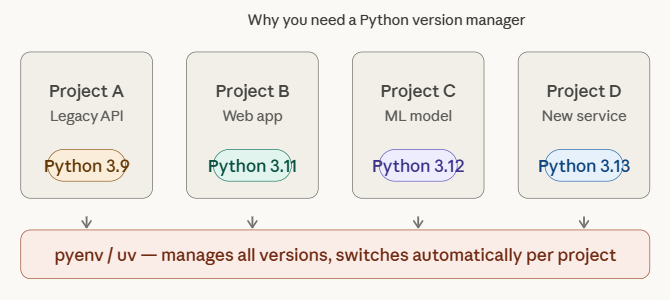
Package managers handle libraries. Version managers handle which Python itself you’re running. These are different problems and different tools. Let’s break them down.
Why Do You Even Need This?
Consider this scenario:
- Your day job project uses Python 3.9 because it’s a legacy codebase
- Your side project uses Python 3.12 with all the latest features
- Your friend’s open source project requires exactly Python 3.11.4 for some weird compatibility reason
Without a version manager, switching between these means uninstalling and reinstalling Python every time, which is a special kind of torture. A version manager lets you have all of them installed at once and switch effortlessly.
1. pyenv — The Long-Standing Standard
pyenv has been the go-to Python version manager for years. It works by intercepting your python command and pointing it to whichever version you've specified for a project or globally.
# Install pyenv (macOS/Linux)
curl https://pyenv.run | bash

# List all available Python versions (there are MANY)
pyenv install --list

# Install specific versions
pyenv install 3.11.4
pyenv install 3.12.1
pyenv install 3.9.18

# Set global default
pyenv global 3.12.1

# Set a version for a specific project (creates .python-version file)
cd my-old-project
pyenv local 3.9.18

# Check what's active
pyenv version
The .python-version file that pyenv local creates is a plain text file with just the version number. When you cd into that directory, pyenv automatically switches to that version. It's magic. (It's PATH manipulation, actually, but magic sounds better.)
# .python-version file content:
3.9.18
The caveat: pyenv doesn’t manage packages or virtual environments by itself. You’d pair it with venv or pipenv or Poetry for the full workflow. Some people also install the pyenv-virtualenv plugin:
# With pyenv-virtualenv plugin
pyenv virtualenv 3.11.4 my-project-env
pyenv activate my-project-env2. asdf — The Polyglot's Dream
If you work with multiple programming languages — not just Python — asdf is worth knowing. It's a single version manager for everything: Python, Node.js, Ruby, Go, Rust, Java, and like 600 other runtimes via plugins.
# Install asdf (see their docs for OS-specific instructions)
# https://asdf-vm.com/guide/getting-started.html

# Add the Python plugin
asdf plugin add python

# Install Python versions
asdf install python 3.12.1
asdf install python 3.9.18

# Set version for a project
asdf local python 3.12.1  # Creates .tool-versions file

# Global default
asdf global python 3.12.1
Your .tool-versions file can manage multiple languages at once:
python 3.12.1
nodejs 20.10.0
ruby 3.2.0
One file, one command to install all your runtimes. For full-stack projects or polyglot teams, this is a game-changer.
[embed]asdf Manage multiple runtime versions with a single CLI toolasdf-vm.com
3. uv as a Version Manager — Wait, Again?
Here’s the plot twist: uv doesn’t just manage packages. As of recent versions, it also manages Python versions. It’s becoming the all-in-one tool the Python community has been waiting for.
# Install a specific Python version
uv python install 3.12

# Install multiple versions
uv python install 3.11 3.12 3.13

# Pin a project to a specific Python version
uv python pin 3.11

# See what's installed
uv python list

# Create a virtual environment with a specific Python version
uv venv --python 3.11
The amazing part? You don’t even need Python installed beforehand. uv python install downloads and manages Python binaries directly. No more dealing with pyenv, no more compilation from source, no more weird PATH issues. Just uv python install 3.12 and you're done.
This is why a lot of new projects are just going full uv for everything — packages, lock files, Python versions, virtual environments. One tool, one config, one workflow.
The Big Comparison Table
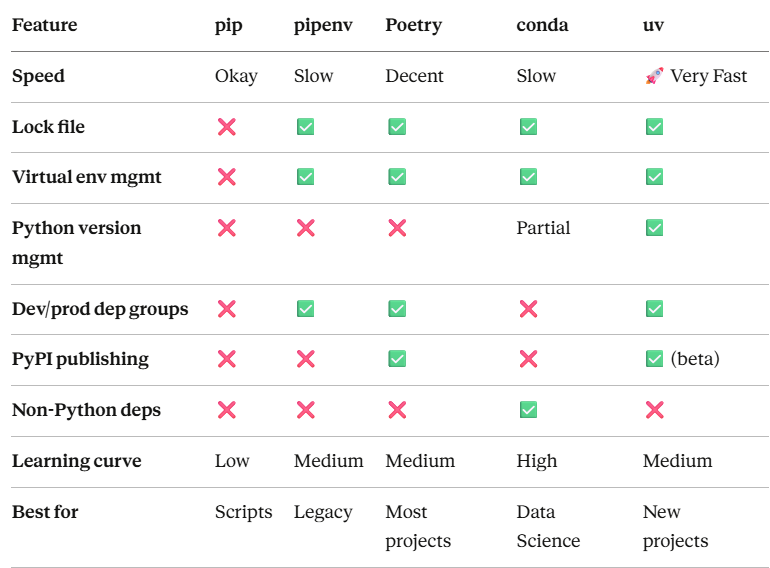
Okay, Which One Should I Actually Use?
Let me save you the analysis paralysis. Here’s a simple decision guide:
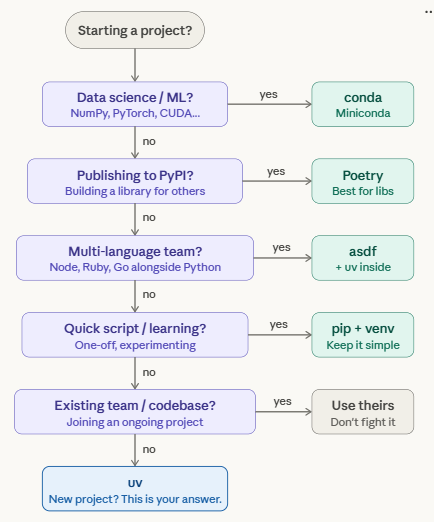
You’re learning Python or writing quick scripts: → Just use pip + venv. Don't overthink it.
python -m venv env && source env/bin/activate
pip install whatever-you-need
You’re starting a serious Python project in 2025: → Use **uv**. It's fast, modern, handles everything, and has excellent docs.
uv init my-project
cd my-project
uv add requests fastapi
uv run python main.py
You’re building a Python library to publish on PyPI: → Poetry is still the most polished experience for this, though uv is catching up.
You work in data science / ML / scientific computing: → conda (specifically Miniconda) for environment and heavy dep management, pip/uv inside for pure-Python packages.
You work across multiple languages (Python + Node + Ruby…): → asdf for version management, then uv or Poetry inside for Python deps.
Your team is already using something: → Stick with it. The cost of migration is almost never worth it unless you’re in real pain.
Migrating Between Tools (When You Must)
Sometimes you inherit a codebase using an older tool and want to modernize. Here are the migration paths that actually make sense.
From pip + requirements.txt → uv
# uv can read requirements.txt directly
uv pip install -r requirements.txt

# To create a proper uv project from an existing requirements.txt:
uv init
uv add $(cat requirements.txt | grep -v "^#" | tr '\n' ' ')
From pip + requirements.txt → Poetry
poetry init  # Walk through the interactive setup
# Manually add your deps from requirements.txt, or:
cat requirements.txt | grep -v "^#" | xargs poetry add
From Poetry → uv
This is becoming increasingly common. uv can read pyproject.toml files that Poetry created:
# uv understands pyproject.toml natively
uv sync  # Will read your existing pyproject.toml and create uv.lock

# If you want to fully migrate, just start using uv commands
# uv add / uv remove instead of poetry add / poetry remove
The migration is mostly painless. The pyproject.toml format is standardized, so most of your config carries over.
The Future of Python Packaging
Here’s where things are heading, and it’s actually exciting for once:

**pyproject.toml is winning.** The Python community has rallied around this standard configuration file (defined in PEP 517, 518, and 660). All modern tools — Poetry, uv, Hatch, PDM — use it. The days of having setup.py, setup.cfg, requirements.txt, and a MANIFEST.in in the same project are (slowly) dying. 🎉
uv is on a serious trajectory. Astral has funding, the tool is being updated constantly, and the Python community has embraced it faster than almost any tooling project in recent memory. There’s a real chance that within 2–3 years, uv becomes the default recommendation for new Python projects — the way npm/yarn did for Node.
PEP 723 brings inline script metadata, meaning even for quick single-file scripts, you’ll be able to declare dependencies at the top of the file:
# /// script
# requires-python = ">=3.11"
# dependencies = [
#   "requests<3",
#   "rich",
# ]
# ///

import requests
from rich import print
# ...
And uv run my_script.py will automatically create an ephemeral environment and run it. No requirements.txt, no virtual env setup. Just run. It's the future and it's already here.
TL;DR
Here’s the quick summary for those who scrolled straight to the bottom (no judgment):
- pip — built-in, simple, no lock files, fine for small stuff
- pipenv — tried to fix pip, mostly succeeded, but kind of got left behind
- Poetry — the professional choice for most Python projects, great DX
- conda — data science royalty, handles non-Python deps, but heavy
- uv — new, stupid fast, written in Rust, does everything, the future is now
- pyenv — manage multiple Python versions, the classic choice
- asdf — pyenv but for every language you use
- uv (again) — yes, it also manages Python versions. uv is out here doing too much and we love it
For a brand new project starting today? My personal pick: uv for everything. Install it, run uv init, add your deps with uv add, use uv python install to get the right Python version, and call it a day. Come back when you need conda or have to publish a library to PyPI.
Resources to Dig Deeper
- pip documentation
- Pipenv documentation
- Poetry documentation
- conda documentation
- uv documentation
- pyenv GitHub
- asdf documentation
- Python Packaging User Guide (official)
- PEP 723 — Inline Script Metadata
If this helped you, drop a clap or fifty — Medium says the cap is 50, not judging if you max it out 😅. And if I got something wrong or your favorite tool got slighted, the comment section is right there. Be kind, we’re all just trying to keep our virtual environments intact.
메타데이터
- post_id
- e2c91aef5ec9
- slug
- pip-poetry-uv-and-friends-the-only-python-package-manager-guide-youll-ever-need-e2c91aef5ec9
- url
- https://towardsdev.com/pip-poetry-uv-and-friends-the-only-python-package-manager-guide-youll-ever-need-e2c91aef5ec9
- canonical_url
- https://towardsdev.com/pip-poetry-uv-and-friends-the-only-python-package-manager-guide-youll-ever-need-e2c91aef5ec9
- author_url
- https://medium.com/@rahulrpandey1105
- status
- ok
- fetched_at
- 2026-07-27 01:40:07