Tweaking native-federation
This article series is meant to provide a peek under the hood of native federation, as well as some tips and tricks regarding optimization.
Tweaking native-federation
This article series is meant to provide a peek under the hood of native federation, as well as some tips and tricks on how you can optimize your native-federation architecture setup.
Before we start, here is some good-to-know information:
The goal of native-federation is very simple: “sharing dependencies between micro frontends”, thus improving the performance of your webapp overal. And to do it, it will extract those dependencies into separate bundles.
To do this, native federation is, like module federation v2 [1], built upon the principle of 2 components: A “build-time” part (the builder) and a “runtime” part (the orchestrator). If you are new to native-federation and want to know more about why you would want to use Native federation, I’d recommend this absolute classic:
Previously, I have written an article series on how to optimally use the orchestrator and how it works. It was initially only for monoliths but the concepts are the same when you migrate from an SPA aplication. you can find that series here:
To complement that article series, this one is provided for the “builder”. If you want to know more about how native-federation works in the browser, I recommend reading the first article of that series to know more about how native-federation works before continuing this one.
Note: Currently, the most supported builder is the Angular one so I will use that one for the examples. We are planning on supporting more builders in the future.
One last mention, this article series contains an up-to-date explanation of the native-federation (v3+) builder (@angular-architects/native-federation >21.1.0 and >20.3.0), but all core concepts of native-federation can be found in the enterprise-angular e-book from Manfred Steyer
Now, let’s get started!
Photo by Mattttt ttttttaM on Unsplash
The basics
The first step to optimizing native-federation is to know how it works. So what’s happening when you add native-federation to your micro frontend repository? You can see by creating a new Angular project and by running the following commands:
# Angular setup
$ npm install -g @angular/cli
$ ng new <your-workspace> --no-create-application
$ ng g app <your-project>

# Native-federation setup
$ npm install @angular-architects/native-federation
$ ng add @angular-architects/native-federation:init --project <your-project> --port 4201 --type remote
Alternatively, I prepared a repository here:
https://github.com/Aukevanoost/native-federation-examples-ng/tree/tweaking-nf/starter
The most important changes are in the angular.json: Two new builders have been added, one for ng serve, and one for ng build .
{
 "$schema": "./node_modules/@angular/cli/lib/config/schema.json",
 "version": 1,
 "newProjectRoot": "projects",
 "projects": {
  "mfe1": {
   "projectType": "application",
   "root": "projects/mfe1",
   // [...] Settings
   "architect": {

    // Here we see a new builder!
    "build": {
     "builder": "@angular-architects/native-federation:build",
     "options": {
       "cacheExternalArtifacts": false
     },
     "configurations": {
      "production": {
       "target": "mfe1:esbuild:production"
      },
      "development": {
       "target": "mfe1:esbuild:development",
       "dev": true
      }
     },
     "defaultConfiguration": "production"
    },

    // Here we also see a new builder!
    "serve": {
     "builder": "@angular-architects/native-federation:build",
     "options": {
      "target": "mfe1:serve-original:development",
      "cacheExternalArtifacts": false,
      "rebuildDelay": 0,
      "dev": true,
      "port": 0
     }
    },

    // The original builder was renamed to "esbuild"!
    "esbuild": {
     "builder": "@angular/build:application",
     "options": {
      "outputPath": "dist/mfe1",
      "verbose": false,
      "index": "projects/mfe1/src/index.html",
      "browser": "projects/mfe1/src/main.ts",
      "polyfills": [
       "es-module-shims"
      ],
      "tsConfig": "projects/mfe1/tsconfig.app.json",
      "inlineStyleLanguage": "scss",
      "assets": [
       {
        "glob": "**/*",
        "input": "projects/mfe1/public"
       }
      ],
      "styles": [
       "projects/mfe1/src/styles.scss"
      ],
      "scripts": []
     },
     "configurations": {
      "production": {
       "budgets": [
        {
         "type": "initial",
         "maximumWarning": "500kB",
         "maximumError": "1MB"
        },
        {
         "type": "anyComponentStyle",
         "maximumWarning": "4kB",
         "maximumError": "8kB"
        }
       ],
       "outputHashing": "all"
      },
      "development": {
       "optimization": false,
       "extractLicenses": false,
       "sourceMap": true
      }
     },
     "defaultConfiguration": "production"
    },

    // And finally the original serve
    "serve-original": {
     "builder": "@angular/build:dev-server",
     "configurations": {
      "production": {
       "buildTarget": "mfe1:esbuild:production"
      },
      "development": {
       "buildTarget": "mfe1:esbuild:development"
      }
     },
     "defaultConfiguration": "development",
     "options": {
      "port": 4201
     }
    }
    // [...] Other builders
   }
  // [...] Other projects
  }
 }
}
Now let’s take some native-federation options from the “serve” builder and understand them a bit better:
"options": {
  "target": "mfe1:serve-original:development",

  // Enable caching of externals over multiple builds. This will be explained
  // in detail in one of the following sections.
  "cacheExternalArtifacts": false,

  // Allows for throttling. In volatile settings during runtime where multiple file
  // saves keep triggering the rebuilds, the nf builder can become a bit overwelmed.
  // This option tells the builder to wait until idle for an x amount of ms.
  // this allows nf to only rebuild when needed.
  // for example: 500 (ms).
  "rebuildDelay": 0,

  // Will enable some devtools like source maps and raw unminified files.
  "dev": true,

  // Allows you to set a port, will override the "serve-original" port
  "port": 0
}
Diving into the builder process
The “verbose” properrty in the “esbuild” builder (in the angular.json) allows you to debug the native federation build and see what is happening behind the scenes. When set to true, the builder will show the performed steps!
aukevanoost:~/native-federation-examples-ng$ ng build mfe1
 DBG!  00:00:755.334ms - To load the federation config.
 INFO  Building federation artefacts
 DBG!  00:01:451.652ms - [build artifacts] - To bundle all mappings and exposed.
 INFO  Preparing shared npm packages for the platform browser
 NOTE  This only needs to be done once, as results are cached
 NOTE  Skip packages you don't want to share in your federation config
 DBG!  00:04:199.646ms - [build artifacts] - To bundle all shared browser externals
 DBG!  00:05:654.005ms - To build the artifacts.

 *** debug messages omitted for clarity ***

Initial chunk files   | Names         |  Raw size | Estimated transfer size
polyfills-G7GBCUTJ.js | polyfills     |  36.72 kB |                11.96 kB
main-EBCRGQM7.js      | main          |   2.79 kB |                 1.16 kB
chunk-2NFLSA4Y.js     | -             | 449 bytes |               449 bytes
styles-5INURTSO.css   | styles        |   0 bytes |                 0 bytes

                      | Initial total |  39.95 kB |                13.58 kB

Lazy chunk files      | Names         |  Raw size | Estimated transfer size
chunk-5MOS6PT2.js     | bootstrap     |  19.97 kB |                 5.28 kB

Application bundle generation complete. [1.377 seconds] - 2025-xx-xxTxx:xx:xx.xxxZ

Output location: /path/to/native-federation-examples-ng/dist/mfe1
So what does this tell us? We can see a couple of timestamps (4 to be precise) before the “angular builder” starts (because native-federation is just a decorator over the Angular builder that performs some preparation and enhancements). The timestamps show how long it took to process every step of the builder.
The native-federation builder can be divided into 4 steps:
- Load and process the config file (federation.config.js). (Duration: 755ms)
- Process and bundle the exposed modules and shared mappings. (Duration: 1s and 451 ms)
- Process and bundle the externals. (Duration: 4s and 199ms)
- Run the Angular builder. (Duration: 1s and 377 ms)
There are of course some other extra steps but these are the 4 main steps.
What are all these steps? The “exposed modules” are the final micro frontends, the “shared-mappings” are internal libraries that are converted to shared bundles, and the “externals” are the dependencies (like RxJs and Angular) that are bundled to be reused. By bundling all these parts separately from each other, we can share and reuse JavaScript modules (like the externals) to improve performance.
Configuring the builder
Okay, now we kinda know what the builder does, but how does it know what dependencies to bundle? You can configure the output of the builder in the “federation.config.js”. The initial file might look similar to this:
const { withNativeFederation, shareAll } = require('@angular-architects/native-federation/config');

module.exports = withNativeFederation({
  name: 'mfe1',
  exposes: {
    './Component': './projects/mfe1/src/bootstrap.ts',
  },
  shared: {
    ...shareAll({ singleton: true, strictVersion: true, requiredVersion: 'auto' }),
  },
  skip: [
    'rxjs/ajax',
    'rxjs/fetch',
    'rxjs/testing',
    'rxjs/webSocket',
    (pkg) => pkg.startsWith('vanilla-native-federation'),
    // Add further packages you don't need at runtime
  ],
  features: {
    ignoreUnusedDeps: true
  }
});
The name is important because it is used as an unique identifier for your “remote”. According to the native-federation spec:
A remote (a.k.a. micro frontend) is a collection of “exposed modules” and “externals” that represents a subdomain within your application/architecture.
It is therefore recommended to have a remote per team/subdomain. But that’s for another discussion :).
The name property A remote name should have a similar name to npm packages like “mfe1” or “@org/mfe1”, but alternatively “team/mfe1” is also acceptable.
The exposes property
The exposed components are used as custom imports to the exposed bundle file. In this example, the bootstrap.ts file will be bundled into an ESM bundle that is accessible at runtime under the mfe1/./Component path. The codesnippet below shows the final import path in the “import-map” without externals:
{
  "imports":{
    "mfe1/./Component": "./component.js"
  }
}
The shared property: By default, if you leave this property empty, it will not share any dependencies. That means that all dependencies will be bundled into a single “component.js” file. This can be beneficial since this allows ESbuild to fully optimize and treeshake the file, only the used code will be included in the bundle and all “dead code” is removed [2]. For a single micro frontend this is the best solution, but for setups with multiple micro frontends, this will result in a lot of code duplication.
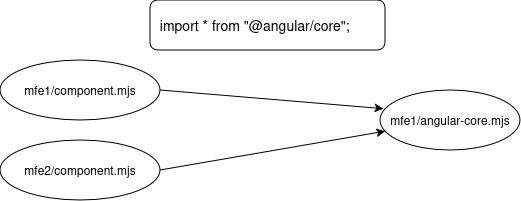
Example: Breaking up modules will create smaller bundles
Therefore, it might be beneficial to extract the dependencies into multiple bundles that can be reused.
The “shareAll” helper function will iterate through the root package.json (only the “dependencies” property) and bundle all node_modules into separate files. Secondly, for every package, the “share” helper function will find out which secondary entrypoints exist and it will create separate bundles for those as well.
Let’s first see what happens when we only share Angular core:
const { withNativeFederation, shareAll } = require('@angular-architects/native-federation/config');

module.exports = withNativeFederation({
  name: 'mfe1',
  exposes: {
    './Component': './projects/mfe1/src/bootstrap.ts',
  },
  shared: {
    ...share({
      "@angular/core": { singleton: true, strictVersion: true, requiredVersion: 'auto' }
    }),
  },
  skip: [],
  features: {
    ignoreUnusedDeps: false
  }
});
The upper federation.config.js would result in an importmap like shown below:
{
  "imports": {
    // Exposed component
    "mfe1/./Component": "./component.js",
    // Shared Angular core dependency
    "@angular/core":"./_angular_core.js",
    "@angular/core/event-dispatch-contract.min.js":"./_angular_core_event_dispatch_contract_min_js.js",
    "@angular/core/primitives/di":"./_angular_core_primitives_di.js",
    "@angular/core/primitives/event-dispatch":"./_angular_core_primitives_event_dispatch.js",
    "@angular/core/primitives/signals":"./_angular_core_primitives_signals.js",
    "@angular/core/rxjs-interop":"./_angular_core_rxjs_interop.js"
  }
}
As you can see, all imports from the shared external are mapped to single (ESM bundle) javascript files. This allows them to be reused by multiple micro frontends.
The skip property When the shareAll property is used, it is possible to skip certain packages from being treated as external. A reason could be because ESM support is insufficient to create a separate bundle (especially with packages bundled in commonjs format), in this case the packages can be bundled into the micro frontends instead.
Note: it will look for the full name of the package/secondary-entry-point. If you only want to skip “@angular/core/rxjs-interop” you can add it to the skip list, but if you want to skip all of “@angular/core”, you’ll have to use a lambda filter like “(pkg) => pkg.startsWith(‘@angular/core’)”
The features property This property allows you to opt-in to extra features like “ignoreUnusedDeps”. For example, it might be that you’re using a monorepo setup with a lot of dependencies, in this case the “ignoreUnusedDeps” feature can be used to share only the externals that are used by your application/exposed modules.
Caching
Bundling all external node_modules every time you run a ng serveor ng build command can become tedious and time consuming. Therefore, as mentioned before, it is possible to enable “externals caching” by setting the “cacheExternalArtifacts” to true in the Angular workspace file (this can be configured per project and builder). When set to true, it will cache the bundled externals per micro frontend in the ./node_modules/.cache/native-federation/<project-name> folder, the “project-name” is defined in the federation.config.js. When the builder is run with caching enabled, it will output something a little bit different:
aukevanoost:~/native-federation-examples-ng$ ng build mfe1
 DBG!  00:00:387.914ms - To load the federation config.
 INFO  Building federation artefacts
 DBG!  00:00:779.642ms - [build artifacts] - To bundle all mappings and exposed.
 DBG!  Checksum of browser-shared matched, Skipped artifact bundling
 DBG!  00:00:008.745ms - [build artifacts] - To bundle all shared browser externals
 DBG!  00:00:788.998ms - To build the artifacts.

 *** debug messages omitted for clarity ***

Initial chunk files   | Names         |  Raw size | Estimated transfer size
polyfills-G7GBCUTJ.js | polyfills     |  36.72 kB |                11.96 kB
main-EBCRGQM7.js      | main          |   2.79 kB |                 1.16 kB
chunk-2NFLSA4Y.js     | -             | 449 bytes |               449 bytes
styles-5INURTSO.css   | styles        |   0 bytes |                 0 bytes

                      | Initial total |  39.95 kB |                13.58 kB

Lazy chunk files      | Names         |  Raw size | Estimated transfer size
chunk-5MOS6PT2.js     | bootstrap     |  19.97 kB |                 5.28 kB

Application bundle generation complete. [0.779 seconds] - 2025-12-30T09:58:04.330Z

Output location: /path/to/native-federation-examples-ng/dist/mfe1
That seems a lot faster than before! So what happened? Apparently a checksum matched, allowing native-federation to reuse the artifacts (bundles) created by the previous run. The metadata of the artifacts can be found in a meta json file in the cache folder e.g. browser-shared.meta.json which includes the following data:
{
   "checksum":"071b3e8776554ee81b8266b5ae574e2e4f6db39f253ee7bb680a1a25c79ae237",
   "externals":[
      {
         "packageName":"@angular/core",
         "outFileName":"_angular_core.CH1f-PL9lh.js",
         "requiredVersion":"^21.0.6",
         "singleton":true,
         "strictVersion":true,
         "version":"21.0.6"
      },
      {
         "packageName":"@angular/core/primitives/di",
         "outFileName":"_angular_core_primitives_di.63DUUDHkzv.js",
         "requiredVersion":"^21.0.6",
         "singleton":true,
         "strictVersion":true,
         "version":"21.0.6"
      },
      {
         "packageName":"@angular/core/primitives/signals",
         "outFileName":"_angular_core_primitives_signals.5PqDyOp3np.js",
         "requiredVersion":"^21.0.6",
         "singleton":true,
         "strictVersion":true,
         "version":"21.0.6"
      },
      {
         "singleton":false,
         "strictVersion":false,
         "requiredVersion":"0.0.0",
         "version":"0.0.0",
         "packageName":"@nf-internal/chunk-IXOA6WTM",
         "outFileName":"chunk-IXOA6WTM.js"
      },
      {
         "singleton":false,
         "strictVersion":false,
         "requiredVersion":"0.0.0",
         "version":"0.0.0",
         "packageName":"@nf-internal/chunk-WDE5IQ2F",
         "outFileName":"chunk-WDE5IQ2F.js"
      },
      {
         "singleton":false,
         "strictVersion":false,
         "requiredVersion":"0.0.0",
         "version":"0.0.0",
         "packageName":"@nf-internal/chunk-2VMXMS7J",
         "outFileName":"chunk-2VMXMS7J.js"
      }
   ],
   "files":[
      "_angular_core.CH1f-PL9lh.js",
      "_angular_core_primitives_di.63DUUDHkzv.js",
      "chunk-IXOA6WTM.js",
      "_angular_core_primitives_signals.5PqDyOp3np.js",
      "chunk-WDE5IQ2F.js",
      "chunk-2VMXMS7J.js"
   ]
}
The checksum is the most important property here, it is generated from a list of all externals in the build, including their respective version:
deps:@angular/core@21.0.6:@angular/core/primitives/di@21.0.6:@angular/core/primitives/signals@21.0.6This way, until at least one of the packages in the build changes, all externals are cached and reused saving precious seconds (or even minutes) of build-time.
Build types For shared node_modules (externals), there are 3 different types of bundling: ‘default’, ‘separate’ and in the newest version (>21.0.4 and >20.3.0) of native-federation also ‘package’. The ‘default’ build type bundles all externals in 1 single build, so 1 metadata file in total. “package” will bundle each external individually which will result in a meta file per external, you can set the build type in the remoteEntry.json:
const { withNativeFederation, share } = require('@angular-architects/native-federation/config');

module.exports = withNativeFederation({
  name: 'mfe1',
  exposes: {
    './Component': './projects/mfe1/src/bootstrap.ts',
  },
  shared: {
    ...share({
      "@angular/core": {
        singleton: true,
        strictVersion: true,
        requiredVersion: 'auto',
        build: 'package',
      }
    })
  },
  skip: [ ],
  features: {
    ignoreUnusedDeps: true
  }
});
This is mostly an edge case but can come in handy if you want to bundle each external separately.
Corrupted cache
Whenever your build or cache becomes corrupt for whatever reason, you can simply remove the node_modules/.cache folder and all bundles will be re-created.
In conclusion
This small introductory article showed the different components necessary for native-federation to build production ready micro frontends. We’ve looked at the different components in the federation.config.js, and steps that are performed in the native-federation build. Finally, when used correctly, caching can improve performance by skipping already bundled stale files like externals.
The next article will take a look at how pseudo-treeshaking can be leveraged to optimize the amount of externals that are shared and why this could be important…
You can find the article here:
See you there!
메타데이터
- post_id
- e2d514366d08
- slug
- tweaking-native-federation-e2d514366d08
- url
- https://medium.com/@auke997/tweaking-native-federation-e2d514366d08
- canonical_url
- https://medium.com/@auke997/tweaking-native-federation-e2d514366d08
- author_url
- https://medium.com/@auke997
- status
- ok
- fetched_at
- 2026-07-28 02:32:30





