Real-Time RAG Systems: Boosting AI with Dynamic Data
Elevate AI with Real-Time Data: Understanding RAG Systems and Applications
Real Time Information Access in Retrieval Augmented Generation
Retrieval-Augmented Generation (RAG) enhances large language models (LLMs) by integrating dynamic, real-time data retrieval with generative capabilities. This architecture ensures AI systems deliver contextually accurate, up-to-date responses across applications such as customer support, financial analysis, and enterprise knowledge management.
Before, we begin with understanding how real-time datasets can be used with RAG to elevate your projects to the next stage, it is essential that you have a good foundation of RAG and its use cases. In case, you missed it you can read the article right here.
Core Components of real-time RAG Systems
1. Retriever Mechanisms → Queries structured and unstructured data sources (e.g., CRM systems, knowledge bases) to fetch contextually relevant information.
→ Utilizes semantic search algorithms and vector embeddings to prioritize real-time data relevance.
→Dense Passage Retriever (DPR) and BM25 are commonly used algorithms for efficient retrieval.
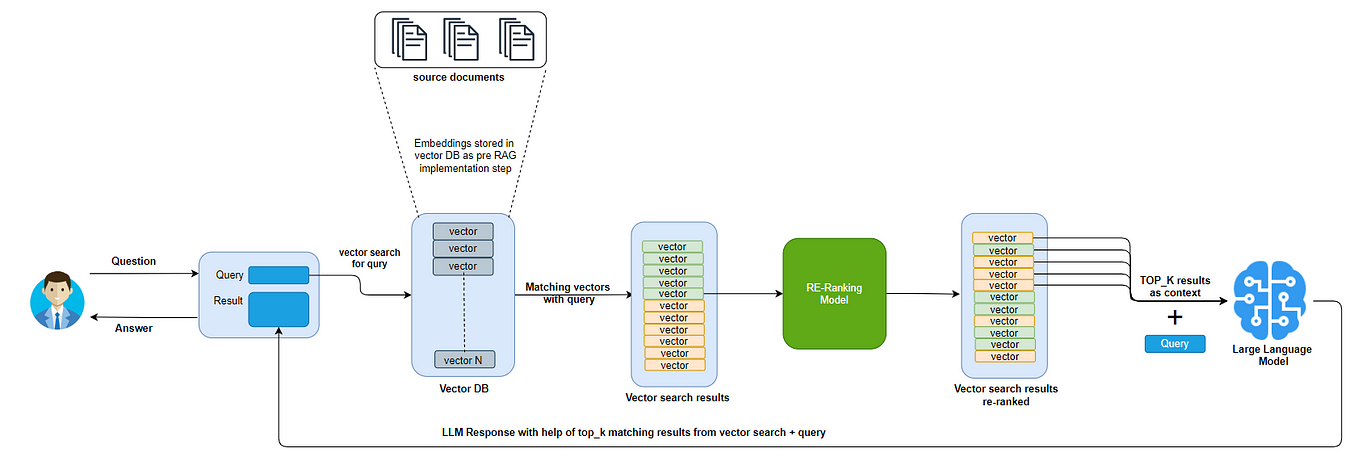
Dense Passage Retrievers
2. Vector Database → Stores high-dimensional embeddings of external data, enabling rapid similarity searches during retrieval.
→ Tools like Pinecone and Estuary Flow streamline real-time data ingestion and indexing.
→ These databases are optimized for fast query performance, often using GPU acceleration.
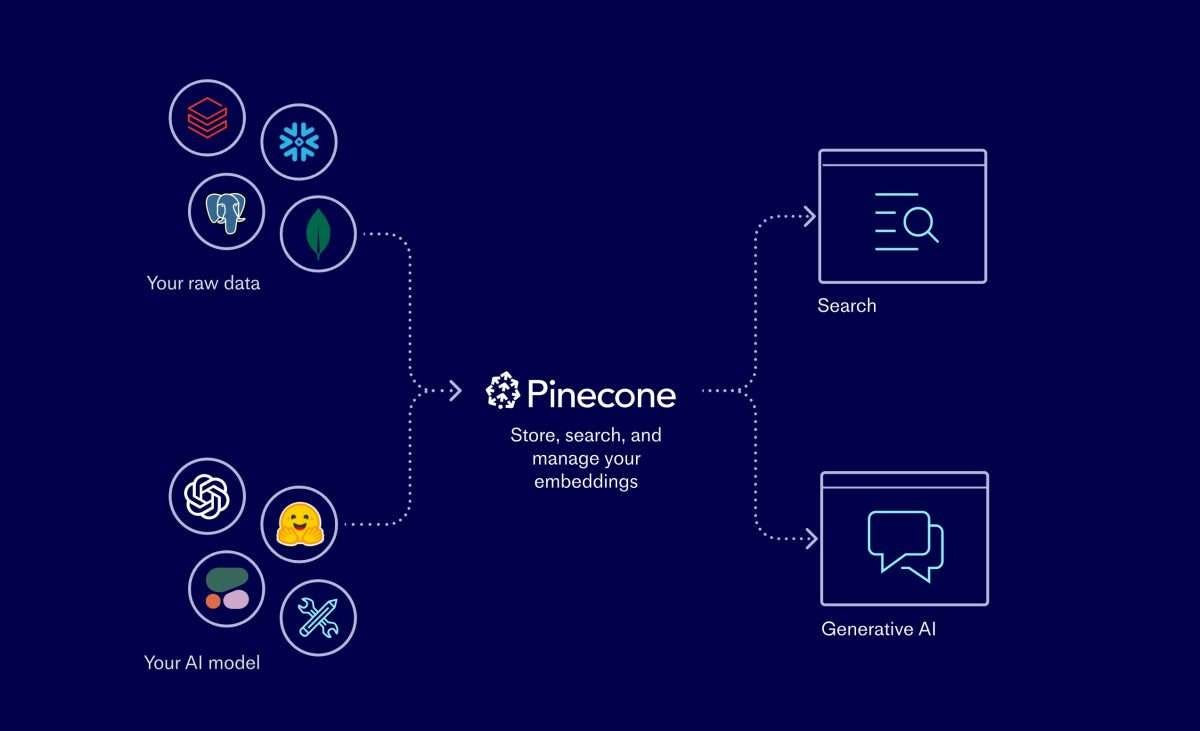
Pinecone fully managed vector database
3. Large Language Model (LLM) → Generates responses using retrieved data and pre-trained knowledge, ensuring outputs are both informed and contextually grounded.
→ Models like LLaMA and PaLM are popular choices due to their high performance in generating coherent text.
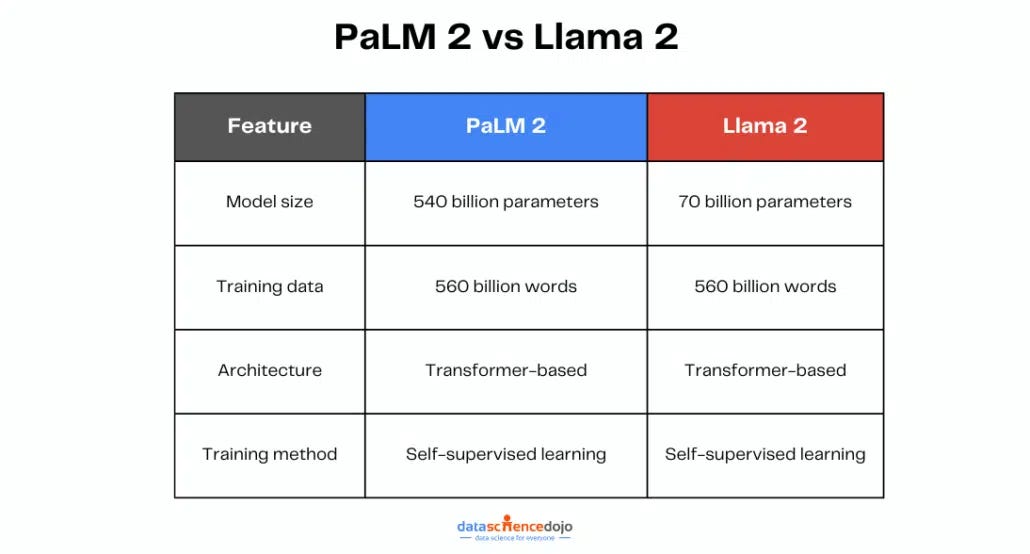
PaLM vs Llama
4. Shared Infrastructure → Tokenizer and embedding models standardize data processing across indexing and retrieval pipelines, reducing latency.
→ Micro-batching techniques balance real-time efficiency with computational load, ensuring that data freshness is maintained without overwhelming system resources.
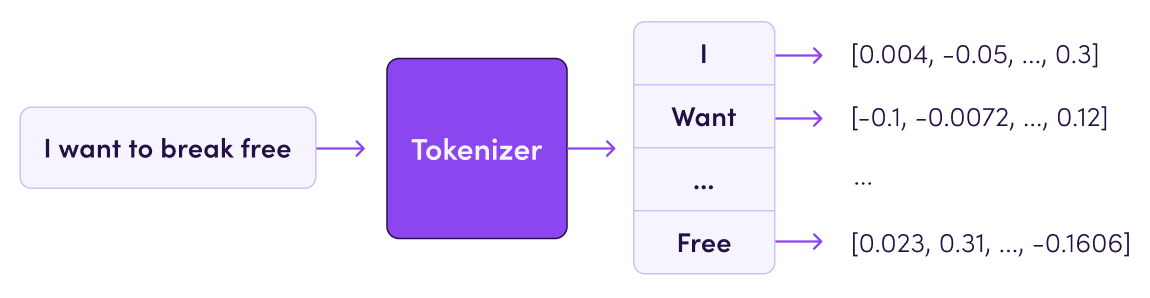
Tokenizer and Tokenization
Architectural Workflow for Real-Time Data Integration
1. Data Ingestion and Preprocessing → External data is cleaned, normalized, and converted into vector embeddings.
→ Real-time pipelines (e.g Bytewax) process streaming data to update vector databases continuously.
→ Data validation checks ensure that only relevant and accurate information is indexed.
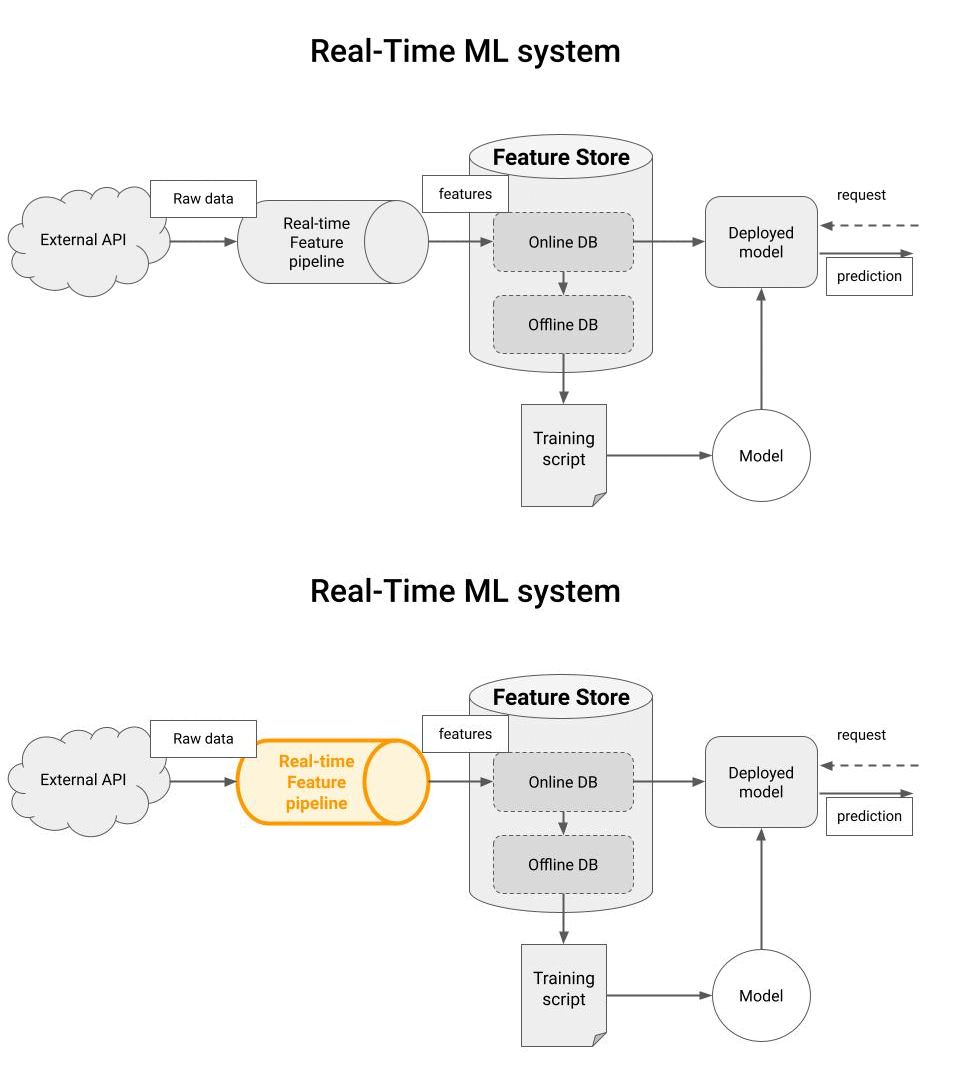
Real-Time Feature Pipeline
2. Query Processing → User prompts trigger parallel searches across vector databases and enterprise systems to retrieve the most current information.
→Retrieval latency is minimized through optimized indexing and distributed computing, often leveraging cloud services for scalability.
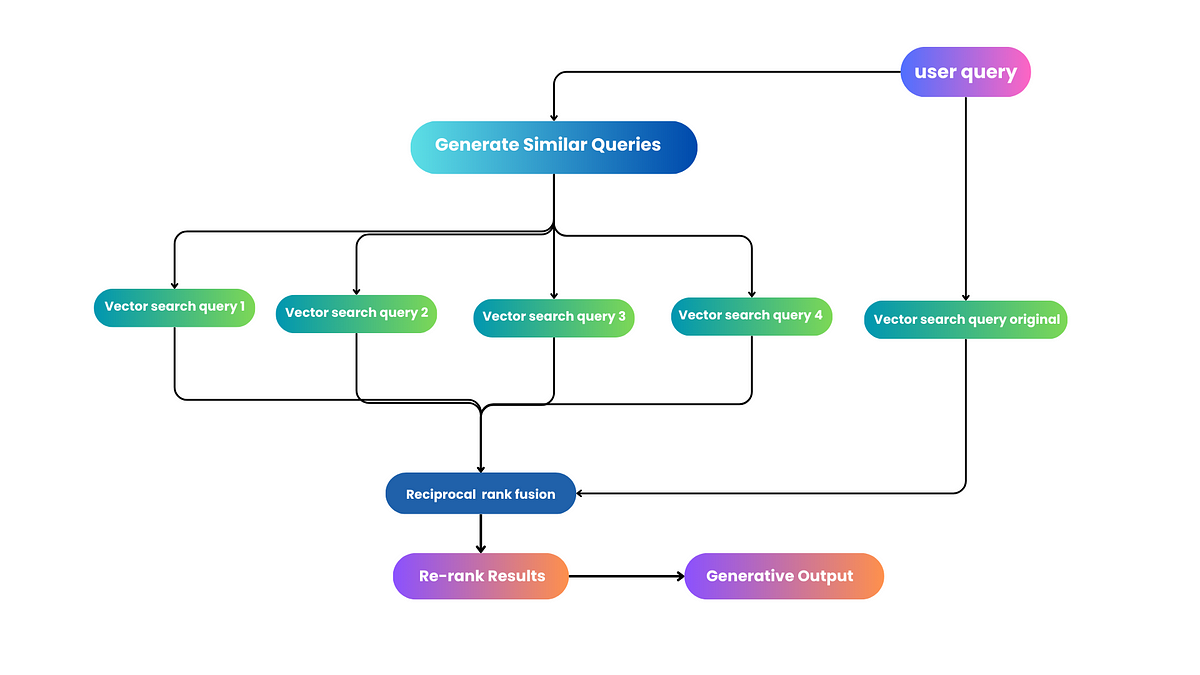
3. Prompt Augmentation → Retrieved Data is injected into the LLM’s input context using templates or dynamic concatenation, enhancing response accuracy.
→ Techniques like prompt engineering further optimize how queries are framed to maximize retrieval relevance.
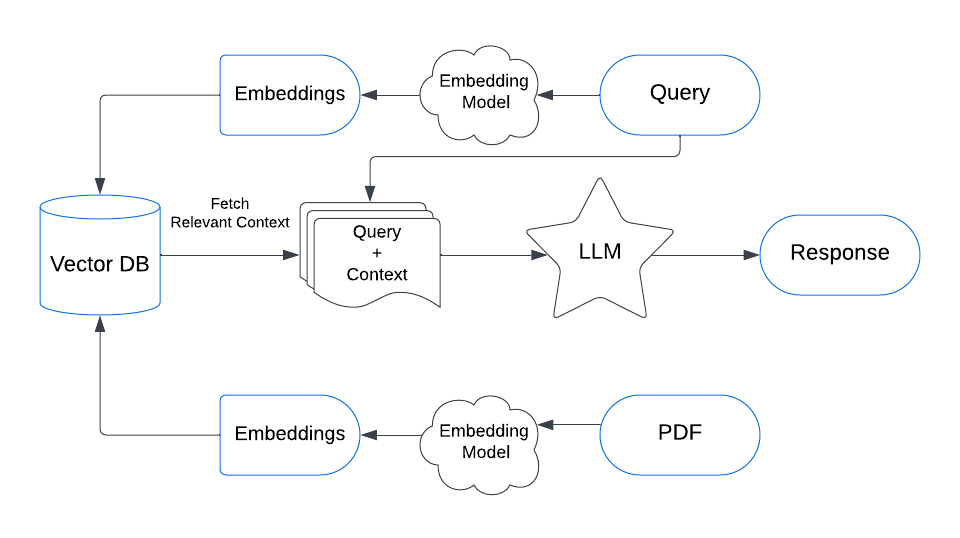
Retriever data with context, passed to LLM
4. Response Generation → The LLM synthesizes retrieved data with its parametric knowledge to produce coherent, sourced answers.
→ Post-processing may include fact-checking and fluency evaluation to ensure high-quality outputs.
Applications of Real-Time RAG
- Customer Support: Delivers personalized responses using real-time CRM and billing data.
- Financial Analytics: Integrates live market feeds and SEC filings for up-to-the-minute insights.
- Compliance Engines: Cross-references regulatory documents dynamically to ensure accuracy.
- Healthcare Informatics: Provide real-time clinical guidance by integrating patient records and medical literature.
Advanced Techniques for Enhanced Performance:
- Active Learning: Incorporates user feedback to iteratively improve retrieval accuracy and response relevance.
- Knowledge Graph Integration: Enhances contextual understanding by linking entities across different data sources.
- Explainability: Techniques like SHAP and LIME provide insights into how real-time data influences model outputs, improving transparency.
Case Study: Real- Time Weather Update Chat-bot
Create a chat-bot that uses real-time weather data to respond to user queries about the current weather in a specific location.
Components:
- Retriever Mechanics: Fetches real-time weather data from an API.
- Large Language Model (LLM): Generates responses based on the retrieved data.
- Shared Infrastructure: Handles user input and integrates the retriever and LLM.
Code Snippet
import requests
from transformers import pipeline

# Function to retrieve real-time weather data
def get_weather_data(location, api_key):
    base_url = f"http://api.openweathermap.org/data/2.5/weather?q={location}&appid={api_key}"
    response = requests.get(base_url)
    weather_data = response.json()
    return weather_data

# Function to generate a response using the LLM
def generate_response(weather_data):
    # Initialize the LLM
    model_name = "t5-small"
    generator = pipeline('text-generation', model=model_name)

    # Prepare the input prompt
    prompt = f"Describe the current weather in {weather_data['name']}: "

    # Generate the response
    response = generator(prompt, max_length=100)[0]['generated_text']
    return response

# Main function to handle user queries
def handle_user_query(location, api_key):
    weather_data = get_weather_data(location, api_key)
    response = generate_response(weather_data)
    return response

# Example usage
if __name__ == "__main__":
    # Replace 'YOUR_OPENWEATHERMAP_API_KEY' with your actual API key
    api_key = "YOUR_OPENWEATHERMAP_API_KEY"

    # For testing purposes, you can use a public API key if available, but it's recommended to use your own.
    # Note: As of my last update, there are no publicly available API keys for OpenWeatherMap that you can use directly.
    # You must sign up at https://openweathermap.org/ to get your own API key.

    location = input("Enter a city name: ")
    response = handle_user_query(location, api_key)
    print(response)
Instructions:
1. Obtain an OpenWeatherMap API Key:
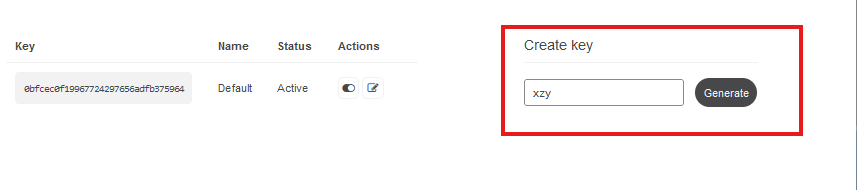
→ Go to OpenWeatherMap and sign up for an account. Once logged in, navigate to your account page and find the “API keys” section.
→ Generate a new API key and copy it.
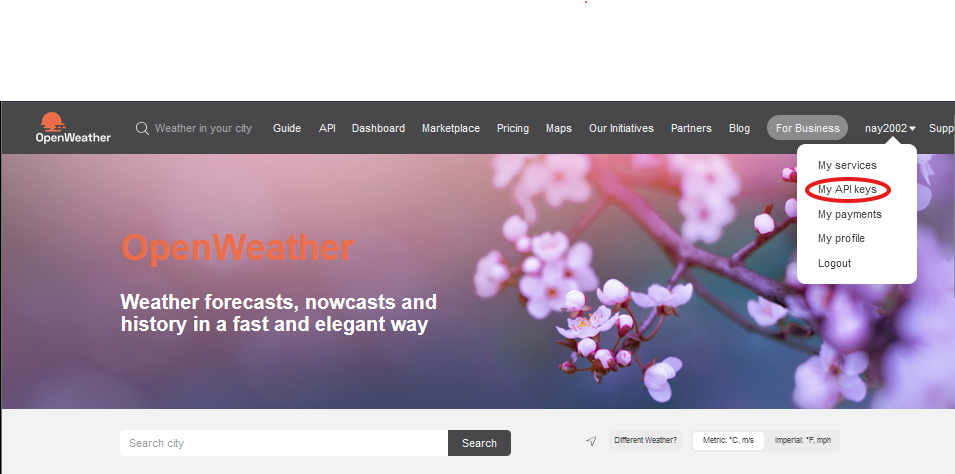
2. Replace the Placeholder API Key:
→ Replace
'YOUR_OPENWEATHERMAP_API_KEY'with your actual API key.
- Install Required Libraries:
→ Run
pip install requests transformersin your terminal to install necessary libraries.
Code Explanation:
The code begins by importing necessary libraries: requests for API calls and transformers for the language model. It defines functions to retrieve weather data and generate responses.
The get_weather_data function fetches real-time weather data using an API key. The generate_response function uses this data to create a response with a T5 model. The main function integrates these processes, prompting the user for a city name and displaying the generated weather description.
Citations:
- https://paperswithcode.com/method/rag
- https://qatalog.com/blog/post/real-time-ai/
- https://winder.ai/llm-architecture-rag-implementation-design-patterns/
- https://www.k2view.com/what-is-retrieval-augmented-generation
- https://hyperight.com/7-practical-applications-of-rag-models-and-their-impact-on-society/
- https://github.com/aishwaryanr/awesome-generative-ai-guide/blob/main/research_updates/rag_research_table.md
- https://www.linkedin.com/pulse/rag-architecture-deep-dive-frank-denneman-4lple
- https://airbyte.com/data-engineering-resources/rag-architecure-with-generative-ai
- https://www.ucumberlands.edu/blog/use-ai-real-time-data-analysis-and-decision-making
- https://arxiv.org/pdf/2312.10997.pdf
- https://arxiv.org/abs/2005.11401
- https://srels.org/index.php/sjim/article/view/171583
- https://www.databricks.com/glossary/retrieval-augmented-generation-rag
메타데이터
- post_id
- e2dcc9be4e7c
- slug
- real-time-rag-systems-boosting-ai-with-dynamic-data-e2dcc9be4e7c
- url
- https://medium.com/@nay1228/real-time-rag-systems-boosting-ai-with-dynamic-data-e2dcc9be4e7c
- canonical_url
- https://medium.com/@nay1228/real-time-rag-systems-boosting-ai-with-dynamic-data-e2dcc9be4e7c
- author_url
- https://medium.com/@nay1228
- status
- ok
- fetched_at
- 2026-06-27 23:56:40






