ACL (access control list)
Wiki topics:
🔓 · Open Source
ACL (access control list)
ACL use to set permission over file and directory to specific user or specific group. We can assign multiple user with different permission on same file or directory.
Definition and Purpose: ACL (Access Control List) is used to set permissions over a file or directory for a specific user or group, allowing multiple users to be assigned different permissions on the same file or directory.
To set ACL for a group: setfacl -m g:<grp_name>:<permissions> <file_name>
From the Group perspective:

- Group Example: Group
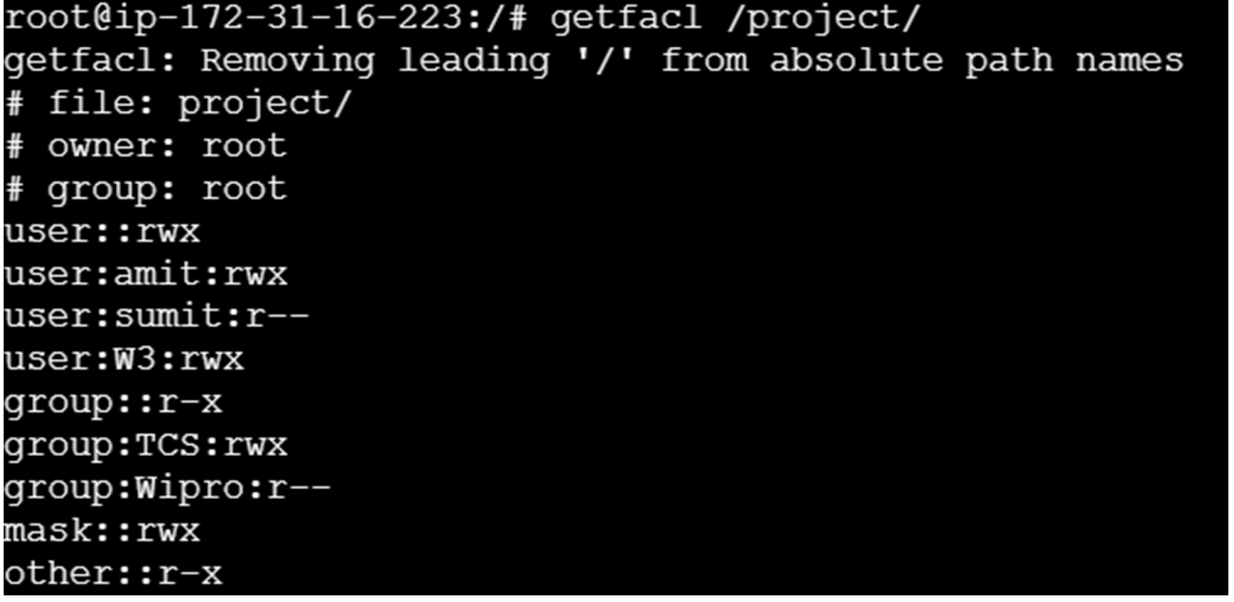
TCSwas givenrwx, and groupWIPROwas given no permission (-), but userW3of theWIPROgroup was givenrwx. - In above example, we have no permission of group WIPRO but we can put some permission to the user ‘W3’ of WIPRO group.
- Remove multiple users/groups: List them separated by a comma, e.g.,
# setfacl -x u:sumit, u:W3 /project. - Remove all ACL entries: Use the
-b, --remove-alloption (# setfacl -b/abc.txt). Note that this only removes extended ACL entries, retaining the base ACLs for the owner, group, and others.
메타데이터
- post_id
- e2ed72244ce3
- slug
- acl-access-control-list-e2ed72244ce3
- url
- https://medium.com/@mukundeotale9860/acl-access-control-list-e2ed72244ce3
- canonical_url
- https://medium.com/@mukundeotale9860/acl-access-control-list-e2ed72244ce3
- author_url
- https://medium.com/@mukundeotale9860
- status
- ok
- fetched_at
- 2026-06-13 07:35:29


