How to Scale a Spring Boot Reactive Application from 0 to 1 Million Users
How I Would Scale Spring WebFlux from 0 to 1,000,000 Users
How to Scale a Spring Boot Reactive Application from 0 to 1 Million Users
How I Would Scale Spring WebFlux from 0 to 1,000,000 Users
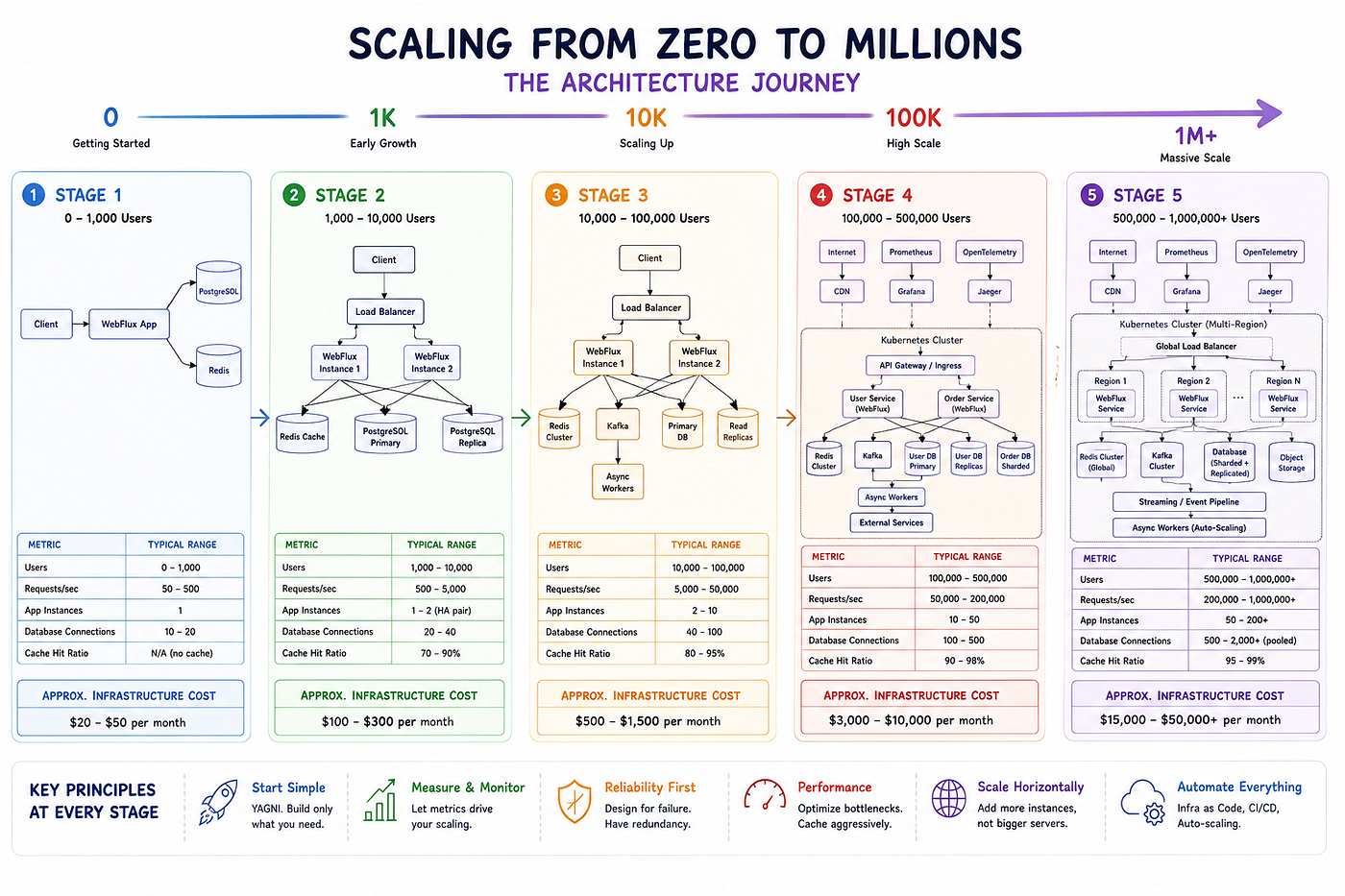
You’ve written your first reactive endpoint with Spring WebFlux. It responds in under 10 milliseconds. It uses only a handful of threads. You deploy it, and it handles 500 concurrent requests without breaking a sweat. It feels like you’ve unlocked a performance superpower.
Then reality arrives.
A few months later, you’re no longer serving hundreds of requests per second. You’re looking at 5,000, then 50,000, and eventually hundreds of thousands of users. Along the way, latencies begin to rise, databases start struggling, and your simple, elegant service turns into a collection of bottlenecks you never anticipated.
Why do some reactive applications scale effortlessly while others collapse under growth?
The answer isn’t the framework itself.
Spring WebFlux gives you the capability to handle massive concurrency, but capability alone doesn’t guarantee scalability. Architecture — not technology — is what determines whether your application survives growth. Scaling is a series of deliberate decisions made before you hit each limit, not after the outage has already happened.
This guide walks through those decisions step by step.
This isn’t a production postmortem or a fictional startup success story. Instead, it’s a practical architectural roadmap based on patterns that repeatedly emerge as systems grow. You’ll learn when to introduce new infrastructure, how to recognize upcoming bottlenecks, what architectural changes matter at each scale, and which optimizations often create more problems than they solve.
By the end, you’ll have a clear picture of how a Spring Boot Reactive application evolves from a small deployment serving a few users to a distributed platform capable of supporting millions.
Let’s start where every successful system begins: small, simple, and intentionally under-engineered.
Stage 1: 0 to 1,000 Users
At this stage, traffic is minimal.
You’re probably building a proof of concept, an internal platform, an MVP, or a newly launched API. The biggest challenge isn’t performance — it’s delivering value quickly.
Your primary goal is simplicity. Every component you add today becomes something you’ll need to maintain tomorrow.
What you need:
- A single Spring Boot application running on a modest VM or container (1–2 CPUs, 1–2 GB RAM).
- Embedded Netty (the default in WebFlux) — no separate application server required.
- A single PostgreSQL database instance.
- Basic indexing on primary keys and columns used in WHERE clauses.
- A deployment mechanism that’s simple: a shell script, a container image pushed to a registry, or even scp and java -jar.
Why this works
Netty’s event loop threads can handle thousands of connections without the overhead of excessive context switching. The application is completely self-contained, so there is no network latency between components. Debugging is straightforward because you only have one process to inspect through logs, thread dumps, and application metrics.

What Breaks Next?
A single instance can easily handle up to a few hundred requests per second. The first pain point is almost always the database — specifically, connection wait times. When the number of concurrent requests exceeds the available database connections, threads (or rather, event-loop tasks) start queuing. That’s your signal to tune connection pooling and introduce caching.

Stage 2: 1,000 to 10,000 Users
Traffic is growing. The application is still responsive, but you start seeing occasional latency spikes under peak load. Database connection pools are reaching their limits, and external API calls — if any — are taking longer to respond.
Changes you should make:
- Connection pooling for the database (R2DBC pool). Raise the maximum pool size and set an acquire timeout to fail fast rather than hang.
spring:
  r2dbc:
    pool:
      max-size: 30
      initial-size: 10
      max-idle-time: 30m
      max-acquire-time: 3s
2. WebClient for outgoing HTTP calls.
If your service calls other APIs, switch from RestTemplate (blocking) to a tuned WebClient. This keeps the reactive chain intact and avoids stealing event-loop threads.
@Bean
public WebClient webClient() {
    ConnectionProvider provider = ConnectionProvider.builder("http-pool")
            .maxConnections(200)
            .pendingAcquireMaxCount(500)
            .pendingAcquireTimeout(Duration.ofSeconds(10))
            .maxIdleTime(Duration.ofSeconds(30))
            .build();
    HttpClient httpClient = HttpClient.create(provider)
            .responseTimeout(Duration.ofSeconds(5))
            .compress(true);
    return WebClient.builder()
            .clientConnector(new ReactorClientHttpConnector(httpClient))
            .build();
}- Redis caching for hot queries.
Add the reactive Redis starter. Wrap frequently executed database calls with a cache-aside pattern. Keep TTLs short for data that changes rapidly, longer for reference data.
public Mono<User> getUserById(Long id) {
    return redisOps.opsForValue()
            .get("user:" + id)
            .switchIfEmpty(
                    userRepo.findById(id)
                            .flatMap(u -> redisOps.opsForValue()
                                    .set("user:" + id, u, Duration.ofMinutes(5))
                                    .thenReturn(u))
            );
}- JVM tuning.
Move to the G1 garbage collector. Set a heap size suitable for your memory budget (2–4 GB). Enable GC logging to catch early pause problems.
-Xms2g -Xmx2g -XX:+UseG1GC -XX:MaxGCPauseMillis=100Architecture diagram (Stage 2)

Should You Introduce Redis?
Use Redis when:
- The same queries are executed repeatedly within short time windows.
- Database CPU or connection utilization is consistently above 50%.
- Latency spikes correlate with database load.
Avoid Redis when:
- Data changes so frequently that cache invalidation adds complexity without reducing load.
- The dataset fits comfortably in application memory and you’re not horizontally scaled yet (in-memory cache like Caffeine is simpler).

Stage 3: 10,000 to 100,000 Users
The single server is now a bottleneck both for capacity and availability. The database, even with caching, struggles under combined read/write loads.
What to introduce:
Horizontal scaling of the application tier
Run multiple identical WebFlux instances behind a load balancer (NGINX, HAProxy, cloud LB). Since the application is stateless and relies on a shared Redis for caching, sticky sessions are not required.
Database read replicas
Create one or more PostgreSQL replicas. Route writes to the primary, reads to the replicas. This can be done with a routing ConnectionFactory or middleware like PgBouncer.
Asynchronous processing
Offload tasks that aren’t needed for the immediate response (sending emails, generating thumbnails) to a background queue. Even a simple Reactor Sink can work, but a proper message broker may be warranted if durability is needed.
Architecture diagram (Stage 3)

Should You Introduce a Load Balancer with Multiple Instances?
Already doing it. But note: statelessness is crucial. Any local cache (e.g., Caffeine) must be carefully scoped, or you’ll serve stale data.
What Breaks Next?
Read replicas solve read scaling, but write throughput hits physical limits of a single database instance. Also, inter-service communication (if you’ve begun splitting the monolith) becomes a web of synchronous calls that amplify latency. Event-driven decoupling becomes essential.

Architect’s Note: At this scale, the difference between success and failure often lies in how fast the load balancer can detect and exclude a sick instance. Keep health checks frequent and aggressive.
Stage 4: 100,000 to 500,000 Users
Data volume and synchronous coupling are the enemies now. The database, even with read replicas, can become a source of contention during write spikes. Cached data may drift if invalidation is unreliable. The load on external services may cause cascading failures.
Changes to make:
Distributed caching with a Redis cluster
Use Redis Cluster or a sharded proxy. For extremely popular keys, add a local Caffeine cache with a very short TTL (1–5 seconds) to reduce hot-key pressure.
Introduce Kafka for event-driven communication
Move from direct synchronous calls to asynchronous events. When a user signs up, an event is fired to Kafka. Other services consume it to send a welcome email, update analytics, etc. This decouples services and absorbs traffic spikes.
Reactive Kafka consumer example:
@Bean
public Disposable userSignupConsumer() {
    return reactiveKafkaConsumerTemplate
            .receiveAutoAck()
            .flatMap(record -> handleSignup(record.value()), 8)
            .subscribe();
}
2. Database partitioning or sharding
If a single PostgreSQL instance is reaching its write limits, partition large tables by tenant or time. Sharding at the application level is complex; exhaust other optimizations first.
3. Backpressure management in Reactor pipelines
When data flows between services or from Kafka, control how much in-flight data you allow.’
Flux.fromIterable(batch)
    .flatMap(item -> process(item), 16)
    .onBackpressureBuffer(1000, BufferOverflowStrategy.DROP_OLDEST)
    .subscribe();
Architecture diagram (Stage 4)

Should You Introduce Kafka?
Use Kafka when:
- Multiple services need to react to the same business event.
- You need to absorb traffic spikes and process later.
- You need guaranteed delivery and replay-ability.
Avoid Kafka when:
- You only have one producer and one consumer (a simple queue is enough).
- Latency is critical and must be in single-digit milliseconds end-to-end.
- You lack the operational expertise to manage a Kafka cluster.
What Breaks Next?
With many services, one slow downstream service can exhaust connection pools and cause cascading latency. Without proper observability, debugging becomes impossible. Auto-scaling becomes a requirement, not a luxury.

Architect’s Note: Backpressure is the soul of reactive systems. But if you connect to a non-reactive source (like a Kafka topic with millions of unprocessed messages), you must explicitly buffer or drop. Otherwise, the memory will silently climb until the pod OOMs.
Stage 5: 500,000 to 1 Million Users
You’re now running a large-scale distributed system. The reactive core is efficient, but the surrounding infrastructure must be equally resilient and elastic.
Essential patterns:
Kubernetes for orchestration
Package each service as a container. Use the Horizontal Pod Autoscaler (HPA) based on CPU and custom metrics (e.g., request rate). Readiness and liveness probes are mandatory.
Service decomposition
If you haven’t already, split the monolith into independent services by domain. Each gets its own database and scaling policy.
Circuit breakers and bulkheads
Apply Resilience4j’s Circuit Breaker to all external calls. Use Bulkheads to limit concurrent calls to a single downstream service, preventing one slow service from starving all threads.
Netty tuning
On Kubernetes nodes with 8 CPUs, set worker threads to 8 and enable epoll.
Garbage collection
Switch from G1 to ZGC for sub-millisecond pause times.
-XX:+UseZGC -Xms4g -Xmx4g -XX:+AlwaysPreTouch- Observability stack. Micrometer + Prometheus + Grafana for metrics. OpenTelemetry for distributed tracing. Structured logging aggregated to Loki or Elasticsearch. Alert on event loop pending tasks, connection pool pending acquires, and consumer lag.
Final architecture diagram (1M+ users)

Should You Move to Kubernetes?
Use Kubernetes when:
- You’re managing dozens of service instances and need automated scheduling.
- You need zero-downtime deployments and auto-scaling.
- Your team has operational expertise or can use a managed Kubernetes service.
Avoid Kubernetes when:
- You have only a few services and can manage them with simple scripts.
- The learning curve would slow down delivery more than the platform benefits.

Architect’s Note: At this scale, the most dangerous phrase is “it worked in staging.” Production traffic patterns are chaotic. Load test constantly, game-day your failure modes, and never assume the database will survive a cache flush.
Reactive Programming Myths
Over the years, several myths about reactive systems have led teams astray. Let’s debunk them.
Myth 1: WebFlux automatically makes applications fast
WebFlux changes how you handle concurrency, but it doesn’t make slow database queries or inefficient algorithms any faster. A 2-second query will still take 2 seconds — it just won’t block a thread while waiting.
Myth 2: Reactive means no connection pools needed
False. Even non-blocking I/O uses connections. R2DBC and WebClient both use connection pools. You still need to size them for your concurrency limits.
Myth 3: Higher flatMap concurrency always improves throughput
Beyond an optimal point, more concurrency saturates downstream services, increases memory pressure, and can actually reduce throughput. Use load testing to find the sweet spot (commonly 16–32 for I/O tasks).
Myth 4: Reactive applications cannot run out of memory
They absolutely can. Backpressure controls flow within the reactive stream, but if you hook a slow consumer to a fast producer without a buffer limit, you can run out of memory. Always define onBackpressureBuffer with a size cap or drop strategy.
Myth 5: You must rewrite the whole application to benefit from reactive
You can adopt WebFlux incrementally, routing traffic to reactive endpoints while keeping existing MVC endpoints. This allows gradual migration.
Reactive Programming Optimizations (Already covered; keep existing code)
(Existing Reactor tuning section with flatMap concurrency, publishOn, etc. can remain, but I’ll add a lead-in.)
Using Reactor effectively prevents many scaling issues. A few guidelines:
- Always set a concurrency limit on flatMap when the inner operation does I/O: flatMap(fn, 16).
- Use publishOn(Schedulers.boundedElastic()) to move heavy CPU work off the Netty event loop.
- Never call subscribeOn inside a request flow — it changes the subscription context, not the execution context of operators, leading to confusion.
- Avoid Mono.block() and Flux.blockLast(). They turn non-blocking flows into blocking ones, defeating the purpose.
Good:
return userRepo.findById(id)
    .flatMap(user -> enrichUser(user))
    .publishOn(Schedulers.boundedElastic());
Bad:
return Mono.just(userRepo.findById(id).block()); // kills reactivityCommon Scaling Mistakes
- Using block() in request handling. Instantly reduces concurrency to the Netty worker count.
- Keeping blocking JDBC or RestTemplate in a WebFlux app. Replace them with R2DBC and WebClient.
- Synchronous logging. Use async appenders; keep log levels at INFO or above.
- No cache strategy. Even a simple Redis cache-aside pattern can cut database load by 90%.
- Unlimited concurrency in flatMap. Set sensible concurrency limits.
- Using default connection pool settings. Size them for peak concurrent I/O.
Database Scaling Strategy
Indexing
Use composite indexes for all performance-critical queries. Verify index usage with EXPLAIN.
Read Replicas
Implement read replicas when read load outgrows a single database instance.
Partitioning
For large tables, partition by tenant or date if queries include the partition key.
Sharding
Use sharding as a last resort when write throughput exceeds a single node’s capacity. Implement application-aware routing.
Cache Scaling Strategy
Redis as Distributed Cache
Use Redis as a distributed cache. Adopt Redis Cluster for horizontal scaling.
Cache-Aside Pattern
Implement the cache-aside pattern with TTLs appropriate for the required data freshness.
Hot Key Mitigation
Place a local Caffeine cache with a short TTL in front of Redis to reduce hot-key pressure.
Cache Invalidation
Use write-through, delete-on-write, or publish invalidation events via Kafka.
Messaging and Event Processing (Kafka)
Kafka decouples services and provides durability. With reactive consumers, you can process events with controlled concurrency and backpressure.
Monitoring and Observability
Critical metrics to watch in production
- reactor_netty_eventloop_pending_tasks (blocking indicator)
- reactor_netty_connection_provider_pending_acquire_count (connection pool saturation)
- reactor_scheduler_boundedElastic_queue_size
- jvm_gc_pause_seconds
- Kafka consumer lag
- Custom cache hit ratios
Observability Stack
- Prometheus + Grafana for metrics collection and visualization.
- OpenTelemetry for end-to-end distributed tracing through reactive contexts.
메타데이터
- post_id
- e2fdca214f0e
- slug
- how-to-scale-a-spring-boot-reactive-application-from-0-to-1-million-users-e2fdca214f0e
- url
- https://medium.com/@gaddamnaveen192/how-to-scale-a-spring-boot-reactive-application-from-0-to-1-million-users-e2fdca214f0e
- canonical_url
- https://medium.com/@gaddamnaveen192/how-to-scale-a-spring-boot-reactive-application-from-0-to-1-million-users-e2fdca214f0e
- author_url
- https://medium.com/@gaddamnaveen192
- status
- ok
- fetched_at
- 2026-06-24 16:30:55