The Complete Guide to GitLab Migration and Implementation: Strategy, Execution, and Best Practices
Executive Summary
The Complete Guide to GitLab Migration and Implementation: Strategy, Execution, and Best Practices
Executive Summary
As organizations modernize their development workflows, GitLab has emerged as a comprehensive DevSecOps platform that integrates source code management, CI/CD, security scanning, and project management into a single application. This guide provides a comprehensive roadmap for successful GitLab migration and implementation, drawing from real-world enterprise deployments and industry best practices.
Part 1: The Case for GitLab Migration Why Organizations Are Moving to GitLab
The Modern Development Challenge: Organizations today face mounting pressure to accelerate software delivery while maintaining quality, security, and compliance. Legacy toolchains often consist of disconnected systems — Git repositories here, Jenkins servers there, separate security scanners, and project management tools elsewhere. This fragmentation creates significant overhead in maintenance, integration, and context switching.
GitLab’s Value Proposition: GitLab offers a unified platform that addresses this fragmentation through:
End-to-End Visibility: Single interface for code, pipelines, security findings, and project tracking
Reduced Tool Sprawl: Consolidated toolchain with fewer integration points and reduced licensing complexity
Built-in Security: Shift-left security with SAST, DAST, dependency scanning, and license compliance
Accelerated Time-to-Value: Integrated CI/CD eliminates configuration overhead between systems
Cost Optimization: Predictable pricing model and reduced infrastructure management burden
Common Migration Triggers Organizations typically migrate to GitLab when experiencing:
Scalability Issues: Legacy systems struggling with growing team sizes or codebase complexity
Security Concerns: Need for integrated security scanning and compliance reporting
DevOps Transformation: Moving from traditional development to modern DevOps/DevSecOps practices
Mergers and Acquisitions: Unifying disparate toolchains across newly combined organizations
Cost Reduction Initiatives: Consolidating multiple tool licenses and infrastructure costs
Part 2: Pre-Migration Assessment and Planning
Discovery Phase: Understanding Your Current State
Conduct a Comprehensive Toolchain Audit:
Inventory Current Tools: Document all existing SCM, CI/CD, security, and project management tools
Map Workflows: Diagram current development workflows, including branch strategies, review processes, and deployment pipelines
Assess Integration Points: Identify all custom integrations and automation between existing tools
Quantify Usage Patterns: Analyze repository sizes, active users, pipeline execution frequency, and storage requirements
Key Questions to Answer:
- How many repositories need migration?
- What are the largest/most complex repositories?
- What integrations require re-implementation?
- Are there compliance requirements (SOC2, HIPAA, GDPR)?
- What is the current cost structure versus GitLab’s pricing?
**Building Your Business Case
**ROI Analysis Components:
Direct Cost Savings:
- License consolidation from multiple tools
- Infrastructure reduction (servers, maintenance)
- Reduced integration development/maintenance
Productivity Gains:
- Estimated time saved from reduced context switching
- Faster pipeline setup and configuration
- Reduced troubleshooting time with integrated tooling
Risk Reduction:
- Improved security posture with built-in scanning
- Better compliance reporting and audit trails
- Reduced vendor management complexity
Example Calculation Template:
Total Current Annual Cost: $[Current Tool Costs] + $[Infrastructure] + $[Maintenance FTEs]
Projected GitLab Annual Cost: $[GitLicenses] + $[Reduced Infrastructure]
Annual Savings: $[Difference]
Productivity Gain: [X] FTEs worth of developer time
Payback Period: [Y] months
Part 3: GitLab Implementation Strategy
Choosing the Right Deployment Model
SaaS (GitLab.com) vs. Self-Managed:
Part 3: GitLab Implementation Strategy
Choosing the Right Deployment Model
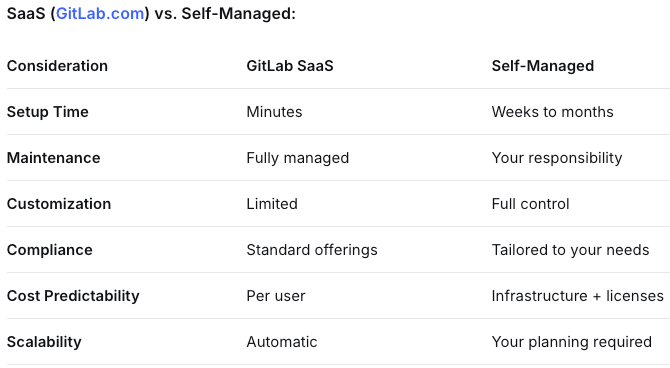
Hybrid Approach: Some organizations start with SaaS for smaller teams or proof-of-concepts while planning self-managed deployments for larger, compliance-sensitive workloads.
Infrastructure Planning for Self-Managed
Sizing Guidelines:
# Example sizing for different organization sizes
Small Team (< 50 users):
  - Application Servers: 2 nodes, 4-8 CPU, 16GB RAM each
  - PostgreSQL: 4 CPU, 8GB RAM (or managed service)
  - Redis: 2 CPU, 4GB RAM
  - Object Storage: S3-compatible (min 1TB initial)
  - Gitaly: 4 CPU, 16GB RAM per node

Medium Enterprise (50-500 users):
  - Application Servers: 3-5 nodes, 8-16 CPU, 32GB RAM each
  - PostgreSQL: 8-16 CPU, 16-32GB RAM (HA setup)
  - Redis Cluster: 3 nodes minimum
  - Object Storage: Based on artifact retention policies
  - Gitaly Cluster: Multiple nodes with load balancing

Large Enterprise (500+ users):
  - Reference Architecture recommended
  - Geo-replication for disaster recovery
  - Separate runners infrastructure
  - Enterprise-grade monitoring and logging
Migration Approaches
- Phased Migration (Recommended):
Phase 1: Pilot Project
  - Select non-critical project
  - Validate workflows
  - Train core team

Phase 2: Department/Team Rollout
  - Migrate entire teams
  - Refine processes
  - Expand training

Phase 3: Enterprise Rollout
  - Migrate remaining teams
  - Decommission legacy systems
  - Full adoption monitoringBig Bang Migration:
2. Big Bang Migration:
- All repositories migrate simultaneously
- Requires extensive planning and testing
- Higher risk, potentially faster completion
- Best for smaller organizations or greenfield projects
3. Hybrid Parallel Run:
- Both systems operate concurrently
- Gradual migration of projects
- Lowest risk, highest overhead
- Useful for mission-critical systems
Part 4: Technical Migration Process
Repository Migration Methodology
Preparation Steps:
- Repository Cleanup:
# Archive inactive repositories
# Remove large binary files with BFG or git-filter-repo
# Standardize .gitignore files
# Migrate LFS objects if applicable
2. Metadata Preservation:
- Map user accounts between systems
- Export/import issue trackers
- Preserve merge request history
- Migrate wiki pages and documentation
3. Pipeline Translation:
- Analyze existing CI/CD configurations
- Map to GitLab CI/CD syntax
- Test converted pipelines
- Document differences and gotchas
Automated Migration Script Example:
#!/usr/bin/env python3
"""
GitLab Migration Automation Script
Handles repository migration with metadata preservation
"""
import subprocess
import json
import requests

class GitLabMigrator:
    def __init__(self, source_token, target_token, target_url):
        self.source_headers = {"PRIVATE-TOKEN": source_token}
        self.target_headers = {"PRIVATE-TOKEN": target_token}
        self.target_url = target_url

    def clone_and_push(self, source_repo, target_namespace):
        """Migrate repository with all branches and tags"""
        # Clone with all references
        subprocess.run([
            "git", "clone", "--mirror",
            source_repo["ssh_url_to_repo"]
        ], check=True)

        # Push to new GitLab instance
        repo_name = source_repo["path_with_namespace"]
        target_url = f"{self.target_url}/{target_namespace}/{repo_name}.git"

        subprocess.run([
            "git", "push", "--mirror", target_url
        ], check=True)

        # Cleanup
        subprocess.run(["rm", "-rf", repo_name])

    def migrate_issues(self, source_project_id, target_project_id):
        """Transfer issues with comments and labels"""
        # Implementation for issue migration
        pass

# Usage example
migrator = GitLabMigrator(
    source_token="SOURCE_ACCESS_TOKEN",
    target_token="TARGET_ACCESS_TOKEN",
    target_url="https://gitlab.example.com"
)
CI/CD Pipeline Transformation
Common Conversion Patterns:
Jenkins to GitLab CI/CD:
# Before: Jenkinsfile
pipeline {
  agent any
  stages {
    stage('Build') {
      steps {
        sh 'mvn clean compile'
      }
    }
  }
}

# After: .gitlab-ci.yml
stages:
  - build

build:
  stage: build
  script:
    - mvn clean compile
Complex Workflow Handling:
# Multi-project pipelines
build:
  stage: build
  script:
    - echo "Building application"
  artifacts:
    paths:
      - target/*.jar

deploy:
  stage: deploy
  trigger:
    project: infrastructure/deployment
    strategy: depend

# Parent-child pipelines
include:
  - local: '/templates/.security-scan.yml'
  - project: 'shared/ci-templates'
    file: '/docker-build.yml'
Security and Compliance Setup
Essential Security Configurations:
Authentication and Authorization:
- Configure LDAP/SSO integration
- Set up group and project access controls
- Implement two-factor authentication
Security Scanning Pipeline:
stages:
  - test
  - security

include:
  - template: Security/SAST.gitlab-ci.yml
  - template: Security/Dependency-Scanning.gitlab-ci.yml
  - template: Security/Container-Scanning.gitlab-ci.yml

# Custom security policies
security-policy:
  stage: security
  script:
    - check_license_compliance.py
    - audit_dependencies.py
Compliance Framework Implementation:
- Configure audit events and streaming
- Set up compliance pipelines
- Implement merge request approval rules
- Configure protected branches and tags
Part 5: Post-Migration Optimization
Performance Tuning
Database Optimization:
-- PostgreSQL tuning for GitLab
ALTER SYSTEM SET shared_buffers = '4GB';
ALTER SYSTEM SET effective_cache_size = '12GB';
ALTER SYSTEM SET maintenance_work_mem = '1GB';
ALTER SYSTEM SET checkpoint_completion_target = 0.9;
ALTER SYSTEM SET wal_buffers = '16MB';
Gitaly Configuration:
# gitaly.config.toml
[[storage]]
name = "default"
path = "/var/opt/gitlab/git-data/repositories"

[gitaly-ruby]
dir = "/opt/gitlab/embedded/service/gitaly-ruby"

[[listeners]]
address = "/var/opt/gitlab/gitaly/gitaly.socket"
Runner Optimization:
# /etc/gitlab-runner/config.toml
concurrent = 20
check_interval = 0

[[runners]]
  name = "docker-executor"
  url = "https://gitlab.example.com"
  token = "PROJECT_REGISTRATION_TOKEN"
  executor = "docker"
  [runners.docker]
    tls_verify = false
    image = "alpine:latest"
    privileged = false
    disable_entrypoint_overwrite = false
    oom_kill_disable = false
    disable_cache = false
    volumes = ["/cache"]
    shm_size = 0
  [runners.cache]
    [runners.cache.s3]
      ServerAddress = "s3.amazonaws.com"
      AccessKey = "AMAZON_ACCESS_KEY"
      SecretKey = "AMAZON_SECRET_KEY"
      BucketName = "runner-cache"
Monitoring and Maintenance
Essential Monitoring Stack:
GitLab Prometheus Metrics:
- Application performance indicators
- Background job queues
- Repository storage growth
- User activity patterns
Infrastructure Monitoring:
- CPU, memory, disk I/O
- Database connection pools
- Network latency and throughput
- Backup success rates
Business Metrics:
- Pipeline success rates
- Mean time to recovery (MTTR)
- Deployment frequency
- Lead time for changes
Automated Maintenance Tasks:
#!/bin/bash
# GitLab maintenance script

# Daily tasks
gitlab-rake gitlab:backup:create
gitlab-rake gitlab:uploads:check

# Weekly tasks
gitlab-rake gitlab:doctor:secrets
gitlab-rake gitlab:cleanup:orphan_job_artifacts

# Monthly tasks
gitlab-rake gitlab:cleanup:project_uploads
gitlab-rake gitlab:cleanup:remote_uploads
Part 6: Change Management and Adoption
Training Strategy
Role-Based Training Programs:
Developers:
- Basic Git workflow in GitLab
- Merge requests and code review
- CI/CD pipeline interaction
- Security scanning results interpretation
DevOps Engineers:
- Advanced CI/CD configuration
- Runner management and optimization
- Infrastructure as Code integration
- Monitoring and troubleshooting
Security Teams:
- Security dashboard navigation
- Vulnerability management workflow
- Compliance reporting
- Security policy configuration
Managers:
- Project and group management
- Analytics and reporting
- Resource planning
- Value stream metrics
Adoption Metrics and KPIs
Track These Key Metrics:
Adoption Metrics:
  - Active users per week/month
  - Repository creation rate
  - Merge request volume
  - Pipeline execution count
  - Security scan adoption rate

Performance Metrics:
  - Pipeline success rate (%)
  - Average pipeline duration
  - Mean time to merge
  - Deployment frequency
  - Lead time for changes

Business Metrics:
  - Developer productivity scores
  - Incident rate reduction
  - Security vulnerability detection rate
  - Cost per deployment
Part 7: Common Pitfalls and How to Avoid Them
Technical Challenges
Large Repository Migration:
- Problem: Timeouts during push of large repositories
- Solution: Use incremental migration, optimize repository before migration, increase timeout settings
Pipeline Performance Issues:
- Problem: Slow CI/CD pipelines after migration
- Solution: Optimize Docker layers, implement caching, use parallel jobs, review runner configuration
Authentication Problems:
- Problem: SSO/LDAP integration issues
- Solution: Test with small group first, ensure proper attribute mapping, have fallback authentication
Organizational Challenges
1. Resistance to Change:
- Strategy: Identify champions, provide ample training, demonstrate quick wins, maintain legacy system parallel during transition
2. Skill Gaps:
- Strategy: Phased training program, pair experienced with new users, create comprehensive documentation, establish internal support channels
3. Process Inconsistency:
- Strategy: Define and document standard operating procedures, implement linting for CI/CD files, use templates and includes for consistency
Conclusion: Maximizing GitLab Value
Successful GitLab implementation extends beyond technical migration. Organizations that realize the greatest value from GitLab:
- Embrace the Platform Mentality: Leverage integrated features rather than recreating old workflows
- Iterate and Optimize: Treat your DevOps platform as a product that evolves with your needs
- Measure Continuously: Track both technical metrics and business outcomes
- Foster Community: Encourage knowledge sharing and best practice development internally
- Stay Current: Regularly update and leverage new GitLab features as they’re released
Next Steps Checklist
- Complete pre-migration assessment
- Define success metrics and KPIs
- Choose deployment model (SaaS vs. self-managed)
- Develop detailed migration plan
- Execute pilot migration
- Train key users and administrators
- Migrate production workloads
- Establish monitoring and optimization processes
- Plan for ongoing governance and improvement
By following this comprehensive guide, organizations can navigate the complexities of GitLab migration while setting the foundation for accelerated software delivery, improved security, and enhanced collaboration across their development teams.
메타데이터
- post_id
- e3046629f01a
- slug
- the-complete-guide-to-gitlab-migration-and-implementation-strategy-execution-and-best-practices-e3046629f01a
- url
- https://medium.com/@nagamuralikoneru/the-complete-guide-to-gitlab-migration-and-implementation-strategy-execution-and-best-practices-e3046629f01a
- canonical_url
- https://medium.com/@nagamuralikoneru/the-complete-guide-to-gitlab-migration-and-implementation-strategy-execution-and-best-practices-e3046629f01a
- author_url
- https://medium.com/@nagamuralikoneru
- status
- ok
- fetched_at
- 2026-07-23 00:52:37



