I Built an AI Assistant That Lives in Slack, Here’s the Architecture Behind It
No fancy servers. No complicated setup. Just a bot that actually understands what you’re asking, and the decisions that made it work.
I Built an AI Assistant That Lives in Slack, Here’s the Architecture Behind It
No fancy servers. No complicated setup. Just a bot that actually understands what you’re asking, and the decisions that made it work.
Imagine working in an office where people repeatedly walk over to the same filing cabinet.
They search through folders, collect a few documents, perform some calculations, and return to their desks with an answer.

Repetitive Task | PC: (image generated using chatgpt prompt)
Now imagine there is someone who already knows where everything is. You ask a question, they retrieve the right information from the right systems, and they explain the answer clearly.
That is essentially what I built.
The “filing cabinets” were internal APIs and databases. The assistant was an AI model. And instead of building another website that people would have to remember to visit, I placed the entire experience inside Slack.
The final system was not especially complicated. But that simplicity came from making several architectural decisions carefully before writing too much code.
I started with the place people already worked
My first decision was to build the assistant inside Slack rather than create a separate web application.
A standalone application would have given me more freedom over the interface. It would also have required people to open another tab, sign in, learn a new workflow, and remember that the tool existed.
For an internal assistant, that felt unnecessary.
People were already using Slack to ask questions, share updates, and discuss customer issues. Putting the assistant there meant they could interact with it the same way they interacted with a colleague.
They could type:
How did this customer perform during the last seven days?
Then continue in the same thread:
What about last month?
There was no new interface to learn and no need to repeat the full context with every question.
Slack threads turned out to be especially useful. Each thread naturally became a separate conversation with its own context. That made the assistant feel less like a command-line tool and more like a teammate participating in a discussion.
I chose Socket Mode instead of opening a public webhook
A traditional Slack bot normally receives events through a webhook.
Slack sends an HTTP request to a public endpoint whenever someone sends the bot a message. This works well, but it means the bot needs an internet-accessible address.
For an internal tool, that introduces work I did not actually need:
- A public endpoint
- Load balancer or ingress configuration
- TLS certificates
- Firewall rules
- Local tunnelling during development
- Another externally exposed surface to secure
I chose Slack Socket Mode instead.
With Socket Mode, the bot opens an outbound WebSocket connection to Slack and keeps that connection alive. Slack events arrive through the existing connection, and the bot sends responses back through it.
The direction of the connection mattered.
Instead of exposing a door and waiting for Slack to knock, my service connected to Slack from inside the corporate network.
The setup was small:
import { App } from "@slack/bolt";const app = new App({
token: process.env.SLACK_BOT_TOKEN,
appToken: process.env.SLACK_APP_TOKEN,
socketMode: true
});app.message(async ({ message, say }) => {
await say(`Got it. You said: ${message.text}`);
});await app.start();console.log("Slack assistant is running");There was no public URL, no inbound port, and no development tunnel.
For an internal assistant running inside a controlled network, this was the cleaner boundary.
The language model understood questions, but not my data
Once Slack communication was working, the more interesting problem appeared.
A language model can understand many different ways of asking the same question. It can recognise that:
How is Acme doing?
and:
Show me Acme’s delivery performance for this week.
are probably asking for similar information.
But the model does not automatically know what is inside a company database or an internal analytics API.
Giving it access to everything would be impractical and unsafe. It also would not scale. The model did not need all the data. It needed a controlled way to retrieve the specific data required for the current question.
I used tool calling for this.
I treated the model as an analyst who could understand the question but needed to call specialists to retrieve facts.
Each specialist was a small JavaScript function with one clear responsibility.
For example, I could define a tool for retrieving customer performance:
const tools = [
  {
    type: "function",
    function: {
      name: "get_metrics",
      description:
        "Fetch performance metrics for a customer over a requested time window.",
      parameters: {
        type: "object",
        properties: {
          customer_id: {
            type: "string",
            description: "The unique customer identifier"
          },
          window: {
            type: "string",
            description:
              "The requested time window, such as 7 days or last month"
          }
        },
        required: ["customer_id", "window"]
      }
    }
  }
];
The model received the available tool definitions along with the conversation.
It then decided whether it could answer directly or needed to call one of those tools.
I built the assistant as a small reasoning loop
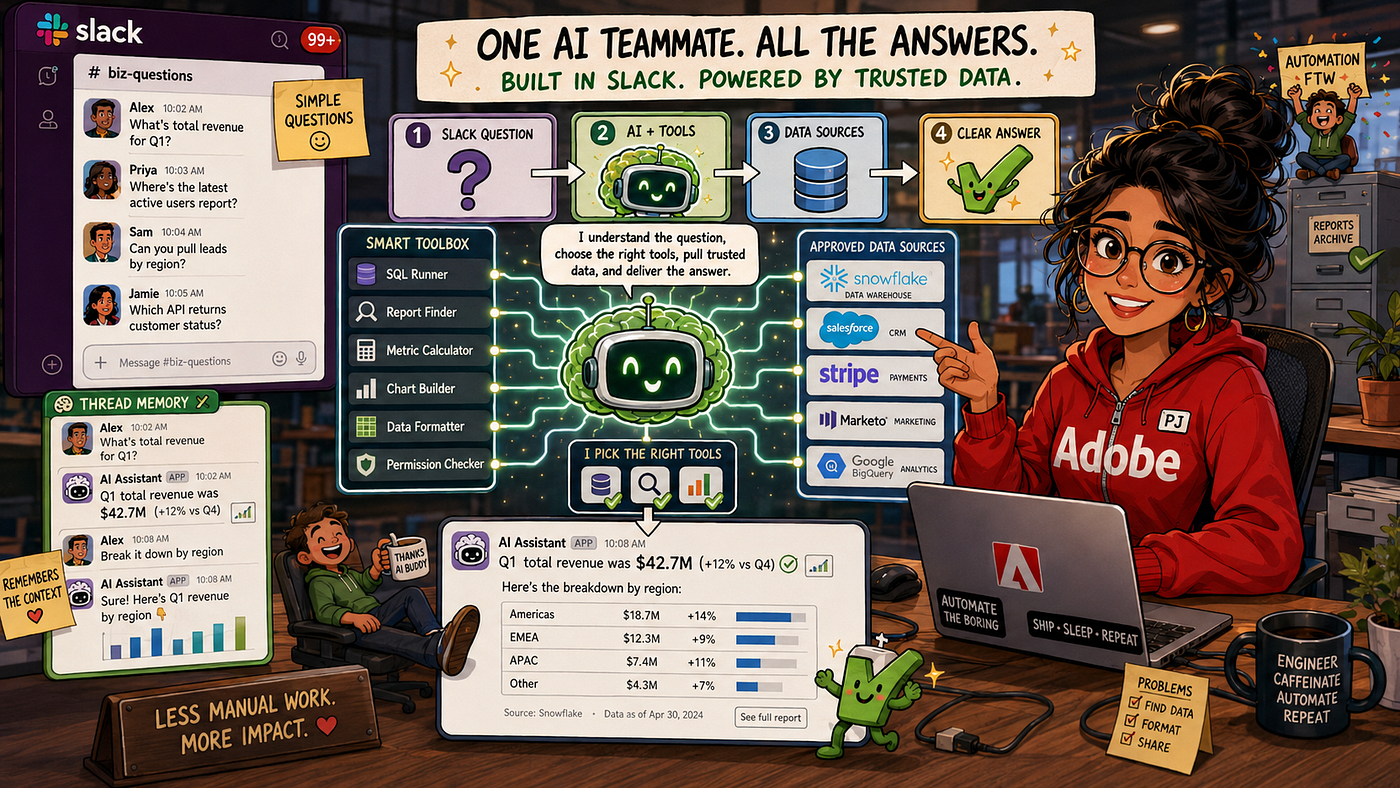
AI powered slack bot | PC: (image generated using chatgpt prompt)
The core of the architecture was a loop.
The model received the conversation and the list of tools. If it requested a tool, the application executed that function and returned the result to the model. The model could then either call another tool or produce the final response.
A simplified version looked like this:
async function runAgentLoop(messages, tools) {
  while (true) {
    const response = await openai.chat.completions.create({
      model: "gpt-4o",
      messages,
      tools
    });
const choice = response.choices[0]; if (choice.finish_reason === "tool_calls") {
const toolCall = choice.message.tool_calls[0];
const args = JSON.parse(toolCall.function.arguments); const result = await executeTool(
toolCall.function.name,
args
); messages.push(choice.message);
messages.push({
role: "tool",
tool_call_id: toolCall.id,
content: JSON.stringify(result)
}); continue;
} return choice.message.content;
}
}This loop made the assistant flexible without making the surrounding application complicated.
The model handled language interpretation and tool selection. My application remained responsible for executing approved functions and returning their structured results.
That boundary was important.
The model could choose from the tools I provided, but it could not arbitrarily query systems or execute unrestricted code.
Thread memory made follow-up questions work
Without conversation memory, the assistant would quickly become frustrating.
A user might ask:
How is Acme performing?
Then follow with:
What about the previous month?
Without the earlier message, the second question is incomplete. The bot would have to ask which customer the user meant.
I used the Slack thread timestamp as the conversation identifier.
Each thread stored its own message history:
const threadHistory = new Map();app.message(async ({ message, client }) => {
const threadTs = message.thread_ts ?? message.ts;
const history = threadHistory.get(threadTs) ?? []; history.push({
role: "user",
content: message.text
}); const reply = await runAgentLoop(
[systemPrompt, ...history],
tools
); history.push({
role: "assistant",
content: reply
}); threadHistory.set(
threadTs,
history.slice(-20)
); await client.chat.postMessage({
channel: message.channel,
thread_ts: threadTs,
text: reply
});
});I intentionally limited the history to the most recent 20 turns.
Keeping every message forever would increase the amount of context sent to the model with each request. That would increase both latency and cost, even when older messages were no longer useful.
Twenty turns was enough for the conversations I expected while keeping the context bounded.
For this first version, I stored the history in memory. That meant it disappeared when the process restarted. I accepted that tradeoff because the tool was intended for internal, short-lived conversations.
If durable memory became necessary, I could move the same thread history into Redis or another shared store without changing the rest of the architecture.
The quality of the tools mattered more than the prompt
Most of the real design work was not in the Slack integration or the model call.
It was in the tools.
I found that tools worked best when each one had a narrow purpose. A function that tried to support ten unrelated operations was harder for the model to select correctly and harder for engineers to test.
I preferred several small tools over one large “do everything” function.
The descriptions were also important. The model used them to decide when a tool was appropriate. I treated every description as an API contract written for an intelligent but unfamiliar colleague.
A vague description created vague routing.
A precise description gave the model enough context to choose correctly.
I also made the tools return structured data rather than finished sentences:
async function get_metrics({ customer_id, window }) {
  const data = await fetchFromAPI(
    customer_id,
    window
  );
return {
customer: data.name,
sent: data.totalSent,
delivery_rate: data.deliveryRate,
bounce_rate: data.bounceRate,
period: window
};
}The tool retrieved facts. The model explained those facts.
This kept responsibilities clear.
The data function did not need to know whether the response would be used in Slack, a weekly report, or another interface. It returned a stable JSON structure that any consumer could use.
Structured errors followed the same pattern. Instead of throwing a raw stack trace into the conversation, a tool could return something like:
{
  "status": "not_found",
  "message": "No customer matched the supplied identifier."
}
The model could then explain the problem naturally and ask the user to verify the identifier.
I kept deployment intentionally boring
Socket Mode removed the need for a public web server, so the assistant could run as a normal Node.js process.
I used systemd to keep it running:
[Unit]
Description=AI Slack Assistant
After=network.target
[Service]
WorkingDirectory=/opt/my-bot
ExecStart=/usr/bin/node src/index.js
Restart=always
RestartSec=5
EnvironmentFile=/opt/my-bot/.env[Install]
WantedBy=multi-user.targetThe important line was:
Restart=alwaysIf the process crashed, the operating system restarted it. The WebSocket connection was re-established, and the bot returned within seconds.
I also added a deployment script that ran the test suite before restarting the service. A failed test prevented the new version from replacing the working one.
This was not the most sophisticated deployment architecture available.
It was the architecture the workload needed.
There was one bot, one connection, and a focused internal user base. Adding container orchestration, ingress infrastructure, or multiple replicas would have created more operational work without improving the experience meaningfully.
The architecture became more valuable as I added tools
Once the basic structure was working, adding new capabilities became straightforward.
A new data source usually meant adding another tool.
A new database query meant defining a focused function and describing when it should be used.
The Slack integration, thread memory, model loop, error handling, and response formatting did not need to be rebuilt.
I could also reuse the same tools outside interactive conversations.
For example, a weekly scheduled summary could call the same functions the assistant used:
import cron from "node-cron";cron.schedule("0 8 * * 1", async () => {
await postWeeklyDigest(
app.client,
CHANNEL_ID
);
});That reuse was one of the strongest outcomes of the architecture.
The tools became a small internal capability layer. Slack was one interface to them, but it did not have to be the only one.
The tradeoffs were acceptable, not invisible
The assistant was not instant.
A request involving one or more model tool calls could take several seconds. For an internal assistant answering analytical questions, that was acceptable. For a latency-sensitive product, it would not be.
The deployment also used one process and one Slack connection. If the process failed, the bot was unavailable until systemd restarted it.
That recovery time was short enough for an internal tool. It would not have been sufficient for a customer-facing critical service.
And because thread history lived in memory, conversations reset after a restart.
I understood these limitations before choosing the architecture.
They were not accidental shortcomings. They were tradeoffs I accepted because they matched the expected usage, reliability requirement, and operational budget.
If those requirements changed, the architecture had a clear path forward: Redis for shared memory, multiple workers for availability, stronger observability, and a more formal deployment platform.
I did not need to build all of that on day one.
What I would tell someone building this today
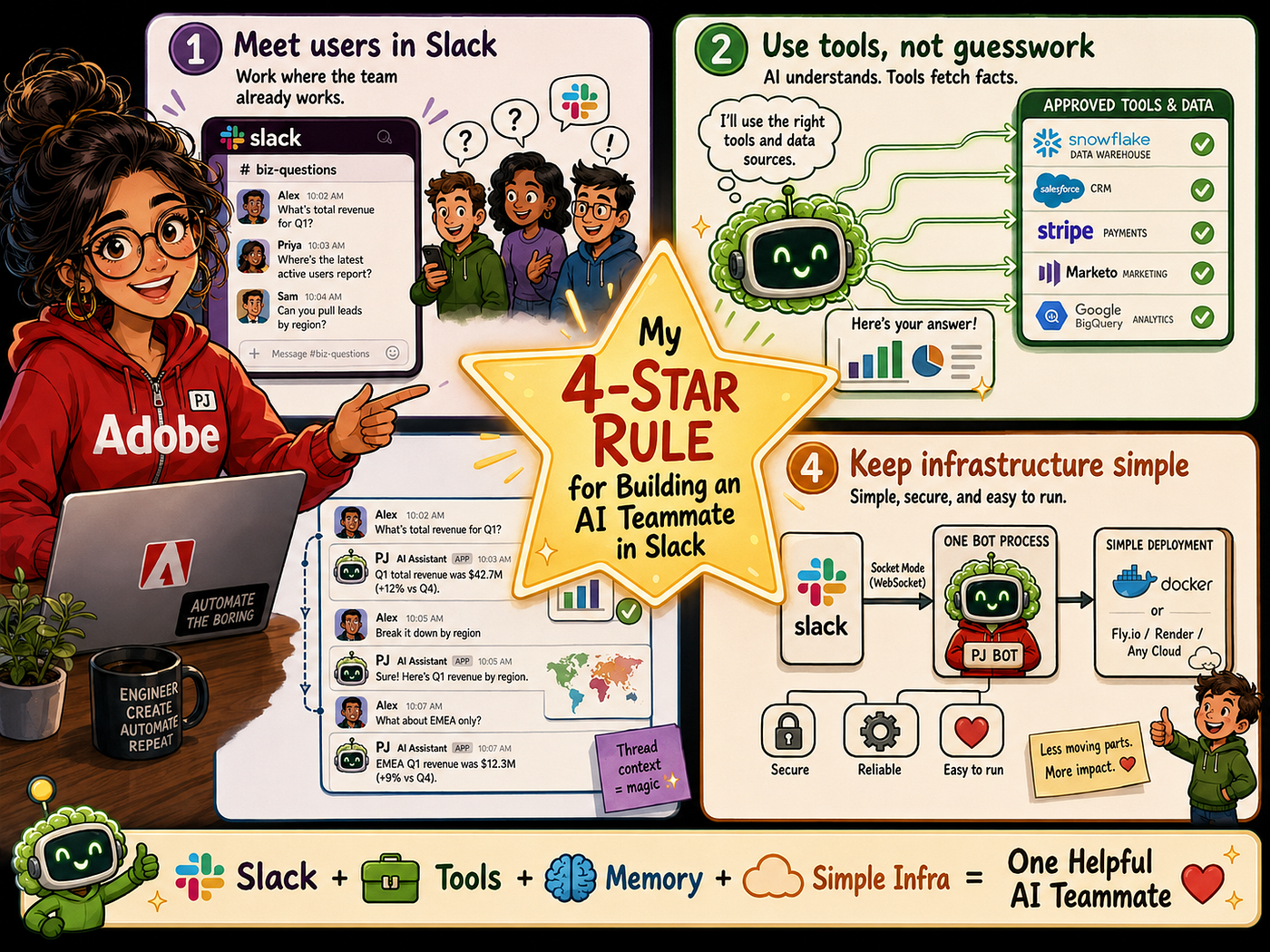
4 Star rule | PC: (image generated using chatgpt prompt)
Start with one useful question.
Do not begin by trying to build a universal company assistant. Choose one repeated task that currently requires someone to search a system manually.
Build one focused tool for it.
Give the tool a clear contract. Return structured data. Let the model handle the conversation, but keep data access and permissions inside code you control.
Then place the assistant where people already work.
For my team, that place was Slack.
The hard part was not connecting an AI model to a chat window. The hard part was deciding which responsibilities belonged to the model, which belonged to the tools, and which tradeoffs were reasonable for an internal service.
Once those boundaries were clear, the implementation became surprisingly small.
The result was not an AI that magically knew everything.
It was something more useful: an assistant that understood the question, knew which approved systems to consult, and returned the answer where the team was already having the conversation.
메타데이터
- post_id
- e33e858eaee2
- slug
- i-built-an-ai-assistant-that-lives-in-slack-heres-the-architecture-behind-it-e33e858eaee2
- url
- https://medium.com/@priyanshijajoo96/i-built-an-ai-assistant-that-lives-in-slack-heres-the-architecture-behind-it-e33e858eaee2
- canonical_url
- https://medium.com/@priyanshijajoo96/i-built-an-ai-assistant-that-lives-in-slack-heres-the-architecture-behind-it-e33e858eaee2
- author_url
- https://medium.com/@priyanshijajoo96
- status
- ok
- fetched_at
- 2026-08-11 06:36:52