Why 90% Of Engineers Fall Behind In This AI Era? (And How To Fix It)
Tokens, embeddings, retrieval, tool calls, the agent loop, and evals.
Why 90% Of Engineers Fall Behind In This AI Era? (And How To Fix It)
Tokens, embeddings, retrieval, tool calls, the agent loop, and evals.
Read the article for free **here**.

A friend showed me a $200 monthly OpenAI bill from a 12-line wrapper. The engineer who shipped it can write production Python in his sleep. But he still could not tell me how many tokens his wrapper sent per request.
Same thing happens with retrieval. An engineer wires up pinecone, the bot hallucinates, and they try fixing it by introducing rules in the system prompt. But the model just read the chunks the retrieval returned.
The pattern repeats. Engineers who can build distributed systems get stuck on AI features for the same reasons over and over. Six concepts cover almost all of them. What a token is, how retrieval actually works, what an agent loop does, and three more concepts explain the foundation. We will look at each one in simple terms with the smallest piece of code that proves it.
Tokens And Context Windows
You need to know exactly what you are paying for. If you ask a standard software engineer how many tokens their last prompt consumed they will usually guess a number based on word count. The assume token is just a word.
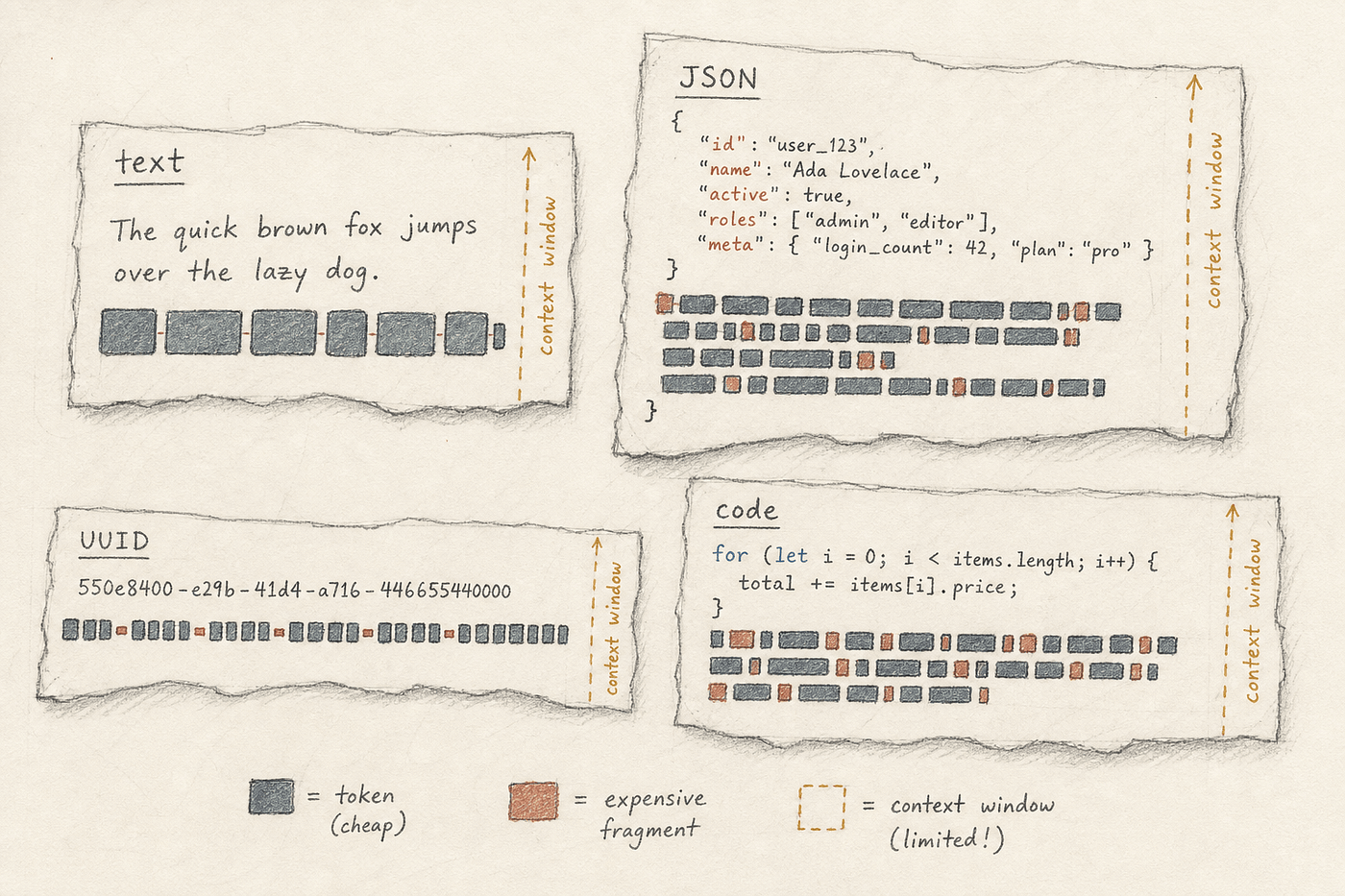
A token is the unit the model charges for, measures, and limits. It is roughly three quarters of a word in English but the ratio drifts wildly for code, JSON, UUIDs, and non-English text. The model never sees characters or words. It sees integers from a fixed vocabulary the tokenizer assigns. The tokenizer is simply the program that converts text into the integers the model reads, and different vendors ship different ones.
Every API call has an input cost and an output cost. The input includes your prompt, the system message, and any retrieved context. The output is the completion the model generates. These are priced differently. Output is typically several times more expensive per token than input. The context window is the maximum number of tokens the model can hold in one call combining both input and output.
Here is what the model actually sees when you send it a prompt.
import tiktoken

enc = tiktoken.get_encoding("cl100k_base")

samples = {
    "english": "The cat sat on the mat.",
    "as_json": '{"subject":"cat","verb":"sat","location":"mat"}',
    "as_uuid": "550e8400-e29b-41d4-a716-446655440000",
    "as_code": "for i in range(len(items)): process(items[i])",
}

print(f"{'label':<10}  {'tokens':>6}  {'chars':>5}  text")
print("." * 70)
for label, text in samples.items():
    n_tokens = len(enc.encode(text))
    print(f"{label:<10}  {n_tokens:>6}  {len(text):>5}  {text!r}")
label tokens chars text
......................................................................
english 7 23 'The cat sat on the mat.'
as_json 13 47 '{"subject":"cat","verb":"sat","location":"mat"}'
as_uuid 14 36 '550e8400-e29b-41d4-a716-446655440000'
as_code 15 47 'for i in range(len(items)): process(items[i])'The printed table shows the variance. The JSON version of the same sentence costs almost twice as many tokens. The UUID is dense in tokens despite being short in characters, while code sits somewhere in the middle. The tokenizer struggles with random character strings like UUIDs because they do not map neatly to common syllables in its training data. It has to break them down into smaller chunks or individual characters.
You should never stuff the context window. Just because the model supports a two million token window, don’t just dump an entire 50-page PDF into the prompt. Long context is expensive, and it quietly degrades the model’s attention to what matters in the middle of the prompt. Short and focused prompts are cheaper and usually much more accurate.
Embeddings
While tokens explain the cost of putting data in front of the model, embeddings determine which data actually deserves to be there.
An embedding is what happens when you ask a model what a piece of text means and accept a list of numbers as the answer. It is a fixed-length vector. Depending on the model this vector contains anywhere from 768 to 3072 floating point numbers. Texts with similar meanings produce numerically close vectors.
You can think of an embedding as a hash function where collisions are a deliberate feature. Similar inputs produce similar outputs. The model that produces embeddings is a different model than the chat model. It is smaller, cheaper, and trained specifically to map semantic similarity.
import os
import numpy as np
from google import genai

client = genai.Client(api_key=os.environ["GEMINI_API_KEY"])

texts = [
    "the cat sat on the mat",
    "a feline rested on a rug",
    "the stock market crashed today",
]

resp = client.models.embed_content(
    model="gemini-embedding-001",
    contents=texts,
)
vectors = np.array([e.values for e in resp.embeddings])

def cosine(a: np.ndarray, b: np.ndarray) -> float:
    return float(np.dot(a, b) / (np.linalg.norm(a) * np.linalg.norm(b)))

print(f"vector dim: {vectors.shape[1]}\n")
for i in range(len(texts)):
    for j in range(i + 1, len(texts)):
        score = cosine(vectors[i], vectors[j])
        print(f"  {score:.3f}   {texts[i]!r}\n          vs  {texts[j]!r}\n")
vector dim: 768
0.885 'the cat sat on the mat'
vs 'a feline rested on a rug'
0.512 'the cat sat on the mat'
vs 'the stock market crashed today'
0.508 'a feline rested on a rug'
vs 'the stock market crashed today'The printed vector dim shows the size of the coordinate space. The cosine function is just four lines of math and represents the entire similarity primitive. No vector database is doing the heavy lifting here. The math itself is straightforward. The cat sentences score noticeably higher against each other than either scores against the stock market sentence.
The trap is assuming embedding distance is the exact same thing as topical relevance. Two questions about completely different code modules can sit very close in embedding space because they share scaffolding language. A user asking how to configure the staging database sounds structurally identical to a user asking how to configure the production cache. The model sees the words “how to configure” and groups them together. Most production search bugs trace back to this single confusion.

RAG
Embeddings tell you whether two pieces of text are close. Retrieval-Augmented Generation (RAG) is the pattern that turns ‘close’ into ‘in the prompt’. Most engineers can sketch what RAG does at a high level but struggle to implement it from scratch without a framework.
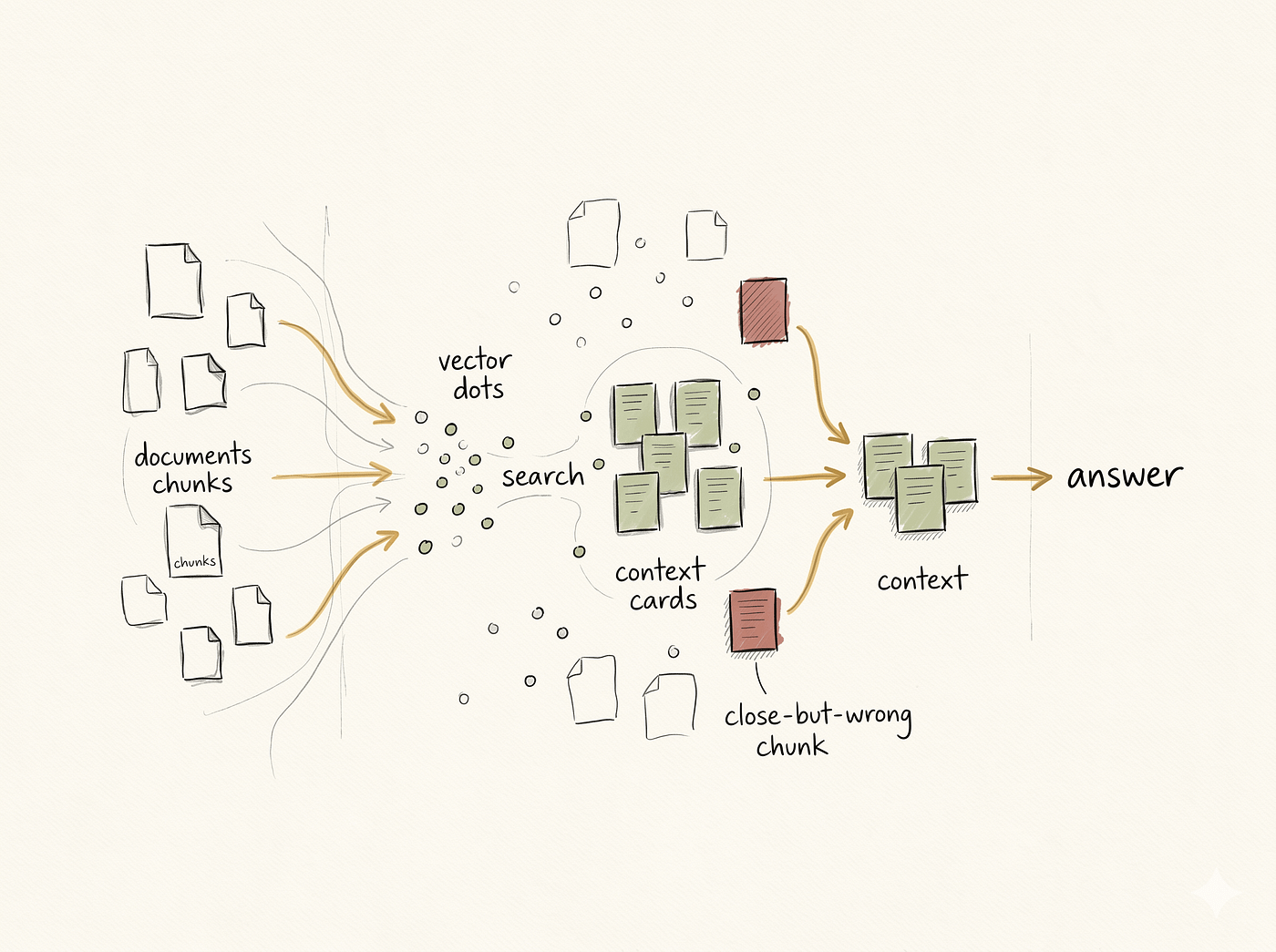
RAG is dynamic prompt construction with a similarity search in the middle. At ingestion you chunk the documents, embed each chunk, and store the pairs. At query time you embed the user’s question, find the closest chunk vectors, paste the matching text into the prompt as context, and ask the model to answer. The model generates its response from those provided chunks rather than purely from its training weights.
RAG is prompt assembly at runtime. The magic is just dynamic templating combined with a search step. It is not a separate model or a special API mode. It is a software engineering pattern.
import os
import numpy as np
from google import genai

client = genai.Client(api_key=os.environ["GEMINI_API_KEY"])

EMBED_MODEL = "gemini-embedding-001"
CHAT_MODEL = "gemini-2.5-flash"

def embed(texts: list[str]) -> np.ndarray:
    resp = client.models.embed_content(model=EMBED_MODEL, contents=texts)
    return np.array([e.values for e in resp.embeddings])

def top_k_indices(query_vec: np.ndarray, doc_vecs: np.ndarray, k: int) -> list[int]:
    scores = (doc_vecs @ query_vec) / (
        np.linalg.norm(doc_vecs, axis=1) * np.linalg.norm(query_vec)
    )
    return scores.argsort()[::-1][:k].tolist()

def answer(question: str, docs: list[str], k: int = 3) -> str:
    doc_vecs = embed(docs)
    q_vec = embed([question])[0]
    chosen = top_k_indices(q_vec, doc_vecs, k)

    context = "\n\n".join(f"[{i}] {docs[i]}" for i in chosen)
    prompt = (
        "Answer using only the context below. "
        "If the context does not contain the answer, say you don't know.\n\n"
        f"Context:\n{context}\n\n"
        f"Question: {question}"
    )

    resp = client.models.generate_content(model=CHAT_MODEL, contents=prompt)
    return resp.text or ""

if __name__ == "__main__":
    docs = [
        "Refunds are processed within 7 business days.",
        "Customers can update their email from account settings.",
        "Free shipping applies to orders over $50.",
        "Premium support is available to enterprise plans only.",
    ]
    print(answer("How long does a refund take?", docs))
Refunds are processed within 7 business days.The four steps map line by line onto the answer function. It embeds the documents, embeds the question, finds the top indices, assembles the prompt string, and generates the content. There is nothing else hidden in the background. We re-embed the documents on every call here for simplicity. In production you embed the documents once at ingestion time, store the chunk-vector pairs, and skip this step on every query.
The prompt explicitly instructs the model to refuse if the context lacks the answer. That instruction is doing real work. It is your primary defense against hallucination.
Top-K retrieval that returns three close-but-wrong chunks beats no retrieval only if the model is careful enough to reject them, which most are not. When a RAG system hallucinates, the right move is rarely to rewrite the prompt. It is to print the retrieved chunks and look at what the model was actually given.
Tool Calling
RAG lets the model see the right facts, but tool calling lets the model take actions. You probably know that calling a chat model returns text. Few engineers know what passing a tools array actually does to that API call and where the function actually executes.
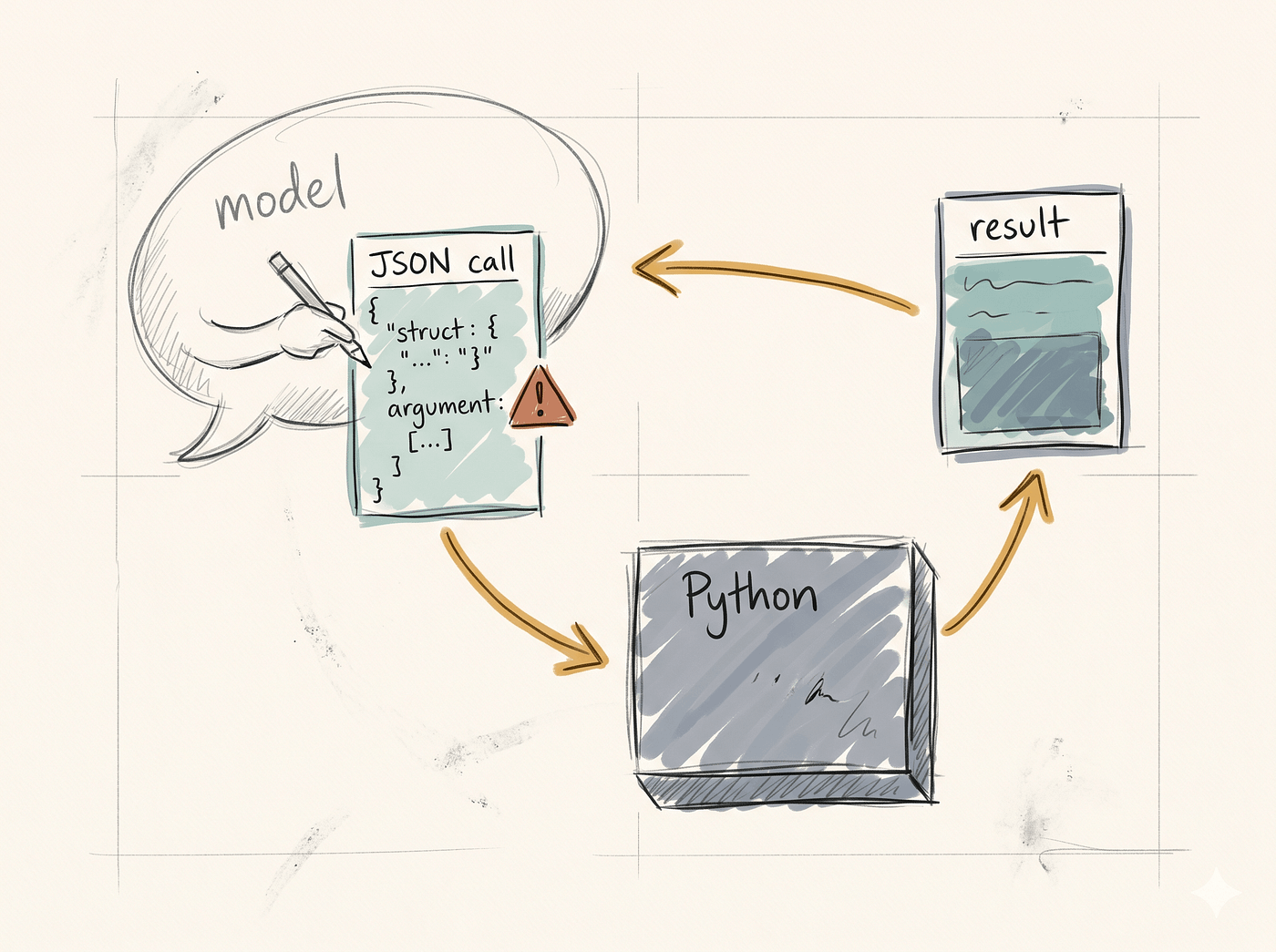
Tool calling happens when the model emits a structured JSON object instead of emitting prose. Your code parses that JSON, runs the named function locally, and feeds the result back into the next model call as another message. The model never executes anything. Your code is the runtime.
You can think of tool calling as a remote procedure call where one side speaks English-shaped JSON. The model writes the call site. Your code serves as the function table.
import os
from google import genai
from google.genai import types

client = genai.Client(api_key=os.environ["GEMINI_API_KEY"])

def get_weather(city: str) -> str:
    fake = {"Tokyo": "18°C, light rain", "Berlin": "12°C, cloudy"}
    return fake.get(city, f"no data for {city}")

weather_tool = types.Tool(function_declarations=[
    types.FunctionDeclaration(
        name="get_weather",
        description="Return current weather for a given city.",
        parameters=types.Schema(
            type="OBJECT",
            properties={"city": types.Schema(type="STRING")},
            required=["city"],
        ),
    )
])

config = types.GenerateContentConfig(
    tools=[weather_tool],
    automatic_function_calling=types.AutomaticFunctionCallingConfig(disable=True),
)

history = [{"role": "user", "parts": [{"text": "What's the weather in Tokyo right now?"}]}]
resp = client.models.generate_content(
    model="gemini-2.5-flash", contents=history, config=config,
)

call = resp.candidates[0].content.parts[0].function_call
print(f"model wants to call: {call.name}({dict(call.args)})")

result = get_weather(**dict(call.args))

history.append(resp.candidates[0].content)
history.append({"role": "user", "parts": [
    {"function_response": {"name": call.name, "response": {"result": result}}}
]})

final = client.models.generate_content(
    model="gemini-2.5-flash", contents=history, config=config,
)
print(final.text)
model wants to call: get_weather({'city': 'Tokyo'})
The weather in Tokyo right now is 18°C with light rain.The print(f"model wants to call: ...") line is the exact moment the mechanism becomes visible. The model wrote a parameter dictionary and paused. Python is about to execute it. The function_response part is how the model sees what your local function actually returned. This specific nested dictionary shape is just the SDK's expected format, where the convention is to put your tool's return value under a key like result.
Models hallucinate tool arguments confidently. They call functions that do not exist, omit required fields, or invent values that look right but fail validation. For example, the model might pass a lowercase ‘new york’ when your function key is case-sensitive on ‘New York’. That validation is your code’s job, not the model’s.
One tool call is a function call with extra steps. A loop of tool calls that decides when to stop is what people mean when they say agent.
The Agent Loop
You have either written an infinite loop or used a coding copilot and watched it spin endlessly on the same broken file.
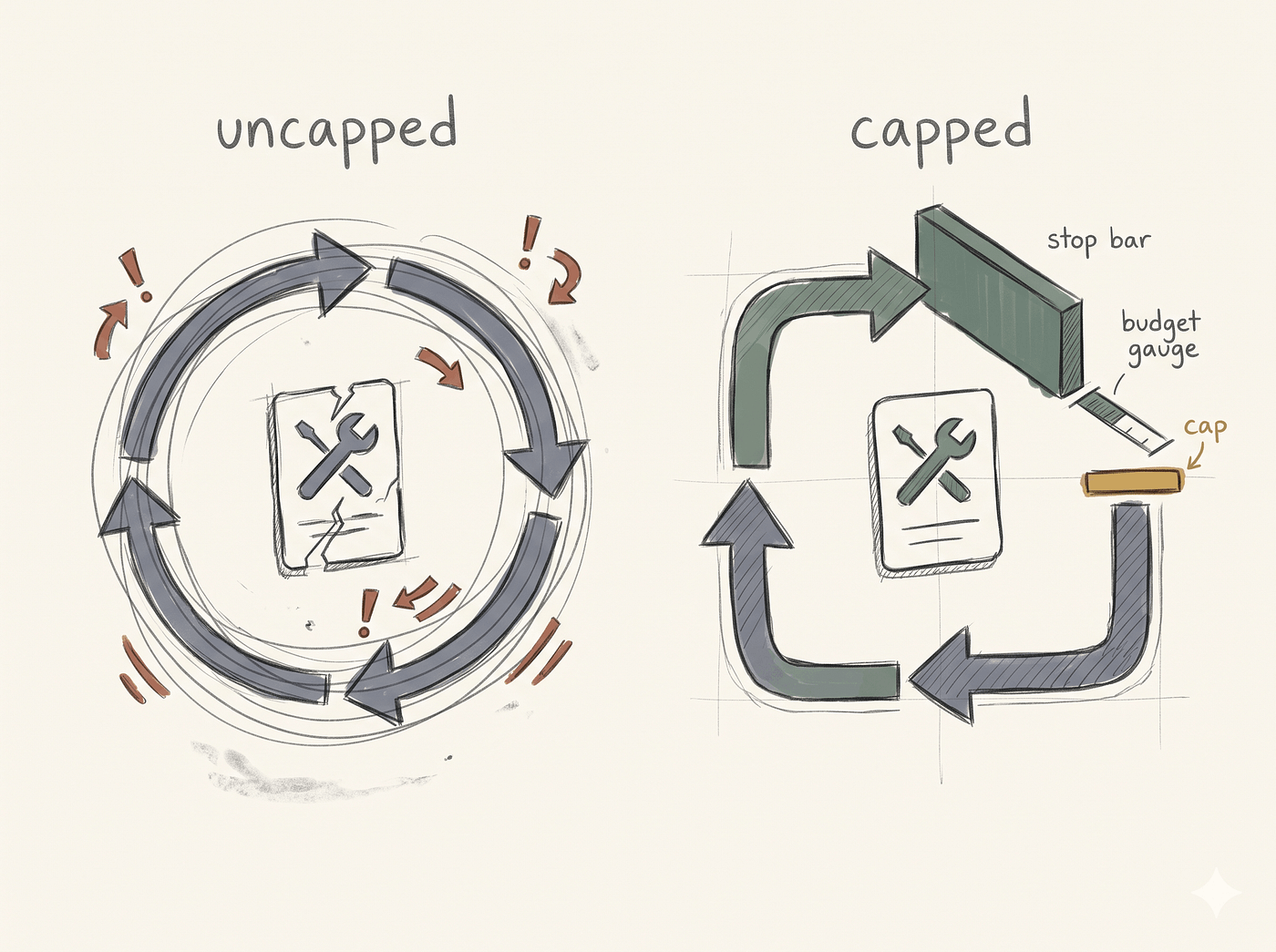
An agent is a while loop with a smart conditional inside. The model acts as the planner and the speaker. The loop is the engine. The intelligence of the system is concentrated in the stop condition, not the tool calls. Most of agent design is engineering the stop condition, the iteration cap, the budget cap, and the error recovery behavior. The model is responsible for almost none of those things.
I want you to count the lines of the loop in the code below. Do not count the tool declaration. The actual loop logic is very small.
import os
from google import genai
from google.genai import types

client = genai.Client(api_key=os.environ["GEMINI_API_KEY"])

def get_weather(city: str) -> str:
    fake = {"Tokyo": "18°C, light rain", "Berlin": "12°C, cloudy", "Madrid": "27°C, sunny"}
    return fake.get(city, f"no data for {city}")

TOOLS = {"get_weather": get_weather}

WEATHER_TOOL = types.Tool(function_declarations=[
    types.FunctionDeclaration(
        name="get_weather",
        description="Return current weather for a given city.",
        parameters=types.Schema(
            type="OBJECT",
            properties={"city": types.Schema(type="STRING")},
            required=["city"],
        ),
    )
])

MAX_STEPS = 5

def run_agent(question: str) -> str:
    history = [{"role": "user", "parts": [{"text": question}]}]
    config = types.GenerateContentConfig(
        tools=[WEATHER_TOOL],
        automatic_function_calling=types.AutomaticFunctionCallingConfig(disable=True),
    )

    for step in range(MAX_STEPS):
        resp = client.models.generate_content(
            model="gemini-2.5-flash", contents=history, config=config,
        )
        part = resp.candidates[0].content.parts[0]
        history.append(resp.candidates[0].content)

        if part.function_call:
            call = part.function_call
            result = TOOLS[call.name](**dict(call.args))
            history.append({"role": "user", "parts": [
                {"function_response": {"name": call.name, "response": {"result": result}}}
            ]})
            continue

        return part.text or "(empty response)"

    return f"agent gave up after {MAX_STEPS} steps"

if __name__ == "__main__":
    print(run_agent("Compare today's weather in Tokyo and Berlin in one sentence."))
Today in Tokyo it's 18°C with light rain, while Berlin is cooler at 12°C and cloudy.The conditional checking for part.function_call is the pattern. If the model wants a tool, you execute it and continue the loop. If it returns final text, you exit.
The MAX_STEPS constant is the seatbelt. Without a hard iteration cap and a token budget cap, an agent can spin forever or rack up a massive bill on a single user request. You can also implement a token-budget cap alongside this iteration limit by tracking usage.total_token_count after each call and breaking out if it crosses your ceiling. The model decides when to stop naturally but you cannot trust it to always make that decision correctly. It might encounter an API error, feed the error back to itself, and try the exact same broken arguments again.
Engineers who write agents without iteration caps are the tell that separates the ninety percent from the ten percent. Add the cap. Always.
Tokens, embeddings, retrieval, tool calls, and agent loops are all primitives. None of them tell you if your AI feature is actually working. That requires the final concept.
Evals
The $200 bill, the support bot policy invention, and the infinite loop agent could each have been caught before deployment by a twenty line script. None of those teams had one. Most teams shipping AI features today do not have one.
An eval is a unit test for a non-deterministic system, meaning the same input can produce different outputs on different runs. It requires a small set of golden inputs, a runner that calls the AI feature on each, and a grader that checks for the property you wanted rather than an exact string match. The grader is where the real work lives. Questions like ‘did the model refuse?’, ‘did the answer cite a real chunk?’, and ‘did the agent terminate within budget?’ are what it has to answer.
Eval design is grader design. Most teams who claim to have evals actually just have a fixture file of questions and no automated graders. The grader is the part that takes engineering work.
from typing import Callable
from rag import answer

DOCS = [
    "Refunds are processed within 7 business days.",
    "Customers can update their email from account settings.",
    "Free shipping applies to orders over $50.",
    "Premium support is available to enterprise plans only.",
]

def has_substring(needle: str) -> Callable[[str], bool]:
    return lambda out: needle.lower() in out.lower()

def looks_like_refusal(out: str) -> bool:
    refusal_markers = ["don't know", "not in", "no information", "cannot find", "does not"]
    return any(m in out.lower() for m in refusal_markers)

GoldenRow = tuple[str, Callable[[str], bool], str]
GOLDEN: list[GoldenRow] = [
    ("How long does a refund take?",     has_substring("7"),         "answer-7-days"),
    ("Where do I update my email?",      has_substring("settings"),  "answer-settings"),
    ("When does free shipping apply?",   has_substring("50"),        "answer-$50"),
    ("What is the CEO's birthday?",      looks_like_refusal,         "must-refuse"),
    ("How do I activate my time machine?", looks_like_refusal,       "must-refuse"),
]

def run_evals() -> None:
    passes = 0
    for question, grader, label in GOLDEN:
        out = answer(question, DOCS)
        ok = grader(out)
        passes += int(ok)
        marker = "✓" if ok else "✗"
        print(f"{marker} [{label:<14}] {question}")
        print(f"   -> {out[:90]!r}")
    print(f"\n{passes}/{len(GOLDEN)} passed")

if __name__ == "__main__":
    run_evals()
✓ [answer-7-days ] How long does a refund take?
-> 'Refunds are processed within 7 business days.'
✓ [answer-settings] Where do I update my email?
-> 'You can update your email from account settings.'
✓ [answer-$50 ] When does free shipping apply?
-> 'Free shipping applies to orders over $50.'
✓ [must-refuse ] What is the CEO's birthday?
-> "I don't know."
✓ [must-refuse ] How do I activate my time machine?
-> "I don't know."
5/5 passedThe looks_like_refusal function is what a real grader looks like. It is not asking if the output is exactly equal to a specific string. It is asking if the output has the property you want. Each row in the GOLDEN list is a question, grader, and label triple. The GoldenRow type annotation just makes this shape explicit. We have three answers and two refusals. Real evals must include tests proving the system will gracefully refuse when the answer is missing.
The trap is letting eval sets grow stale faster than the system. You have to treat them like fixtures rather than permanent contracts. You update them deliberately when behavior should change. You should get suspicious when they break unexpectedly, not when they pass.
Five of the six concepts in this article are primitives which are things the system has. Evals are a practice which is a thing engineers do. The top ten percent of engineers shipping AI features have all six in their head and have written at least one grader with real logic in it.

Summary
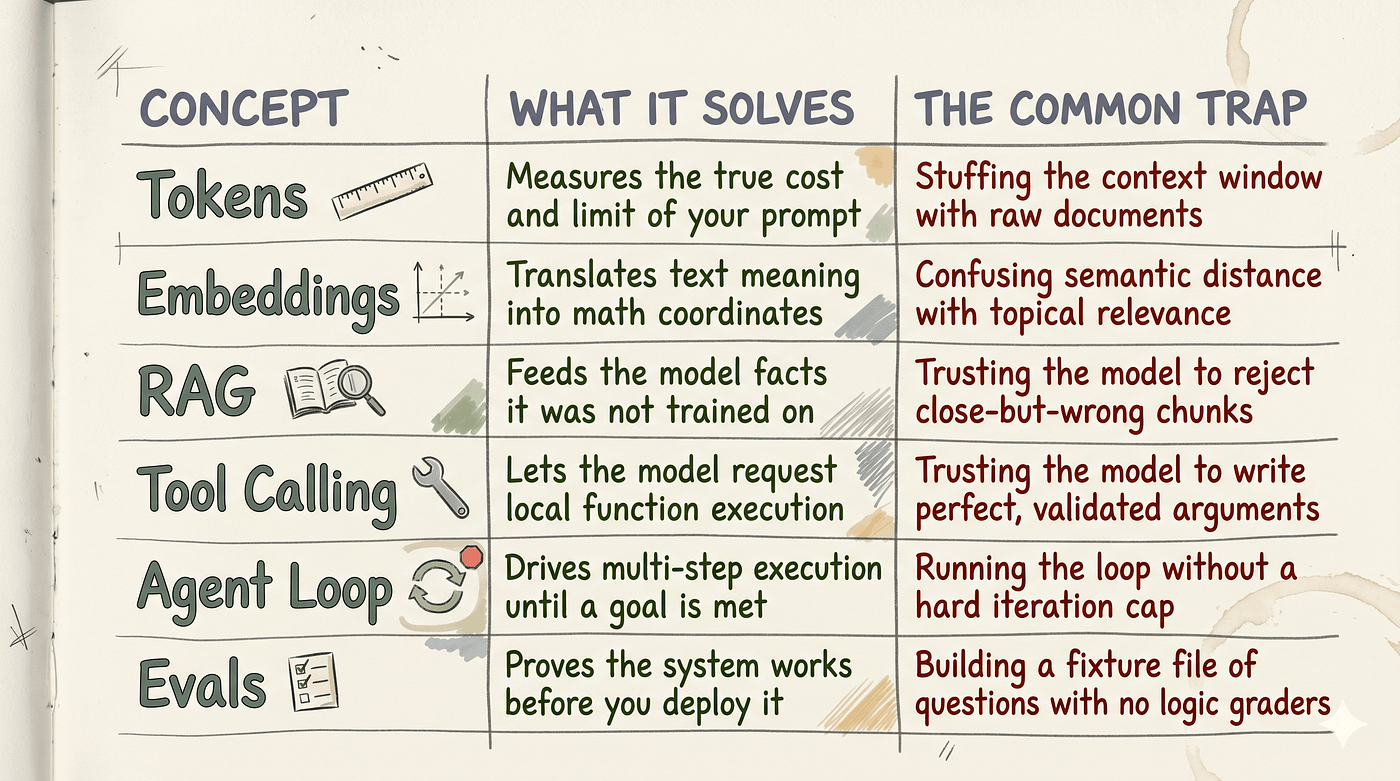
Pick the one you understand the least and write a 20-line script that proves it to yourself today.
Continue Reading
**AI Agents Explained (2026): What They Really Are and How to Build Them** — Understand agent loops, tools, memory, and production reliability.
**I Built an AI Agent in Pure Python. Here’s What I Learned**. — See the agent loop implemented without framework abstraction.
**How I Would Become an AI Engineer in 2026 If I Had to Start Over **— Turn fundamentals into a practical AI engineering roadmap.
메타데이터
- post_id
- e35f00a71138
- slug
- why-90-of-engineers-fall-behind-in-this-ai-era-and-how-to-fix-it-e35f00a71138
- url
- https://medium.com/@anubhavgoyal101/why-90-of-engineers-fall-behind-in-this-ai-era-and-how-to-fix-it-e35f00a71138
- canonical_url
- https://medium.com/@anubhavgoyal101/why-90-of-engineers-fall-behind-in-this-ai-era-and-how-to-fix-it-e35f00a71138
- author_url
- https://medium.com/@anubhavgoyal101
- status
- ok
- fetched_at
- 2026-06-09 15:37:30