I Trained a Custom Plant Detector in One Night — Here’s How COCO Failed Me and YOLO-World Saved the…
How I used a large open-vocabulary model to auto-annotate 5,000 images, fine-tuned YOLOv8n for single-class plant detection, and deployed…
I Trained a Custom Plant Detector in One Night — Here’s How COCO Failed Me and YOLO-World Saved the Day
How I used a large open-vocabulary model to auto-annotate 5,000 images, fine-tuned YOLOv8n for single-class plant detection, and deployed it to an iPhone at 11ms inference.
I’ve been building Trail Botanist — an iOS app that identifies herbs and plants using on-device machine learning. My first model was a ResNet18 classifier that takes a photo and tells you “this is basil” or “this is chamomile.” It works well.
But I wanted more. I wanted the app to find plants in real-time through the camera viewfinder — draw bounding boxes around every plant it sees, so you can tap the one you’re curious about. That meant adding object detection to a classification app.
I figured it’d be straightforward: grab a pretrained YOLOv8 model, export to CoreML, done. It wasn’t. What I learned about domain gaps, knowledge distillation, and the difference between “works on paper” and “works in my garden” is what this article is about.
The Plan: Add Real-Time Detection to a Classification App
My existing app, Trail Botanist, uses a ResNet18 model fine-tuned on 70+ herb species. The user takes a photo, the model classifies it. Simple.
The upgrade: a two-stage inference pipeline.
Stage 1 — Detection (continuous): YOLOv8 runs on every camera frame, drawing bounding boxes around plants in the scene. Single class: “plant.” Optimized for recall — find every plant, even if some boxes are imperfect.
Stage 2 — Classification (on demand): When the user taps a bounding box, the app crops that region from the frame and feeds it to ResNet18 for species identification.
The detector answers “where are the plants?” The classifier answers “what kind of plant is this?” Two models, optimized for different objectives. This is the same pattern used in autonomous driving (object detector → tracker → classifier) and face recognition (face detector → face recognizer).
For the detector I picked YOLOv8n — the nano variant. 3.2M parameters, ~6MB as CoreML Float16. It’s the smallest YOLOv8 you can get, designed specifically for edge deployment. The accuracy tradeoff vs the larger variants doesn’t matter much for me because the classifier handles fine-grained ID — I just need the detector to find plant-shaped things.
I downloaded the COCO-pretrained yolov8n.pt, exported to CoreML, dropped it into the app. ~11ms inference on the iPhone Neural Engine. Time to test it on actual plants.
The Quick Win That Wasn’t
I walked outside with the app and pointed it at my garden. Here’s what happened:
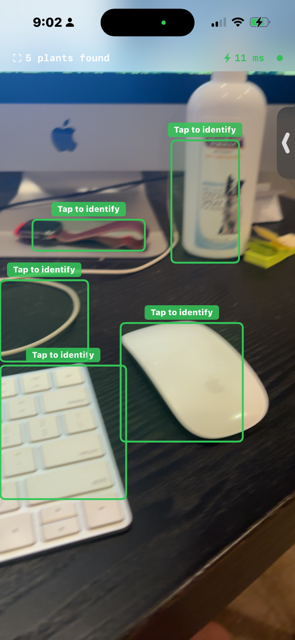


About 40% of my test images got detections. The rest got nothing.
The reason is that COCO — the dataset every pretrained YOLO ships with — has 80 object classes, and exactly one of them is plant-related: “potted plant.” Class 58 of 80. And it’s trained on a very specific visual pattern: a discrete plant object sitting in or on a container, surrounded by non-plant context.
That’s not what plants look like in the wild. Or in my raised beds. Or in the close-up macro shots that are the whole point of an herb identification app.
This Is a Domain Gap
In production ML, this is one of the most common failure modes. The model was trained on one distribution (COCO’s “potted plant” images) and you’re deploying it on a different distribution (trail and garden plant photos). The architecture is fine. The training was fine. The training data just doesn’t match the deployment reality.
The fix is to fine-tune on data from your actual deployment distribution. Which sounds simple until you realize: YOLOv8 needs annotated bounding boxes. My 5,400-image herb dataset has folder-per-class labels — great for classification training, useless for detection. Detection needs (class_id, x_center, y_center, width, height) for every plant in every image, in normalized coordinates.
Manually annotating 5,000 images at roughly 15 seconds per image is 20+ hours of labeling work. I had a few evenings, not a few weekends.
Knowledge Distillation, Applied to Detection
Here’s the trick that saved the project: use a bigger, more flexible model to generate the labels.
YOLO-World is an open-vocabulary YOLO variant — it uses CLIP-style text-image matching to detect any object you describe in natural language. You don’t have to retrain it for new classes. You just give it the prompt “plant” and it draws boxes around anything plant-like. It’s much larger than YOLOv8n (~50MB), much slower, and you’d never ship it on a phone. But for offline auto-annotation, it’s perfect.
What I’m doing here is knowledge distillation applied to detection. A large, flexible teacher model (YOLO-World) generates training labels. A small, fast student model (YOLOv8n) learns from those labels. The teacher’s flexibility transfers to the student through the labels themselves. The student inherits enough of the teacher’s “this is a plant” knowledge to work in production at 11ms.
Here’s the auto-annotation pipeline:
from ultralytics import YOLO
from pathlib import Path
import shutil, random
# Load YOLO-World as the teacher
teacher = YOLO("yolov8s-worldv2.pt")
teacher.set_classes(["plant"]) # tell it what to look forraw_dir = Path("data/raw") # 70+ herb subfolders
out_dir = Path("plant_detection")
images_dir = out_dir / "images"
labels_dir = out_dir / "labels"
images_dir.mkdir(parents=True, exist_ok=True)
labels_dir.mkdir(parents=True, exist_ok=True)# Walk every image, run teacher, save annotations
all_images = []
for img_path in raw_dir.rglob("*.jpg"):
# Prefix with parent folder to avoid filename collisions
new_name = f"{img_path.parent.name}_{img_path.name}"
new_img = images_dir / new_name
shutil.copy(img_path, new_img) results = teacher(img_path, conf=0.15, verbose=False)
boxes = results[0].boxes label_path = labels_dir / new_name.replace(".jpg", ".txt")
if len(boxes) > 0:
# Write YOLO format: class_id x_center y_center w h
with open(label_path, "w") as f:
for box in boxes.xywhn: # already normalized
x, y, w, h = box.tolist()
f.write(f"0 {x:.6f} {y:.6f} {w:.6f} {h:.6f}\n")
all_images.append((new_img, label_path))
else:
# Keep some negative examples (~10%)
if random.random() < 0.1:
label_path.touch() # empty file = no objects
all_images.append((new_img, label_path))A few decisions worth calling out:
Confidence threshold of 0.15. This is way lower than the 0.4–0.5 you’d use in production. For auto-annotation, false positives are less harmful than false negatives. A bounding box that’s slightly wrong adds noise — the model can learn through annotation noise during fine-tuning. But a missed plant means the model never learns that visual pattern exists. I’d rather have noisy labels than missing labels.
Negative examples. I keep about 10% of images where YOLO-World detected nothing. These act as “there’s nothing to detect here” examples and prevent the trained model from hallucinating plants in every frame. Without them, the model can drift toward over-detection because every training image had at least one object.
Filename prefixing. Different herb folders had files with the same names (img001.jpg in basil, img001.jpg in cilantro). When everything lands in a flat images/ directory, those collide. Prefixing with the parent folder name (basil_img001.jpg) avoids it.
The whole script ran in about 90 minutes on an M-series Mac. Out came 5,000+ annotated images and a data.yamldescribing them. Time to fine-tune.
Fine-Tuning vs Training From Scratch
I had two paths:
- Train from scratch — random init, learn everything (visual features and plant patterns) from my 5K images
- Fine-tune — start from COCO weights and adapt them
Fine-tuning is almost always the right call for this kind of dataset, and it’s worth understanding why. The COCO-pretrained YOLOv8n already knows how to detect edges, textures, shapes, and objects in general. The early layers — roughly the first 15 — extract universal visual features that transfer to any detection task. Only the later layers and detection head need to learn “what a plant looks like” specifically.
Training from scratch on 5K images would underfit. The model would have to learn vision and plants simultaneously, with not enough data for either. Fine-tuning only needs to learn the delta: “a plant looks like this, not like the 80 COCO classes you already know.” That’s a much smaller problem.
The training script is short:
from ultralytics import YOLOmodel = YOLO("yolov8n.pt") # COCO pretrained weightsresults = model.train(
data="plant_detection/data.yaml",
epochs=30,
imgsz=640,
batch=16,
device="mps", # Apple Silicon GPU
patience=10,
project="runs/plant_detect",
name="herbcam_v1",
)30 epochs, batch size 16, image size 640×640. On an M-series Mac with MPS acceleration, the full training took about 8 hours. I let it run overnight.
The Results
Here’s the comparison between the pretrained COCO model and the fine-tuned plant detector, on the same garden test set:


The key result: the fine-tuned detector is the same speed and roughly the same size, but detects plants the pretrained model completely missed. The architecture didn’t change. The training data did.
A couple of things I find satisfying about these numbers:
Recall (0.891) is higher than precision (0.809). That’s exactly what I want for stage 1 of a two-stage pipeline. I’d rather catch every plant (high recall) and accept a few extra boxes that turn out to be non-plants (lower precision), than miss plants entirely. The classifier in stage 2 can ignore non-plant crops; it can’t classify a plant that was never detected.
mAP50 is 0.900 but mAP50–95 is 0.779. mAP50 only requires 50% box overlap with ground truth; mAP50–95 averages mAP across IoU thresholds from 50% to 95% in 5% steps. The gap (0.121) tells me the boxes are mostly in the right place but not pixel-perfect. For a crop-then-classify pipeline this is fine — the classifier tolerates some slack in the crop. For an application that needed precise localization (like measuring plant size), I’d want to push mAP50–95 higher.
Model size barely changed. 6.2 MB → 5.9 MB. Slightly smaller because 1 class instead of 80. Same inference speed because the architecture is identical. Architecture determines size and speed; training data determines accuracy.That’s worth internalizing — it means I can iterate on data without worrying about the latency budget changing under me.
Exporting to CoreML is one line:
model.export(format="coreml", nms=True, half=True)Out comes yolov8n.mlpackage. Drop it into the iOS project, and now both models — the new YOLOv8 detector and the existing ResNet18 classifier — run on the Neural Engine in the same app. Combined footprint: ~12 MB on device.
Five Things I Took Away
1. Pretrained models are a starting point, not a destination. A COCO model is trained on COCO’s distribution. If your deployment distribution is different (and it almost always is), you’ll see a domain gap. The first thing to do with any pretrained model is test it on your actual data and measure where it fails.
2. Auto-annotation via knowledge distillation is wildly underused. Manual labeling is slow and expensive. If you can describe what you want in natural language, an open-vocabulary model can probably annotate it for you. The labels won’t be perfect, but they’re often good enough — and they get you to a working model in a fraction of the time.
3. For auto-annotation, optimize for recall, not precision. Drop the confidence threshold. Add negative examples. False positives in your training set are noise the model can learn through; false negatives are knowledge the model never gets to acquire.
4. Fine-tuning beats training from scratch on small datasets. 5K images is plenty for fine-tuning because the backbone already knows vision. It’s nowhere near enough for training from scratch. Use what’s already there.
5. Architecture determines size and speed; training data determines accuracy. My fine-tuned detector is 5.9 MB vs 6.2 MB for the pretrained COCO model — same inference speed, same general architecture, dramatically better recall on plants. If you can fix a problem with data, that’s almost always cheaper than fixing it with architecture.
What’s Next
In the next article, I’ll cover how I integrated this detector into the iOS app alongside the existing ResNet18 classifier — building the two-stage tap-to-classify pipeline, solving SwiftUI gesture recognition bugs with rapidly-updating detection views, and debugging the aspect-fill coordinate mismatch between camera preview and pixel buffer.
The detector finds the plant. The classifier names it. Two models, 12 MB total, running entirely on-device at real-time speed.
This is part 6 of my series on building Trail Botanist — an on-device herb identification app. Previous articles cover ResNet18 fine-tuning, CoreML deployment, feedback loops, and CLIP-based fallback classification.
References
[1] Jocher, G., Chaurasia, A., & Qiu, J. (2023). Ultralytics YOLOv8. GitHub
[2] Cheng, T. et al. (2024). YOLO-World: Real-Time Open-Vocabulary Object Detection. CVPR. arXiv
[3] Lin, T.Y. et al. (2014). Microsoft COCO: Common Objects in Context. ECCV. arXiv
[4] Hinton, G., Vinyals, O., & Dean, J. (2015). Distilling the Knowledge in a Neural Network. arXiv
[5] He, K., Zhang, X., Ren, S., & Sun, J. (2016). Deep Residual Learning for Image Recognition. CVPR. arXiv
[6] Radford, A. et al. (2021). Learning Transferable Visual Models From Natural Language Supervision. ICML. arXiv
Links
- 🌿 Live API: https://computer-vision-yin8.onrender.com/docs
- 📱 Article 1: I Trained ResNet18 to Identify 70 Medicinal Herbs
- 📱 Article 2: I Built an ML App for Foragers in Forests. Server-Side Inference Would Have Killed It.
- 📱 Article 3: I Ran My Herb Classifier 4 Times. The Third Run Made It Worse. Here’s Why.
- 📱 Article 4: I Built a Production ML Feedback Loop with FastAPI and Render. Here’s What Actually Broke.
- Article 5: Can Gemma 4 Replace My 45MB Model?
- 💻 GitHub: https://github.com/rachana1101/plantsnap
- 💼 LinkedIn: https://www.linkedin.com/in/rachana1101/
If this resonated, follow for upcoming Articles.
Building something similar? I’d love to hear about it — drop a comment or connect on LinkedIn!
메타데이터
- post_id
- e36673ba6c8a
- slug
- i-trained-a-custom-plant-detector-in-one-night-heres-how-coco-failed-me-and-yolo-world-saved-the-e36673ba6c8a
- url
- https://medium.com/@rachana.gupta_7569/i-trained-a-custom-plant-detector-in-one-night-heres-how-coco-failed-me-and-yolo-world-saved-the-e36673ba6c8a
- canonical_url
- https://medium.com/@rachana.gupta_7569/i-trained-a-custom-plant-detector-in-one-night-heres-how-coco-failed-me-and-yolo-world-saved-the-e36673ba6c8a
- author_url
- https://medium.com/@rachana.gupta_7569
- status
- ok
- fetched_at
- 2026-06-09 15:37:30