Migrating a Spring Boot App from Java 17 to Java 21 with OpenRewrite: What It Automates — and What…
A practical hands-on guide to upgrading a real Spring Boot application from Java 17 and Spring Boot 3.1.5 to Java 21 and Spring Boot 3.3…
Migrating a Spring Boot App from Java 17 to Java 21 with OpenRewrite: What It Automates — and What It Doesn’t
A practical hands-on guide to upgrading a real Spring Boot application from Java 17 and Spring Boot 3.1.5 to Java 21 and Spring Boot 3.3 using OpenRewrite.

Java 17 to Java 21 Migration Flow Using OpenRewrite
TL;DR
In this guide, we migrate a real Spring Boot application from Java 17 and Spring Boot 3.1.5 to Java 21 and Spring Boot 3.3 using OpenRewrite.
We configure the OpenRewrite Maven plugin, run migration recipes, preview changes using dryRun, apply the upgrade, review the generated diff, and finally validate the project with Maven build and tests.
The goal is not just to change version numbers, but to understand how automated migration works, what OpenRewrite can safely update, and what still needs manual review.
Understanding the Migration Journey
Migrating to Java 21 isn’t just about changing a version number in your build file. It’s a strategic upgrade that requires careful planning and assessment. Java 21 is a Long-Term Support (LTS) release that brings significant performance improvements and powerful new features like Virtual Threads, Pattern Matching, and advanced garbage collection.Whether your project runs on Java 11 or Java 17, this guide shows a safe, step-by-step path to Java 21 with minimal risk.
Our Demo Project: Order Management Service
In this guide, we’ll migrate a real Spring Boot application — the Order Management Service — from Java 17 and Spring Boot 3.1.5 to Java 21 and Spring Boot 3.3. This is a complete order management REST API with JPA persistence, validation, business logic, and comprehensive testing that demonstrates all the common migration challenges you’ll encounter in production applications.
Instead of a “Hello World” toy example, we’ll work with a realistic service that handles order processing, status management, and customer data — mirroring real-world enterprise applications.
Let’s dive in.
Prerequisites
Before running OpenRewrite, you should have:
- JDK 21 installed
- Maven 3.9+
- Git (so you can review and revert changes safely)
Getting Started with the Legacy Application
First, let’s understand what we’re working with.
Project Structure:
order-service/
├── pom.xml
├── src/
│   ├── main/
│   │   ├── java/
│   │   │   └── com/
│   │   │       └── example/
│   │   │           └── orders/
│   │   │               ├── OrderServiceApplication.java
│   │   │               ├── controller/
│   │   │               │   └── OrderController.java
│   │   │               ├── service/
│   │   │               │   └── OrderService.java
│   │   │               ├── model/
│   │   │               │   ├── Order.java
│   │   │               │   ├── OrderStatus.java
│   │   │               │   └── PaymentMethod.java
│   │   │               └── repository/
│   │   │                   └── OrderRepository.java
│   │   └── resources/
│   │       └── application.yml
│   └── test/
│       └── java/
│           └── com/
│               └── example/
│                   └── orders/
│                       └── OrderServiceTest.java
Current State (Java 17)
pom.xml (Before Migration):
<?xml version="1.0" encoding="UTF-8"?>
<project xmlns="http://maven.apache.org/POM/4.0.0"
         xmlns:xsi="http://www.w3.org/2001/XMLSchema-instance"
         xsi:schemaLocation="http://maven.apache.org/POM/4.0.0
         http://maven.apache.org/xsd/maven-4.0.0.xsd">
    <modelVersion>4.0.0</modelVersion>

    <parent>
        <groupId>org.springframework.boot</groupId>
        <artifactId>spring-boot-starter-parent</artifactId>
        <version>3.1.5</version>
    </parent>

    <groupId>com.example</groupId>
    <artifactId>order-service</artifactId>
    <version>1.0.0</version>
    <packaging>jar</packaging>

    <properties>
        <java.version>17</java.version>
        <maven.compiler.source>17</maven.compiler.source>
        <maven.compiler.target>17</maven.compiler.target>
    </properties>

    <dependencies>
        <dependency>
            <groupId>org.springframework.boot</groupId>
            <artifactId>spring-boot-starter-web</artifactId>
        </dependency>
        <dependency>
            <groupId>org.springframework.boot</groupId>
            <artifactId>spring-boot-starter-data-jpa</artifactId>
        </dependency>
        <dependency>
            <groupId>com.h2database</groupId>
            <artifactId>h2</artifactId>
            <scope>runtime</scope>
        </dependency>
        <dependency>
            <groupId>org.springframework.boot</groupId>
            <artifactId>spring-boot-starter-test</artifactId>
            <scope>test</scope>
        </dependency>
    </dependencies>

    <build>
        <plugins>
            <plugin>
                <groupId>org.springframework.boot</groupId>
                <artifactId>spring-boot-maven-plugin</artifactId>
            </plugin>
        </plugins>
    </build>
</project>
Order.java (Domain Model):
package com.example.orders.model;

import jakarta.persistence.*;
import java.math.BigDecimal;
import java.time.LocalDateTime;

@Entity
@Table(name = "orders")
public class Order {
    @Id
    @GeneratedValue(strategy = GenerationType.IDENTITY)
    private Long id;

    private String customerEmail;
    private BigDecimal totalAmount;

    @Enumerated(EnumType.STRING)
    private OrderStatus status;

    @Enumerated(EnumType.STRING)
    private PaymentMethod paymentMethod;

    private LocalDateTime createdAt;
    private LocalDateTime updatedAt;

    // Constructors
    public Order() {
        this.createdAt = LocalDateTime.now();
        this.status = OrderStatus.PENDING;
    }

    public Order(String customerEmail, BigDecimal totalAmount, PaymentMethod paymentMethod) {
        this();
        this.customerEmail = customerEmail;
        this.totalAmount = totalAmount;
        this.paymentMethod = paymentMethod;
    }

    // Getters and Setters
    public Long getId() { return id; }
    public void setId(Long id) { this.id = id; }

    public String getCustomerEmail() { return customerEmail; }
    public void setCustomerEmail(String customerEmail) { this.customerEmail = customerEmail; }

    public BigDecimal getTotalAmount() { return totalAmount; }
    public void setTotalAmount(BigDecimal totalAmount) { this.totalAmount = totalAmount; }

    public OrderStatus getStatus() { return status; }
    public void setStatus(OrderStatus status) {
        this.status = status;
        this.updatedAt = LocalDateTime.now();
    }

    public PaymentMethod getPaymentMethod() { return paymentMethod; }
    public void setPaymentMethod(PaymentMethod paymentMethod) {
        this.paymentMethod = paymentMethod;
    }

    public LocalDateTime getCreatedAt() { return createdAt; }
    public LocalDateTime getUpdatedAt() { return updatedAt; }
}
OrderStatus.java:
package com.example.orders.model;

public enum OrderStatus {
    PENDING,
    CONFIRMED,
    PROCESSING,
    SHIPPED,
    DELIVERED,
    CANCELLED
}
PaymentMethod.java:
package com.example.orders.model;

public enum PaymentMethod {
    CREDIT_CARD,
    DEBIT_CARD,
    UPI,
    NET_BANKING,
    CASH_ON_DELIVERY
}
OrderService.java
package com.example.orders.service;

import com.example.orders.model.Order;
import com.example.orders.model.OrderStatus;
import com.example.orders.repository.OrderRepository;
import org.springframework.stereotype.Service;
import java.util.List;
import java.util.Optional;

@Service
public class OrderService {

    private final OrderRepository orderRepository;

    public OrderService(OrderRepository orderRepository) {
        this.orderRepository = orderRepository;
    }

    public Order createOrder(Order order) {
        return orderRepository.save(order);
    }

    public Optional<Order> getOrderById(Long id) {
        return orderRepository.findById(id);
    }

    public List<Order> getAllOrders() {
        return orderRepository.findAll();
    }

    public Order updateOrderStatus(Long id, OrderStatus newStatus) {
        Order order = orderRepository.findById(id)
            .orElseThrow(() -> new RuntimeException("Order not found: " + id));
        order.setStatus(newStatus);
        return orderRepository.save(order);
    }

    public void deleteOrder(Long id) {
        orderRepository.deleteById(id);
    }

    public String getOrderStatusMessage(Order order) {
        // Old-style switch statement
        switch (order.getStatus()) {
            case PENDING:
                return "Your order is awaiting confirmation";
            case CONFIRMED:
                return "Your order has been confirmed";
            case PROCESSING:
                return "Your order is being processed";
            case SHIPPED:
                return "Your order has been shipped";
            case DELIVERED:
                return "Your order has been delivered";
            case CANCELLED:
                return "Your order has been cancelled";
            default:
                return "Unknown status";
        }
    }
}
OrderController.java
package com.example.orders.controller;

import com.example.orders.model.Order;
import com.example.orders.model.OrderStatus;
import com.example.orders.service.OrderService;
import org.springframework.http.ResponseEntity;
import org.springframework.web.bind.annotation.*;

import java.util.List;

@RestController
@RequestMapping("/api/orders")
public class OrderController {

    private final OrderService orderService;

    public OrderController(OrderService orderService) {
        this.orderService = orderService;
    }

    @PostMapping
    public ResponseEntity<Order> createOrder(@RequestBody Order order) {
        Order created = orderService.createOrder(order);
        return ResponseEntity.ok(created);
    }

    @GetMapping("/{id}")
    public ResponseEntity<Order> getOrder(@PathVariable Long id) {
        return orderService.getOrderById(id)
            .map(ResponseEntity::ok)
            .orElse(ResponseEntity.notFound().build());
    }

    @GetMapping
    public ResponseEntity<List<Order>> getAllOrders() {
        return ResponseEntity.ok(orderService.getAllOrders());
    }

    @PatchMapping("/{id}/status")
    public ResponseEntity<Order> updateStatus(
            @PathVariable Long id,
            @RequestParam OrderStatus status) {
        Order updated = orderService.updateOrderStatus(id, status);
        return ResponseEntity.ok(updated);
    }

    @DeleteMapping("/{id}")
    public ResponseEntity<Void> deleteOrder(@PathVariable Long id) {
        orderService.deleteOrder(id);
        return ResponseEntity.noContent().build();
    }
}
What is OpenRewrite?
Before we dive into the migration steps, let’s understand the tool that will automate most of our work.
OpenRewrite is an automated code transformation tool that modernizes your source code through “recipes.” Think of it as an intelligent code modifier that understands Java syntax, dependencies, and build configurations.
Key Concepts
Lossless Semantic Tree (LST): This is the foundation of how OpenRewrite works. LST is an in-memory tree data structure that represents your source code — similar to an Abstract Syntax Tree (AST), but with a critical difference: it preserves everything.
When OpenRewrite runs:
- Your source files are parsed into LST objects stored in memory
- Recipes perform transformations on these LST objects (not your actual files)
- After transformations, the modified LST is converted back to text
- This text overwrites your source files on disk (your .java, .xml files, etc.)
- The LST itself is then discarded from memory — it’s not persisted between recipe runs
What makes LST “lossless”? It preserves:
- All formatting (spaces, tabs, indentation)
- All comments (inline, block, Javadoc)
- All whitespace (line breaks, blank lines)
- Import order and organization
- Type information — even for types defined in other files or dependencies
Unlike traditional text-based find-and-replace or even standard ASTs (which lose formatting), LST allows OpenRewrite to make surgical code changes while keeping your code style completely intact. When OpenRewrite converts the modified LST back into source code and writes it to your files, your original formatting style is preserved.
Important: For OpenRewrite to run locally, the entire LST must fit into memory. For very large projects (millions of lines of code), this might require significant RAM.
Note on Moderne: Moderne (a commercial platform built on OpenRewrite) can serialize LSTs — meaning it saves the LST data structure itself to disk as binary artifacts, not just the source code. This allows Moderne to:
- Work with LSTs that don’t fit entirely in memory (load pieces at a time)
- Reuse LSTs across multiple recipe runs without reparsing
- Run recipes across thousands of repositories efficiently
However, for most Spring Boot applications, OpenRewrite’s in-memory approach works perfectly fine.
Recipes: Reusable transformation instructions that can be written in three ways:
- Declarative recipes — Defined in YAML files that compose existing recipes together. These are the simplest and most common. For example,
UpgradeToJava21is a declarative recipe that orchestrates multiple smaller recipes. - Imperative recipes — Java code that implements complex transformation logic when YAML isn’t sufficient
- Refaster templates — Template-based recipes for straightforward expression/statement replacements
When you reference a recipe like org.openrewrite.java.migrate.UpgradeToJava21, you're referencing either:
- A YAML file packaged in a JAR (declarative recipe)
- A Java class that implements the Recipe interface (imperative recipe)
Visitors: The engine that actually performs transformations. Visitors traverse the LST tree structure to find and transform matching patterns. They create a new version of the LST with modifications applied (the original LST remains unchanged until the new one replaces it). Recipes use visitors internally — you don’t write these manually unless creating custom imperative recipes.
Recipe Composition: Recipes can contain other recipes. The UpgradeToJava21 recipe actually runs dozens of smaller recipes like:
- Update Java version in
pom.xml - Migrate deprecated APIs
- Update Spring Boot version
- Fix incompatible code patterns
Why Use OpenRewrite for Migration?
- Accuracy: Understands Java semantics, not just text patterns
- Speed: Migrates entire projects in minutes, not days
- Safety: Dry-run capability lets you preview changes before applying
- Repeatability: Same recipes work consistently across projects
- Community Recipes: Leverage migrations battle-tested by thousands of developers
Now that we understand what OpenRewrite does, let’s put it to work.
Step 1: Add OpenRewrite Maven Plugin

OpenRewrite Maven Plugin Configuration for Java 21 Migration
Add the OpenRewrite plugin to your pom.xml:
<build>
    <plugins>
        <plugin>
            <groupId>org.springframework.boot</groupId>
            <artifactId>spring-boot-maven-plugin</artifactId>
        </plugin>

        <!-- Add OpenRewrite Plugin -->
        <plugin>
            <groupId>org.openrewrite.maven</groupId>
            <artifactId>rewrite-maven-plugin</artifactId>
            <version>5.37.0</version>
            <configuration>
                <activeRecipes>
                    <recipe>org.openrewrite.java.migrate.UpgradeToJava21</recipe>
                    <recipe>org.openrewrite.java.spring.boot3.UpgradeSpringBoot_3_3</recipe>
                </activeRecipes>
            </configuration>
            <dependencies>
                <dependency>
                    <groupId>org.openrewrite.recipe</groupId>
                    <artifactId>rewrite-migrate-java</artifactId>
                    <version>2.20.0</version>
                </dependency>
                <dependency>
                    <groupId>org.openrewrite.recipe</groupId>
                    <artifactId>rewrite-spring</artifactId>
                    <version>5.16.0</version>
                </dependency>
            </dependencies>
        </plugin>
    </plugins>
</build>
Understanding the Recipes
**UpgradeToJava21**: Ensures your project builds and runs on Java 21 by upgrading build configuration, fixing deprecated APIs, and resolving compatibility issues.**UpgradeSpringBoot_3_3**: Updates Spring Boot to 3.3.x (compatible with Java 21)
Step 2: Discover Available Changes

Discover Available and Active OpenRewrite Recipes
Verify that OpenRewrite can detect the configured recipes and confirm the plugin is working correctly:
mvn rewrite:discoverThis command analyzes your project and shows applicable recipes. You’ll see output like:
[INFO] Scanning for projects...
[INFO]
[INFO] ---------------------< com.example:order-service >----------------------
[INFO] Building Order Service - Java 17 1.0.0
[INFO] --------------------------------[ jar ]---------------------------------
[INFO]
[INFO] --- rewrite:5.37.0:discover (default-cli) @ order-service ---
[INFO] Available Recipes:
[INFO]     org.openrewrite.java.migrate.UpgradeToJava21
[INFO]     org.openrewrite.java.spring.boot3.UpgradeSpringBoot_3_3
[INFO]     ... (1000+ other available recipes)
[INFO]
[INFO] Active Recipes:
[INFO]     org.openrewrite.java.migrate.UpgradeToJava21
[INFO]     org.openrewrite.java.spring.boot3.UpgradeSpringBoot_3_3
[INFO]
[INFO] Found 1081 available recipes and 6 available styles.
[INFO] Configured with 2 active recipes and 0 active styles.
[INFO] ------------------------------------------------------------------------
[INFO] BUILD SUCCESS
The key things to notice:
- Available Recipes: Shows all 1000+ recipes OpenRewrite has available
- Active Recipes: Shows the 2 recipes we configured in
pom.xml - Build Success: Confirms the plugin is properly configured
Step 3: Preview Changes with Dry Run

Preview Migration Changes with mvn rewrite:dryRun
Always do a dry run first to preview changes:
mvn rewrite:dryRunOpenRewrite will generate a patch file showing exactly what will change. You’ll see output like:
[INFO] --- rewrite:5.37.0:dryRun (default-cli) @ order-service ---
[INFO] Using active recipe(s) [org.openrewrite.java.migrate.UpgradeToJava21,
                                org.openrewrite.java.spring.boot3.UpgradeSpringBoot_3_3]
[INFO] Validating active recipes...
[INFO] Project [Order Service - Java 17] Parsing source files
[INFO] Running recipe(s)...
[WARNING] These recipes would make changes to pom.xml:
[WARNING]     org.openrewrite.java.migrate.UpgradeToJava21
[WARNING]         org.openrewrite.java.migrate.UpgradeBuildToJava21
[WARNING]             org.openrewrite.java.migrate.UpgradeJavaVersion: {version=21}
[WARNING]                 org.openrewrite.java.migrate.maven.UpdateMavenProjectPropertyJavaVersion: {version=21}
[WARNING]     org.openrewrite.java.spring.boot3.UpgradeSpringBoot_3_3
[WARNING]         org.openrewrite.maven.UpgradeParentVersion: {groupId=org.springframework.boot,
                                                                 artifactId=spring-boot-starter-parent,
                                                                 newVersion=3.3.x}
[WARNING] These recipes would make changes to src\test\java\com\example\orders\OrderServiceTest.java:
[WARNING]     org.openrewrite.java.migrate.util.SequencedCollection
[WARNING]         org.openrewrite.java.migrate.util.ListFirstAndLast
[WARNING]
[WARNING] Patch file available:
[WARNING]     target/rewrite/rewrite.patch
[WARNING] Estimate time saved: 5m
[WARNING] Run 'mvn rewrite:run' to apply the recipes.
[INFO] ------------------------------------------------------------------------
[INFO] BUILD SUCCESS
Understanding the Output:
Files to be changed: pom.xml and test files
Changes to pom.xml:
- Java version: 17 → 21
- Spring Boot: 3.1.5 → 3.3.x (upgraded through intermediate versions)
Changes to Java files:
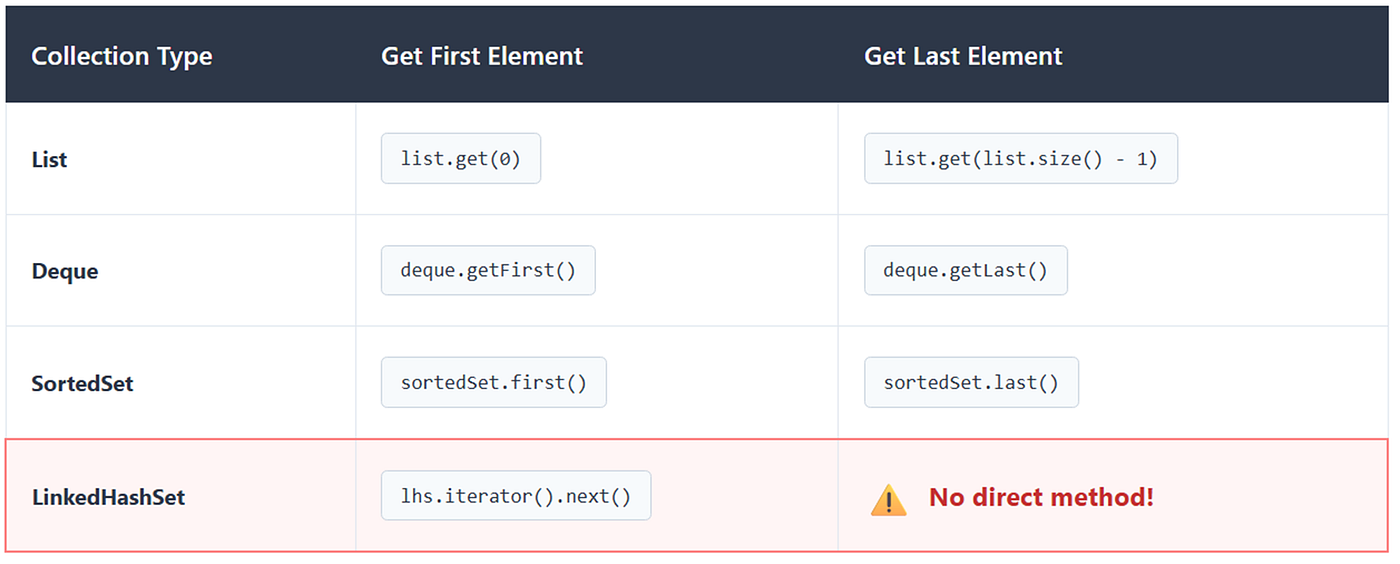
- Collection APIs modernized to use Sequenced Collections
- List access patterns updated with
ListFirstAndLastrecipe
Patch file: Detailed diff saved at target/rewrite/rewrite.patch
Time saved: OpenRewrite estimates 5 minutes of manual work
Review the Patch File
Examine target/rewrite/rewrite.patch to see exact changes:
diff --git a/pom.xml b/pom.xml
index f17baf7..f7e027b 100755
--- a/pom.xml
+++ b/pom.xml
@@ -8,7 +8,7 @@
     <parent>
         <groupId>org.springframework.boot</groupId>
         <artifactId>spring-boot-starter-parent</artifactId>
-        <version>3.1.5</version>
+        <version>3.3.13</version>
     </parent>

     <groupId>com.example</groupId>
@@ -19,9 +19,9 @@
     <description>Order Management Service - Before Java 21 Migration</description>

     <properties>
-        <java.version>17</java.version>
-        <maven.compiler.source>17</maven.compiler.source>
-        <maven.compiler.target>17</maven.compiler.target>
+        <java.version>21</java.version>
+        <maven.compiler.source>21</maven.compiler.source>
+        <maven.compiler.target>21</maven.compiler.target>
         <project.build.sourceEncoding>UTF-8</project.build.sourceEncoding>
     </properties>
Key Changes in pom.xml:
- Spring Boot parent:
3.1.5→3.3.13in this migration run - Java version:
17→21(all three properties updated)
diff --git a/src/test/java/com/example/orders/OrderServiceTest.java b/src/test/java/com/example/orders/OrderServiceTest.java
index f213525..cb3db0e 100755
--- a/src/test/java/com/example/orders/OrderServiceTest.java
+++ b/src/test/java/com/example/orders/OrderServiceTest.java
@@ -107,7 +107,7 @@

         assertEquals(1, pendingOrders.size());
         assertEquals(1, shippedOrders.size());
-        assertEquals(OrderStatus.SHIPPED, shippedOrders.get(0).getStatus());
+        assertEquals(OrderStatus.SHIPPED, shippedOrders.getFirst().getStatus());
     }
Key Changes in Test Code:
- List access:
list.get(0)→list.getFirst()(Java 21 Sequenced Collections API) - This is more expressive and intention-revealing
The patch shows clean, targeted changes — exactly what we want!
Step 4: Execute the Migration

Apply the Migration with mvn rewrite:run
If the dry run looks good, apply the changes:
mvn rewrite:runOpenRewrite will now modify your source files. You’ll see output confirming the changes:
[INFO] --- rewrite:5.37.0:run (default-cli) @ order-service ---
[INFO] Using active recipe(s) [org.openrewrite.java.migrate.UpgradeToJava21,
                                org.openrewrite.java.spring.boot3.UpgradeSpringBoot_3_3]
[INFO] Validating active recipes...
[INFO] Project [Order Service - Java 17] Resolving Poms...
[INFO] Project [Order Service - Java 17] Parsing source files
[INFO] Running recipe(s)...
[WARNING] Changes have been made to pom.xml by:
[WARNING]     org.openrewrite.java.migrate.UpgradeToJava21
[WARNING]         org.openrewrite.java.migrate.UpgradeBuildToJava21
[WARNING]             org.openrewrite.java.migrate.UpgradeJavaVersion: {version=21}
[WARNING]                 org.openrewrite.java.migrate.maven.UpdateMavenProjectPropertyJavaVersion: {version=21}
[WARNING]     org.openrewrite.java.spring.boot3.UpgradeSpringBoot_3_3
[WARNING]         org.openrewrite.maven.UpgradeParentVersion: {groupId=org.springframework.boot,
                                                                 artifactId=spring-boot-starter-parent,
                                                                 newVersion=3.3.x}
[WARNING] Changes have been made to src\test\java\com\example\orders\OrderServiceTest.java by:
[WARNING]     org.openrewrite.java.migrate.UpgradeToJava21
[WARNING]         org.openrewrite.java.migrate.util.SequencedCollection
[WARNING]             org.openrewrite.java.migrate.util.ListFirstAndLast
[WARNING]
[WARNING] Please review and commit the results.
[WARNING] Estimate time saved: 5m
[INFO] ------------------------------------------------------------------------
[INFO] BUILD SUCCESS
[INFO] Total time:  59.266 s
What Just Happened:
✅ Files Modified: Your actual source files have been updated (not just a patch)
pom.xml- Java 21 and Spring Boot 3.3.13OrderServiceTest.java- Modern Java 21 APIs
✅ Changes Applied: All the transformations from the dry run are now in your code
✅ Review Reminder: OpenRewrite prompts you to review and commit
Verify the Changes
Check your updated pom.xml:
<properties>
    <java.version>21</java.version>
    <maven.compiler.source>21</maven.compiler.source>
    <maven.compiler.target>21</maven.compiler.target>
</properties>

<parent>
    <groupId>org.springframework.boot</groupId>
    <artifactId>spring-boot-starter-parent</artifactId>
    <version>3.3.13</version>
</parent>
Step 5: Clean and Rebuild
mvn clean installIf you encounter compilation errors, they’re typically:
Common Issue #1: Java Version Mismatch
Error:
[ERROR] Failed to execute goal org.apache.maven.plugins:maven-compiler-plugin:3.11.0:compile
(default-compile) on project order-service: Fatal error compiling: error: invalid target release: 21
Solution: Ensure your JAVA_HOME points to JDK 21:
Common Issue #2: Dependency Conflicts
Some older libraries may not be compatible with Java 21 or the upgraded Spring Boot version.
If you face dependency-related errors after the migration, first check whether the dependency is already managed by Spring Boot. For example, Hibernate is managed through the Spring Boot dependency management/BOM when you use spring-boot-starter-data-jpa.
In most cases, you should avoid manually overriding Hibernate or other managed dependency versions unless you have a specific compatibility reason. Prefer upgrading through the Spring Boot parent/BOM and let Spring Boot choose the tested dependency versions.
If a third-party library is not managed by Spring Boot, then check its Java 21 compatibility and upgrade that library explicitly.
Step 6: Run Tests
mvn testAll existing tests should pass. If any fail, it’s likely due to:
- Behavioral changes in Java 21 APIs (rare)
- Spring Boot 3.3 changes
- Timing-sensitive tests (Virtual Threads may affect timing)
Step 7: Leverage Java 21 Features (Post-Migration)
Your migration is complete! Your application now runs on Java 21 and Spring Boot 3.3. The steps below are optional enhancements that show you how to take advantage of Java 21’s new features to modernize your codebase further.
Switch Expressions for Cleaner Status Messages
Update OrderService.getOrderStatusMessage():
Before (Java 17):
public String getOrderStatusMessage(Order order) {
    switch (order.getStatus()) {
        case PENDING:
            return "Your order is awaiting confirmation";
        case CONFIRMED:
            return "Your order has been confirmed";
        case PROCESSING:
            return "Your order is being processed";
        case SHIPPED:
            return "Your order has been shipped";
        case DELIVERED:
            return "Your order has been delivered";
        case CANCELLED:
            return "Your order has been cancelled";
        default:
            return "Unknown status";
    }
}
After (Java 21):
public String getOrderStatusMessage(Order order) {
    return switch (order.getStatus()) {
        case PENDING -> "Your order is awaiting confirmation";
        case CONFIRMED -> "Your order has been confirmed";
        case PROCESSING -> "Your order is being processed";
        case SHIPPED -> "Your order has been shipped";
        case DELIVERED -> "Your order has been delivered";
        case CANCELLED -> "Your order has been cancelled";
    };
}
Records for Cleaner API Responses
Create a record for cleaner API responses:
OrderResponse.java
package com.example.orders.model;

public record OrderResponse(
    Long id,
    String customerEmail,
    String amount,
    String status,
    String message
) {}
Updated Controller Method:
@GetMapping("/{id}/details")
public ResponseEntity<OrderResponse> getOrderDetails(@PathVariable Long id) {
    return orderService.getOrderById(id)
        .map(order -> {
            String message = orderService.getOrderStatusMessage(order);
            return new OrderResponse(
                order.getId(),
                order.getCustomerEmail(),
                order.getTotalAmount().toString(),
                order.getStatus().name(),
                message
            );
        })
        .map(ResponseEntity::ok)
        .orElse(ResponseEntity.notFound().build());
}
Virtual Threads for I/O Operations
Enable Virtual Threads in Spring Boot (Java 21’s killer feature):
application.yml
spring:
  threads:
    virtual:
      enabled: true
This makes Spring MVC request handling use Virtual Threads, dramatically improving scalability for I/O-bound operations.
Sequenced Collections
Add a method to get the most recent orders:
public List<Order> getRecentOrders(int limit) {
    List<Order> allOrders = orderRepository.findAll();
    // Java 21: reversed() is now available on List
    return allOrders.reversed()
        .stream()
        .limit(limit)
        .toList();
}
See It Live: Interactive Demo
I have also created a full video version of this lesson where I demonstrate upgrading a real Spring Boot application from Java 17 and Spring Boot 3.1.5 to Java 21 and Spring Boot 3.3 using OpenRewrite.
Watch the Java 17 to Java 21 Migration with OpenRewrite demo here:
[embed]
Source Code
All Java 21 examples used in this article are available in this GitHub repository:
https://github.com/j2eeexpert2015/order-service-java17
Further Learning
This article is part of my broader Java 21 learning series. If you prefer a structured course format, I also cover Java 21 features, Spring Boot demos, Virtual Threads, JMeter performance testing, monitoring, and Java 21 migration in my Udemy course:
**Java 21 Features Deep Dive: Virtual Threads & Spring Boot**
Disclosure: This is my own Udemy course. If you enroll using the course link above, I may receive instructor revenue from Udemy.
Conclusion
Migrating to Java 21 is not just a version bump. It is an opportunity to modernize the runtime, improve maintainability, and prepare your Spring Boot applications for newer Java features.
OpenRewrite makes this process much safer by automating repetitive upgrade steps, generating reviewable diffs, and allowing you to preview changes before modifying source files.
Still, automation is only one part of a successful migration. Always review the generated changes, run your tests, validate application behavior, and upgrade dependencies carefully.
In this demo, we migrated a Spring Boot application from Java 17 and Spring Boot 3.1.5 to Java 21 and Spring Boot 3.3, reviewed the changes, and confirmed the project builds successfully.
Key Takeaways
✅ OpenRewrite automates many repetitive migration changes,saving hours of manual refactoring.But you should still review the diff, run tests, and validate application behavior before committing the upgrade. ✅ LST technology preserves your code formatting and style automatically ✅ Dry-run capability ensures safe, predictable changes before committing ✅ Java 21 features like Virtual Threads provide immediate performance benefits ✅ Minimal risk — staged upgrades and comprehensive testing ensure stability
메타데이터
- post_id
- e36fb79d8627
- slug
- java-17-to-java-21-migration-with-openrewrite-spring-boot-3-3-upgrade-guide-e36fb79d8627
- url
- https://medium.com/javarevisited/java-17-to-java-21-migration-with-openrewrite-spring-boot-3-3-upgrade-guide-e36fb79d8627
- canonical_url
- https://medium.com/javarevisited/java-17-to-java-21-migration-with-openrewrite-spring-boot-3-3-upgrade-guide-e36fb79d8627
- author_url
- https://medium.com/@mrayandutta
- status
- ok
- fetched_at
- 2026-08-20 05:48:05