Flint: a linter setup that doesn’t slow down your AI agent
TL;DR: Super-Linter is great — until your coding agent runs in a container and can’t launch Docker. Flint keeps the parts I liked (easy…
Flint: a linter setup that doesn’t slow down your AI agent
TL;DR: Super-Linter is great — until your coding agent runs in a container and can’t launch Docker. Flint keeps the parts I liked (easy setup, auto-fix, pinned versions) and drops the Docker dependency by running linters natively via mise.

Do you still look at your code in the age of AI coding agents?
I still do — less than before, and not as often as I should. And when I do, I always get frustrated by the same thing: Claude and Codex nail my Go and Rust, then mangle my Markdown.
Fixing that by hand defeats the point of using an agent. The real fix is to let the agent run the linter and auto-fix its own output on every iteration. But my linter was too slow for that, and it couldn’t even run inside the container the agent lives in. That was the bottleneck.
This is the story of how I used the increased productivity of coding agents to remove that bottleneck — a bottleneck the coding agents themselves created — and how it led to Flint, a linter setup built to keep up with an AI agent. It provides near-instant startup, lints only what changed, and runs anywhere the agent does — even inside a container.
Along the way I’ll also explain what I value in a linter setup.
What I want from a linter setup
Before I get to Super-Linter and Flint, here’s the scorecard I’ll use for both:
- Easy to set up: One place to configure, no hunting for a linter per file format
- Updatable versions: Linter versions can be bumped automatically (tools like Renovate and Dependabot)
- Runs locally: Same checks locally as on CI, no “works on CI only” surprises
- Auto-fix: If the linter can fix it, I shouldn’t have to
- Fast: Especially important when an AI agent is waiting on the result
Super-Linter
Ironically, it was my former self who set up most of those linters — typically via Super-Linter, a lint orchestrator that bundles dozens of linters into one GitHub Action. It scored well on items 1 through 4 on my scorecard:
- Easy to set up: Just add the GitHub action — no need to find a linter for each file format. Files and directories can be excluded in one place
- Updatable versions: It’s simply the version of the GitHub action
- Runs locally: It’s a Docker image
- Auto-fix: When running locally with
FIX_MARKDOWNstyle environment variables
The one it never scored: 5, Fast. Bundling every linter into a Docker image means paying that image’s startup cost on every run — the problem that eventually broke the setup, as we’ll see.
Where Super-Linter started to crack
Even before I used coding agents I ran into the issue that my local Docker version did not match the GitHub Actions version. And some linters (maybe golangci-lint) were flagging different issues on each.
I fixed that by creating a script that could be used both locally and on CI, with a Renovate rule to keep the version up to date:
# renovate: datasource=docker depName=ghcr.io/super-linter/super-linter
SUPER_LINTER_VERSION="v8.2.1@sha256:6331793e23be44827ade3bfcd27c2c3f0870c663fb2b118db38035f4e59ab136"
So 1 (easy setup) and 3 (runs locally) were already at odds in my setup.
On top of that, the easy setup was not always the case. My occasional Python script would be formatted by both ruff and black (probably a non-issue for a regular Python dev, but non-obvious to me). The fix: select one of them via an env var.
The AI agent bottleneck
Once I started using AI agents heavily in February, Super-Linter became a real bottleneck:
- It was just too slow; every agent iteration paid the Docker startup cost.
- Docker (or Podman) cannot be run from inside the container my coding agent runs in.
That second point is the killer. The whole appeal of Super-Linter — just run the container — stops working the moment the agent running it is itself in a container. The agent’s sandbox has no Docker daemon of its own, and handing it access to the host is a privilege most agent setups (rightly) don’t grant:

Flint
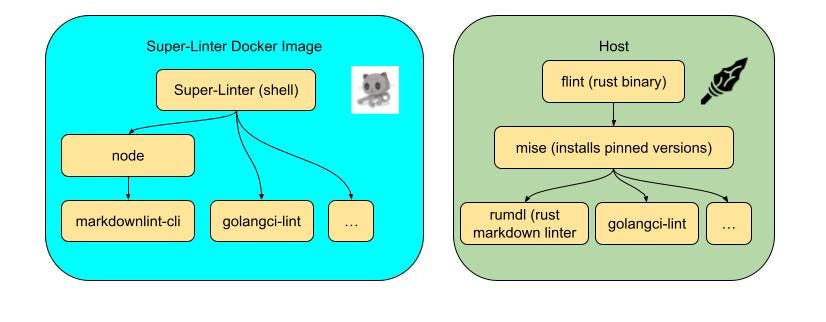
I spent some time trying to build a script that would extract the linter versions from the Super-Linter Docker image and run them natively using mise.
It quickly turned out that running linters via miseis great for several reasons — so much so that Super-Linter was no longer needed.
A mise config file with linters:
[tools]
lychee = "0.24.2"
rumdl = "0.1.91"
Mise covers the scorecard like this:
- Updatable versions: Via Renovate
- Runs locally by default: That’s mise’s whole job
- Fast: You only download the linters you want, and the mise GitHub action caches them across runs
That left 1 (easy setup) and 4 (auto-fix). mise is the foundation — it installs and runs the linters — but it doesn’t know which files changed, how to exclude paths, or how to auto-fix in one command. So I built Flint as the two stories on top: a thin Rust binary that drives mise’s linters, takes one config file, and runs auto-fix for free.
Two months later, there is flint. It took longer to implement than I expected, but the execution was much faster than I expected:
- Flint uses mostly linters that don’t need a runtime (usually Rust- or Go-based), so startup is near-instant.
- Flint only lints files that changed in a PR, or compared to
mainwhen running locally. - Flint itself is written in Rust and executes linters in parallel.
flint initis the easy setup command that lets you select the linters that you want to have.
Side by side, the two setups look like this:
Final scorecard:

(Full comparison against other lint orchestrators: alternatives.md.)
One more thing the agent cares about: tokens
Once Flint was fast enough, the next bottleneck was how much output the agent
had to read back. So Flint is built to be quiet: a clean run prints nothing,
and flint run --fix silently fixes what it can and ends in a one-liner:
[shellcheck]

In bad.sh line 2:
echo $1
     ^-- SC2086 (info): Double quote to prevent globbing and word splitting.
...
flint: fixed: cargo-fmt — commit before pushing | review: shellcheck
This is exactly the context needed to fix what couldn’t be auto-fixed, nothing more — and just as nice to read for me as it is cheap for Claude.
Want to see Flint in a real repo? Look at grafana/docker-otel-lgtm, A Grafana open source project that provides an open source backend for OpenTelemetry in a Docker image. I uses mise.toml, flint.toml, and lint workflow as the canonical setup.
메타데이터
- post_id
- e3a85044c4c2
- slug
- flint-a-linter-setup-that-doesnt-slow-down-your-ai-agent-e3a85044c4c2
- url
- https://medium.com/grafana-labs/flint-a-linter-setup-that-doesnt-slow-down-your-ai-agent-e3a85044c4c2
- canonical_url
- https://medium.com/grafana-labs/flint-a-linter-setup-that-doesnt-slow-down-your-ai-agent-e3a85044c4c2
- author_url
- https://medium.com/@zeitlinger
- status
- ok
- fetched_at
- 2026-06-20 20:29:01