How to Set Up and Run COAL Code Using DOSBox and AFD Debugger
Introduction:
How to Set Up and Run COAL Code Using DOSBox and AFD Debugger
Introduction:
- Briefly explain what COAL code is and why DOSBox and AFD Debugger are essential tools for running it on modern systems.
- Mention that DOSBox emulates DOS, which is needed for running 16-bit programs like the AFD Debugger, while AFD helps debug and test assembly code.
Step 1: Setting Up DOSBox
- Download and Install DOSBox:
- Provide a link to the official DOSBox website and briefly explain the installation process for Windows/Linux/Mac.
2. Create a Working Directory:
- Create a folder on your PC (e.g.,
C:\dosprog) to store the COAL code and AFD Debugger.
3. Configure DOSBox:
- Open the
dosbox.conffile (found in the DOSBox directory). - Edit the
[autoexec]section to automatically mount your working directory: - [autoexec] mount c c:\dosprog c:
- Save the file and restart DOSBox.
Step 2: Installing AFD Debugger
- Download AFD Debugger:
- Provide a link to download the AFD Debugger (you might need to upload it or link to a trusted source).
2. Copy AFD to Working Directory:
- Move the AFD executable into the working directory you created (e.g.,
C:\dosprog).
3. Test the Setup:
- Run DOSBox, navigate to the working directory, and execute
afd.exeto verify the installation. - c:> afd.exe
Step 3: Writing COAL Code
- Create a COAL Assembly File:
- Write a sample COAL code file using a text editor (e.g.,
hello.asm) that starts with[org 0x0100]since you prefer minimal directives. - Example:
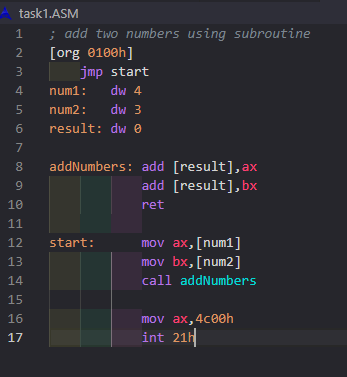
2. Assembling and runing Code on AFD debugger:
- Use an assembler (e.g.,
tasm) to convert the.asmfile to an executable.
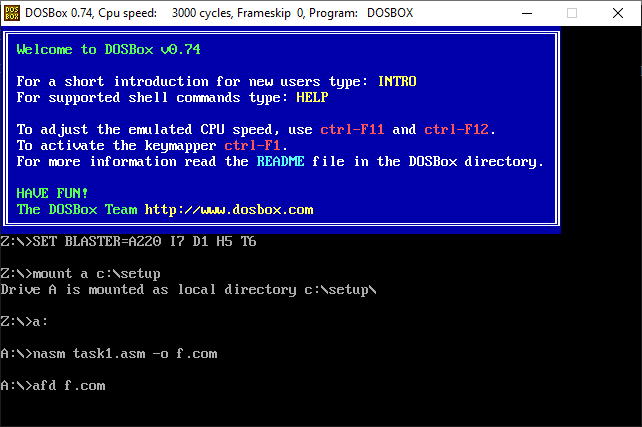
3. Visualizing Output of the Code:
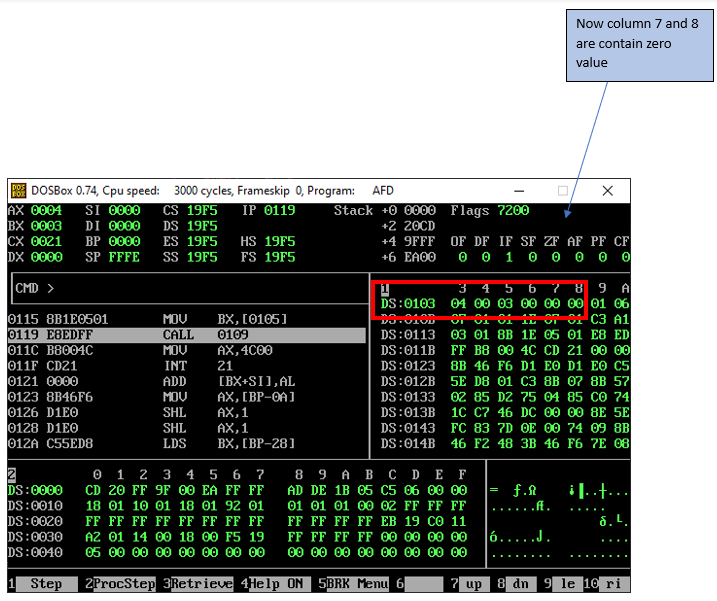
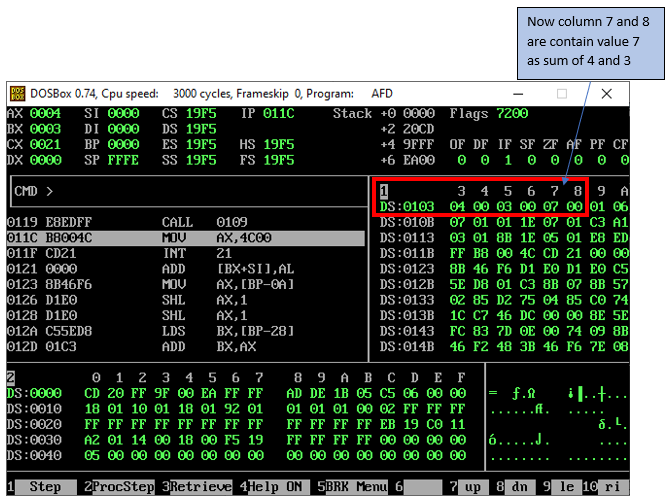
- Conclusion:
. We write a code and then run on afd debugger and visualize our output.
메타데이터
- post_id
- e3cd70f1ba67
- slug
- how-to-set-up-and-run-coal-code-using-dosbox-and-afd-debugger-e3cd70f1ba67
- url
- https://medium.com/@muhammadahmad28423/how-to-set-up-and-run-coal-code-using-dosbox-and-afd-debugger-e3cd70f1ba67
- canonical_url
- https://medium.com/@muhammadahmad28423/how-to-set-up-and-run-coal-code-using-dosbox-and-afd-debugger-e3cd70f1ba67
- author_url
- https://medium.com/@muhammadahmad28423
- status
- ok
- fetched_at
- 2026-07-22 10:50:30