GCP-PDE — The CFO Has Entered the Room — Optimising Resources (Section 5.1)
Building a data platform that works is engineering. Building one that works without bankrupting the company is architecture.
GCP-PDE — The CFO Has Entered the Room — Optimising Resources (Section 5.1)
Building a data platform that works is engineering. Building one that works without bankrupting the company is architecture.
There’s a moment in every data engineering team’s journey when someone from finance walks in with a spreadsheet. The cloud bill has arrived. The numbers are larger than anyone expected. The conversation that follows is uncomfortable — not because the team did anything wrong, but because nobody designed the platform with cost as a first-class requirement.
I’ve been in that room. And I’ve learned that the most expensive mistake in cloud data engineering isn’t a wrong architectural choice — it’s the right architectural choice deployed without the right cost controls. A Dataproc cluster running 24/7 when it’s only needed for 2 hours per night. A Spanner instance over-provisioned for peak load that happens once a quarter. A BigQuery project where analysts run SELECT * on petabyte tables every morning.
Cost optimisation isn’t about being cheap. It’s about paying for what you use, provisioning for what you need, and not subsidising idle compute with your infrastructure budget.
Section 5.1 is the exam’s way of asking: given a specific data processing requirement, which resource configuration minimises cost while meeting the business SLA — and how do you ensure critical workloads always have enough capacity when it matters?
We’ll follow Cymbal’s Cloud Cost Optimisation Initiative — the project that started when the finance team walked in with that spreadsheet.
01 — Paying Only for What You Need: Minimising Costs
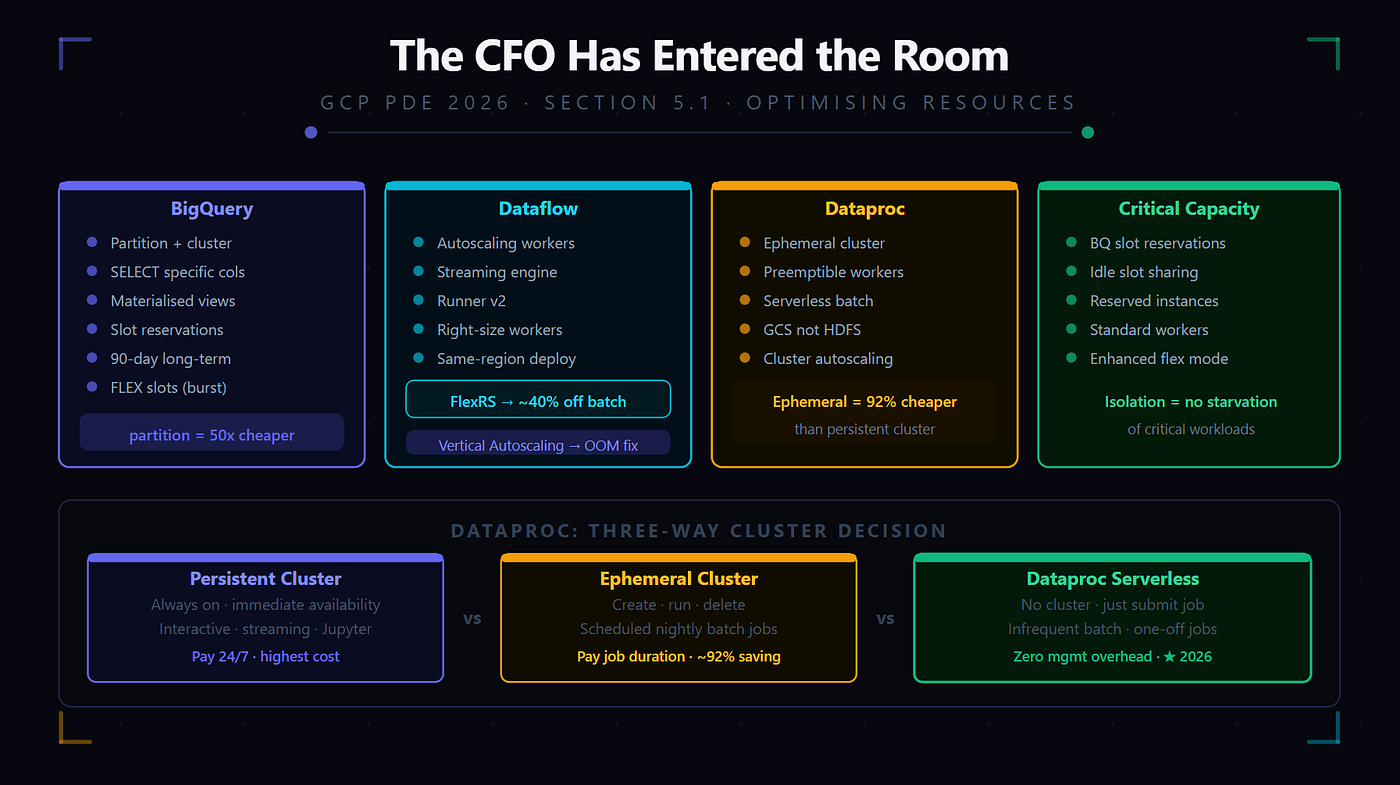
Cost minimisation isn’t a single decision — it’s a set of design patterns applied consistently across every service in the stack. The exam tests whether you know the cost model of each major GCP data service and which configuration levers reduce cost without compromising the business requirement.
Think of cost optimisation like utility billing in a building. You don’t heat every room to the same temperature year-round — you heat occupied rooms to the temperature people need, let unoccupied rooms cool down, and use smart thermostats to respond to actual demand. Cloud cost optimisation is the same — provision what’s needed, when it’s needed, no more.
BigQuery cost optimisation
BigQuery has two pricing models and multiple levers within each — the exam tests all of them.
On-demand pricing charges per TB of data scanned. Every query costs money proportional to how much data it reads.
- Partitioning — the single most impactful cost lever. Queries with a partition filter scan only the matching partitions. A date-partitioned 100 TB table queried with a 7-day filter scans ~2 TB. Without the filter, it scans 100 TB. Same query, 50x cost difference.
- Clustering — reduces bytes scanned within partitions. A table clustered by store_id and product_category scans far fewer bytes when queries filter on these columns.
- SELECT specific columns — BigQuery is columnar. SELECT * on a 200-column table reads 200 columns worth of data. SELECT col1, col2, col3 reads only 3 columns. On a 10 TB table, this can be a 99% cost reduction.
- Materialised views — precompute expensive aggregations once. Dashboard queries scan kilobytes of precomputed results instead of terabytes of raw data.
- Long-term storage pricing — any BigQuery table or partition not modified for 90+ days automatically drops to approximately 50% cheaper long-term storage rates.
Capacity pricing (slot reservations) is a flat monthly rate for a fixed number of BigQuery processing slots. Right for predictable, high-volume workloads where on-demand cost exceeds the reservation cost.
- Autoscaling reservations — a minimum slot count is always available, scaling up to a maximum during peaks.
- Reservation assignments — assign slots to specific projects, folders, or organisations. Cymbal assigns 500 slots to the analytics project and 200 slots to the data engineering project. Each project has guaranteed capacity without competing.
- FLEX slots — short-term slot rentals available by the minute for burst workloads. Not the same as FlexRS.
Dataflow cost optimisation
Dataflow charges for vCPU-hours and GB-hours of memory used by workers.
- Autoscaling — workers scale up and down based on pipeline backlog. Only pay for workers actually needed.
- Streaming engine — offloads shuffle and state storage from workers to a managed backend. Reduces worker count for streaming pipelines.
- Runner v2 — more efficient resource utilisation than the original runner.
- FlexRS — the discounted night shift for batch Dataflow jobs. Covered in full in Section 02.
- Right-sizing workers — choose the smallest machine type that meets the pipeline’s memory requirements. An n1-standard-2 costs 75% less than an n1-standard-8.
- Regional deployment — run Dataflow in the same region as data sources to avoid cross-region egress charges.
Dataproc cost optimisation
Dataproc charges for VMs in the cluster per second.
- Ephemeral clusters — create the cluster, run the job, delete the cluster. A nightly 2-hour Spark job on an ephemeral cluster costs 2 hours of VM time instead of 24 hours — 92% cost reduction.
- Preemptible VMs — 60–91% discount compared to standard VMs. Use for batch jobs that can tolerate occasional worker loss and recomputation. Never use preemptible for the master node.
- Dataproc Serverless — pay only for vCPU and memory during job execution. No cluster startup overhead.
- Cloud Storage instead of HDFS — decouples storage from compute. Ephemeral clusters can be deleted after jobs while data persists in Cloud Storage.
- Autoscaling — cluster autoscaling based on YARN metrics for variable workloads.
Cloud Spanner cost optimisation
- Right-sizing the instance — monitor CPU utilisation and scale up only when CPU consistently exceeds 65%.
- Stale reads — bounded staleness reads are cheaper than strong reads for reporting queries where slight staleness is acceptable.
Cloud Storage cost optimisation
- Lifecycle policies — transition objects through storage classes automatically as they age. Standard to Nearline at 30 days, Coldline at 90 days, Archive at 365 days.
- Object versioning cost control — set lifecycle rules to delete non-current versions after 30 days to prevent version accumulation multiplying storage costs.
💡 Exam Tip — Cost minimisation cheat sheet:
“Reduce BigQuery query cost” → partition + cluster + SELECT specific columns
“Reduce BigQuery storage cost for old data” → long-term storage auto-classification (90 days)
“Predictable high-volume BigQuery workload” → slot reservation (capacity pricing)
“Burst BigQuery capacity for a short period” → FLEX slots
“Reduce Dataflow cost” → autoscaling + streaming engine + Runner v2 + right-sized workers
“Batch Dataflow, not time-critical” → FlexRS
“Dataproc nightly batch job” → ephemeral cluster (pay only for job duration)
“Dataproc batch with cost-tolerant restarts” → preemptible/spot worker nodes
“Infrequent Spark batch, no cluster management” → Dataproc Serverless
“Spanner reporting queries, slight staleness acceptable” → bounded staleness reads
02 — The Discounted Night Shift: Dataflow FlexRS
FlexRS deserves its own section because it’s the 2026 exam’s featured cost optimisation concept for Dataflow — and because the mental model is unusual enough that it trips up candidates who know what it is but don’t understand when it applies.
Think of FlexRS like a print shop that offers a 40% discount on jobs submitted after business hours. The work gets done — same quality, same output — but Google schedules it when their infrastructure has spare capacity. You don’t control exactly when it runs, only that it runs within a specified window. In exchange, you pay significantly less.
What FlexRS is
- A Dataflow batch job scheduling mode where you tell Google: “Run this pipeline, but you can schedule it whenever you have spare capacity in the next N hours.”
- Google applies a substantial discount — typically 40% off the standard Dataflow batch price.
- The job runs on a mix of standard and preemptible VMs. When preemptible VMs are reclaimed, Dataflow automatically migrates work to standard VMs — the job continues.
When FlexRS is correct
- The batch job is not time-critical — results only need to be ready within a window, not by a specific time.
- The job is large enough that the 40% discount represents meaningful savings.
- The job is idempotent — it can safely restart if preemptible workers are reclaimed.
When FlexRS is NOT correct
- The pipeline has a hard SLA — “results must be in BigQuery by 6 AM.” If FlexRS delays the job, the SLA is breached.
- Streaming pipelines — FlexRS is batch-only.
- Jobs where preemptible worker interruption causes unacceptable recomputation overhead.
FlexRS in practice
Cymbal’s nightly historical reprocessing job takes 4 hours and doesn’t need to complete until the next morning. FlexRS submits it with a 6-hour scheduling window — Google schedules it during off-peak hours, Cymbal pays 40% less.
Cymbal’s real-time order aggregation pipeline must complete within 5 minutes of receiving events — FlexRS is wrong here. Use standard Dataflow streaming mode.
Vertical Autoscaling — the complement to FlexRS
Where FlexRS reduces cost by scheduling flexibility, Vertical Autoscaling reduces cost and improves performance by right-sizing workers dynamically during a job. Dataflow Runner v2 can automatically upgrade workers to larger machine types when memory pressure is detected and downgrade when pressure subsides. Vertical Autoscaling is about performance and cost correctness; FlexRS is about scheduling-based discounts.
💡 Exam Tip:
“40% discount on Dataflow batch job, not time-critical” → FlexRS
“FlexRS + hard SLA” → WRONG — FlexRS cannot guarantee a specific completion time
“FlexRS + streaming” → WRONG — FlexRS is batch-only
“Dataflow workers OOM mid-job” → Vertical Autoscaling (not FlexRS)
When the exam says “not time-critical” or “results needed by end of day,” FlexRS is the answer. When it says “must complete by 6 AM,” FlexRS is wrong.
03 — The Capacity That Cannot Fail: Ensuring Resources for Critical Workloads
Cost minimisation is only half the story. The other half is ensuring that the cost-optimised platform doesn’t starve business-critical processes of the resources they need.
BigQuery reservations for workload isolation
On-demand BigQuery means all queries compete for the same shared slot pool. Slot reservations with reservation assignments solve this.
Cymbal creates three reservations:
- critical-pipeline — 1,000 slots assigned to the data engineering project. Nightly pipeline transformations always have guaranteed capacity.
- analytics — 500 slots assigned to the analytics project. Dashboard queries are never starved.
- adhoc — 200 autoscaling slots assigned to the data science project. Ad-hoc exploration gets capacity when available.
Reservations are isolated — the adhoc reservation being fully utilised doesn’t affect the critical-pipeline reservation.
Idle slot sharing — if the critical-pipeline reservation isn’t fully utilised, idle slots can be shared with other reservations. The analytics project can burst into unused pipeline slots during off-peak hours without paying for more slots.
Dataflow guaranteed capacity
- Reserved instances (committed use discounts) — commit to a specific number of vCPUs for 1 or 3 years. Reserved instances are always available — no capacity risk — at 37–55% discount. Used for Cymbal’s real-time fraud detection pipeline that must always be running.
- Regional selection — deploy critical pipelines in primary regions (us-central1, us-east1, europe-west1) with the most capacity headroom.
Dataproc: ensuring critical job completion
- For critical Dataproc batch jobs (month-end financial reports, weekly ML model retraining), use standard (non-preemptible) worker nodes. Preemptible workers can be reclaimed — unacceptable for a job that must complete by a specific time.
- Enhanced flexibility mode — 70% standard workers (reliable completion) + 30% preemptible (cost savings). If preemptible workers are reclaimed, the job continues on standard workers.
- Dataproc autoscaling — for jobs with variable workload profiles, autoscaling provides workers when stages need them without over-provisioning.
💡 Exam Tip:
“Critical BigQuery queries must not be starved by ad-hoc queries” → slot reservation with project assignment
“Share unused slots between workloads” → idle slot sharing in BigQuery reservations
“Guaranteed VM capacity for critical Dataflow pipeline” → reserved instances (committed use discounts)
“Critical Dataproc job must complete — no preemptible workers” → standard worker nodes only
“Save cost on Dataproc but maintain job completion guarantee” → enhanced flexibility mode
04 — Persistent vs Job-Based Clusters: The Dataproc Decision
The persistent vs ephemeral cluster decision is one of the most frequently tested Dataproc concepts — and the 2026 exam now adds Dataproc Serverless as a third option.
Think of this decision like choosing between buying a car, renting a car, or using a taxi. Buying (persistent cluster) makes sense if you drive every day. Renting (ephemeral cluster) makes sense for occasional trips. A taxi (Dataproc Serverless) makes sense when you don’t want to think about the vehicle at all.
Persistent cluster — always on
- Runs continuously, 24/7, ready to accept jobs at any time.
- Pay for every hour the cluster exists regardless of whether jobs are running.
- Right for: interactive workloads, real-time Spark Structured Streaming, Jupyter notebook sessions, high-frequency job submission where startup cost dominates.
Ephemeral cluster — job-scoped
- Created for a specific job, deleted after the job completes.
- Pay only for the time the job runs — no idle compute cost.
- Right for: scheduled batch jobs on a fixed cadence (nightly, weekly), ETL jobs with clear start and end points.
- Automate with Composer: DataprocCreateClusterOperator → DataprocSubmitJobOperator → DataprocDeleteClusterOperator.
Dataproc Serverless — no cluster
- Submit a PySpark batch job without creating or managing any cluster.
- Pay only for vCPUs and memory used during job execution, billed per second.
- Right for: infrequent batch jobs, teams that don’t want cluster management, one-off jobs.
- NOT right for: interactive analysis, streaming workloads, Hadoop ecosystem tools.
The decision framework
Scenario Answer Interactive data exploration throughout the day Persistent cluster Nightly 2-hour ETL job Ephemeral cluster Monthly ML retraining, no cluster management desired Dataproc Serverless Spark Structured Streaming, must run continuously Persistent cluster One-off historical backfill Dataproc Serverless or Ephemeral Multiple short batch jobs submitted every 30 minutes Persistent cluster
💡 Exam Tip:
“Always available, interactive, or streaming” → persistent cluster
“Scheduled batch, runs once per night” → ephemeral cluster
“No cluster config, infrequent batch” → Dataproc Serverless
“Automate ephemeral cluster lifecycle in Composer” → DataprocCreateClusterOperator → DataprocSubmitJobOperator → DataprocDeleteClusterOperator
The 2026 exam tests all three Dataproc modes — don’t default to ephemeral when the scenario says “no cluster management.” That’s Serverless.
Practice Questions
Q1 — FlexRS: Correct Application
Cymbal’s data engineering team runs a weekly historical aggregation job in Dataflow. The job processes 12 months of order data, takes approximately 5 hours, and produces a summary table used for quarterly business reviews. The summary needs to be ready by Monday morning — the job runs Sunday evening. The team wants to reduce Dataflow costs. Which configuration is correct?
- A. Enable Dataflow Vertical Autoscaling — dynamically resize workers during the job
- B. Use FlexRS — submit the job Sunday evening with a 12-hour scheduling window; Google schedules it at optimal capacity, applying a ~40% discount
- C. Use Dataflow streaming mode — streaming is more efficient than batch for large datasets
- D. Switch to Dataproc ephemeral cluster — Spark is cheaper than Dataflow
Answer: B
- The job is batch, not time-critical (any time Sunday night to Monday morning is acceptable), and large enough for meaningful discount. FlexRS is exactly right. Vertical Autoscaling (A) helps with worker right-sizing — it doesn’t provide the scheduling-based discount that FlexRS does. Streaming mode © is for unbounded data — a historical batch job should not use streaming. Switching to Dataproc (D) changes the processing engine unnecessarily.
Q2 — Dataproc: Persistent vs Ephemeral
Cymbal’s data science team has 8 analysts who work with PySpark throughout the business day. They submit interactive queries, iterate on code in Jupyter notebooks, and run exploratory analyses. Each session lasts 1–4 hours. A new data engineer proposes switching to ephemeral clusters for each session. What is the problem?
- A. Ephemeral clusters don’t support PySpark
- B. Ephemeral clusters take 2–5 minutes to start — analysts waiting for a cluster for every session significantly impacts productivity; for interactive, throughout-the-day workloads, a persistent cluster is more appropriate
- C. Ephemeral clusters are more expensive than persistent clusters for all workloads
- D. Cloud Composer cannot manage ephemeral Dataproc clusters
Answer: B
- Interactive workloads need immediate availability — a 2–5 minute startup for every session is unacceptable for analysts iterating on code throughout the day. Persistent clusters are always available. Ephemeral clusters are right for scheduled batch jobs with fixed start/end points, not interactive sessions with unpredictable timing.
Q3 — BigQuery Slot Reservations
Cymbal’s BigQuery project serves two workloads: (1) the nightly ETL pipeline that must complete by 5 AM, and (2) data scientists running ad-hoc exploratory queries throughout the day. Currently all queries share the on-demand pool — the nightly pipeline sometimes takes 3 hours instead of 1 hour because scientists’ exploratory queries consume most of the on-demand slots. Which configuration resolves this?
- A. Schedule data scientists’ queries to run only during business hours
- B. Create two BigQuery slot reservations: etl-critical (1,000 slots) assigned to the ETL pipeline project, and adhoc (500 autoscaling slots) assigned to the data science project — workloads are isolated and cannot compete
- C. Increase the on-demand quota for the ETL pipeline project
- D. Use BigQuery scheduled queries to run the ETL pipeline — they get higher priority than manual queries
Answer: B
- Slot reservations with project-level assignments physically isolate workloads. The ETL pipeline’s 1,000 reserved slots are always available — scientists’ queries cannot consume them. Scheduling scientists to business hours (A) restricts their work and doesn’t guarantee ETL slots during off-hours. On-demand quota © doesn’t prevent competition. Scheduled queries (D) don’t get special priority — they compete in the same on-demand pool.
Q4 — Preemptible Workers
Cymbal’s weekly inventory reconciliation Dataproc job runs every Sunday at midnight, takes 90 minutes, processes 500 GB, and is fully idempotent. The team wants to minimise cost without risking job failure due to node loss. Which worker configuration is appropriate?
- A. All preemptible workers — maximum cost savings
- B. All standard (non-preemptible) workers — no risk of node loss
- C. Standard workers for the master and 70% of workers; preemptible workers for the remaining 30% — meaningful cost savings while maintaining job completion even if preemptible workers are reclaimed
- D. Dataproc Serverless — no workers to configure
Answer: C
- Enhanced flexibility mode provides the best cost/reliability balance. The job continues to completion even if the 30% preemptible workers are reclaimed. All preemptible (A) risks complete job failure. All standard (B) foregoes cost savings that the idempotency and Sunday timing make acceptable. Dataproc Serverless (D) is also valid but C specifically addresses the worker configuration question.
Q5 — Dataproc Serverless: Correct Scenario
Cymbal’s compliance team needs to run a one-time PySpark job that scans 5 years of historical transaction data (80 TB in Cloud Storage) for a regulatory compliance report. The job takes approximately 6 hours. The team has PySpark expertise but has never managed a Dataproc cluster — they want to focus on the code, not infrastructure. Which Dataproc option is correct?
- A. Dataproc persistent cluster — always ready, no startup wait
- B. Dataproc ephemeral cluster — create for the job, delete after
- C. Dataproc Serverless — submit the PySpark batch job without any cluster configuration
- D. Dataflow — rewrite the PySpark job as an Apache Beam pipeline
Answer: C
- One-time job, no cluster management preference, PySpark expertise — Dataproc Serverless is purpose-built for this. A persistent cluster (A) wastes money before and after the one-time job. An ephemeral cluster (B) requires configuring machine types, worker counts, and cluster parameters — the team doesn’t want that overhead. Dataflow (D) requires rewriting the PySpark job as Beam code — unnecessary for a one-time job.
Q6 — Dataflow Cost: Worker Right-Sizing
Cymbal’s Dataflow streaming pipeline uses n1-standard-8 workers (8 vCPU, 30 GB RAM). Cloud Monitoring shows average CPU utilisation of 22% and average memory utilisation of 18% across all workers. The pipeline has been stable for 3 months. What is the recommended cost optimisation?
- A. Enable autoscaling — reduces the number of workers automatically
- B. Switch to a smaller machine type such as n1-standard-2 (2 vCPU, 7.5 GB RAM) — low CPU and memory utilisation indicates workers are significantly over-provisioned; smaller workers cost 75% less
- C. Switch to FlexRS — the pipeline is inefficiently priced
- D. Migrate to Dataproc — Spark is more memory-efficient than Dataflow
Answer: B
- 22% CPU and 18% memory on n1-standard-8 means Cymbal pays for 8 vCPU and 30 GB while using approximately 1.8 vCPU and 5.4 GB. An n1-standard-2 costs 75% less and handles the actual utilisation with headroom. Autoscaling (A) adjusts worker count not size. FlexRS © is for batch jobs, not streaming. Migrating to Dataproc (D) is an unnecessary rewrite.
Q7 — BigQuery: Partition + Cluster for Cost
Cymbal’s order_facts table is 150 TB, unpartitioned, and unclustered. The analytics team runs queries that almost always filter by order_date (a specific week or month) and store_region (one of 8 regions). Current average query cost: $18 per query, 500 queries per month = $9,000/month. After adding date partitioning and clustering by store_region, which outcome is most likely?
- A. No cost change — partitioning and clustering only affect query speed, not cost
- B. Query cost increases — partitioning and clustering add storage overhead
- C. Query cost drops significantly — date filters prune entire partitions; region clustering further reduces bytes scanned within partitions; typical reduction of 90–99% for well-filtered queries
- D. Query cost is eliminated — partitioned and clustered tables are free to query
Answer: C
- Partitioning eliminates partitions outside the date filter — a 1-week filter on a 3-year daily-partitioned table scans approximately 1/157th of the data. Clustering on store_region reduces bytes within each partition by 1/8. Combined, a query filtering by 1 week and 1 region scans a fraction of 150 TB instead of all of it. Option A is wrong — on-demand BigQuery pricing charges per bytes scanned, which partitioning and clustering reduce. Option B is wrong — storage overhead from partitioning metadata is negligible.
Q8 — Ensuring Critical Capacity
Cymbal’s month-end financial close process runs a critical BigQuery aggregation job that must complete within 4 hours. The CFO has made clear that any delay has regulatory consequences. Which configuration ensures guaranteed capacity?
- A. Submit the job at 2 AM when on-demand slot availability is higher
- B. Create a BigQuery slot reservation of 2,000 slots assigned to the finance project — the month-end job always has guaranteed capacity regardless of other on-demand activity
- C. Use BigQuery FLEX slots — purchase 2,000 slots on-demand for the duration of the job
- D. Run the job on a Dataproc cluster instead — guaranteed compute capacity
Answer: B
- A dedicated slot reservation guarantees capacity. The finance project’s 2,000 reserved slots are always available, isolated from all other activity. Running at 2 AM (A) reduces competition but doesn’t guarantee capacity. FLEX slots © are purchased on-demand and may not be immediately available if the regional slot pool is constrained. Dataproc (D) runs Spark, not BigQuery SQL — requires unnecessary rewriting.
A Final Reflection
The cloud bill is one of the most honest feedback mechanisms in data engineering. It tells you, in dollars and cents, exactly which choices you made and what they cost. An over-provisioned cluster, an unpartitioned table, a streaming pipeline that should be batch — the bill knows.
What I’ve come to appreciate about cost optimisation is that it’s not a post-launch activity. It’s a design discipline. Every decision about cluster type, partition strategy, slot reservation, and worker sizing is a cost decision as much as it is a performance decision.
Cymbal’s Cloud Cost Optimisation Initiative didn’t just reduce the bill. It forced a conversation about which workloads are truly time-critical (and should have guaranteed capacity), which are opportunistic (and should use FlexRS or preemptible workers), and which are interactive (and need persistent infrastructure despite the cost).
That conversation — about what the business actually needs versus what the engineering team built — is what Section 5.1 is really about.
Section 5.2 covers Automation and Repeatability — Composer DAG design patterns, scheduling strategies, and making Cymbal’s pipelines self-operating.
메타데이터
- post_id
- e3e95a07d1e4
- slug
- gcp-pde-the-cfo-has-entered-the-room-optimising-resources-section-5-1-e3e95a07d1e4
- url
- https://medium.com/@boda.aparna/gcp-pde-the-cfo-has-entered-the-room-optimising-resources-section-5-1-e3e95a07d1e4
- canonical_url
- https://medium.com/@boda.aparna/gcp-pde-the-cfo-has-entered-the-room-optimising-resources-section-5-1-e3e95a07d1e4
- author_url
- https://medium.com/@boda.aparna
- status
- ok
- fetched_at
- 2026-06-10 18:44:10