Deep dive into visionOS 30Days -Day 25: Drag and Drop
Original source: satoshi0212
Deep dive into visionOS 30Days -Day 25: Drag and Drop
Day25App
import SwiftUI

@main
struct Day25App: App {

    @State private var viewModel = ViewModel()

    var body: some Scene {
        WindowGroup("", id: "home") {
            ContentView(viewModel: viewModel)
        }
        .defaultSize(width: 480, height: 640)

        WindowGroup("", id: "other") {
            ContentViewOther(viewModel: viewModel)
        }
        .defaultSize(width: 480, height: 640)
    }
}
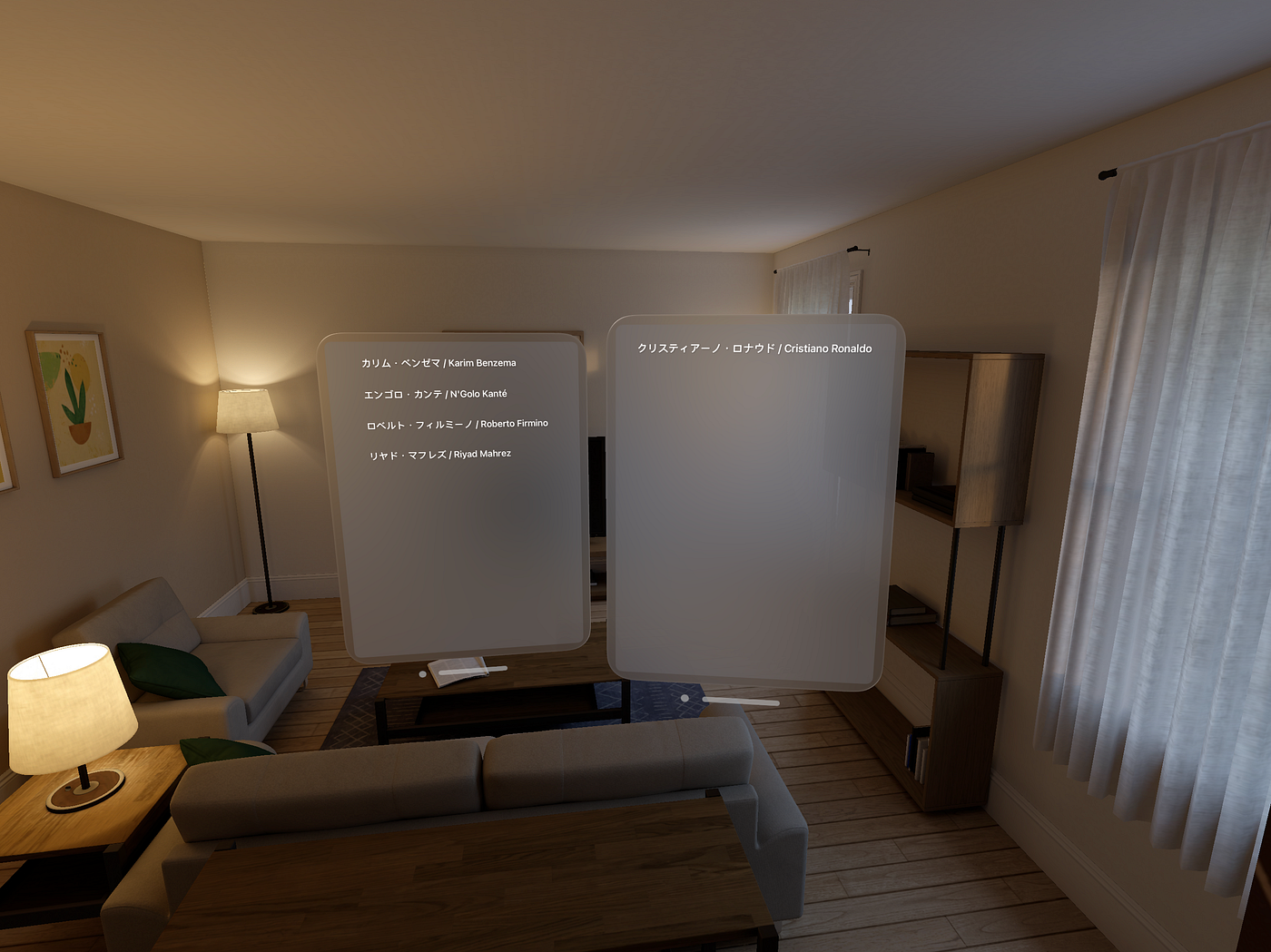
Our app uses two Scenes for drag and drop.
ViewModel
import RealityKit
import Observation

@Observable
class ViewModel {

    private var contentEntity = Entity()

    var leftListItems = ["カリム・ベンゼマ / Karim Benzema",
                         "エンゴロ・カンテ / N'Golo Kanté",
                         "ロベルト・フィルミーノ / Roberto Firmino",
                         "リヤド・マフレズ / Riyad Mahrez"]
    var rightListItems = ["クリスティアーノ・ロナウド / Cristiano Ronaldo"]

    var isHomeTargeted = false
    var isOtherTargeted = false

    func setupContentEntity() -> Entity {
        return contentEntity
    }
}
The provided ViewModel is a class that serves as a data and state management component within an application.
ContentView
import SwiftUI
import RealityKit
import UniformTypeIdentifiers

struct ContentView: View {

    var viewModel: ViewModel

    @Environment(\.openWindow) private var openWindow

    var body: some View {

        @Bindable var viewModel = viewModel

        VStack {
            TargetView(items: viewModel.leftListItems)
                .dropDestination(for: String.self) { items, location in
                    for item in items {
                        viewModel.rightListItems.removeAll { $0 == item }
                        if !viewModel.leftListItems.contains(item) {
                            viewModel.leftListItems.append(item)
                        }
                    }
                    return true
                }
        }
        .padding()
        .onAppear() {
            openWindow(id: "other")
        }
    }
}

struct TargetView: View {

    let items: [String]

    var body: some View {
        VStack(alignment: .leading) {
            ZStack {
                RoundedRectangle(cornerRadius: 12)
                    .frame(maxWidth: .infinity)
                    .foregroundColor(Color(.secondarySystemFill))

                VStack(alignment: .leading, spacing: 12) {
                    ForEach(items, id: \.self) { item in
                        Text(item)
                            .padding(12)
                            .cornerRadius(8)
                            .shadow(radius: 1, x: 1, y: 1)
                            .draggable(item)
                    }
                    Spacer()
                }
                .padding(.vertical)
            }
        }
    }
}- The
ContentViewstruct represents the main content of the app's user interface. It takes aViewModelas a parameter. - Inside
ContentView, it creates aVStackthat contains aTargetViewfor displaying a list of items. - The
.dropDestination(for: String.self)modifier is applied to theTargetView. This modifier defines a drop destination for strings and specifies an action to perform when items are dropped. In this case, it handles the items being dropped by updating theviewModel. - The
TargetViewstruct represents the view where the drag-and-drop operations take place. It receives an array of strings (items) as input. - Within
TargetView, it constructs a vertical layout using aVStack. Inside theVStack, there is aZStackthat provides a rounded rectangle background for the list of items. - Inside the
ZStack, there is anotherVStackthat holds the actual content. It uses aForEachloop to iterate over theitemsarray and displays each item as aTextelement. - Each
Textelement is styled with padding, a corner radius, and a shadow, making it visually appealing. - The
draggablemodifier is applied to eachTextelement, allowing it to be draggable.
ContentViewOther
This view share almost same code with ContentView .
.dropDestination
Defines the destination of a drag and drop operation that handles the dropped content with a closure that you specify.
func dropDestination<T>(
    for payloadType: T.Type = T.self,
    action: @escaping ([T], CGPoint) -> Bool,
    isTargeted: @escaping (Bool) -> Void = { _ in }
) -> some View where T : Transferable
메타데이터
- post_id
- e4233da62c76
- slug
- deep-dive-into-visionos-30days-day-12-drag-and-drop-e4233da62c76
- url
- https://medium.com/@aspalt85/deep-dive-into-visionos-30days-day-12-drag-and-drop-e4233da62c76
- canonical_url
- https://medium.com/@aspalt85/deep-dive-into-visionos-30days-day-12-drag-and-drop-e4233da62c76
- author_url
- https://medium.com/@aspalt85
- status
- ok
- fetched_at
- 2026-06-17 08:20:12