Real-Time Wazuh Alerts in Discord — A Complete Integration Guide
If you’re running Wazuh as your SIEM, you already know how powerful it is for threat detection. But what’s the point of catching threats in…
Real-Time Wazuh Alerts in Discord — A Complete Integration Guide
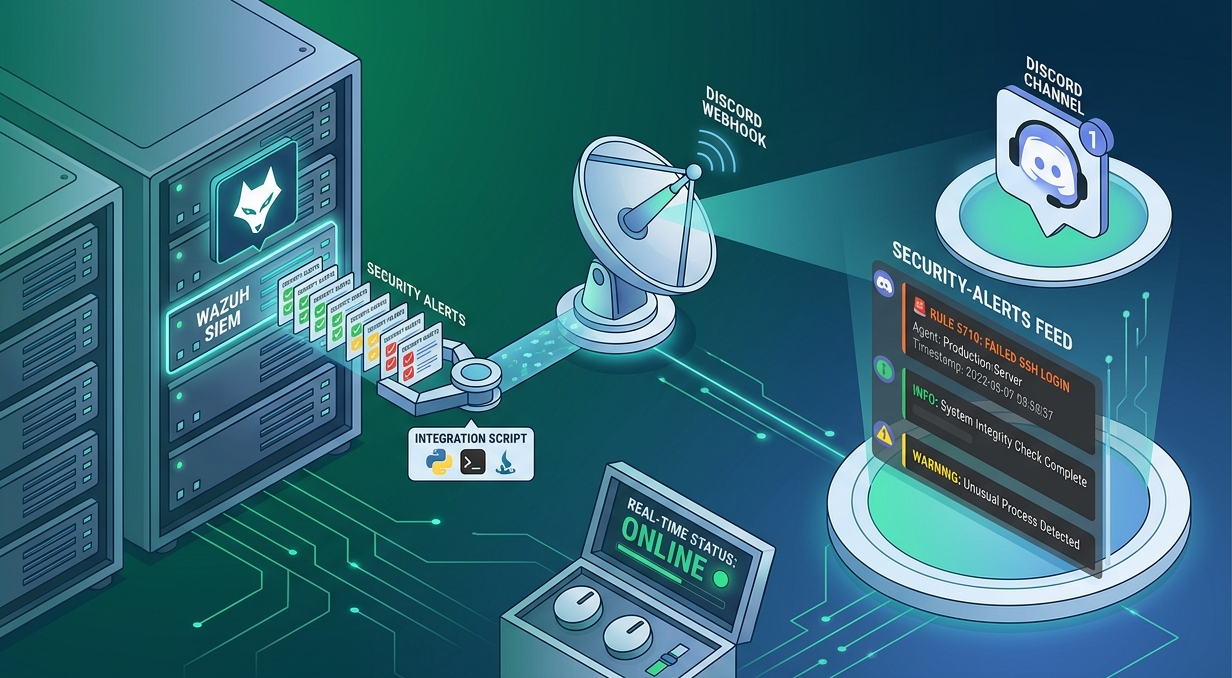
Real-time SIEM alerts via Discord Webhooks
If you’re running Wazuh as your SIEM, you already know how powerful it is for threat detection. But what’s the point of catching threats in real time if your team only sees the alert the next morning when they open the dashboard?
In this guide, we’ll connect Wazuh’s alert engine directly to a Discord channel using a custom integration. When a rule fires — a failed SSH login, a file integrity change, a suspicious process — your team gets an instant Discord notification with all the details.
No paid tools. No plugins. Just a bash wrapper, a Python script, a webhook URL, and a few lines of Wazuh config.

Wazuh to Discord: Automated Alert Pipeline
Prerequisites
- A running Wazuh manager (v4.x recommended)
- Root or sudo access to the Wazuh server
- A Discord server where you have “Manage Webhooks” permission
- Python 3 and pip3 available on the Wazuh manager
- Basic familiarity with Linux terminal and XML config
Step-by-Step Setup
Before writing any scripts, make sure your system packages are up to date and Python’s package manager is available. SSH into your Wazuh manager and run:
# Refresh apt index and upgrade existing packages
sudo apt update && sudo apt upgrade -y

# Ensure pip3 is installed for Python package management
sudo apt install python3-pip -y

# Install the requests library (used in our Python script)
pip3 install requests
The requests library is not part of Python's standard library. It's needed to POST the alert payload to Discord's webhook endpoint over HTTPS.
Create the bash wrapper — custom-discord
Wazuh’s integration engine calls shell scripts from /var/ossec/integrations/. The shell script is just a launcher — it figures out where Wazuh is installed and calls the matching Python script. Create the file:
📄 /var/ossec/integrations/custom-discord
#!/bin/sh
# Wazuh integration launcher for Discord

WPYTHON_BIN="framework/python/bin/python3"
SCRIPT_PATH_NAME="$0"
DIR_NAME="$(cd "$(dirname "${SCRIPT_PATH_NAME}")"; pwd -P)"
SCRIPT_NAME="$(basename "${SCRIPT_PATH_NAME}")"

case ${DIR_NAME} in
    */active-response/bin | */wodles*)
        if [ -z "${WAZUH_PATH}" ]; then
            WAZUH_PATH="$(cd "${DIR_NAME}/../.."; pwd)"
        fi
        PYTHON_SCRIPT="${DIR_NAME}/${SCRIPT_NAME}.py"
    ;;
    */bin)
        if [ -z "${WAZUH_PATH}" ]; then
            WAZUH_PATH="$(cd "${DIR_NAME}/.."; pwd)"
        fi
        PYTHON_SCRIPT="${WAZUH_PATH}/framework/scripts/$(echo "${SCRIPT_NAME}" \
            | sed 's/\.sh$/.py/')"
    ;;
    */integrations)
        if [ -z "${WAZUH_PATH}" ]; then
            WAZUH_PATH="$(cd "${DIR_NAME}/.."; pwd)"
        fi
        PYTHON_SCRIPT="${DIR_NAME}/${SCRIPT_NAME}.py"
    ;;
esac

# Execute the Python script with all arguments passed through
exec "${WAZUH_PATH}/${WPYTHON_BIN}" "${PYTHON_SCRIPT}" "$@"
Now set the correct permissions so Wazuh can execute it:
sudo chmod 750 /var/ossec/integrations/custom-discord
sudo chown root:wazuh /var/ossec/integrations/custom-discord
Create the Python script — custom-discord.py
This is the actual integration logic. It reads the Wazuh alert from a JSON file, formats it into a Discord embed message, and POSTs it to your webhook URL.
📄 /var/ossec/integrations/custom-discord.py
#!/usr/bin/env python3

import sys
import requests
import json

# Read configuration
alert_file = sys.argv[1]
user = sys.argv[2].split(":")[0]
hook_url = sys.argv[3]

# Read alert file
with open(alert_file) as f:
    alert_json = json.loads(f.read())

# Basic info
rule = alert_json.get("rule", {})
alert_level = rule.get("level", 0)
agent_ = alert_json.get("agent", {}).get("name", "agentless")
#agent_ip = agent.get("ip") or alert_json.get("data", {}).get("srcip", "N/A")
# Color coding
if alert_level < 5:
    color = 5763719
elif 5 <= alert_level <= 7:
    color = 16705372
else:
    color = 15548997

# Start building fields
fields = [
    {"name": "Rule ID", "value": str(rule.get("id", "N/A")), "inline": True},
    {"name": "Level", "value": str(alert_level), "inline": True},
    {"name": "Agent", "value": agent_, "inline": True},
    #{"name": "Agent IP", "value": agent_ip, "inline": True},
    {"name": "Description", "value": rule.get("description", "N/A"), "inline": F                                                                                                             alse},
    {"name": "Timestamp", "value": alert_json.get("timestamp", "N/A"), "inline":                                                                                                              False}
]

# Dynamically add key fields from data
data = alert_json.get("data", {})
key_fields = ["srcip", "srcport", "dstip", "dstport", "srccountry", "dstcountry"                                                                                                             ,
              "action", "app", "url", "user", "protocol", "eventtype", "msg","ds                                                                                                             tuser","status","mitre.tactic"]

for key in key_fields:
    if key in data:
        fields.append({
            "name": key.replace("_", " ").title(),
            "value": str(data[key]),
            "inline": True if len(str(data[key])) < 50 else False
        })

# Add full_log (truncated for Discord limits)
full_log = alert_json.get("full_log", "")
if full_log:
    fields.append({
        "name": "Full Log",
        "value": f"{full_log}",
        "inline": False
    })

# Build payload
payload = json.dumps({
    "content": "",
    "embeds": [
        {
            "title": f"Wazuh Alert - Rule {rule.get('id', 'N/A')}",
            "color": color,
            "fields": fields
        }
    ]
})

# Send to Discord
requests.post(hook_url, data=payload, headers={"content-type": "application/json                                                                                                             "})
sys.exit(0)
Set permissions on the Python file too:
sudo chmod 750 /var/ossec/integrations/custom-discord.py
sudo chown root:wazuh /var/ossec/integrations/custom-discord.py
Create the Discord webhook
Now let’s create the destination for our alerts inside Discord.
Open Discord → go to the channel where you want alerts → click the gear icon (Edit Channel) → go to Integrations → click Webhooks → click New Webhook.
Give it a name (e.g., Wazuh Alerts), optionally set an avatar, then click Copy Webhook URL. Save this URL — you’ll need it in the next step.
Configure Wazuh to use the integration
Open /var/ossec/etc/ossec.conf and add the following block inside the <ossec_config> section. Replace the placeholder values with your real webhook URL and desired rule IDs:
📄 /var/ossec/etc/ossec.conf — add inside <ossec_config>
<integration>
  <name>custom-discord</name>
  <hook_url>https://discord.com/api/webhooks/YOUR_WEBHOOK_URL</hook_url>
  <rule_id>5710,5711,5712,87901,87902</rule_id>
  <alert_format>json</alert_format>
</integration>
The <rule_id> field accepts a comma-separated list of rule IDs. Use this to scope which alerts trigger Discord notifications — for example, SSH brute force (5710–5712), web attacks (31100+), or your own custom rules. To alert on ALL rules above a certain level, replace <rule_id> with <level>7</level>.
Common rule IDs worth notifying on
# SSH authentication failures
5710, 5711, 5712

# Sudo privilege escalation
5401, 5402

# File integrity monitoring (FIM) changes
550, 554

# Web server attacks (Apache/Nginx)
31100, 31108

# Windows event log anomalies
60106, 60204
Restart Wazuh and verify
Apply the configuration by restarting the Wazuh manager:
sudo systemctl restart wazuh-manager

# Watch the integration logs for errors
sudo tail -f /var/ossec/logs/integrations.log
To test the integration without waiting for a real alert, you can trigger a test event. On any monitored agent, intentionally fail an SSH login a few times. Within seconds, you should see a formatted embed appear in your Discord channel.
If nothing appears, check the integration log above — common issues are wrong file permissions, a malformed webhook URL, or missing the requests library.
Troubleshooting
Here are the most common issues and how to fix them quickly:
# Re-check ownership and executable bit
ls -la /var/ossec/integrations/custom-discord*
sudo chown root:wazuh /var/ossec/integrations/custom-discord*
sudo chmod 750 /var/ossec/integrations/custom-discord*
ModuleNotFoundError: No module named ‘requests’
# Install for Wazuh's embedded Python if pip3 install requests didn't help
sudo /var/ossec/framework/python/bin/pip3 install requests
Discord returns HTTP 400 / payload too large
# Truncate long field values in custom-discord.py
# e.g. limit description to 2000 chars (Discord embed limit)
"description": rule.get("description", "")[:2000]
Conclusion
What you build:
A lightweight, self-hosted alert forwarding pipeline that sends Wazuh security events to Discord in real time — with severity color coding, agent info, timestamps, and MITRE ATT&CK technique IDs, all in a clean embed format your team can act on immediately.
From here, you can extend this further: add a level filter in ossec.conf instead of individual rule IDs to catch all high-severity events, post to different Discord channels based on rule groups, or enrich the embed with GeoIP data on suspicious source IPs.
The integration pattern you’ve just implemented — a bash launcher + Python processor + webhook destination — is the same pattern used for all Wazuh custom integrations. The same approach works for Slack, Microsoft Teams, Telegram, or any service that accepts webhook payloads.
메타데이터
- post_id
- e431bba0e0fc
- slug
- real-time-wazuh-alerts-in-discord-a-complete-integration-guide-e431bba0e0fc
- url
- https://medium.com/@kevitdaki007/real-time-wazuh-alerts-in-discord-a-complete-integration-guide-e431bba0e0fc
- canonical_url
- https://medium.com/@kevitdaki007/real-time-wazuh-alerts-in-discord-a-complete-integration-guide-e431bba0e0fc
- author_url
- https://medium.com/@kevitdaki007
- status
- ok
- fetched_at
- 2026-08-05 06:16:58




