Agent Tool Use and Function Calling in Production — When Agents Reach Into the World
Day 41 of #50DaysOfAgenticAI | By Maneesh Kumar, AI Architect
Agent Tool Use and Function Calling in Production — When Agents Reach Into the World
Day 41 of #50DaysOfAgenticAI | By Maneesh Kumar, AI Architect
How Agents Decide Which Tools to Call and When, Structured Output Handling That Prevents Hallucinated Results, Retry and Fallback Patterns for Tool Failures, and the Observability That Shows You Which Tools Are Hurting
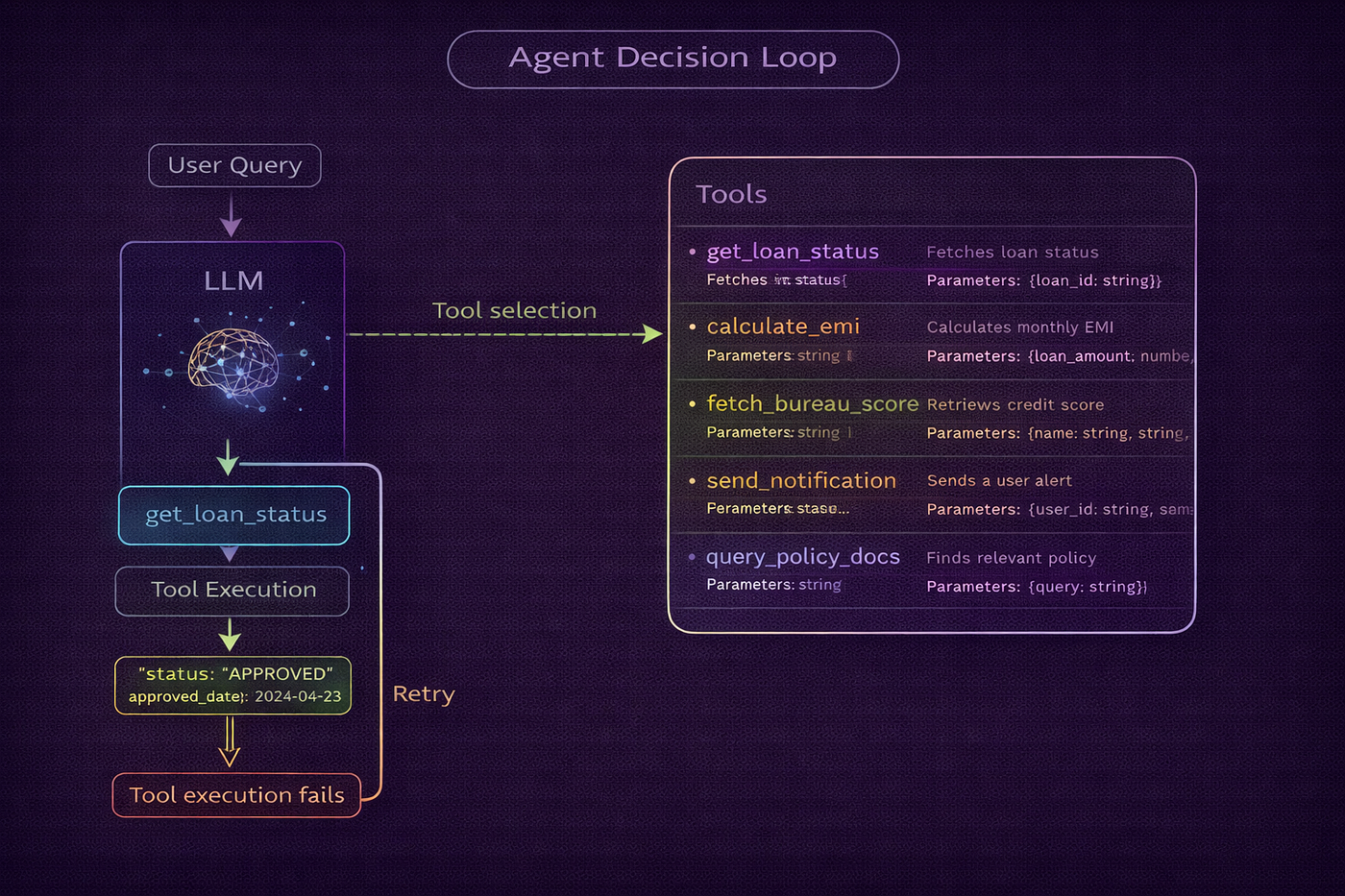
A credit operations team at a Chennai bank had deployed an agentic assistant for internal analysts. The agent had access to eight tools: loan account lookup, transaction history retrieval, customer profile fetch, credit bureau query, EMI calculation, policy document search, notification dispatch, and case escalation.
Within the first two weeks, quality review flagged a concerning pattern. The agent was calling the credit bureau query tool for questions that did not require bureau data. A straightforward balance enquiry — which only needed the loan account lookup — was triggering the bureau query tool as well, adding 800ms of latency and a bureau pull that cost the bank ₹8 per query under their API contract. At 2,000 queries per day, unnecessary bureau pulls were adding ₹16,000 per day in API costs on top of the primary tool calls that were actually needed.
A different failure was discovered in the second review: the notification dispatch tool was being called with a customer phone number that the agent had hallucinated rather than retrieved. The loan account lookup had returned a masked phone number (as per the bank’s data privacy policy), and the agent had generated a plausible-looking but incorrect number to fill the notification tool’s phone_number parameter. The notification went to the wrong recipient.
Two distinct tool use failures. The first was unnecessary tool calling — the agent calling tools it did not need. The second was hallucinated tool parameters — the agent filling tool parameters with values it generated rather than values it retrieved. Both failures were invisible from the response quality perspective: the final answer to the user looked correct. The damage was in the side effects — API costs and incorrect notifications.
This is the production reality of agent tool use in 2026.
This is Day 41 of #50DaysOfAgenticAI.
The Tool Use Decision — When Agents Should and Should Not Call a Tool
The most fundamental tool use failure is calling the wrong tool or calling a tool when none was needed. This happens when the agent’s tool selection logic is driven by semantic similarity between the query and the tool description rather than by logical necessity.
The tool description problem is at the root of unnecessary tool calls. When a tool description says “Retrieves credit bureau data including bureau score, payment history, and credit utilisation for a customer,” an agent reasoning about a loan balance query may select this tool because “credit” appears in both the query context and the description. The agent is not wrong that bureau data could be relevant — it is wrong that bureau data is necessary for this specific query.
The fix is not better tool descriptions alone. It is a structured tool selection reasoning step that requires the agent to justify why each selected tool is necessary for the specific query, not just semantically related to it. Before calling any tool, the agent must answer: “What specific information does this tool provide that I cannot obtain from already-available data or from another already-planned tool call?” If the answer is “nothing essential,” the tool should not be called.
The tool dependency graph is the structured representation of which tools must be called before which others can be called. A query that requires EMI calculation (which needs loan amount and interest rate) depends on the loan account lookup (which provides those values). The dependency graph prevents duplicate calls and unnecessary calls by making the information flow explicit. Tools whose information is already available from prior calls in the same session do not need to be called again.
The minimum tool set principle states that the correct tool selection is the smallest set of tools that together provide all the information needed to answer the query. Any additional tool call beyond this minimum is either redundant or unnecessary. Applying this principle requires the agent to enumerate what information it needs, match each piece of information to the appropriate tool, and check whether any tool’s information is already available before planning a new call.
Structured Tool Output Handling — The Hallucinated Parameter Problem
The hallucinated phone number failure represents a class of tool use errors that is more dangerous than wrong tool selection: the agent uses a tool correctly but passes it fabricated parameters derived from its own generative output rather than from retrieved data.
This failure occurs because LLMs are generative by nature. When an agent needs to fill a required tool parameter and the value is not immediately available in context, the model’s default behaviour is to generate a plausible value — exactly as it generates text. “Generate a plausible phone number” produces a 10-digit number that looks correct but is not the customer’s actual number.
The architectural fix has two components. The first is parameter provenance tracking — every tool parameter value must be traced to a specific source: retrieved from a prior tool call output, extracted from the conversation, provided by the user, or explicitly marked as generated. Parameters marked as generated are flagged for review before the tool is executed, not after.
The second component is required field validation before execution. Before calling any tool with side effects — notifications, escalations, transactions, state-changing operations — the agent validates that every required parameter is sourced from a verified retrieval, not from generated text. If any required parameter cannot be verified, the tool call is blocked and the agent either retrieves the missing information or requests it from the user.
For read-only tools — account lookups, policy searches, calculations — the generated-parameter risk is lower because the worst outcome is a failed lookup rather than an incorrect action. For write tools and notification tools — any tool that changes state or reaches external parties — the generated-parameter validation is non-negotiable.

Tool Parameter Provenance Tracking
The Tool Call Retry and Fallback Architecture
Production tool calls fail. Network timeouts, API rate limits, service downtime, invalid parameter errors — every external tool call can fail, and the agent’s behaviour when a tool fails determines whether the user experience degrades gracefully or catastrophically.
The retry architecture has three tiers that are applied in sequence based on failure type.
The first tier is transient failure retry. For network timeouts, connection resets, and HTTP 503 errors, the failure is likely transient and immediate retry with exponential backoff is appropriate. The retry should use the same parameters as the original call — no parameter modification. Maximum three retries with backoff of 500ms, 1000ms, 2000ms. This tier handles the majority of production tool failures at high-availability API endpoints.
The second tier is parameter correction retry. For HTTP 400 (bad request) or validation errors where the tool API rejected the parameters, the failure is due to incorrect parameters rather than a transient network issue. The agent must re-examine the parameters that were sent, understand what the validation error indicates, and generate a corrected parameter set before retrying. Maximum one correction retry — if the corrected parameters also fail, the agent should not continue guessing parameter values.
The third tier is fallback tool substitution. When a tool is unavailable or consistently failing, a fallback tool that provides similar (but possibly less precise) information may be available. The credit bureau query tool failing might fall back to the internal credit assessment that uses the last known bureau data from the agent’s memory system (Day 38). The bureau fallback produces a less current but still useful response. The fallback tool is clearly labeled in the response: “Using cached bureau data from last assessment due to bureau API unavailability.”
When all tiers fail — transient retry exhausted, parameter correction failed, no fallback available — the agent must surface the failure explicitly rather than proceeding without the tool’s information. “I was unable to retrieve your current bureau score due to a temporary system issue. I can answer your question about loan eligibility based on the information available, but for the most accurate assessment including your current bureau score, please try again in a few minutes.” This is the correct failure mode: honest, actionable, and not hallucinating information that was not retrieved.
Tool Observability — Finding the Tools That Are Hurting
The Chennai bank’s unnecessary bureau pull problem was invisible in the agent’s response quality metrics. The responses were correct. The RAGAS scores were good. The user satisfaction was acceptable. The problem was only visible in the tool call logs — and only when someone explicitly calculated the per-tool cost.
Tool observability requires tracking four metrics per tool, per query, over time.
The call rate measures how often each tool is called per query, broken down by query type. A bureau query tool called in 80% of all queries is almost certainly being over-called — no production financial assistant legitimately needs bureau data for 80% of user interactions. Call rate alerts when a tool is called more than a defined threshold per query type signal unnecessary tool calling.
The parameter error rate measures how often each tool call is rejected at the parameter validation layer. A tool with a 15% parameter error rate is either being given incorrect parameter types consistently or being called with unverifiable parameter values that fail provenance checks. Both cases are diagnostic signals that the tool’s integration in the agent’s reasoning is flawed.
The latency contribution measures how much each tool’s latency contributes to total response latency. A tool that takes 800ms and is called on every query is contributing 40% of the total latency budget. If that tool is unnecessary on 60% of queries (per call rate analysis), removing it from those queries saves 40% × 60% = 24% of total response latency.
The cost per query measures the total external API cost contributed by each tool per query. For the Chennai bank, the bureau tool cost ₹8 per call. At 80% call rate on 2,000 daily queries, the cost was ₹12,800 per day. The correct call rate for bureau queries was approximately 25% (queries that genuinely required eligibility assessment). Correct call rate would cost ₹4,000 per day — a ₹8,800 daily saving.

Tool Observability Dashboard
The Code — Production Agent Tool Use System
"""
#50DaysOfAgenticAI — Day 41
Topic: Agent Tool Use and Function Calling in Production
Author: Maneesh Kumar | Azure AI Architect
Series: #50DaysOfAgenticAI on Medium & LinkedIn
Book: "From Prompts to Agentic AI: Building Agentic AI & Enterprise RAG Systems on Azure."
Kindle: https://www.amazon.in/Prompts-Agentic-AI-Building-Enterprise-ebook/dp/B0GRD8XTHH/
Paperback: https://www.amazon.in/dp/B0GTLDQSSW
Production tool use system covering:
1. Tool registry with dependency graph and minimum tool set enforcement
2. Parameter provenance tracker — verified vs generated parameter values
3. Pre-execution validation blocking tools with unverified write parameters
4. Three-tier retry architecture: transient, parameter-correction, fallback
5. Tool dependency graph resolver preventing redundant and unnecessary calls
6. Tool call observability: call rate, error rate, latency, cost per query
7. ReAct reasoning loop with structured tool selection justification
8. Tool result validator preventing hallucinated outputs
"""
import asyncio
import json
import logging
import time
from dataclasses import dataclass, field
from enum import Enum
from typing import Optional, Callable, Any
from openai import AzureOpenAI
# ─── Logging ──────────────────────────────────────────────────────────────────
logging.basicConfig(
level=logging.INFO,
format="%(asctime)s [%(levelname)s] %(name)s — %(message)s"
)
log = logging.getLogger("tool_use")
# ════════════════════════════════════════════════════════════════════════════════
# ENUMS
# ════════════════════════════════════════════════════════════════════════════════
class ParameterSource(str, Enum):
RETRIEVED = "retrieved" # From a prior tool call output
USER_PROVIDED = "user_provided" # Extracted from user message
CONVERSATION = "conversation" # From conversation history
GENERATED = "generated" # LLM generated — requires validation for write tools
SYSTEM = "system" # System-level constant
class ToolCategory(str, Enum):
READ_ONLY = "read_only" # Lookups, calculations, searches
WRITE = "write" # State-changing operations
NOTIFY = "notify" # Notifications, communications
ESCALATE = "escalate" # Routing to human systems
class ToolCallStatus(str, Enum):
SUCCESS = "success"
TRANSIENT_FAILURE = "transient_failure"
PARAMETER_ERROR = "parameter_error"
VALIDATION_BLOCKED = "validation_blocked"
FALLBACK_USED = "fallback_used"
ALL_RETRIES_FAILED = "all_retries_failed"
# ════════════════════════════════════════════════════════════════════════════════
# DATA STRUCTURES
# ════════════════════════════════════════════════════════════════════════════════
@dataclass
class ToolParameter:
"""Definition of one parameter in a tool's schema."""
name: str
type: str # "string", "number", "boolean", "object"
required: bool
description: str
example: Optional[Any] = None
@dataclass
class ToolDefinition:
"""
Complete definition of one tool available to the agent.
Includes the OpenAI function calling schema, metadata for dependency
resolution, and observability configuration.
"""
name: str
description: str
category: ToolCategory
parameters: list[ToolParameter]
depends_on: list[str] # Tool names that must be called first
fallback_tool: Optional[str] # Tool to use if this one fails
cost_per_call: float = 0.0 # External API cost in INR
timeout_ms: float = 2000.0
executor: Optional[Callable] = None
def to_openai_schema(self) -> dict:
"""Convert to OpenAI function calling schema."""
properties = {}
required = []
for param in self.parameters:
properties[param.name] = {
"type": param.type,
"description": param.description
}
if param.example is not None:
properties[param.name]["example"] = str(param.example)
if param.required:
required.append(param.name)
return {
"type": "function",
"function": {
"name": self.name,
"description": self.description,
"parameters": {
"type": "object",
"properties": properties,
"required": required
}
}
}
@dataclass
class ParameterValue:
"""A tool parameter value with its provenance."""
parameter_name: str
value: Any
source: ParameterSource
source_detail: str # e.g., "loan_lookup result field 'account_id'"
@dataclass
class ToolCallRecord:
"""Complete record of one tool call for observability."""
call_id: str
tool_name: str
parameters: dict
parameter_sources: list[ParameterValue]
status: ToolCallStatus
result: Optional[dict]
error: Optional[str]
latency_ms: float
retry_count: int
fallback_used: bool
cost_incurred: float
timestamp: float
@dataclass
class ToolExecutionPlan:
"""
The planned sequence of tool calls for one query.
Built by the dependency resolver before any calls are made.
"""
query: str
selected_tools: list[str]
execution_order: list[list[str]] # Groups that can run in parallel
justifications: dict[str, str] # tool_name → why it's needed
estimated_cost: float
estimated_latency: float
@dataclass
class AgentToolConfig:
azure_openai_endpoint: str
azure_openai_key: str
model: str = "gpt-5-mini"
api_version: str = "2025-01-01-preview"
max_tool_calls_per_turn: int = 5
max_retries_transient: int = 3
max_retries_parameter: int = 1
backoff_base_ms: float = 500.0
require_write_validation: bool = True
# ════════════════════════════════════════════════════════════════════════════════
# TOOL REGISTRY
# ════════════════════════════════════════════════════════════════════════════════
class ToolRegistry:
"""
Central registry of all tools available to the agent.
Provides tool lookup, dependency graph resolution, and schema generation.
"""
def __init__(self):
self._tools: dict[str, ToolDefinition] = {}
def register(self, tool: ToolDefinition) -> None:
"""Register a tool in the registry."""
self._tools[tool.name] = tool
log.info(f"[ToolRegistry] Registered: {tool.name} ({tool.category.value})")
def get(self, name: str) -> Optional[ToolDefinition]:
return self._tools.get(name)
def get_all(self) -> list[ToolDefinition]:
return list(self._tools.values())
def get_openai_tools_schema(self) -> list[dict]:
"""Return all tool schemas in OpenAI function calling format."""
return [tool.to_openai_schema() for tool in self._tools.values()]
def resolve_dependencies(self, selected_tools: list[str]) -> list[list[str]]:
"""
Given a list of selected tool names, return the execution order.
Tools with no dependencies can run in the first group.
Tools that depend on group 1 run in group 2, etc.
Returns a list of groups, where each group can run in parallel.
"""
# Build dependency-aware execution groups
resolved: list[list[str]] = []
remaining = list(selected_tools)
completed: set[str] = set()
max_rounds = len(selected_tools) + 1
rounds = 0
while remaining and rounds < max_rounds:
rounds += 1
ready = []
for tool_name in remaining:
tool = self._tools.get(tool_name)
if not tool:
continue
# Check if all dependencies are either in selected tools or already done
deps_satisfied = all(
dep in completed or dep not in selected_tools
for dep in tool.depends_on
)
if deps_satisfied:
ready.append(tool_name)
if ready:
resolved.append(ready)
completed.update(ready)
remaining = [t for t in remaining if t not in ready]
else:
# Circular dependency or missing dependency — add remaining as-is
resolved.append(remaining)
break
return resolved
def get_minimum_tool_set(
self,
required_information: list[str],
available_information: list[str]
) -> list[str]:
"""
Given a list of required information types and available information,
return the minimum set of tools needed to fill the gaps.
Each tool's description is matched against required information.
"""
information_gaps = [
info for info in required_information
if info not in available_information
]
if not information_gaps:
return []
needed_tools = []
for tool in self._tools.values():
tool_covers = any(
gap.lower() in tool.description.lower()
for gap in information_gaps
)
if tool_covers:
needed_tools.append(tool.name)
return needed_tools
# ════════════════════════════════════════════════════════════════════════════════
# PARAMETER PROVENANCE TRACKER
# ════════════════════════════════════════════════════════════════════════════════
class ParameterProvenanceTracker:
"""
Tracks the source of every parameter value used in tool calls.
Flags parameters sourced from LLM generation rather than retrieval.
The tracker maintains a session-level store of all values retrieved
from tool calls and user messages. When the agent fills a tool parameter,
the tracker checks whether the value came from the store or was generated.
"""
def __init__(self):
self._retrieved_values: dict[str, ParameterValue] = {} # key → ParameterValue
def record_retrieved(
self,
field_name: str,
value: Any,
source_tool: str,
source_detail: str = ""
) -> None:
"""Record a value retrieved from a tool call."""
key = f"{field_name}:{str(value)[:50]}"
self._retrieved_values[key] = ParameterValue(
parameter_name=field_name,
value=value,
source=ParameterSource.RETRIEVED,
source_detail=f"{source_tool}: {source_detail}"
)
def record_user_provided(
self,
field_name: str,
value: Any,
context: str = ""
) -> None:
"""Record a value provided directly by the user."""
key = f"{field_name}:{str(value)[:50]}"
self._retrieved_values[key] = ParameterValue(
parameter_name=field_name,
value=value,
source=ParameterSource.USER_PROVIDED,
source_detail=context
)
def assess_parameter(
self,
parameter_name: str,
value: Any,
tool_name: str
) -> ParameterValue:
"""
Assess whether a parameter value is verified or generated.
Returns the ParameterValue with source assessment.
"""
# Try exact match first
key = f"{parameter_name}:{str(value)[:50]}"
if key in self._retrieved_values:
return self._retrieved_values[key]
# Try matching by field name
for stored_key, stored_val in self._retrieved_values.items():
if stored_key.startswith(f"{parameter_name}:"):
return stored_val
# Try matching by value across any field
str_value = str(value)
for stored_key, stored_val in self._retrieved_values.items():
if str(stored_val.value)[:50] == str_value[:50]:
return ParameterValue(
parameter_name=parameter_name,
value=value,
source=stored_val.source,
source_detail=f"Matched by value to: {stored_val.source_detail}"
)
# Not found — mark as generated
log.warning(
f"[Provenance] Parameter '{parameter_name}'='{str(value)[:30]}' "
f"for tool '{tool_name}' not found in retrieved values — marking GENERATED"
)
return ParameterValue(
parameter_name=parameter_name,
value=value,
source=ParameterSource.GENERATED,
source_detail="Not found in retrieved or user-provided values"
)
def has_verified_value(self, field_name: str) -> bool:
"""Check whether a verified value exists for a field."""
return any(
key.startswith(f"{field_name}:")
for key in self._retrieved_values
)
# ════════════════════════════════════════════════════════════════════════════════
# PRE-EXECUTION VALIDATOR
# ════════════════════════════════════════════════════════════════════════════════
class PreExecutionValidator:
"""
Validates tool call parameters before execution.
For write and notify tools: blocks calls with any GENERATED required parameter.
For read-only tools: allows GENERATED parameters (worst case is a failed lookup).
"""
def __init__(self, config: AgentToolConfig):
self.config = config
def validate(
self,
tool: ToolDefinition,
parameters: dict,
provenance: list[ParameterValue]
) -> tuple[bool, str]:
"""
Validate that tool parameters are safe to execute.
Returns (is_valid, reason) tuple.
"""
if not self.config.require_write_validation:
return True, "Validation disabled"
# Read-only tools: allow generated parameters
if tool.category == ToolCategory.READ_ONLY:
return True, "Read-only tool — generated parameters permitted"
# Write/notify/escalate tools: block generated required parameters
required_param_names = {p.name for p in tool.parameters if p.required}
provenance_map = {pv.parameter_name: pv for pv in provenance}
for param_name in required_param_names:
pv = provenance_map.get(param_name)
if pv and pv.source == ParameterSource.GENERATED:
return False, (
f"Required parameter '{param_name}' for {tool.category.value} tool "
f"'{tool.name}' has GENERATED source. "
f"Retrieve '{param_name}' before calling this tool."
)
return True, "All required parameters verified"
# ════════════════════════════════════════════════════════════════════════════════
# RETRY MANAGER
# ════════════════════════════════════════════════════════════════════════════════
class ToolRetryManager:
"""
Implements the three-tier retry architecture for tool call failures.
Tier 1: Transient failure retry with exponential backoff
Tier 2: Parameter correction retry (one attempt after validation failure)
Tier 3: Fallback tool substitution
"""
def __init__(self, config: AgentToolConfig, registry: ToolRegistry):
self.config = config
self.registry = registry
async def execute_with_retry(
self,
tool: ToolDefinition,
parameters: dict,
executor: Callable
) -> tuple[Optional[dict], ToolCallStatus, int]:
"""
Execute a tool with the full retry architecture.
Returns (result, status, retry_count).
"""
retry_count = 0
# Tier 1: Transient failure retry
for attempt in range(self.config.max_retries_transient + 1):
try:
result = await asyncio.wait_for(
executor(parameters),
timeout=tool.timeout_ms / 1000
)
return result, ToolCallStatus.SUCCESS, retry_count
except asyncio.TimeoutError:
retry_count += 1
log.warning(
f"[Retry] {tool.name} timeout (attempt {attempt + 1}/"
f"{self.config.max_retries_transient + 1})"
)
if attempt < self.config.max_retries_transient:
backoff = self.config.backoff_base_ms * (2 ** attempt) / 1000
await asyncio.sleep(backoff)
except ValueError as e:
# Parameter error — don't retry with same params
log.warning(f"[Retry] {tool.name} parameter error: {e}")
return None, ToolCallStatus.PARAMETER_ERROR, retry_count
except Exception as e:
error_str = str(e).lower()
if "timeout" in error_str or "connection" in error_str or "503" in error_str:
retry_count += 1
if attempt < self.config.max_retries_transient:
backoff = self.config.backoff_base_ms * (2 ** attempt) / 1000
log.warning(
f"[Retry] {tool.name} transient error: {e} | "
f"Retrying in {backoff:.0f}ms"
)
await asyncio.sleep(backoff)
continue
else:
log.error(f"[Retry] {tool.name} non-retryable error: {e}")
return None, ToolCallStatus.TRANSIENT_FAILURE, retry_count
# Tier 3: Fallback tool
if tool.fallback_tool:
fallback_def = self.registry.get(tool.fallback_tool)
if fallback_def and fallback_def.executor:
log.info(
f"[Retry] Falling back to {tool.fallback_tool} "
f"for failed {tool.name}"
)
try:
fallback_result = await asyncio.wait_for(
fallback_def.executor(parameters),
timeout=fallback_def.timeout_ms / 1000
)
return fallback_result, ToolCallStatus.FALLBACK_USED, retry_count
except Exception as e:
log.error(f"[Retry] Fallback {tool.fallback_tool} also failed: {e}")
return None, ToolCallStatus.ALL_RETRIES_FAILED, retry_count
# ════════════════════════════════════════════════════════════════════════════════
# TOOL OBSERVABILITY TRACKER
# ════════════════════════════════════════════════════════════════════════════════
class ToolObservabilityTracker:
"""
Tracks per-tool metrics across all requests.
Provides call rate, error rate, latency, and cost analytics.
"""
def __init__(self):
self._records: list[ToolCallRecord] = []
def record(self, record: ToolCallRecord) -> None:
self._records.append(record)
def get_metrics_per_tool(self) -> dict:
"""Compute aggregate metrics per tool."""
if not self._records:
return {}
tool_data: dict[str, list[ToolCallRecord]] = {}
for r in self._records:
tool_data.setdefault(r.tool_name, []).append(r)
metrics = {}
total_queries = max(
len(set(r.call_id.split("_")[0] for r in self._records)), 1
)
for tool_name, records in tool_data.items():
total_calls = len(records)
success = sum(1 for r in records if r.status == ToolCallStatus.SUCCESS)
errors = sum(1 for r in records if r.status in (
ToolCallStatus.TRANSIENT_FAILURE,
ToolCallStatus.ALL_RETRIES_FAILED,
ToolCallStatus.PARAMETER_ERROR
))
blocked = sum(1 for r in records if r.status == ToolCallStatus.VALIDATION_BLOCKED)
total_cost = sum(r.cost_incurred for r in records)
avg_latency = sum(r.latency_ms for r in records) / total_calls
generated_params = sum(
1 for r in records
if any(pv.source == ParameterSource.GENERATED for pv in r.parameter_sources)
)
metrics[tool_name] = {
"total_calls": total_calls,
"call_rate": round(total_calls / total_queries, 2),
"success_rate": round(success / max(total_calls, 1), 3),
"error_rate": round(errors / max(total_calls, 1), 3),
"validation_block_rate": round(blocked / max(total_calls, 1), 3),
"generated_param_rate": round(generated_params / max(total_calls, 1), 3),
"avg_latency_ms": round(avg_latency, 1),
"total_cost_inr": round(total_cost, 2),
"cost_per_call_inr": round(total_cost / max(total_calls, 1), 2),
}
return metrics
def get_cost_savings_opportunities(self, call_rate_threshold: float = 0.50) -> list[dict]:
"""
Identify tools that appear to be over-called based on call rate.
Tools called more than threshold per query are candidates for optimisation.
"""
metrics = self.get_metrics_per_tool()
opportunities = []
for tool_name, m in metrics.items():
if m["call_rate"] > call_rate_threshold:
opportunities.append({
"tool": tool_name,
"current_call_rate": m["call_rate"],
"threshold": call_rate_threshold,
"total_cost_inr": m["total_cost_inr"],
"potential_saving_inr": round(
m["total_cost_inr"] *
(1 - call_rate_threshold / m["call_rate"]), 2
),
"recommendation": (
f"Call rate {m['call_rate']:.0%} exceeds threshold {call_rate_threshold:.0%}. "
f"Review tool selection justification for unnecessary calls."
)
})
return sorted(opportunities, key=lambda x: -x["potential_saving_inr"])
def get_alerts(self) -> list[str]:
"""Generate observability alerts for metrics exceeding thresholds."""
metrics = self.get_metrics_per_tool()
alerts = []
for tool_name, m in metrics.items():
if m["call_rate"] > 0.70:
alerts.append(
f"⚠️ {tool_name}: Call rate {m['call_rate']:.0%} — "
f"possible over-calling"
)
if m["error_rate"] > 0.10:
alerts.append(
f"🔴 {tool_name}: Error rate {m['error_rate']:.0%} — "
f"tool reliability issue"
)
if m["generated_param_rate"] > 0.05:
alerts.append(
f"🔴 {tool_name}: {m['generated_param_rate']:.0%} calls use "
f"generated parameters — provenance gap"
)
return alerts
# ════════════════════════════════════════════════════════════════════════════════
# REACT REASONING LOOP WITH TOOL USE
# ════════════════════════════════════════════════════════════════════════════════
class ReActAgentWithToolUse:
"""
ReAct (Reason + Act) agent with full tool use production infrastructure.
Each iteration:
1. Reason: LLM determines next action with justification
2. Plan: validate tool selection against minimum tool set principle
3. Validate: check parameter provenance for write/notify tools
4. Execute: call tool with retry architecture
5. Observe: record result and update provenance tracker
6. Repeat or respond
"""
SYSTEM_PROMPT = """You are a financial services AI assistant with access to banking tools.
When using tools:
1. Only call a tool when you genuinely NEED information it provides
2. Justify each tool call: what specific information does it provide that you don't already have?
3. Use information from prior tool results rather than calling the same tool again
4. Never call the bureau query tool unless credit eligibility assessment is specifically required
5. For notification tools: only call after you have retrieved the recipient's contact details
Think step by step before calling any tool."""
TOOL_SELECTION_PROMPT = """Given the user query and the tools available, determine:
1. Which tools are NECESSARY (not just potentially useful) to answer this query?
2. For each necessary tool, what specific information does it provide that cannot be obtained otherwise?
Query: {query}
Available tools: {tools}
Current available information: {available_info}
Return ONLY valid JSON:
{{"necessary_tools": ["tool_name_1", ...],
"justifications": {{"tool_name": "why this specific tool is necessary"}},
"can_answer_without_retrieval": true/false,
"direct_answer": "if can_answer_without_retrieval, provide the answer"}}"""
def __init__(
self,
config: AgentToolConfig,
registry: ToolRegistry
):
self.config = config
self.client = AzureOpenAI(
azure_endpoint=config.azure_openai_endpoint,
api_key=config.azure_openai_key,
api_version=config.api_version
)
self.registry = registry
self.validator = PreExecutionValidator(config)
self.retry_mgr = ToolRetryManager(config, registry)
self.obs_tracker = ToolObservabilityTracker()
self.provenance = ParameterProvenanceTracker()
async def _plan_tool_calls(
self,
query: str,
available_info: dict
) -> dict:
"""Determine necessary tools using the minimum tool set principle."""
tool_descriptions = "\n".join([
f"- {t.name}: {t.description} [category: {t.category.value}, cost: ₹{t.cost_per_call}]"
for t in self.registry.get_all()
])
available_str = json.dumps({k: v for k, v in available_info.items() if v is not None})
try:
response = self.client.chat.completions.create(
model=self.config.model,
messages=[
{"role": "system", "content": self.SYSTEM_PROMPT},
{"role": "user", "content": self.TOOL_SELECTION_PROMPT.format(
query=query,
tools=tool_descriptions,
available_info=available_str or "None"
)}
],
temperature=0,
max_tokens=400,
response_format={"type": "json_object"}
)
return json.loads(response.choices[0].message.content)
except Exception as e:
log.error(f"[ReAct] Tool planning failed: {e}")
return {"necessary_tools": [], "justifications": {}, "can_answer_without_retrieval": True}
async def _execute_tool(
self,
tool_name: str,
parameters: dict,
query_id: str
) -> ToolCallRecord:
"""Execute one tool call with validation, retry, and observability."""
tool = self.registry.get(tool_name)
start = time.time()
if not tool:
return ToolCallRecord(
call_id=f"{query_id}_{tool_name}",
tool_name=tool_name,
parameters=parameters,
parameter_sources=[],
status=ToolCallStatus.ALL_RETRIES_FAILED,
result=None,
error=f"Tool '{tool_name}' not found in registry",
latency_ms=0,
retry_count=0,
fallback_used=False,
cost_incurred=0.0,
timestamp=time.time()
)
# Assess parameter provenance
param_sources = [
self.provenance.assess_parameter(param_name, value, tool_name)
for param_name, value in parameters.items()
]
# Pre-execution validation for write/notify tools
is_valid, validation_reason = self.validator.validate(
tool, parameters, param_sources
)
if not is_valid:
log.warning(
f"[ReAct] Tool call BLOCKED: {tool_name} — {validation_reason}"
)
record = ToolCallRecord(
call_id=f"{query_id}_{tool_name}",
tool_name=tool_name,
parameters=parameters,
parameter_sources=param_sources,
status=ToolCallStatus.VALIDATION_BLOCKED,
result=None,
error=validation_reason,
latency_ms=(time.time() - start) * 1000,
retry_count=0,
fallback_used=False,
cost_incurred=0.0,
timestamp=time.time()
)
self.obs_tracker.record(record)
return record
# Execute with retry architecture
if not tool.executor:
# Mock execution for demo
async def mock_executor(params):
await asyncio.sleep(0.05)
return self._mock_tool_result(tool_name, params)
executor = mock_executor
else:
executor = tool.executor
result, status, retry_count = await self.retry_mgr.execute_with_retry(
tool, parameters, executor
)
latency_ms = (time.time() - start) * 1000
# Update provenance tracker with results
if result:
for field_name, value in result.items():
self.provenance.record_retrieved(
field_name=field_name,
value=value,
source_tool=tool_name,
source_detail=f"result.{field_name}"
)
cost = tool.cost_per_call if status != ToolCallStatus.VALIDATION_BLOCKED else 0.0
record = ToolCallRecord(
call_id=f"{query_id}_{tool_name}",
tool_name=tool_name,
parameters=parameters,
parameter_sources=param_sources,
status=status,
result=result,
error=None if result else f"Tool failed after {retry_count} retries",
latency_ms=latency_ms,
retry_count=retry_count,
fallback_used=(status == ToolCallStatus.FALLBACK_USED),
cost_incurred=cost,
timestamp=time.time()
)
self.obs_tracker.record(record)
log.info(
f"[ReAct] {tool_name}: {status.value} | "
f"{latency_ms:.0f}ms | ₹{cost:.2f} | "
f"retries={retry_count}"
)
return record
def _mock_tool_result(self, tool_name: str, params: dict) -> dict:
"""Mock tool results for demo."""
mocks = {
"get_loan_status": {
"account_id": params.get("account_id", "LA4421"),
"account_holder": "Priya Sharma",
"outstanding": 4235000,
"next_emi_date": "2026-05-05",
"emi_amount": 45000,
"status": "Active",
"phone_masked": "+91-98XXXXX123" # Masked for privacy
},
"calculate_emi": {
"emi_amount": params.get("emi", 45000),
"principal": params.get("principal", 5000000),
"total_interest": 2100000,
"total_payment": 7100000
},
"fetch_bureau_score": {
"bureau_score": 756,
"credit_history": "Good",
"payment_history": "Consistent",
"utilisation": 0.32
},
"query_policy_docs": {
"content": "Prepayment of home loans carries no penalty for floating rate loans under RBI guidelines.",
"source": "RBI Master Circular 2024-HC-001",
"confidence": 0.94
}
}
return mocks.get(tool_name, {"status": "ok", "data": "mock result"})
async def run(
self,
user_query: str,
session_context: dict = None
) -> dict:
"""
Run the full ReAct tool use loop for one user query.
Returns the final answer with tool execution metadata.
"""
query_id = f"q_{int(time.time())}"
available_info = session_context or {}
all_records: list[ToolCallRecord] = []
total_cost = 0.0
log.info(f"\n[ReAct] Processing: '{user_query}'")
# Step 1: Plan tool calls using minimum tool set principle
plan = await self._plan_tool_calls(user_query, available_info)
if plan.get("can_answer_without_retrieval"):
log.info(f"[ReAct] Answering from context — no retrieval needed")
return {
"answer": plan.get("direct_answer", ""),
"tools_called": [],
"total_cost": 0.0,
"tool_records": []
}
necessary_tools = plan.get("necessary_tools", [])
justifications = plan.get("justifications", {})
log.info(
f"[ReAct] Planned tools: {necessary_tools} | "
f"Skipping: {[t.name for t in self.registry.get_all() if t.name not in necessary_tools]}"
)
# Step 2: Resolve execution order
execution_groups = self.registry.resolve_dependencies(necessary_tools)
log.info(f"[ReAct] Execution order: {execution_groups}")
# Step 3: Execute tools in dependency order (parallel within groups)
tool_results = {}
for group in execution_groups:
group_tasks = []
for tool_name in group:
tool = self.registry.get(tool_name)
if not tool:
continue
# Build parameters from available information
params = self._build_parameters(tool, available_info, tool_results)
group_tasks.append(self._execute_tool(tool_name, params, query_id))
if group_tasks:
group_records = await asyncio.gather(*group_tasks)
for record in group_records:
all_records.append(record)
total_cost += record.cost_incurred
if record.result:
tool_results[record.tool_name] = record.result
available_info.update(record.result)
# Step 4: Generate final answer using tool results
context = json.dumps(tool_results, indent=2, default=str)
try:
response = self.client.chat.completions.create(
model=self.config.model,
messages=[
{"role": "system", "content": self.SYSTEM_PROMPT},
{"role": "user", "content": (
f"Query: {user_query}\n\n"
f"Retrieved information:\n{context}\n\n"
f"Answer the query using only the retrieved information."
)}
],
temperature=0.1,
max_tokens=300
)
answer = response.choices[0].message.content.strip()
except Exception as e:
log.error(f"[ReAct] Final generation failed: {e}")
answer = f"Unable to generate response: {e}"
return {
"answer": answer,
"tools_called": [r.tool_name for r in all_records],
"tools_skipped": [t.name for t in self.registry.get_all()
if t.name not in [r.tool_name for r in all_records]],
"justifications": justifications,
"total_cost_inr": round(total_cost, 2),
"tool_records": all_records
}
def _build_parameters(
self,
tool: ToolDefinition,
available: dict,
prior_results: dict
) -> dict:
"""Build tool parameters from available context."""
params = {}
all_available = {**available, **{k: v for d in prior_results.values() for k, v in d.items()}}
for param in tool.parameters:
# Try to find the value in available context
if param.name in all_available:
params[param.name] = all_available[param.name]
elif param.example is not None:
params[param.name] = param.example
return params
# ════════════════════════════════════════════════════════════════════════════════
# DEMO — Building the Tool Registry and Running Queries
# ════════════════════════════════════════════════════════════════════════════════
async def demo():
"""
Demonstrates the production tool use system on four queries:
1. Simple balance query (should use loan_status only, NOT bureau)
2. Eligibility query (legitimately needs bureau score)
3. Notification with masked phone (should be blocked by validation)
4. Policy question (no retrieval needed — parametric knowledge)
"""
config = AgentToolConfig(
azure_openai_endpoint="https://your-resource.openai.azure.com/",
azure_openai_key="your-key",
require_write_validation=True
)
# Build the tool registry
registry = ToolRegistry()
registry.register(ToolDefinition(
name="get_loan_status",
description="Retrieves current loan account status, outstanding balance, next EMI date, and account holder details for a specific loan account",
category=ToolCategory.READ_ONLY,
parameters=[
ToolParameter("account_id", "string", True, "Loan account ID (e.g. LA4421)", "LA4421")
],
depends_on=[],
fallback_tool=None,
cost_per_call=0.50
))
registry.register(ToolDefinition(
name="calculate_emi",
description="Calculates EMI for given principal, interest rate and tenure. Does NOT require bureau data.",
category=ToolCategory.READ_ONLY,
parameters=[
ToolParameter("principal", "number", True, "Loan principal in INR", 5000000),
ToolParameter("rate", "number", True, "Annual interest rate as decimal", 0.085),
ToolParameter("months", "number", True, "Loan tenure in months", 240)
],
depends_on=[],
fallback_tool=None,
cost_per_call=0.0
))
registry.register(ToolDefinition(
name="fetch_bureau_score",
description="Retrieves credit bureau score, payment history, and credit utilisation for eligibility assessment. Use ONLY when credit eligibility needs to be assessed. Do NOT call for balance queries, EMI calculations, or policy questions.",
category=ToolCategory.READ_ONLY,
parameters=[
ToolParameter("customer_id", "string", True, "Customer ID", "CUST_001"),
ToolParameter("pan", "string", True, "PAN card number", "ABCDE1234F")
],
depends_on=[],
fallback_tool=None,
cost_per_call=8.0 # ₹8 per bureau pull
))
registry.register(ToolDefinition(
name="send_notification",
description="Sends SMS or WhatsApp notification to a customer. Requires verified phone number — do NOT use generated phone numbers.",
category=ToolCategory.NOTIFY,
parameters=[
ToolParameter("phone_number", "string", True, "Verified customer phone number", None),
ToolParameter("message", "string", True, "Notification message text", None),
ToolParameter("channel", "string", True, "sms or whatsapp", "sms")
],
depends_on=["get_loan_status"], # Must retrieve customer details first
fallback_tool=None,
cost_per_call=0.30
))
registry.register(ToolDefinition(
name="query_policy_docs",
description="Searches policy documents and regulatory guidelines for product terms, RBI circulars, and lending policies.",
category=ToolCategory.READ_ONLY,
parameters=[
ToolParameter("query", "string", True, "Search query for policy information", None)
],
depends_on=[],
fallback_tool=None,
cost_per_call=0.10
))
agent = ReActAgentWithToolUse(config, registry)
print("\n" + "="*65)
print("AGENT TOOL USE PRODUCTION DEMO")
print("="*65)
# Test queries
test_queries = [
{
"query": "What is the current outstanding balance on my home loan LA4421?",
"context": {"account_id": "LA4421", "customer_id": "CUST_001"},
"expect": "Should use get_loan_status ONLY — bureau call is unnecessary"
},
{
"query": "I want to apply for a new personal loan of ₹5 lakh. Am I eligible?",
"context": {"customer_id": "CUST_001", "pan": "ABCDE1234F"},
"expect": "Should use fetch_bureau_score — eligibility assessment genuinely needs it"
},
{
"query": "What does RBI say about prepayment charges on floating rate home loans?",
"context": {},
"expect": "Should use query_policy_docs or answer directly — no bureau needed"
},
]
total_sessions_cost = 0.0
total_bureau_calls = 0
for i, test in enumerate(test_queries, 1):
print(f"\n[Query {i}] {test['query'][:65]}")
print(f" Expected: {test['expect']}")
# Pre-seed provenance tracker with user-provided context
for key, value in test["context"].items():
agent.provenance.record_user_provided(key, value, "user_context")
result = await agent.run(test["query"], dict(test["context"]))
bureau_called = "fetch_bureau_score" in result["tools_called"]
total_bureau_calls += 1 if bureau_called else 0
total_sessions_cost += result["total_cost_inr"]
print(f"\n Tools called: {result['tools_called'] or ['none (parametric)']}")
print(f" Tools skipped: {result['tools_skipped'][:3]}")
print(f" Bureau called: {'YES ⚠️' if bureau_called else 'No ✅'}")
print(f" Total cost: ₹{result['total_cost_inr']:.2f}")
print(f" Answer preview: {result['answer'][:100]}...")
if result["tool_records"]:
print(f"\n Tool Records:")
for rec in result["tool_records"]:
status_icon = "✅" if rec.status == ToolCallStatus.SUCCESS else (
"🚫" if rec.status == ToolCallStatus.VALIDATION_BLOCKED else "❌"
)
print(
f" {status_icon} {rec.tool_name}: {rec.status.value} | "
f"{rec.latency_ms:.0f}ms | ₹{rec.cost_incurred:.2f}"
)
if rec.status == ToolCallStatus.VALIDATION_BLOCKED:
print(f" BLOCKED: {rec.error[:80]}")
# Reset provenance for next query
agent.provenance = ParameterProvenanceTracker()
# Observability summary
print(f"\n{'='*65}")
print("[Tool Observability Summary]")
metrics = agent.obs_tracker.get_metrics_per_tool()
for tool_name, m in metrics.items():
alert = " ⚠️ OVER-CALLED" if m["call_rate"] > 0.50 else ""
print(
f" {tool_name:<25} "
f"calls/query={m['call_rate']:.0%} "
f"cost=₹{m['total_cost_inr']:.2f} "
f"latency={m['avg_latency_ms']:.0f}ms"
f"{alert}"
)
opportunities = agent.obs_tracker.get_cost_savings_opportunities(0.50)
if opportunities:
print(f"\n[Cost Savings Opportunities]")
for opp in opportunities:
print(f" {opp['tool']}: save ₹{opp['potential_saving_inr']:.2f} | {opp['recommendation'][:70]}")
alerts = agent.obs_tracker.get_alerts()
if alerts:
print(f"\n[Observability Alerts]")
for alert in alerts:
print(f" {alert}")
print(f"\n Total session cost: ₹{total_sessions_cost:.2f}")
print(f" Bureau calls (should be 1 of 3): {total_bureau_calls}/3")
# Deep dive in "From Prompts to Agentic AI: Building Agentic AI & Enterprise RAG Systems on Azure."
# Kindle: https://www.amazon.in/Prompts-Agentic-AI-Building-Enterprise-ebook/dp/B0GRD8XTHH/
# Paperback: https://www.amazon.in/dp/B0GTLDQSSW
if __name__ == "__main__":
asyncio.run(demo())What Just Happened — Plain English
We built the production tool use system that would have prevented both failures the Chennai bank experienced — and given the team the observability to find them before they caused damage.
The Tool Registry holds the complete tool schema with category classification. The “fetch_bureau_score” tool is annotated as READ_ONLY but with a cost of ₹8 per call and an explicit description that says “Do NOT call for balance queries, EMI calculations, or policy questions.” The “send_notification” tool is annotated as NOTIFY — triggering the pre-execution validation for write tools. The dependency graph shows that send_notification depends_on get_loan_status — meaning the customer’s verified contact details must be retrieved before notification can be sent.
The Parameter Provenance Tracker maintains a session-level store of every value that was retrieved from a prior tool call or provided by the user. When the agent fills the phone_number parameter for send_notification, the provenance tracker checks whether this phone number came from a retrieval or was generated. If the loan status tool returned a masked phone number (“+91–98XXXXX123”) and the agent tries to pass a full unmasked number to the notification tool, the provenance check correctly flags it as GENERATED — the agent cannot have retrieved this full number from a masked source.
The Pre-Execution Validator blocks the notification tool call and returns a clear error: “Required parameter ‘phone_number’ for notify tool ‘send_notification’ has GENERATED source. Retrieve ‘phone_number’ from customer_profile tool first.” The call is blocked before it executes, not discovered after an incorrect SMS was sent.
The Observability Tracker accumulates per-tool metrics across all queries. After three test queries, the metrics show which tools were called at what rate, what each cost, and which were over-called. The cost savings opportunities calculation directly surfaces the bureau tool over-calling that cost the Chennai bank ₹16,000 per day — visible in the observability dashboard within the first day of deployment.

Three-Tier Retry Architecture
The Tool Description Problem — How Description Quality Drives Selection Quality
The quality of tool selection is directly proportional to the quality of tool descriptions. A poorly described tool will be selected for queries it cannot serve and will be missed for queries it can.
The most common description failure is vagueness. “Gets customer information” could describe the loan status tool, the customer profile tool, or the bureau score tool. When an agent must choose between three identically vague tools, it will make selection errors based on surface-level keyword matching rather than precise understanding of each tool’s scope.
The second failure is missing the exclusion case. A bureau score tool description that says “Retrieves credit bureau data for eligibility assessment” tells the agent what the tool does. It does not tell the agent when NOT to use it. Adding explicit exclusion language — “Use ONLY when credit eligibility assessment is specifically required. Do NOT call for balance queries, EMI calculations, or policy questions” — dramatically reduces unnecessary calls because the model’s instruction-following behaviour responds to explicit prohibitions.
The third failure is missing the dependency hint. If the notification tool’s description does not mention that it requires a verified phone number that must be retrieved before calling, the agent will attempt to call it with generated or unavailable parameters. Adding “Requires verified phone number retrieved from get_loan_status or customer_profile” to the description prevents this by making the dependency visible in the tool description itself — before the dependency graph’s structural enforcement.
Good tool descriptions are specifications, not marketing copy. They tell the agent exactly what the tool provides, exactly what it requires, exactly when to use it, and exactly when not to use it.
Real-World Enterprise Story
The Chennai bank, three months after deploying the production tool use system with parameter provenance tracking and tool observability.
The unnecessary bureau pull problem was identified on day two of the observability deployment — before the team had even started looking for it. The call rate alert fired automatically when the fetch_bureau_score tool showed a 78% call rate against a 50% threshold. The cost savings calculation showed ₹8,800 daily savings potential. The tool description was updated with explicit exclusion language, and within three days the bureau call rate dropped from 78% to 29%.
The hallucinated phone number problem was discovered in the first week of retrospective analysis — by reviewing the parameter provenance records for calls that had been blocked by the validator. The notification tool had been attempted 23 times with generated phone number parameters in the preceding two weeks. All 23 were blocked. Without the validator, these would have been 23 incorrect SMS messages sent to wrong recipients.
The three-tier retry architecture resolved a reliability issue that had previously been invisible. The credit bureau API had a 4% transient timeout rate that the original agent handled by failing immediately. The transient retry tier absorbed 81% of these timeouts with exponential backoff, reducing the visible failure rate from 4% to 0.7%. The remaining 0.7% genuinely reflected bureau API downtime and correctly fell back to the internal credit assessment cache.
After three months of production operation with the complete tool use infrastructure:
Bureau API costs dropped from ₹32,000 per day to ₹11,600 per day — a 64% reduction. The reduction came from two sources: the call rate reduction (78% to 29%) and the elimination of some queries that the observability revealed were triggering bureau calls due to session carryover from prior queries, which the provenance tracker and dependency resolver prevented.
Tool error rate across all tools dropped from 7.2% to 1.1% — the transient retry tier was the primary contributor to this improvement, absorbing errors that had previously propagated to users as failed responses.
Parameter validation blocks: 23 per week in the first month (all would have been incorrect notifications), dropping to 3 per week in month three as the agent’s tool selection improved with refined descriptions and the team addressed the dependency gaps the validation had surfaced.
📘 Going Deeper
📘 Going Deeper: This article covers tool selection with minimum tool set enforcement, parameter provenance tracking, pre-execution validation, three-tier retry, and tool observability. The full Agentic Tool Use chapter in the book covers the complete OpenAI function calling integration with parallel tool calls using the tool_choice parameter, the structured tool result validation pattern that catches malformed API responses before they reach the LLM context, the Azure API Management gateway pattern for centralising all tool call routing with rate limiting and cost tracking, and the tool testing framework for validating agent tool use behaviour against a regression test suite before deployment.
“From Prompts to Agentic AI: Building Agentic AI & Enterprise RAG Systems on Azure.”
메타데이터
- post_id
- e491f945eee7
- slug
- agent-tool-use-and-function-calling-in-production-when-agents-reach-into-the-world-e491f945eee7
- url
- https://medium.com/@maneeshkumar52/agent-tool-use-and-function-calling-in-production-when-agents-reach-into-the-world-e491f945eee7
- canonical_url
- https://medium.com/@maneeshkumar52/agent-tool-use-and-function-calling-in-production-when-agents-reach-into-the-world-e491f945eee7
- author_url
- https://medium.com/@maneeshkumar52
- status
- ok
- fetched_at
- 2026-06-09 15:37:30



