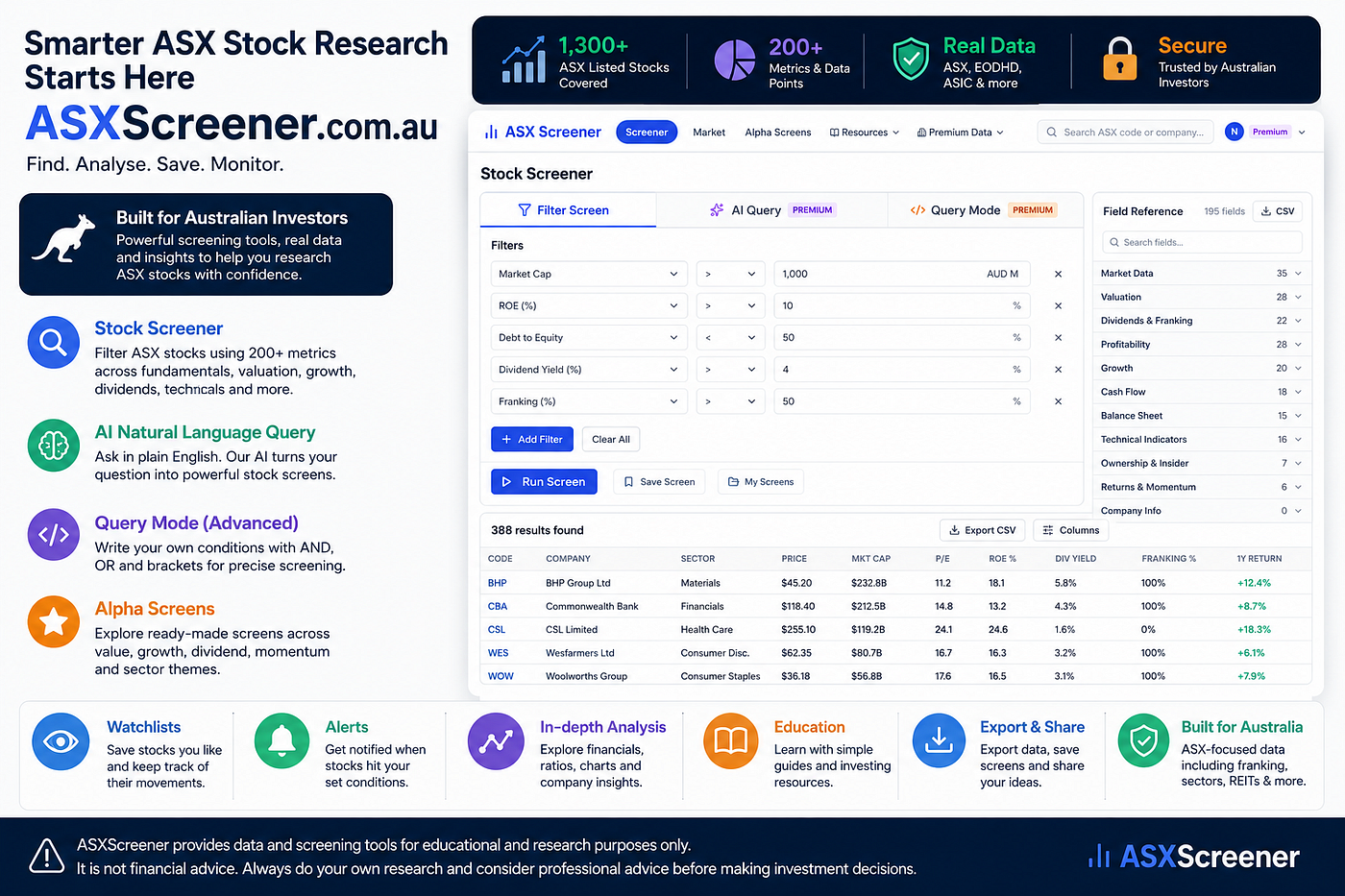
ASX Screener’s Three Screening Modes
From Beginner-Friendly Filters to AI and Power-User Query Mode
ASX Screener’s Three Screening Modes
From Beginner-Friendly Filters to AI and Power-User Query Mode

Most investors do not wake up wanting “more data.”
They want a faster way to answer better research questions.
Which ASX companies are profitable? Which dividend stocks have franking? Which small caps are growing revenue? Which miners are profitable but still under $1B market cap? Which companies are close to their 52-week highs?
That is the problem the ASX Screener Stock Screener is built to solve.
Instead of forcing every investor into one workflow, ASX Screener offers three different screening options:
- Filter Screen — point-and-click screening for everyone
- AI Natural Language Query — type plain English and let AI build the screen
- SQL-like Query Mode — advanced logic for serious investors, analysts, and quants
Each option runs on the same core screener engine, but each is designed for a different type of user.
That matters because beginners, busy investors, dividend researchers, technical traders, fund managers, and data-driven retail investors do not all think the same way.
ASX Screener’s advantage is that it gives each of them a way in.
ASX Screener’s broader positioning is as an ASX-focused research workflow platform, not a broker or stock-tip service; the content strategy repeatedly frames screening as a way to narrow research lists, not as investment advice.
Option 1: Filter Screen — the easiest way to start screening ASX stocks
The Filter Screen is the entry point.

Screenshot 1 — Query Mode: Power users can write advanced screening logic directly, supported by a searchable field reference panel.
It is designed for users who do not want to learn syntax, field names, operators, or AI prompts. They just want to build a stock screen visually.
Click Add Filter, choose a field, choose a condition, enter a value, and run the screen.
That is it.
A beginner might start with:
Market cap greater than $1B Dividend yield greater than 4% Debt-to-equity below 50% ROE greater than 10%
A more experienced investor might combine valuation, quality, growth, cash flow, and momentum filters in a single workflow.
The key benefit is confidence. The user can see every rule they added. There is no hidden interpretation and no coding required.
Why users will like it
Filter Screen works because it matches how most people first learn screening.
They do not think in database fields. They think in plain research criteria:
“Show me profitable companies.”
“Show me larger companies.”
“Show me stocks with dividends.”
“Show me companies with low debt.”
The Filter Screen translates those ideas into a visual, repeatable workflow.
It is also the most accessible option because it is not gated behind a paid plan. That makes it ideal for new users, trial users, and investors who are just learning how to screen ASX stocks.
How it works under the hood
The visual workflow is simple, but the backend is deliberately controlled.
The flow is:
User clicks “Add Filter”
        ↓
Dropdown loads fields grouped by category
        ↓
User chooses field, operator, and value
        ↓
Each row becomes a structured filter
        ↓
Filters are validated
        ↓
Filters are AND-joined safely
        ↓
The screener engine runs against the ASX universe
        ↓
Results return in a sortable, paginated table
The important technical point is safety. User input does not become raw SQL. Field names and values are validated against an approved field list before the query runs.
For the user, that means a smooth no-code experience.
For the platform, it means predictable, controlled query execution.
Option 2: SQL-like Query Mode — full control for serious ASX investors
The Second option is Query Mode.

Screenshot 2— Query Mode with Results: Advanced screens return the same sortable result table, with CSV export and column controls.
This is the most advanced and most powerful screening option.
It is designed for users who know exactly what they want and want to write conditions directly.
For example:
market_cap > 1000
AND pct_from_52w_low < 40
AND roe > 10
AND roa > 10
AND roce > 10
AND roic > 10AND ocf_margin > 10
AND fcf_margin > 10
AND avg_roe_3y > 10This mode feels like writing the WHERE clause of a SQL query, but without giving the user access to raw SQL.
That distinction is critical.
Users get expressive power, but the system still validates fields, operators, values, and structure.
Why Query Mode matters
Filter Screen is easy, but it is usually limited to stacked AND conditions.
AI Query is fast, but the AI decides how to interpret the request.
Query Mode gives users precise logical control.
For example:
roe > 10 AND (roce > 10 OR roic > 10)That type of logic is hard or impossible in a simple visual filter builder.
With Query Mode, users can combine:
- AND logic
- OR logic
- parentheses
- exact field names
- custom thresholds
- repeatable saved expressions
This is where ASX Screener becomes interesting for advanced users.
A serious investor might screen for quality and cash flow. A dividend investor might combine yield, franking, payout ratio, and balance sheet filters. A quant-style user might build multi-factor screens. An analyst might create sector-specific screens for banks, miners, REITs, or healthcare companies.
The point is control.
How it works under the hood
Query Mode does not rely on AI.
It uses a custom query parser.
User types expression
↓
Tokenizer identifies fields, operators, values, AND/OR, parentheses
↓
Parser builds a syntax tree
↓
Fields are checked against a whitelist and alias map
↓
Values become named parameters
↓
Parameterized query fragment is generated
↓
The screener engine runs safely
↓
Results return in the same table formatThis gives the user expressive power without exposing the database to raw string interpolation.
The grammar is intentionally focused:
query = or_expr
or_expr = and_expr ( OR and_expr )*
and_expr = atom ( AND atom )*
atom = ( or_expr ) | condition
condition = field operator numberSupported operators include:
> >= < <= = != <>Supported connectors include:
AND
OR
( )This makes Query Mode predictable, repeatable, and powerful.
The Field Reference panel: the hidden power feature
In Query Mode, the Field Reference panel is always visible on the right.
This matters because advanced users need discoverability.
They may know they want to screen by market cap, ROE, revenue growth, dividend yield, franking, free cash flow margin, or 52-week momentum — but they need the exact field key.
The Field Reference panel solves that.
It gives users:
- searchable field names
- field labels
- categories
- aliases
- clickable insert behavior
- CSV download for offline reference
The screenshot shows the panel listing fields such as:
sector
industry
stock_type
is_reit
is_miner
is_asx20
is_asx50This turns Query Mode from a hidden expert tool into a practical research console.
A power user can keep the right panel open, search fields, insert keys, and build precise screens without leaving the page.
Option 3: AI Natural Language Query — ask in plain English

Screenshot 2 — AI Natural Language Query: Users can type plain English, see how AI interpreted the request, and review the exact filters used.
The AI Natural Language Query mode is for users who know what they want, but do not know which filters to use.
Instead of building rules manually, they can type a sentence such as:
Small caps with strong revenue growth
The app interprets that phrase and turns it into structured filters.
In the screenshot, the AI interprets the query as:
Small cap companies with market cap under $300M and strong revenue growth, such as 1-year revenue growth above 15% or 3-year revenue CAGR above 15%.
Then it shows the filter chips, such as:
market_cap lte 300
revenue_growth_1y gte 15That transparency matters.
The user is not asked to blindly trust an AI answer. They can see exactly what the AI understood before reviewing the results.
Why this is powerful
AI Query lowers the barrier for users who feel overwhelmed by financial filters.
A beginner may not know whether to use revenue growth, earnings growth, ROE, ROIC, free cash flow margin, or debt ratios. But they may know the research idea they want to explore.
They can type:
Healthcare companies with no debt and positive earnings
or:
High dividend yield with franking credit
or:
REITs with low debt and positive earnings
The AI Query turns plain English into a structured screen.
That makes the feature especially attractive for:
- beginner investors who do not know the metric names yet
- busy professionals who want a faster starting point
- users who prefer asking questions rather than building filters
- Pro and Premium users who want speed and convenience
ASX Screener’s AI-related positioning should stay clear that AI is research support only, not a recommendation engine; internal content guidance specifically warns against framing AI as stock-picking, prediction, or buy/sell advice.
How it works under the hood
The architecture choice here is important:
User types plain English
↓
Claude interprets the request
↓
AI returns structured filters and explanation text
↓
Filters are validated against allowed fields
↓
The normal screener engine runs
↓
Results appear with interpretation + filter chipsClaude does not directly query the database.
That is the key trust and safety decision.
The AI acts as a translator, not as an uncontrolled database agent. It converts language into structured filters, and then the same validated screener engine runs the actual screen.
This gives users the convenience of AI while keeping the query process controlled and explainable.
The “Interpreted as” feature builds trust
The best part of the AI Query experience is not just the result count.
It is the explanation.
After each search, users see:
Interpreted as:
Small cap companies with strong revenue growth...Then they see the exact filter chips that were applied.
That makes the AI experience transparent. Users can disagree, refine the wording, or move into Filter Screen or Query Mode if they want more control.
This is the right product pattern for financial research: AI helps the user start, but the user remains responsible for review and verification.
The three modes together: one screener, three user journeys
The real product strength is not that ASX Screener has three separate features.
It is that the three features serve three different user mindsets.

This creates a natural upgrade path.
A new user can start with the free Filter Screen.
As they become more confident, they may want AI Query to move faster.
As their workflow becomes more advanced, Query Mode becomes the tool they use to express exactly what they want.
That is a strong conversion path because the product grows with the user.
Filter Screen vs AI Query vs Query Mode

Example workflows users can try
Beginner quality screen
Market cap greater than $1B
ROE greater than 10%
Positive earnings
Debt below selected thresholdBest mode: Filter Screen
Why: easy to understand, easy to adjust.
AI starting point
Small caps with strong revenue growthBest mode: AI Query
Why: the user does not need to know the exact field names.
Dividend research screen
High dividend yield with franking creditBest mode: AI Query, then refine in Filter Screen or Query Mode.
Why: AI gives the starting point, then the user can add payout, debt, profitability, or cash flow filters.
Advanced quality and cash flow screen
market_cap > 1000
AND roe > 10
AND roa > 10
AND roce > 10
AND roic > 10
AND ocf_margin > 10
AND fcf_margin > 10Best mode: Query Mode
Why: exact, repeatable, and designed for multi-factor logic.
Advanced logical screen
roe > 10 AND (roce > 10 OR roic > 10)Best mode: Query Mode
Why: parentheses and OR logic give users more control than a basic filter builder.
Save, reuse, export, and build a repeatable research workflow
Screening is only the beginning.
The stronger workflow is:
Screen
        ↓
Review
        ↓
Save
        ↓
Export
        ↓
Monitor
        ↓
Revisit
ASX Screener supports this through features such as saved queries, My Queries, export options, and community-style workflows where available.
This is important because serious investors rarely run a screen once.
They come back to the same questions again and again:
- Which companies still meet my dividend criteria?
- Which stocks are still profitable after reporting season?
- Which small caps are growing but not overextended?
- Which stocks moved closer to a technical threshold?
- Which saved screens changed since last review?
A good screener does not just help users find a list once.
It helps them build a repeatable research process.
ASX Screener’s content strategy recommends describing this workflow as “screen, save, monitor, review,” with contextual disclaimers around stock data, filters, alerts, and AI features.
The honest caveat: filtered data is not financial advice
This is especially important for a product using AI and financial data.
A screen result is not a recommendation.
A stock appearing in a result table simply means it matched selected criteria. It does not mean the stock is suitable, undervalued, safe, or likely to perform well.
That is why the product disclaimer is so important:
Results are filtered data only — not investment advice. Always verify independently before acting.
This should not be hidden in the footer. It should be part of the user experience, especially in AI Query and advanced screening modes.
The best positioning is:
ASX Screener helps users ask better research questions. It does not tell them what to buy.
Internal guidance is consistent on this point: screeners, AI insights, alerts, and watchlists should be framed as research support, not predictions, trading signals, suitability assessments, or buy/sell recommendations.
Why this matters for attracting users
The three-mode screener is a strong user acquisition message because it speaks to multiple audiences at once.
For beginners:
Start screening ASX stocks without learning complex tools.
For busy investors:
Type a plain-English research idea and get a structured stock screen.
For serious investors:
Build precise ASX screens using AND, OR, parentheses, and advanced field logic.
For paid users:
Save time, reuse workflows, export results, and unlock advanced screening power.
For trust-conscious users:
See exactly how AI interpreted your query before reviewing results.
For ASX-focused users:
Research Australian stocks using filters built around local market needs.
This gives ASX Screener a clear positioning line:
Three ways to screen ASX stocks — simple filters, AI search, or advanced query logic.
That is easy to understand, easy to market, and easy to demonstrate with screenshots.
Suggested Medium closing CTA
ASX Screener is built for investors who want a cleaner way to research Australian shares.
Start simple with Filter Screen. Move faster with AI Query. Go deeper with Query Mode.
Whether you are learning the basics or building advanced multi-factor screens, ASX Screener helps turn broad ASX market data into a repeatable research workflow.
Try the ASX Screener: asxscreener.com.au/screener
Disclaimer: ASX Screener provides data, screening, education, and research workflow tools only. It does not provide personal financial advice or buy, sell, or hold recommendations. Always verify information independently before making financial decisions.
메타데이터
- post_id
- e49c882e45ca
- slug
- asx-screeners-three-screening-modes-e49c882e45ca
- url
- https://medium.com/@p.noblebose/asx-screeners-three-screening-modes-e49c882e45ca
- canonical_url
- https://medium.com/@p.noblebose/asx-screeners-three-screening-modes-e49c882e45ca
- author_url
- https://medium.com/@p.noblebose
- status
- ok
- fetched_at
- 2026-08-01 04:02:08