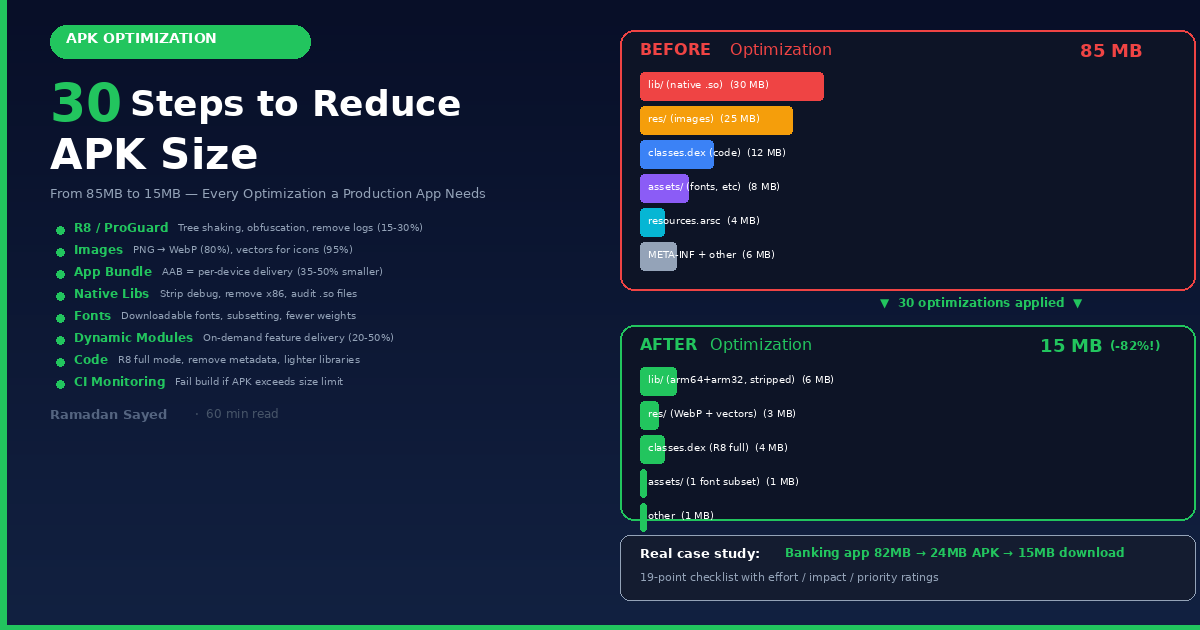
30 Steps to Reduce APK Size: The Complete Guide: From 85MB to 15MB, ProGuard/R8, Resource…
Your APK is 85MB. Users on slow networks abandon downloads over 40MB. Google Play warns you about bloated APKs. Your CI pipeline takes 10…
30 Steps to Reduce APK Size: The Complete Guide: From 85MB to 15MB, ProGuard/R8, Resource Shrinking, WebP, Vector Drawables, App Bundles, Native Library Stripping, Font Subsetting, Dynamic Feature Modules, Baseline Profiles, CI Monitoring, and Every Optimization a Production Android App Needs
Your APK is 85MB. Users on slow networks abandon downloads over 40MB. Google Play warns you about bloated APKs. Your CI pipeline takes 10 minutes to upload. Users in emerging markets with 16GB storage phones skip your app entirely because it’s too big.
APK size directly impacts install conversion. Google’s internal data shows that for every 6MB increase in APK size, install conversion drops by 1%. An 85MB app loses roughly 10% of potential installs compared to a 25MB app.
This article covers every technique to reduce your APK size — from 5-minute quick wins (enable R8, switch image formats) to advanced optimization (dynamic feature modules, baseline profiles, native library stripping). Each technique shows the exact impact in MB saved, so you can prioritize what matters most for your app.
Part 1: Understanding What’s Inside Your APK
APK Anatomy
Before optimizing, you need to know what’s taking space. Use Android Studio’s APK Analyzer (Build → Analyze APK):
TYPICAL 85MB APK BREAKDOWN:

├── classes.dex         →  12 MB  (14%)  → Your Kotlin/Java code + libraries
├── res/                →  25 MB  (29%)  → Drawables, layouts, strings, animations
├── lib/                →  30 MB  (35%)  → Native .so libraries (arm64, armeabi-v7a, x86)
├── assets/             →   8 MB  (10%)  → Fonts, ML models, JSON, HTML
├── resources.arsc      →   4 MB  ( 5%)  → Compiled resource table
├── META-INF/           →   2 MB  ( 2%)  → Signatures, certificates
├── kotlin/             →   2 MB  ( 2%)  → Kotlin metadata
└── AndroidManifest.xml →  <1 MB  ( 1%)  → Manifest

TOP 3 SIZE OFFENDERS (usually):
  1. Native libraries (.so files)     → 30-50% of APK
  2. Drawables (images)               → 15-30% of APK
  3. Code (DEX)                       → 10-20% of APK
How to Analyze
# Command line — detailed size breakdown
./gradlew app:assembleRelease
# Then: Build → Analyze APK → select the .apk file

# Or use bundletool for AAB analysis:
java -jar bundletool.jar build-apks \
  --bundle=app-release.aab \
  --output=output.apks \
  --connected-device
# APK size by architecture:
# arm64-v8a:    typically 40-60% of universal APK
# armeabi-v7a:  typically 30-50% of universal APK
# x86_64:       rarely needed (emulators only)
Part 2: Quick Wins (5 Minutes Each)
1. Enable R8 (Code Shrinking + Obfuscation)
Impact: 15–30% reduction in DEX size
// build.gradle.kts (app module)
android {
    buildTypes {
        release {
            isMinifyEnabled = true       // ← Enable R8 code shrinking
            isShrinkResources = true     // ← Enable resource shrinking
            proguardFiles(
                getDefaultProguardFile("proguard-android-optimize.txt"),
                "proguard-rules.pro"
            )
        }
    }
}
What R8 does:
WITHOUT R8 (debug):
  Your code:           5 MB
  Library code:        20 MB (Retrofit, OkHttp, Room, Compose, Koin...)
  Total DEX:           25 MB

WITH R8 (release):
  Your code (minified): 3 MB   → Removed unused methods, shortened names
  Library code:         7 MB   → Most library code is unused
  Total DEX:           10 MB   → 60% smaller
R8 does 4 things:
  1. TREE SHAKING    → Removes classes/methods that are never called
  2. OBFUSCATION     → Renames com.myapp.TransferViewModel → a.b.c
  3. OPTIMIZATION    → Inlines small methods, removes dead branches
  4. DESUGARING      → Converts Java 8+ features for older devices
2. Enable Resource Shrinking
Impact: 5–15% reduction in res/ folder
release {
    isShrinkResources = true  // ← Removes unused resources
}
This removes resources that are never referenced in code. If your app includes a library with 500 icons but you only use 10, the other 490 are removed.
Custom resource shrinking — keep/discard specific resources:
<!-- res/raw/keep.xml -->
<resources xmlns:tools="http://schemas.android.com/tools"
    tools:shrinkMode="strict"
    tools:keep="@layout/used_*,@drawable/important_*"
    tools:discard="@layout/unused_*,@drawable/test_*" />
3. Use Android App Bundle (AAB) Instead of APK
Impact: 35–50% reduction in download size
UNIVERSAL APK (what you build):
  Contains: ALL architectures (arm64 + arm32 + x86)
           ALL screen densities (mdpi + hdpi + xhdpi + xxhdpi + xxxhdpi)
           ALL languages (50+ string files)
  Size: 85 MB

APP BUNDLE (what Google Play delivers):
  User on Pixel 8 (arm64, xxhdpi, English) gets:
    arm64 only + xxhdpi only + English only
  Size: 35 MB  (59% smaller!)
  User on old Samsung (arm32, hdpi, Arabic) gets:
    arm32 only + hdpi only + Arabic only
  Size: 28 MB
You don’t need to change any code. Just upload AAB instead of APK:
# Build AAB instead of APK
./gradlew app:bundleRelease
# Output: app/build/outputs/bundle/release/app-release.aab

# Test locally with bundletool:
java -jar bundletool.jar build-apks \
  --bundle=app-release.aab \
  --output=output.apks \
  --connected-device
java -jar bundletool.jar install-apks --apks=output.apks
# See size per device:
java -jar bundletool.jar get-size total --apks=output.apks
4. Split APKs by ABI (if not using AAB)
Impact: 50–65% reduction per APK
android {
    splits {
        abi {
            isEnable = true
            reset()
            include("arm64-v8a", "armeabi-v7a")
            // Exclude x86, x86_64 (emulator only)
            isUniversalApk = false  // Don't build universal APK
        }
    }
}
5. Remove Unused Libraries
Impact: 1–10 MB per removed library
// ❌ Adding the entire Google Play Services suite
implementation("com.google.android.gms:play-services:21.0.0")  // ~20 MB!

// ✅ Only the services you actually use
implementation("com.google.android.gms:play-services-auth:21.0.0")     // ~2 MB
implementation("com.google.android.gms:play-services-location:21.2.0") // ~1.5 MB
// Check which libraries contribute most to APK size:
// Build → Analyze APK → Click on classes.dex → Sort by size
Part 3: Image Optimization (Biggest Visual Win)
6. Convert PNGs to WebP
Impact: 50–80% reduction in image sizes
PNG:   hero_image.png       →  2.4 MB
WebP:  hero_image.webp      →  0.5 MB  (79% smaller, same quality!)

PNG:   background.png       →  1.8 MB
WebP:  background.webp      →  0.3 MB  (83% smaller)
Batch convert in Android Studio: Right-click res/drawable → Convert to WebP → Select all PNGs → Convert
WebP advantages:
  ✅ 25-34% smaller than PNG for lossless
  ✅ 25-34% smaller than JPEG for lossy
  ✅ Supports transparency (unlike JPEG)
  ✅ Supports animation (unlike PNG, replaces GIF)
  ✅ Supported on Android 4.0+ (lossless on 4.2+)
  ❌ Slightly slower to decode than PNG (negligible on modern devices)
7. Use Vector Drawables Instead of PNGs
Impact: 80–95% reduction for icons
PNG icons (need mdpi + hdpi + xhdpi + xxhdpi + xxxhdpi):
  ic_settings.png (mdpi):     2 KB
  ic_settings.png (hdpi):     3 KB
  ic_settings.png (xhdpi):    5 KB
  ic_settings.png (xxhdpi):   8 KB
  ic_settings.png (xxxhdpi): 12 KB
  Total: 30 KB × 200 icons = 6 MB

Vector drawables (ONE file, all densities):
  ic_settings.xml:  1 KB
  Total: 1 KB × 200 icons = 200 KB  (97% smaller!)
<!-- res/drawable/ic_settings.xml -->
<vector xmlns:android="http://schemas.android.com/apk/res/android"
android:width="24dp"
android:height="24dp"
android:viewportWidth="24"
android:viewportHeight="24">
<path
android:fillColor="@android:color/white"
android:pathData="M19.14,12.94c0.04,-0.31 0.06,-0.63 ..." />
</vector>Rules for vectors vs bitmaps:
USE VECTOR DRAWABLES FOR:
  ✅ Icons (simple shapes, < 200 path commands)
  ✅ Logos (flat design)
  ✅ Simple illustrations
  ✅ Anything < 200dp × 200dp

USE WebP/PNG FOR:
  ❌ Photos (vectors can't represent photos)
  ❌ Complex illustrations (> 500 path commands → slow rendering)
  ❌ Large images (> 200dp - vector rendering becomes expensive)
8. Use AVIF for Photos (Android 12+)
Impact: 50% smaller than WebP, 60% smaller than JPEG
// For Coil (image loading library):
implementation("io.coil-kt:coil-compose:2.7.0")

// Coil automatically handles AVIF on Android 12+
// Fallback to WebP/JPEG on older devices
// For local resources, keep WebP (broadest compatibility)
// For network images, let your CDN serve AVIF with content negotiation
9. Remove Unused Density Folders
Impact: 20–40% reduction in res/ size
android {
    defaultConfig {
        // Only include the densities you need
        resourceConfigurations += listOf("en", "ar")  // Languages
    }

// If not using AAB, manually limit densities
    buildTypes {
        release {
            // Keep only hdpi and xxhdpi - covers 90% of devices
            // mdpi and xxxhdpi are interpolated from these
        }
    }
}
10. Compress Resources at Build Time
// build.gradle.kts
android {
    packaging {
        resources {
            // Don't compress these (already compressed or needs raw access)
            noCompress += listOf(
                "*.mp4", "*.mp3", "*.ogg",  // Media
                "*.pdf",                      // Documents
                "*.db", "*.sqlite"            // Databases
            )
        }
    }
}
Part 4: Code Optimization
11. ProGuard/R8 Rules — Keep What You Need
# proguard-rules.pro

# ═══════════ KEEP your data models (Retrofit/Moshi/kotlinx.serialization) ═══════════
-keep class com.myapp.data.remote.dto.** { *; }
# ═══════════ Keep @Serializable classes ═══════════
-keepclassmembers class * {
    @kotlinx.serialization.Serializable <fields>;
}
# ═══════════ Hilt ═══════════
-keep class dagger.hilt.** { *; }
# ═══════════ Remove logging in release ═══════════
-assumenosideeffects class android.util.Log {
    public static int v(...);
    public static int d(...);
    public static int i(...);
    public static int w(...);
    public static int e(...);
}
# This REMOVES all Log.v/d/i/w/e calls from the bytecode → smaller DEX
# ═══════════ Remove Kotlin assertions ═══════════
-assumenosideeffects class kotlin.jvm.internal.Intrinsics {
    public static void check*(...);
    public static void throw*(...);
}
# ═══════════ Optimize aggressively ═══════════
-optimizationpasses 5
-allowaccessmodification
-repackageclasses ''
12. Remove Unused Kotlin Metadata
Impact: 1–3 MB reduction
// build.gradle.kts
android {
    packaging {
        resources {
            excludes += listOf(
                "META-INF/LICENSE.md",
                "META-INF/LICENSE-notice.md",
                "META-INF/NOTICE.md",
                "META-INF/*.kotlin_module",
                "kotlin/**",
                "DebugProbesKt.bin",
                "kotlin-tooling-metadata.json"
            )
        }
    }
}
13. Use R8 Full Mode
Impact: 5–10% additional DEX reduction
// gradle.properties
android.enableR8.fullMode=true
R8 COMPATIBILITY MODE (default):
- Keeps more reflection-based code
- Safer, less likely to break things
- Less aggressive optimization
R8 FULL MODE:
- More aggressive tree shaking
- Removes more unused code
- May break reflection-heavy libraries
- Requires testing ALL library features
- 5-10% smaller DEX14. Remove Kotlin Parcelize Runtime If Not Using It
// If you don't use @Parcelize, remove the plugin:
// plugins {
//     id("kotlin-parcelize")  // Remove if unused → saves ~50KB
// }
Part 5: Native Library Optimization
15. Strip Debug Symbols from Native Libraries
Impact: 50–80% reduction in lib/ folder
android {
    buildTypes {
        release {
            ndk {
                debugSymbolLevel = "SYMBOL_TABLE"
                // Options: "FULL", "SYMBOL_TABLE", "NONE"
                // NONE = smallest APK, no crash symbolication
                // SYMBOL_TABLE = good balance (crashes readable)
            }
        }
    }

packaging {
        jniLibs {
            // Strip debug info from .so files
            useLegacyPackaging = false  // Use compressed .so (Android 6.0+)
        }
    }
}
16. Only Include Needed ABIs
Impact: 50–70% reduction in lib/ folder
android {
    defaultConfig {
        ndk {
            // Only include ABIs you need
            abiFilters += listOf("arm64-v8a", "armeabi-v7a")
            // Exclude: "x86", "x86_64" (emulators only — not needed in production)
        }
    }
}

// Size comparison for a typical native library:
// arm64-v8a:     8 MB
// armeabi-v7a:   6 MB
// x86_64:        9 MB  ← Remove this
// x86:           7 MB  ← Remove this
// Total before: 30 MB
// Total after:  14 MB (53% smaller)
17. Audit Native Library Dependencies
COMMON HEAVY NATIVE LIBRARIES:
  SQLCipher:         ~15 MB  → Do you really need encrypted SQLite?
  FFmpeg:            ~20 MB  → Use Media3 ExoPlayer instead
  TensorFlow Lite:   ~10 MB  → Can you use a smaller model?
  OpenCV:            ~30 MB  → Do you need full OpenCV?
  WebRTC:            ~15 MB  → Use only the modules you need

ASK FOR EACH .so FILE:
  1. What library does this belong to?
  2. Do we actually use the feature that needs native code?
  3. Is there a pure-Kotlin/Java alternative?
  4. Can we load this dynamically instead of bundling?
Part 6: Font Optimization
18. Use System Fonts or Google Fonts (Downloadable)
Impact: 2–5 MB reduction per font family
BUNDLED FONTS (in assets/):
  Poppins-Regular.ttf     →  280 KB
  Poppins-Medium.ttf      →  285 KB
  Poppins-SemiBold.ttf    →  282 KB
  Poppins-Bold.ttf        →  283 KB
  Poppins-Light.ttf       →  275 KB
  Poppins-Italic.ttf      →  290 KB
  Total: 1.7 MB for ONE font family

DOWNLOADABLE FONTS (from Google Fonts API):
  No bundled files → 0 MB in APK
  Downloaded at runtime → cached on device
// Using Downloadable Fonts in Compose:
val fontFamily = FontFamily(
Font(
googleFont = GoogleFont("Poppins"),
fontProvider = GoogleFont.Provider(
providerAuthority = "com.google.android.gms.fonts",
providerPackage = "com.google.android.gms",
certificates = R.array.com_google_android_gms_fonts_certs
)
)
)
// Fallback for devices without Google Play Services:
val fallbackFontFamily = FontFamily(
Font(R.font.poppins_regular),
Font(R.font.poppins_bold, FontWeight.Bold)
)19. Subset Fonts (Keep Only Characters You Need)
Impact: 60–80% reduction per font file
# Use pyftsubset (from fonttools) to keep only Latin + Arabic characters
pip install fonttools brotli

# Latin only (removes CJK, Cyrillic, etc.)
pyftsubset Poppins-Regular.ttf \
  --output-file=Poppins-Regular-subset.ttf \
  --unicodes="U+0000-007F,U+00A0-00FF,U+0100-024F,U+0600-06FF" \
  --layout-features='*'
# Before: 280 KB
# After:   65 KB (77% smaller)
20. Use Only Weights You Actually Need
# ❌ Including every weight (6 files × 280KB = 1.7 MB)
font_family = Poppins: Thin, ExtraLight, Light, Regular, Medium, SemiBold, Bold, ExtraBold, Black

# ✅ Include only used weights (3 files × 280KB = 840 KB)
font_family = Poppins: Regular, Medium, Bold
Part 7: Dynamic Feature Modules (Advanced)
21. Move Large Features to On-Demand Modules
Impact: 20–50% reduction in initial download
// settings.gradle.kts
include(":app")
include(":feature:scanner")     // QR/barcode scanner (includes ML Kit: ~5MB)
include(":feature:videochat")   // Video calling (includes WebRTC: ~15MB)
include(":feature:ar")          // AR features (includes ARCore: ~10MB)

// feature/scanner/build.gradle.kts
plugins {
    id("com.android.dynamic-feature")
}

android {
    namespace = "com.myapp.feature.scanner"
}
dependencies {
    implementation(project(":app"))
}
<!-- feature/scanner/src/main/AndroidManifest.xml -->
<manifest xmlns:dist="http://schemas.android.com/apk/dist">
<dist:module
dist:instant="false"
dist:title="@string/scanner_module_title">
<dist:delivery>
<dist:on-demand /> <!-- Downloaded only when user needs it -->
</dist:delivery>
<dist:fusing dist:include="false" />
</dist:module>
</manifest>// In your main app — request the module when needed:
fun openScanner(context: Context) {
val splitInstallManager = SplitInstallManagerFactory.create(context)
// Check if already installed
if (splitInstallManager.installedModules.contains("scanner")) {
// Module is already available - open it
navigateToScanner()
return
}
// Download the module
val request = SplitInstallRequest.newBuilder()
.addModule("scanner")
.build()
splitInstallManager.startInstall(request)
.addOnSuccessListener { sessionId ->
// Monitor download progress
}
.addOnFailureListener { exception ->
// Handle failure
}
}Part 8: Baseline Profiles
22. Generate Baseline Profiles
Impact: 15–30% faster cold start, ~2% larger APK (worth it)
Baseline Profiles tell the ART runtime which methods to compile ahead of time. This isn’t about APK size — it’s about perceived performance. But it slightly increases APK size (~200KB), and the tradeoff is almost always worth it.
// Add dependencies
// build.gradle.kts (app)
dependencies {
    implementation("androidx.profileinstaller:profileinstaller:1.4.1")
}

// build.gradle.kts (benchmark module)
plugins {
    id("com.android.test")
    id("androidx.baselineprofile")
}
dependencies {
    implementation("androidx.benchmark:benchmark-macro-junit4:1.3.3")
}
// Generate the profile
@RunWith(AndroidJUnit4::class)
class BaselineProfileGenerator {
@get:Rule
val rule = BaselineProfileRule()
@Test
fun generateProfile() {
rule.collect("com.myapp") {
// Critical user journeys
startActivityAndWait()
// Scroll the main list
device.findObject(By.scrollable(true))
.scroll(Direction.DOWN, 3f)
// Open a detail screen
device.findObject(By.text("Transfers")).click()
device.waitForIdle()
// Navigate
device.findObject(By.text("Settings")).click()
device.waitForIdle()
}
}
}Part 9: Advanced Techniques
23. Use Compose BOM to Avoid Duplicate Dependencies
dependencies {
    val composeBom = platform("androidx.compose:compose-bom:2025.01.00")
    implementation(composeBom)

// No version numbers - BOM ensures compatible, deduplicated versions
    implementation("androidx.compose.material3:material3")
    implementation("androidx.compose.ui:ui")
    implementation("androidx.compose.ui:ui-tooling-preview")
}
24. Replace Heavy Libraries with Lighter Alternatives
HEAVY → LIGHT ALTERNATIVES:

Gson (350KB)          → kotlinx.serialization (200KB) or Moshi (250KB)
Glide (3MB)           → Coil (500KB) - Kotlin-first, smaller
Joda-Time (1.8MB)     → java.time (built-in API 26+)
Apache Commons (1MB+) → Kotlin stdlib (already included)
OkHttp Logging (200KB) → Remove in release build
Timber (20KB)         → Remove logs with R8 rules (0 KB in release)
RxJava (2.5MB)        → Coroutines + Flow (already included with Kotlin)
25. Defer Large Library Initialization
// ❌ Loading ML model at app startup (adds to cold start + APK size)
class MyApp : Application() {
    override fun onCreate() {
        super.onCreate()
        TensorFlowLite.initialize()  // 10MB model loaded immediately
    }
}

// ✅ Load only when needed
class MyApp : Application() {
    override fun onCreate() {
        super.onCreate()
        // Don't initialize TF here
    }
}
class ScannerViewModel : ViewModel() {
    private val model by lazy {
        // Load ML model only when scanner screen opens
        TensorFlowLite.initialize(context)
    }
}
26. Remove Unused Locales
android {
    defaultConfig {
        resourceConfigurations += listOf("en", "ar", "fr")
        // Only include English, Arabic, French
        // Libraries like AppCompat include 80+ languages — this strips the rest
    }
}

// Impact: Each unused locale has string resources
// 80 unused locales × ~20KB each = ~1.6 MB saved
27. Use shrinkResources with Strict Mode
<!-- res/raw/keep.xml -->
<resources xmlns:tools="http://schemas.android.com/tools"
    tools:shrinkMode="strict">
    <!-- In strict mode, you must declare which resources to keep.
         Anything not referenced in code AND not listed here is removed.
         This catches resources loaded dynamically via getIdentifier(). -->
</resources>
28. Obfuscate with R8 and Check the Output
# After building release, inspect what R8 removed:
# app/build/outputs/mapping/release/

# mapping.txt - obfuscation mapping (upload to Play Console for crash reports)
# seeds.txt - classes/members that were kept (not shrunk)
# usage.txt - classes/members that were REMOVED
# configuration.txt - effective ProGuard rules
# Check usage.txt - if important classes are listed, your keep rules are wrong
# Check seeds.txt - if too many classes are kept, your rules are too broad
Part 10: Monitoring and CI Integration
29. Track APK Size in CI
# GitHub Actions — fail build if APK grows unexpectedly
- name: Check APK size
  run: |
    APK_SIZE=$(stat -f%z app/build/outputs/apk/release/app-release.apk 2>/dev/null || stat -c%s app/build/outputs/apk/release/app-release.apk)
    APK_SIZE_MB=$((APK_SIZE / 1048576))
    echo "APK size: ${APK_SIZE_MB}MB"

    MAX_SIZE_MB=30
    if [ $APK_SIZE_MB -gt $MAX_SIZE_MB ]; then
      echo "❌ APK size (${APK_SIZE_MB}MB) exceeds limit (${MAX_SIZE_MB}MB)"
      exit 1
    fi
    echo "✅ APK size is within limits"
30. APK Size Comparison Report
// Custom Gradle task to track size changes
tasks.register("reportApkSize") {
    dependsOn("assembleRelease")
    doLast {
        val apk = file("app/build/outputs/apk/release/app-release.apk")
        val sizeMB = apk.length() / 1_048_576.0
        println("═══════════════════════════════════")
        println("  APK Size Report")
        println("  Size: %.2f MB".format(sizeMB))
        println("═══════════════════════════════════")

// Save to file for CI comparison
        file("apk-size.txt").writeText("%.2f".format(sizeMB))
    }
}
Part 11: The Complete Optimization Checklist
TECHNIQUE                          EFFORT      IMPACT       PRIORITY
──────────────────────────────────────────────────────────────────────
✅ Enable R8 (minifyEnabled)       5 min       15-30%       ★★★★★
✅ Enable resource shrinking       1 min       5-15%        ★★★★★
✅ Use AAB instead of APK          2 min       35-50%       ★★★★★
✅ Convert PNG → WebP              10 min      50-80%       ★★★★★
✅ Use vector drawables for icons  30 min      80-95%       ★★★★★
✅ Remove unused ABI (x86)         2 min       50-70%       ★★★★★
✅ Remove unused libraries         15 min      1-10 MB      ★★★★☆
✅ Strip native debug symbols      2 min       50-80%       ★★★★☆
✅ Limit language resources        2 min       1-2 MB       ★★★★☆
✅ Remove Kotlin metadata          2 min       1-3 MB       ★★★★☆
✅ Remove Log calls via R8 rules   5 min       0.5-1 MB     ★★★☆☆
✅ R8 full mode                    10 min      5-10%        ★★★☆☆
✅ Use downloadable fonts          15 min      2-5 MB       ★★★☆☆
✅ Subset fonts                    10 min      60-80%       ★★★☆☆
✅ Audit native libraries          30 min      5-20 MB      ★★★☆☆
✅ Replace heavy libraries         1 hour      3-10 MB      ★★☆☆☆
✅ Dynamic feature modules         4 hours     20-50%       ★★☆☆☆
✅ Baseline profiles               2 hours     +200KB       ★★☆☆☆
✅ CI size monitoring               1 hour      prevention   ★★☆☆☆
Part 12: Real-World Case Study
BANKING APP — BEFORE OPTIMIZATION:
  Total APK:        82 MB
  ├── classes.dex:  18 MB  (Retrofit, OkHttp, Room, Compose, Firebase, Analytics)
  ├── res/:         22 MB  (PNG icons, illustrations, density variants)
  ├── lib/:         28 MB  (SQLCipher, TFLite for ID scan, 4 ABIs)
  ├── assets/:       8 MB  (3 font families, lottie animations, country flags)
  ├── resources.arsc: 4 MB
  └── META-INF/:     2 MB

OPTIMIZATIONS APPLIED:
  1. Enable R8 + resource shrinking        →  -8 MB  (DEX 18→12, res 22→20)
  2. PNG → WebP                            →  -12 MB (res 20→8)
  3. PNG icons → Vector drawables          →  -3 MB
  4. Remove x86/x86_64 ABIs              →  -14 MB (lib 28→14)
  5. Strip native debug symbols           →  -4 MB  (lib 14→10)
  6. 3 font families → 1 + downloadable   →  -4 MB
  7. Remove unused locales (keep 3)        →  -1.5 MB
  8. R8 remove Log calls + Kotlin metadata →  -2 MB
  9. Dynamic feature: ID scanner module    →  -8 MB (TFLite moved to on-demand)
  10. Lottie → Compose animations          →  -2 MB
AFTER OPTIMIZATION:
  Total APK:   24 MB  (71% reduction!)
  AAB download: 15 MB (82% reduction from original!)
TIME SPENT: ~8 hours
INSTALL CONVERSION IMPROVEMENT: ~10% (Google's data)
Part 13: Common Pitfalls
Pitfall 1: R8 Breaks Reflection-Based Libraries
// ❌ Retrofit DTOs get stripped by R8
data class TransferDto(val id: String, val amount: Double)
// R8 renames fields → JSON parsing breaks: "No field 'a' in class 'b'"

// ✅ Keep DTO classes
// proguard-rules.pro
-keep class com.myapp.data.remote.dto.** { *; }
Pitfall 2: Forgetting to Test Release Builds
// ❌ "It works in debug" — debug doesn't have R8, different image loading, no obfuscation

// ✅ Test EVERY feature in release build before shipping
// Critical to test: API calls, navigation, deep links, background work, notifications
Pitfall 3: AAB Size vs Download Size Confusion
// ❌ "My AAB is 90MB!" — That's fine. AAB contains ALL variants.
// What matters is the DOWNLOAD size per device.

// Check actual download size:
java -jar bundletool.jar get-size total --apks=output.apks
// This shows what each user actually downloads
Pitfall 4: Removing Too Many ABIs
// ❌ Only keeping arm64-v8a
ndk { abiFilters += listOf("arm64-v8a") }
// Excludes older 32-bit devices (still ~15% of market in some regions)

// ✅ Keep arm64-v8a + armeabi-v7a (covers ~99.5% of devices)
ndk { abiFilters += listOf("arm64-v8a", "armeabi-v7a") }
Conclusion
APK size optimization is not a one-time task — it’s a continuous discipline. The three highest-impact changes are: enable R8 with resource shrinking (5 minutes, 20–30% reduction), convert images to WebP/vectors (30 minutes, 50–95% reduction for images), and use Android App Bundle (2 minutes, 35–50% reduction in user download).
For most apps, these three changes alone bring you from 80MB to 30MB. The advanced techniques (dynamic features, font subsetting, native library auditing, CI monitoring) get you from 30MB to 15MB.
The number to optimize for is not your AAB size — it’s what the user downloads. Use bundletool get-size total to measure what real users actually receive. That's the number that affects install conversion, storage complaints, and user satisfaction.
Connect with Me on LinkedIn
Follow me on LinkedIn
Tags: #Android #APKSize #R8 #ProGuard #WebP #AppBundle #Performance #Kotlin #JetpackCompose #Optimization #MobileDevelopment
메타데이터
- post_id
- e4cdff7ad9c0
- slug
- 30-steps-to-reduce-apk-size-the-complete-guide-from-85mb-to-15mb-proguard-r8-resource-e4cdff7ad9c0
- url
- https://medium.com/@ramadan123sayed/30-steps-to-reduce-apk-size-the-complete-guide-from-85mb-to-15mb-proguard-r8-resource-e4cdff7ad9c0
- canonical_url
- https://medium.com/@ramadan123sayed/30-steps-to-reduce-apk-size-the-complete-guide-from-85mb-to-15mb-proguard-r8-resource-e4cdff7ad9c0
- author_url
- https://medium.com/@ramadan123sayed
- status
- ok
- fetched_at
- 2026-07-11 04:18:25