From SSO to spreadsheets: How we saved $200k in Creative Cloud costs using the Adobe API
By Michael Cotrone
From SSO to spreadsheets: How we saved $200k in Creative Cloud costs using the Adobe API
By Michael Cotrone
By building a pipeline that slashed $200,000 in committed spend and surged license utilization from 40% to over 90%, we moved beyond guesswork to create a data-driven framework for software accountability. Achieving these results required us to solve a significant data challenge.
The problem: Our Adobe footprint had grown faster than our ability to prove who still needed a seat. Adobe bills on entitlements: they do not hand you a clean story about duplicate license assignments, one-off project requests, any usage statistics, or product renames after a contract refresh. We needed evidence tied to our identity sources that leadership could use for chargebacks and renewals.
This post is about the shipped integration stack: a Windows PowerShell pipeline that pulls Adobe users, Active Directory, and Okta activity into one report, flags waste, and feeds weekly Google Sheets review.
What we did first (and why it mattered)
Federation is what made the rest of the story auditable. Moving users to federated Adobe IDs with Okta SSO gave us security alignment and queryable login history we did not have when accounts lived in Adobe’s silo. Once Adobe shipped automated cloud migration for all accounts, we could finish the rollout instead of debating manual asset movement processes.
With SSO in place, we could answer: who actually opens Creative Cloud vs who has a license because they asked one time. That distinction allowed us to strategically trim excess licenses, instead of needing to guess.
The automation pipeline (how the pieces fit)
On a typical run, the flow looks like this:
**Get-AllAdobeUsers— OAuth client-credentials against Adobe Auth API, then paged calls to the User Management API. Credentials live in DPAPI-protectedXMLfiles. Arrays like product groups get joined to strings** before CSV export so downstream steps do not choke on multi-value cells.**Export-OktaAdobeLogins— Pulls successfuluser.session.startandapplication.user_membership.addfrom Okta System logs for our Adobe app over a rolling window, walks Link header pagination, and handles 429 usingX-Rate-Limit-Reset plusexponential backoff on 5xx. Sign-ins and assignments merge into per-user** aggregates (login frequency count, last sign-in, latest assignment date) , newly assigned users have a grace period to not look “inactive” the day after provisioning.**Export-AllADUsers— One bulkGet-ADUserwith the attributes we need, then an in-memory manager chain walk** via a hashtable to resolve executive rollup (ELT / ELT-1) without hammering Active Directory servers to query data already gathered.**Invoke-AdobeEntitlementAudit**— The join layer. It hashes AD proxy addresses and primary SMTP for fast lookups instead of nested loops. It then hashes Okta rows by user. Initially each call prior to the hashtable would take 30–300ms per query, with a hashtable each search was reduced to 0.2ms per user. It also fails fast with email notifications if the Okta Logs are empty so we never publish what would appear to be a silent bad week (Which has happened — followed by an Internal RCA). It classifies Adobe product profiles into buckets (All Apps, Single Apps, Acrobat, Captivate, Express), computes weekly metrics by business segment (recorded music, publishing, corporate, uncategorized), flattens nested structures for CSV, and pushes outputs with **GAM** into Google Sheets–both my workbook and the tabs that feed our stakeholder dashboard.- Cleanup Parameter —
-Cleanupparameter from the previous script builds a CSV of federated users who have entitlements but no recent Okta activity (and no conflicting “newly assigned” signal we care about), uploads it, emails HTML summaries for license overage (e.g. Creative Cloud plus redundant singles) and licenses on AD-missing or disabled accounts. Removal goes through**Remove-InactiveAdobeUsersOktaGroupsand related Okta automation. The removal script batches API work and includes a 50-user safety ceiling** with optional override and email, because nobody wants a typo to deprovision 500+ people again.
The optimizations (what actually paid off)
- Hashtables for identity joins — Matching every Adobe user against every AD proxy address with nested loops does not scale; hashing primary and secondary emails does.
- Pagination + rate limits as first-class — Adobe and Okta both punished my initial naive scripts with 1000+ API calls. Retry-after and Link headers are crucial for understanding API standards.
- One AD bulk read + in-memory org walk — Resolving leadership for chargeback views without per-user LDAP calls kept runtime predictable and fast.
- Structured outputs — Separate CSVs for raw rows, counters, weekly metrics, and cleanup candidates make Sheets and email alerts composable instead of one fragile mega-file.
- Operational guardrails — Abort emails on bad inputs, caps on bulk removal, and transcripts mean the automation is boring when it works and loud when it should stop.
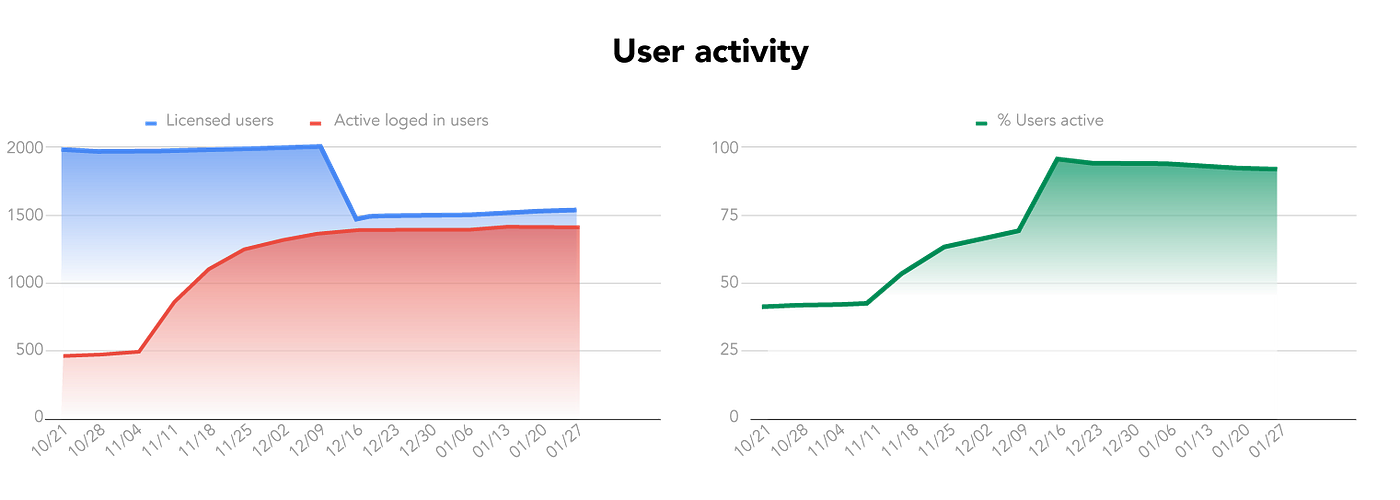
License Optimization: We increased active license utilization from ~40% to 90%+ during the 90-day window
The “so what?”
If you are stuck between vendor dashboards and finance asking who to bill, you probably need your own join across IdP logs, directory truth, and the vendor’s user API. Pick a system of record for people (for us, AD + Okta), treat vendor entitlements as claims to verify, and invest in REST API Calls (with pagination and backoff) and build relevant hashes before you invest in another BI app.
I am still tuning thresholds (60 vs 90 days, grace for new assignments) as usage patterns change, which is normal. The win is making decisions based on data we own, not from the PDF that showed up in the renewal packet.
By moving from “guessing” to “querying,” we ensured our active users stayed productive while slashing license waste. These were the final results:
- License optimization: Proactive identification and removal of inactive users. Initial findings were ~40% utilization to over 90% utilization.
- Reduce committed spending: After trimming excessive licenses it enabled us to reduce spend commitment by $200,000.
메타데이터
- post_id
- e4ee557a0223
- slug
- from-sso-to-spreadsheets-how-we-saved-200k-in-creative-cloud-costs-using-the-adobe-api-e4ee557a0223
- url
- https://tech.wmg.com/from-sso-to-spreadsheets-how-we-saved-200k-in-creative-cloud-costs-using-the-adobe-api-e4ee557a0223
- canonical_url
- https://tech.wmg.com/from-sso-to-spreadsheets-how-we-saved-200k-in-creative-cloud-costs-using-the-adobe-api-e4ee557a0223
- author_url
- https://medium.com/@wmg-tech
- status
- ok
- fetched_at
- 2026-06-14 11:28:49