I Benchmarked Apple’s New Framework Against MLX for On-Device LLMs
It really pays to actually run the comparison.
I Benchmarked Apple’s New Framework Against MLX for On-Device LLMs
It really pays to actually run the comparison.
I was sure it would be slow. You know — one of those frameworks that trades speed for ease of use. Surely the aggressively hand-optimized MLX would be faster.
The result floored me.
It’s stupid fast!!
🐥
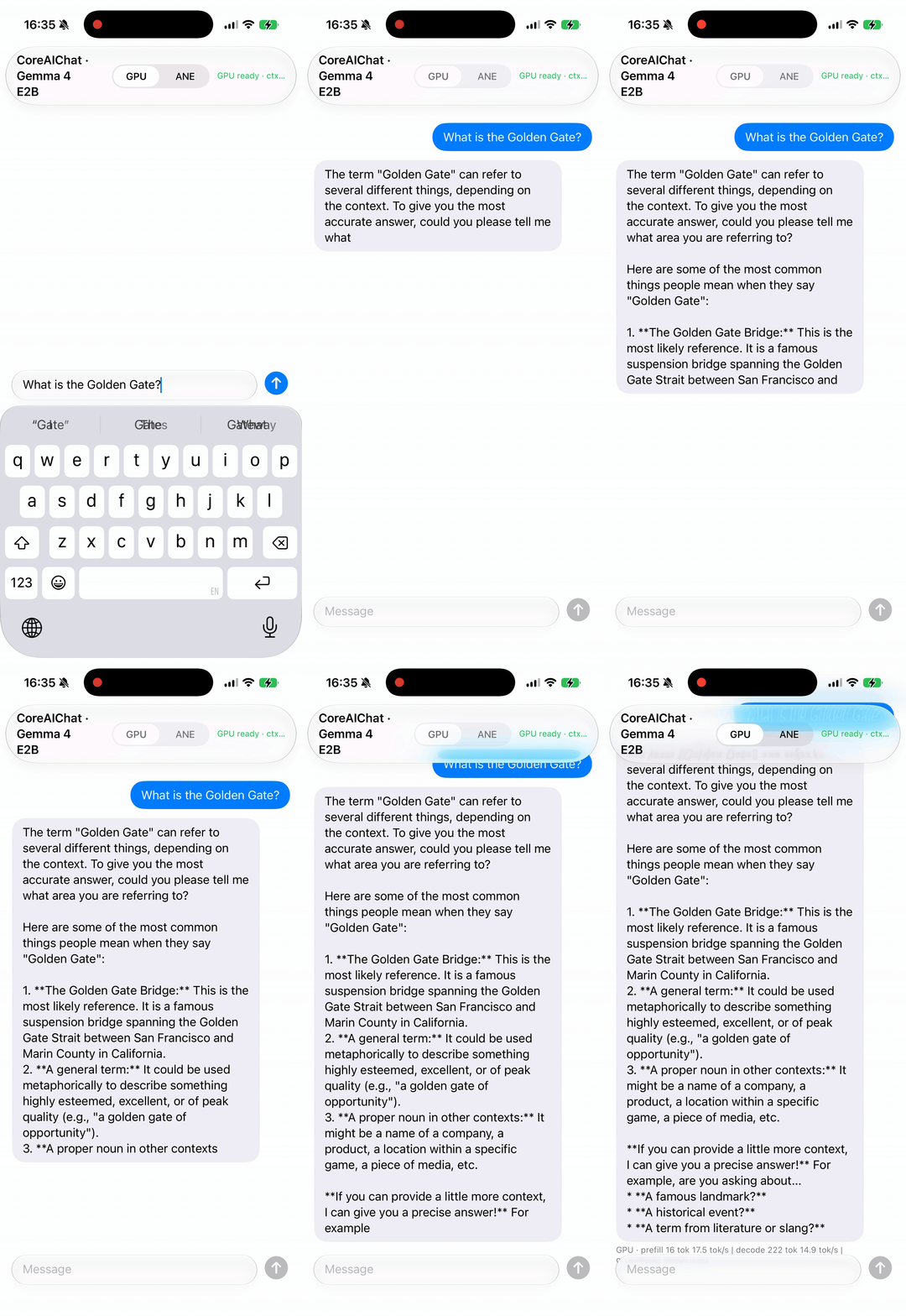
At WWDC 2026 Apple announced Core AI — the successor to Core ML. I ran an LLM with it on a real iPhone 17 Pro and benchmarked it against MLX and CoreML: same model, same harness.
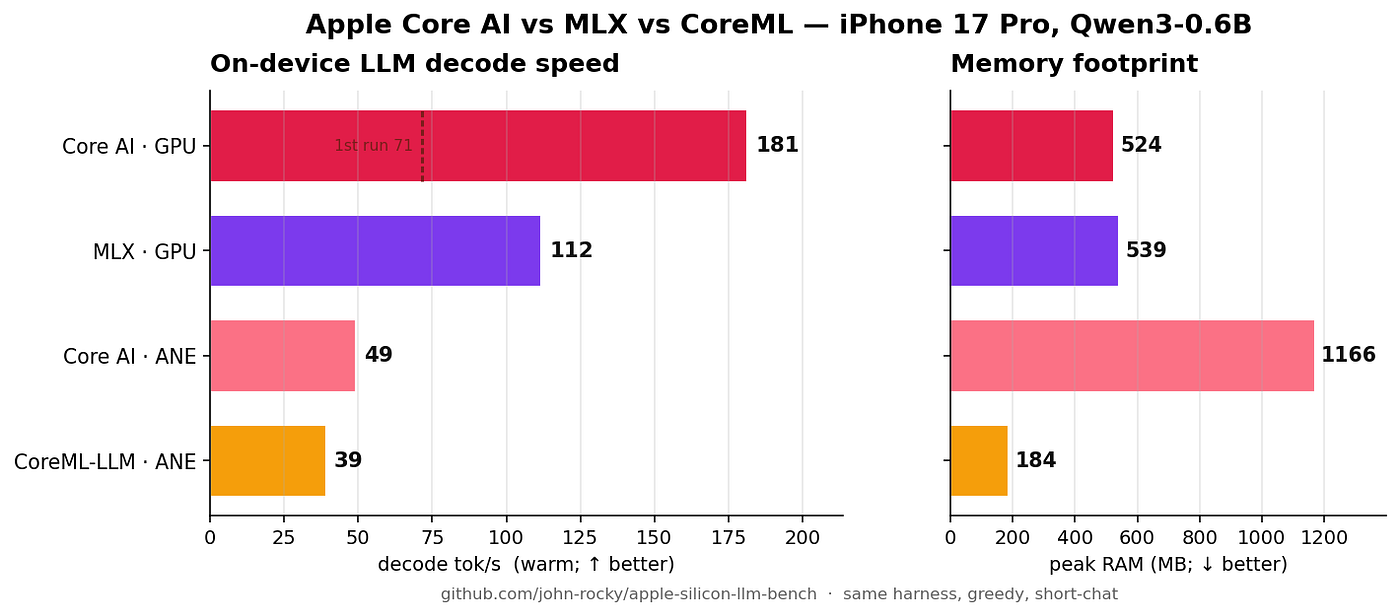
iPhone 17 Pro · Qwen3–0.6B · short-chat · warm decode tok/s (median):
Engine                  Compute  Decode tok/s         Peak RAM
----------------------  -------  -------------------  --------
Core AI (pipelined)     GPU      181 🏆 (1st run: 71)  524 MB
MLX                     GPU      112                  539 MB
Core AI (static-shape)  ANE      49                   1,166 MB
CoreML-LLM              ANE      39                   184 MB 🏆
Repository (fully reproducible — raw data and all the Swift adapters are public): https://github.com/john-rocky/apple-silicon-llm-bench
What is Core AI?
The successor to Core ML, shipping with iOS / macOS 27. The pipeline:
PyTorch → coreai-torch → .aimodel (MLIR IR)
→ executed by the Swift runtime in coreai-models (CoreAILM)
LLMs export to .aimodel with coreai.llm.export <model>. For this benchmark I used Qwen3-0.6B — the model Apple itself uses in its official examples — through the official export and the official Swift runtime. In other words, faithful to how Apple intends it to be used.
uv run coreai.llm.export qwen3-0.6b --platform iOSHow to read the numbers: cold vs warm (the one-time cost)
Core AI GPU’s 181 tok/s is the warm (steady-state) number. The pipelined engine pays a one-time cost on the very first generation — kernel compilation plus filling a 3-stage pipeline — so the first run is 71 tok/s. But it really is one-time: even across app restarts, every run after the first sits at ~181 (the compiled kernels persist). MLX is flat at ~112 from the start.
In short: Core AI is slower exactly once — and from the second run on, it’s ~1.6× MLX, forever.
Reproducing it (the real-device driving gotcha)
scripts/bench_coreai_iphone.sh does the whole thing: export → AOT compile → bundle assembly → side-load → run → collect. There is exactly one trap:
Launching
devicectl process launchwith--consolefrom a non-interactive shell (e.g. in the background) fails withCoreDeviceError 10002. The stable recipe: launch without--console(detached), pass--runs N(one cold + the rest warm in a single session), and pullDocuments/resultsafter it finishes.
On the build side, coreai-models' CXGrammar.xcframework and executorch.xcframework both ship an include/module.modulemap and collide, so the iOS app drops ExecuTorch.
Pitfall #1: iOS can’t JIT the IR — AOT compilation is mandatory
The exported .aimodel is MLIR IR (main.mlirb, compilation.targets: []). macOS JIT-compiles it at load time; iOS cannot JIT. Load the raw IR on the phone and you get:
Model load failed: NSPOSIXErrorDomain Code=2 "No such file or directory"You have to compile it ahead of time (AOT) for the device:
xcrun coreai-build compile qwen3_0_6b_ios.aimodel \
    --platform iOS --preferred-compute neural-engine --output out/
# → out/qwen3_0_6b_ios.h18p.aimodelc  (per GPU family; h18p = iPhone 17 Pro)
Then rewrite assets.main in metadata.json to the compiled file name (qwen3_0_6b_ios.h18p.aimodelc) and reassemble the bundle.
Pitfall #2: the compute unit (ANE/GPU) is decided by the export shape
It does not switch with a runtime flag.EngineFactory decides automatically from the model's structure:
--platform iOS(static shapes) → detected as chunked-static → ANE (thestatic-shapeengine)- a dynamic export → GPU (the
coreai-pipelinedengine)
So to compare GPU vs ANE you prepare two separate AOT-compiled bundles (static = ANE, dynamic = GPU). Forcing coreai-pipelined onto a static model is rejected with unsupportedEngineVariant.
Memory: CoreML-LLM is the memory champion
My own CoreML-LLM conversion (a stateful INT4 ANE-chunked Qwen3–0.6B, 100% ANE residency) is the slowest decoder (39) but overwhelmingly the leanest at 184 MB — roughly 1/6 of Core AI’s ANE path. Its decode speed (39.8) matched my Mac parity measurement exactly. The best runtime depends on the job — Core AI GPU for speed, CoreML for memory.
Full details, methodology, raw JSONL, and the Swift CoreAIRuntime adapter are all public: **https://github.com/john-rocky/apple-silicon-llm-bench**
🐣
I’m a freelance engineer. I write about AI — feel free to check out my profile.
If any of the following sounds like you, don’t hesitate to reach out: you want to build an AI service, bring AI into your business to work more efficiently, build an AI-powered mobile app, build an AR application — or you want to build a mobile app but don’t know where to start…
I can take any of these on at reasonable rates, with no agency overhead.
For work inquiries: rockyshikoku@gmail.com
I build applications with machine learning and AR, and I post about ML / AR.
메타데이터
- post_id
- e52a769494b1
- slug
- i-benchmarked-apples-new-framework-against-mlx-for-on-device-llms-e52a769494b1
- url
- https://medium.com/@rockyshikoku/i-benchmarked-apples-new-framework-against-mlx-for-on-device-llms-e52a769494b1
- canonical_url
- https://medium.com/@rockyshikoku/i-benchmarked-apples-new-framework-against-mlx-for-on-device-llms-e52a769494b1
- author_url
- https://medium.com/@rockyshikoku
- status
- ok
- fetched_at
- 2026-06-20 20:29:01