Deploying AI Behind Closed Doors: How We Built an Enterprise On-Premise System on a Bare-Metal H200
[TR/ENG]
Deploying AI Behind Closed Doors: How We Built an Enterprise On-Premise System on a Bare-Metal H200
[TR/ENG]
Deploying AI to an Air-Gapped Enterprise Network: A Bare-Metal H200 Story from Scratch
Your client loves your system and wants it deployed on their own infrastructure, allocating a brand-new NVIDIA H200 for it. But how do you bring this system to life in an enterprise data center that has zero direct internet access, and where every single command must be copy-pasted across a screen share by an internal operator?
Recently, we deployed an enterprise AI infrastructure onto a single H200 server. The system consists of an end-to-end architecture that listens to meeting audio recordings, transcribes them, separates speakers, and automatically extracts action items using two separate large language models (an OSS 120B primary model and an OSS 20B fallback model). What’s more, not a single byte of data leaves the enterprise, it runs 100% locally on the hardware.
On paper, the plan was clear: “Test models in the cloud, package them, run with Docker, and install the whole system with a single file in one go.” In reality, it turned into a serious engineering battle where our entire strategy was thrown out the window, we built a new architecture from scratch, and dealed with real infrastructure roadblocks.
Here is what we personally experienced in the field, and the story of how we turned a chaotic process spanning several days into a single-command deployment.
The RunPod Trap: Cloud Demo Illusion vs. Bare-Metal Reality
Before stepping into the enterprise network, we rented an H200 via RunPod and ran a rehearsal installation. We pulled our images, launched the services, and everything worked without a hitch on the first try. We were quite confident. But we had fallen into a classic engineering trap. The cloud machine we rented had standard Ubuntu installed; NVIDIA drivers were ready, Docker and kernel configurations were done, network permissions were open, and Python libraries were pre-installed.
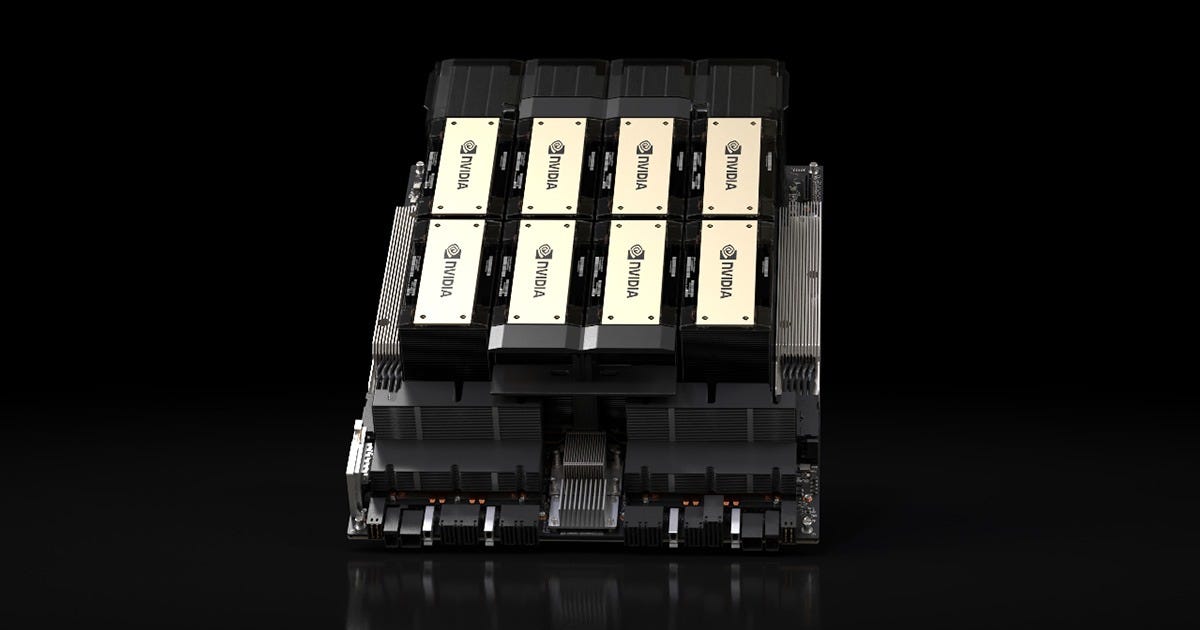
When we connected to the enterprise server, the picture that met us was completely different: a bare-metal machine fresh out of the box. Meaning direct physical hardware without any virtualization layer, ready operating system template, or helper tools. An enterprise Linux distribution with Secure Boot enabled, no access to package repositories, Docker not installed, and not a single driver loaded. We were literally at zero.
The ISO Bottleneck: Limits of Offline File Transfe
Because package repositories had no internet access, our initial plan was to perform an offline installation: burn drivers, tools, and models into ISO images, transfer them inside via the enterprise’s file transfer system, mount, and install.
The base layer worked: our offline packager installed the NVIDIA driver, Docker infrastructure, and Python setup without needing external repos. But when it came to the models, things came to a complete halt. We prepared separate ISO images for speech models, the Whisper fallback, the 20B model, and the massive 120B model. However, enterprise file transfer systems were simply not designed to carry hundreds of gigabytes of AI models. Between file size limits, security scans, and transfer approval queues, the process turned into an operational nightmare. On top of that, due to the single-file size limit of standard ISO formats, our large model files were silently truncated while being written to the image, and we spent hours dealing with corrupted archive errors.
Having to write a new image and wait for approvals for every small fix was choking the system. We had to change our approach.
The Rotation: Nvidia DGX Spark Cluster Advantage and Custom Docker Layers
In the installation scenario we originally prepared, models were supposed to be cleanly downloaded via Hugging Face and then modified inside the server specifically for the project. We were going to do a clean install with a single file. But once model repositories were completely inaccessible, and the plan to modify raw models from scratch fell through under the internal constraints, we completely flipped the strategy: since the only open channel was the Docker registry, instead of tuning models inside, we wrapped them into Docker layers in their already modified states straight from our own test environment. We would push the modified models from our own Docker account and pull them down on the enterprise system.
Here is where our own infrastructure became the game-saving move: We took the models that were already modified and running in an optimized state for this project on our own Spark test cluster. Thanks to the high processing capacity of our Spark cluster and our office’s strong upload bandwidth, we packaged these multi-gigabyte custom models directly into Docker images and pushed them to our private registry in record time. This eliminated the need to re-tune models from scratch on the enterprise server. Even if the connection dropped, downloads did not start over thanks to Docker’s layer structure. Models downloaded completely without error due to Docker’s internal hash verification. The moment models landed on the server, they were ready to serve immediately in their project-tailored state.

Midnight Bare-Metal Rehearsal: The Difference Between Nvidia DGX Spark and H200
Pushing the images was only part of the job. Because the architectures of our own Nvidia DGX Spark cluster and the enterprise’s H200 hardware are different from each other, models running on Spark ran into new hardware-level incompatibilities when moving to the H200 architecture.
After seeing that our first RunPod test had misled us, we couldn’t walk into the enterprise with that risk. The night before the deployment day, we rented a real bare-metal H200 virtual machine that had no drivers or configurations on it.
We pulled the models we had pushed from Spark onto this rented H200. Throughout the night, we applied the specific tensor and memory configurations required by the H200 architecture on bare metal, making the models fully compatible with the H200. We installed the drivers, set up the container engine, and tested the entire pipeline from start to finish twice. That night on our rented twin, we caught and solved every architectural incompatibility we could possibly hit in the enterprise data center the next day.
The Secure Boot Surprise
Even when you get the infrastructure in order, an unexpected hitch always pops up on enterprise machines.
After installing the drivers, when we ran nvidia-smi, the system did not see the card. Because Secure Boot comes enabled by default on enterprise hardware, the operating system kernel directly blocked unsigned third-party modules.
The solution: create and enroll a Machine Owner Key (MOK) via the terminal, and then reboot the machine while the enterprise operator is physically at the console to approve the key from the blue management screen.
In an air-gapped network where you don’t have direct physical access, solving a driver issue isn’t just about typing commands; you have to time the reboot for the exact minute an authorized person is sitting at the console before their shift ends.
The Picture on the Final Day: A Single Installation File
On the morning of the live deployment, we had reduced all the complexity down to a single installation file. All the enterprise operator had to do was run a single script. Forty minutes later, all five AI services were up and running smoothly on a single H200.
When we fed a real, multi-speaker corporate meeting recording into the system; transcription, speaker diarization, and the analysis/summary steps via the 120B model were all completed end-to-end in approximately 2 minutes.
Final Words
Running AI demos in a development environment is one of the easy parts. Transforming these models into a deterministic system that spins up error-free, securely, and with a single script on air-gapped, freshly-built bare-metal enterprise infrastructures is an entirely different world. Your reputation in the client’s eyes is on the line. Even though the client acknowledged that the machine had missing pieces, customer satisfaction and smooth execution were our top priorities. We needed to anticipate every possible obstacle during our own preparation phase rather than hitting it in front of them; because at the end of the day, your reputation and the trust built with the client depend directly on this success.

Kapalı Kurumsal Ağa Yapay Zekâ Kurulumu: Sıfırdan Bir Bare-Metal H200 Hikâyesi
Müşteriniz sisteminizi beğeniyor ve kendi sistemine kurulmasını istiyoru, bunun için size yepyeni bir NVIDIA H200 tahsis ediyor. Peki dış dünyayla internet bağlantısının olmadığı ve her komutun ekran paylaşımı üzerinden bir kurum yetkilisi tarafından kopyalanıp çalıştırıldığı bir kurumsal veri merkezinde bu sistemi nasıl ayağa kaldıracaksınız?
Geçtiğimiz günlerde, tek bir H200 sunucusu üzerine kurumsal bir yapay zekâ altyapısı kurduk. Sistem; toplantı ses kayıtlarını dinleyen, metne döken, konuşmacıları ayrıştıran ve iki ayrı büyük dil modeli (OSS 120B ana model ve OSS 20B yedek model) üzerinden otomatik karar maddeleri çıkaran uçtan uca bir mimariden oluşuyor. Üstelik tek bir bayt veri bile kurum dışına çıkmadan, tamamen yerel donanımda çalışıyor.
Kâğıt üzerinde plan son derece temizdi: “Modelleri bulutta test et, paketle, Docker’la çalıştır., tüm sistemi tek bir dosya ile tek seferde kur.”
Gerçekte ise tüm stratejimizin çöpe gittiği, sıfırdan yeni mimari kurduğumuz ve gerçek altyapı problemleriyle boğuştuğumuz ciddi bir mühendislik mücadelesine dönüştü.
İşte sahada bizzat yaşadıklarımız ve birkaç güne yayılan kaotik bir süreci nasıl tek komutluk bir kuruluma dönüştürdüğümüzün hikâyesi.
RunPod Tuzağı: Bulut Demosu Yanılgısı vs. Bare-Metal Gerçeği
Kurumsal ağa girmeden önce, RunPod üzerinden bir H200 kiralayarak kurulum provası yaptık. İmajlarımızı çektik, servisleri ayağa kaldırdık ve her şey ilk denemede sorunsuz çalıştı.
Kendimizden oldukça emindik. Fakat klasik bir mühendislik tuzağına düşmüştük.
Kiraladığımız o bulut makinesinde standart Ubuntu kuruluydu; NVIDIA sürücüleri hazırdı, Docker ve çekirdek yapılandırmaları yapılmıştı, ağ izinleri açıktı, Python kütüphaneleri kuruluydu.
Kurumun sunucusuna bağlandığımızda ise karşımıza çıkan tablo bambaşkaydı: Kutudan yeni çıkmış bare-metal bir makine. Yani üzerinde hiçbir sanallaştırma katmanı, hazır işletim sistemi şablonu veya yardımcı araç bulunmayan, doğrudan fiziksel donanımın kendisi. Secure Boot açık kurumsal bir Linux dağıtımı, paket depolarına erişim yok, Docker kurulu değil ve tek bir sürücü dahi yüklenmemiş.
Tam anlamıyla sıfır noktasındaydık.

ISO Çıkmazı: Çevrimdışı Dosya Taşımanın Sınırları
Paket depoları internete kapalı olduğu için ilk planımız çevrimdışı kurulum yapmaktı: Sürücüleri, araçları ve modelleri ISO kalıplarına yazmak, kurumun dosya aktarım sisteminden içeri aktarmak ve bağlayıp kurmak.
Temel katman çalıştı: Çevrimdışı paketleyicimiz NVIDIA sürücüsünü , Docker altyapısını ve Python kurulumunu dış repolara ihtiyaç duymadan kurdu. Fakat sıra modellere geldiğinde iş tamamen tıkandı.
Konuşma modelleri, Whisper yedeği, 20B modeli ve devasa 120B modeli için ayrı ayrı ISO kalıpları hazırladık. Ancak kurumsal dosya aktarım sistemleri yüzlerce gigabaytlık yapay zekâ modellerini taşımak için tasarlanmamıştı. Dosya boyutu limitleri, güvenlik taramaları ve transfer onayları arasında süreç operasyonel bir kabusa dönüştü. Üstüne standart ISO formatlarının tekil dosya boyutu sınırı yüzünden büyük model dosyalarımız kalıba yazılırken sessizce kırpıldı ve saatlerce bozuk arşiv hatalarıyla uğraştık.
Her ufak düzeltme için yeni kalıp yazmak ve onay beklemek sistemi kilitliyordu. Yolu değiştirmek zorundaydık.
Rotasyon: Nvidia DGX Spark Cluster Avantajı ve Özel Docker Katmanları
Normalde hazırladığımız kurulum senaryosunda modeller Hugging Face üzerinden temiz bir şekilde inecek ve ardından sunucu içinde projeye özel modifiye edilecekti. Tek dosya ile temiz kurulum yapacaktık. Fakat model depolarına erişim tamamen kapalı olunca ve içerideki kısıtlar altında ham modelleri sıfırdan modifiye etme planı suya düşünce stratejiyi tamamen değiştirdik: Tek açık kanal Docker registry olunca, modelleri içeride ayarlamak yerine kendi test ortamımızda modifiye ettiğimiz halleriyle Docker katmanlarına sardık. Kendi Docker hesabımızdan modifiyeli modelleri pushlayacak ve kurumsal sistemden geri indirecektik.
İşte bu noktada kendi altyapımız süreci kurtaran hamle oldu:
Kendi Spark test cluster’ımızda bu proje özelinde zaten modifiye edilmiş ve optimize çalışır durumda olan modelleri aldık. Spark cluster’ımızın yüksek işlem kapasitesi ve ofisimizin güçlü upload bant genişliği sayesinde onlarca gigabaytlık bu özel modelleri doğrudan Docker imajlarına paketleyip rekor sürede özel registry’mize pushladık.
Böylece kurum sunucusunda modelleri tekrar sıfırdan ayarlamaya gerek kalmadı. Bağlantı kopsa bile Docker katman yapısı sayesinde indirme baştan başlamadı. Docker’ın dahili hash doğrulaması sayesinde modeller eksiksiz indi. Modeller sunucuya indiği anda projeye özel ayarlanmış olarak doğrudan servise hazır hale geldi.
Gece Yarısı Yapılan Bare-Metal Provası: Nvidia DGX Spark ve H200 Farkı
İmajları pushlamak işin sadece bir kısmıydı. Kendi Nvidia DGX Spark kümemiz ile kurumdaki H200 donanımının mimarileri birbirinden farklı olduğu için, Spark üzerinde çalışan modeller H200 mimarisine girdiğinde donanım seviyesinde yeni uyumsuzluklar çıkıyordu.
İlk RunPod testimizin bizi yanılttığını gördükten sonra kuruma bu riskle gidemezdik. Kurulum gününden önceki gece, üzerinde hiçbir sürücü veya yapılandırma bulunmayan gerçek bir bare-metal H200 sanal makinesi kiraladık.
Spark’tan pushladığımız modelleri bu kiralık H200'e çektik. Gece boyunca H200 mimarisinin gerektirdiği özel tensör ve bellek yapılandırmalarını bare-metal üzerinde uygulayarak modelleri H200'e tam uyumlu hale getirdik. Sürücüleri kurduk, konteyner motorunu bağladık ve tüm akışı baştan sona iki kez test ettik. Ertesi gün kurum veri merkezinde başımıza gelebilecek tüm mimari uyumsuzlukları o gece kiralık ikizimizde yakalayıp çözdük.
Secure Boot Sürprizi
Altyapıyı toparlasanız bile kurumsal makinelerde her zaman beklenmedik bir pürüz çıkar.
Sürücüleri kurduktan sonra nvidia-smi çalıştırdığımızda sistem kartı görmedi. Kurumsal donanımlarda Secure Boot varsayılan olarak açık geldiği için, işletim sistemi çekirdeği imzasız üçüncü taraf modülleri doğrudan engelliyordu.
Çözüm; terminal üzerinden bir Machine Owner Key (MOK) oluşturup kaydetmek ve ardından kurum yetkilisi konsol başındayken makineyi yeniden başlatıp mavi yönetim ekranından anahtarı onaylamaktı.
Doğrudan fiziksel erişiminizin olmadığı kapalı bir ağda sürücü problemini çözmek sadece komut yazmaktan ibaret değildir; yeniden başlatma anını, yetkili kişinin mesaisi bitmeden konsol başında olduğu dakikaya denk getirmek zorundasınızdır.
Son Günün Tablosu: Tek Bir Kurulum dosyası
Canlı kurulum sabahında tüm karmaşıklığı tek bir kurulum dosyasına indirgemiştik. Kurum yetkilisinin tek bir script çalıştırması yetti. Kırk dakika içinde beş yapay zekâ servisi tek bir H200 üzerinde sorunsuz şekilde ayağa kalktı.
Çok konuşmacılı gerçek bir kurumsal toplantı kaydı sisteme verildiğinde; transkripsiyon, konuşmacı ayrımı ve 120B model üzerinden analiz/özetleme adımlarının tamamı uçtan uca yaklaşık 2 dakika içinde başarıyla tamamlandı.
Son Söz
Geliştirme ortamında yapay zekâ demoları çalıştırmak işin kolay kısımlarındandır. Bu modelleri dış dünyaya kapalı, sıfırdan kurulan bare-metal kurumsal altyapılarda hatasız, güvenli ve tek bir script ile ayağa kalkan deterministik bir sisteme dönüştürebilmek, tamamen ayrı bir dünya. Müşterinin gözündeki itibarınız söz konusu. Müşteri her ne kadar makinenineksikleri olduğunu kabul etse de, bizim için müşteri memnuniyeti ve işin pürüzsüz ilerlemesi birinci öncelikti. Karşılaşabileceğimiz olası tüm engelleri onların önünde değil, kendi hazırlık sürecimizde öngörebilmemiz gerekiyordu; çünkü günün sonunda müşterinin gözündeki itibarınız ve kurulan güven doğrudan bu başarıya bağlıdır.
Tags: Enterprise AI, LLM, vLLM, On-Premise, GPU Computing, Docker, System Architecture, H200, Speech AI, Diarization
메타데이터
- post_id
- e53edc9f7cc9
- slug
- deploying-ai-behind-closed-doors-how-we-built-an-enterprise-on-premise-system-on-a-bare-metal-h200-e53edc9f7cc9
- url
- https://medium.com/@ovarol240/deploying-ai-behind-closed-doors-how-we-built-an-enterprise-on-premise-system-on-a-bare-metal-h200-e53edc9f7cc9
- canonical_url
- https://medium.com/@ovarol240/deploying-ai-behind-closed-doors-how-we-built-an-enterprise-on-premise-system-on-a-bare-metal-h200-e53edc9f7cc9
- author_url
- https://medium.com/@ovarol240
- status
- ok
- fetched_at
- 2026-08-22 23:50:48


