Full-Screen Size and Responsive Game in Phaser 3
Whenever you make a game for the website, the major and big issue is responsiveness for all devices. Phaser 3 provides us a solution to…
Full-Screen Size and Responsive Game in Phaser 3
Whenever you make a game for the website, the major and big issue is responsiveness for all devices. Phaser 3 provides us a solution to this problem but that is not perfect. Let’s deep dive into it.
First of all, do you know about Phaser 3? Worked before? Let me explain a little bit first.
Phaser 3
Phaser 3 is a Open Source HTML5 Game Framework for over a decade, Phaser has enabled developers of all skill levels to create games for the web.

Phaser 3 for website games
You can setup your project using any of the below boilerplate. One is for javascript and other for typescript.
Now, Let’s talk about the responsiveness of the game. One of the most powerful features of the phaser is scaling. We can use it for scaling on different devices. It will make it responsive, see here.
import Phaser from "phaser";
import GameScene from "./scenes/gameScene.ts";
import LoadingScene from "./scenes/loadingScene.ts";

const config = {
    type: Phaser.AUTO,
    width: 768,
    height: 1024,
    backgroundColor: "#2d7c45",
    min: {
        width: 480,
        height: 720,
    },
    max: {
        width: 1024,
        height: 1280,
    },
    scale: {
        mode: Phaser.Scale.FIT,
        autoCenter: Phaser.Scale.CENTER_BOTH
    },
    dom: {
        createContainer: true
    },
    parent: "body",
    scene: [LoadingScene, GameScene]
}

export default config;
You can use Phaser.Scale to scale your game. Implement flexible layouts that can adapt to different screen sizes and orientations. You can also use min and max values in config to make it align with your requirments. Use relative positioning and sizing for game elements instead of fixed values. Phaser’s built-in scaling modes can help:
- Phaser.Scale.FIT: Scales the game to fit the display area while maintaining the aspect ratio.
- Phaser.Scale.ENVELOP: Scales the game to fill the entire display area, possibly cropping the game’s edges.
- Phaser.Scale.RESIZE: Adjust the game size to match the display size, which can be useful for full-screen games.

Scale Issue in Phaser Game for mobile and desktop devices
The issue with it is that it will not work for the full screen if you use Phaser.Scale.FIT or Phaser.Scale.ENVELOP but if you use Phaser.Scale.RESIZE then it will make full screen and it will not be responsive.
Full Screen and Responsive Game
Follow these steps to make the full-screen and responsive game that will work for all screens correctly. First use Phaser.Scale.RESIZE then add the listener to the window for resizing.
01). Using Phaser.Scale.RESIZE for scaling in the config file.
import Phaser from "phaser";
import GameScene from "./scenes/gameScene.ts";
import LoadingScene from "./scenes/loadingScene.ts";
import MenuScene from "./scenes/menuScene.ts";

const config = {
    type: Phaser.AUTO,
    width: window.innerWidth,
    height: window.innerHeight,
    backgroundColor: "#2d7c45",
    dom: {
        createContainer: true
    },
    scale:{
        mode: Phaser.Scale.RESIZE,
        autoCenter: Phaser.Scale.CENTER_BOTH
    },
    parent: "body",
    scene: [LoadingScene, MenuScene, GameScene]
}

export default config;
02). Adding Event Listeners in the main file for calling the resize function in the scene.
import Phaser from "phaser";
import config from "./config";
import MenuScene from "./scenes/menuScene";
import GameScene from "./scenes/gameScene";

const game = new Phaser.Game(config);

const onChangeScreen = () => {
    game.scale.resize(window.innerWidth, window.innerHeight);
    if (game.scene.scenes.length > 0) {
        let currentScene = game.scene.scenes[0];
        if (currentScene instanceof MenuScene) {
            currentScene.resize();
        }
        else if (currentScene instanceof GameScene) {

        }
    }
}

const _orientation = screen.orientation || (screen as any).mozOrientation || (screen as any).msOrientation;
_orientation.addEventListener('change', () => {
    onChangeScreen();
});

window.addEventListener('resize', () => {
    onChangeScreen();
});
03). Whenever start a new scene then remove the last one so we can get a current scene at 0 index. For example check here:
import Phaser from "phaser";

export default class LoadingScene extends Phaser.Scene {
    constructor() {
        super({
            key: "LoadingScene"
        });
    }
    preload() {
        this.load.image("background", "images/background.jpg");
        this.load.image("btn", "images/btn.png");
        this.load.image("panel", "images/panel.png");
        this.load.image("closeBtn", "images/closeBtn.png");
        this.load.image("soundOnBtn", "images/soundOnBtn.png");
        this.load.image("soundOffBtn", "images/soundOffBtn.png");
        this.load.image("musicOffBtn", "images/musicOffBtn.png");
        this.load.image("musicOnBtn", "images/musicOnBtn.png");
        this.load.image("inputField", "images/inputField.png");
    }
    create() {
        this.scene.start("MenuScene");
        this.scene.remove("LoadingScene");
    }
    update() {

    }
}
04). Resizing all elements on call resize function. Look here example code:
import Phaser from "phaser";
import Button from "../components/Button";
import SettingsPanel from "../components/SettingsPanel";
import ProfilePanel from "../components/ProfilePanel";
import LoginPanel from "../components/LoginPanel";

export default class MenuScene extends Phaser.Scene {
    private isPanelOpen: boolean = false;
    public isSoundOn: boolean = true;
    public isMusicOn: boolean = true;
    private background: Phaser.GameObjects.Image | null = null;
    private logo: Phaser.GameObjects.Text | null = null;
    private startButton: Button | null = null;
    private settingsButton: Button | null = null;
    private exitButton: Button | null = null;
    private profileButton: Button | null = null;
    private chartButton: Button | null = null;
    private betaButton: Button | null = null;
    private loginPanel: LoginPanel | null = null;
    private settingsPanel: SettingsPanel | null = null;
    private profilePanel: ProfilePanel | null = null;

    constructor() {
        super({
            key: "MenuScene"
        });
    }
    preload() {

    }
    create() {
        this.background = this.add.image(0, this.getTopBarHeight(), "background")
            .setDisplaySize(this.game.scale.width, this.game.scale.height - this.getTopBarHeight())
            .setOrigin(0, 0);

        this.logo = this.add.text(this.game.scale.width / 2, this.getLogoY(), "CHRONO DWARFS", {
            font: `bold ${this.getLogoFontSize()}px sans-serif`,
            color: "#fff",
            stroke: "#fff",
            strokeThickness: 3,
        }).setOrigin(0.5, 0.5);

        this.betaButton = new Button(this, this.getBetaButtonX(), this.getTopButtonY(), "btn", "Chrono Dwarfs Beta", {
            keyOnDown: "btn",
            keyOnHover: "btn",
            fontSize: this.getTopButtonFontSize(),
            paddingX: this.getTopButtonPaddingX(),
            paddingY: this.getTopButtonPaddingY(),
            callback: () => {
                console.log("Profile");
            }, isValid: () => {
                return !this.isPanelOpen;
            }
        });

        this.profileButton = new Button(this, this.getProfileButtonX(), this.getTopButtonY(), "btn", "Profile", {
            keyOnDown: "btn",
            keyOnHover: "btn",
            fontSize: this.getTopButtonFontSize(),
            paddingX: this.getTopButtonPaddingX(),
            paddingY: this.getTopButtonPaddingY(),
            callback: () => {
                this.profilePanel = new ProfilePanel(this, () => {
                    this.profilePanel!.destroy();
                    this.profilePanel = null;
                    this.isPanelOpen = false;
                });
            }, isValid: () => {
                return !this.isPanelOpen;
            }
        });
        this.chartButton = new Button(this, this.getChartButtonX(), this.getTopButtonY(), "btn", "Chart", {
            keyOnDown: "btn",
            keyOnHover: "btn",
            fontSize: this.getTopButtonFontSize(),
            paddingX: this.getTopButtonPaddingX(),
            paddingY: this.getTopButtonPaddingY(),
            callback: () => {
                console.log("Profile");
            }, isValid: () => {
                return !this.isPanelOpen;
            }
        });

        this.startButton = new Button(this, this.game.scale.width / 2, this.getStartButtonY(), "btn", "Start", {
            keyOnDown: "btn",
            keyOnHover: "btn",
            fontSize: this.getMainButtonFontSize(),
            paddingX: this.getMainButtonPaddingX(),
            paddingY: this.getMainButtonPaddingY(),
            callback: () => {
                console.log("Start");
            }, isValid: () => {
                return !this.isPanelOpen;
            }
        });

        this.settingsButton = new Button(this, this.game.scale.width / 2, this.getSettingsButtonY(), "btn", "Settings", {
            keyOnDown: "btn",
            keyOnHover: "btn",
            fontSize: this.getMainButtonFontSize(),
            paddingX: this.getMainButtonPaddingX(),
            paddingY: this.getMainButtonPaddingY(),
            callback: () => {
                this.isPanelOpen = true;
                this.settingsPanel = new SettingsPanel(this, () => {
                    this.settingsPanel!.destroy();
                    this.settingsPanel = null;
                    this.isPanelOpen = false;
                });
            }, isValid: () => {
                return !this.isPanelOpen;
            }
        });

        this.exitButton = new Button(this, this.game.scale.width / 2, this.getExitButtonY(), "btn", "Exit", {
            keyOnDown: "btn",
            keyOnHover: "btn",
            fontSize: this.getMainButtonFontSize(),
            paddingX: this.getMainButtonPaddingX(),
            paddingY: this.getMainButtonPaddingY(),
            callback: () => {
                window.close();
            }, isValid: () => {
                return !this.isPanelOpen;
            }
        });

        this.isPanelOpen = true;
        this.loginPanel = new LoginPanel(this, () => {
            this.loginPanel!.destroy();
            this.loginPanel = null;
            this.isPanelOpen = false;
        });
    }
    getScaleY() {
        return this.game.scale.height / 720;
    }
    getTopBarHeight() {
        let height = 60 * this.getScaleY();
        height = Phaser.Math.Clamp(height, 45, 60);
        return height;
    }
    getLogoY() {
        let y = this.getTopBarHeight() + Phaser.Math.Clamp(this.game.scale.height / 4, 80, 150);
        return y;
    }
    getLogoFontSize() {
        let fontSize = 72 * this.getScaleY();
        fontSize = Phaser.Math.Clamp(fontSize, 48, 72);
        return fontSize;
    }
    getStartButtonY() {
        let y = this.getLogoY() + Phaser.Math.Clamp(120 * this.getScaleY(), 70, 120);
        return y;
    }
    getSettingsButtonY() {
        let y = this.getStartButtonY() + Phaser.Math.Clamp(70 * this.getScaleY(), 50, 70);
        return y;
    }
    getExitButtonY() {
        let y = this.getSettingsButtonY() + Phaser.Math.Clamp(70 * this.getScaleY(), 50, 70);
        return y;
    }
    getMainButtonFontSize() {
        let fontSize = 28 * this.getScaleY();
        fontSize = Phaser.Math.Clamp(fontSize, 18, 28);
        return fontSize;
    }
    getMainButtonPaddingX() {
        let paddingX = 100 * this.getScaleY();
        paddingX = Phaser.Math.Clamp(paddingX, 50, 100);
        return paddingX;
    }
    getMainButtonPaddingY() {
        let paddingY = 35 * this.getScaleY();
        paddingY = Phaser.Math.Clamp(paddingY, 25, 35);
        return paddingY;
    }
    getTopButtonY() {
        let y = this.getTopBarHeight() / 2;
        return y;
    }
    getTopButtonFontSize() {
        let fontSize = 18 * this.getScaleY();
        fontSize = Phaser.Math.Clamp(fontSize, 12, 16);
        return fontSize;
    }
    getTopButtonPaddingX() {
        let paddingX = 50 * this.getScaleY();
        paddingX = Phaser.Math.Clamp(paddingX, 25, 50);
        return paddingX;
    }
    getTopButtonPaddingY() {
        let paddingY = 25 * this.getScaleY();
        paddingY = Phaser.Math.Clamp(paddingY, 15, 25);
        return paddingY;
    }
    getBetaButtonX() {
        let x = Phaser.Math.Clamp(140 * this.getScaleY(), 90, 120);
        return x;
    }
    getProfileButtonX() {
        let x = this.game.scale.width - Phaser.Math.Clamp(70 * this.getScaleY(), 40, 70);
        return x;
    }
    getChartButtonX() {
        let x = this.game.scale.width - Phaser.Math.Clamp(200 * this.getScaleY(), 115, 200);
        return x;
    }
    update() {

    }
    resize() {
        this.background!.setPosition(0, this.getTopBarHeight());
        this.background!.setDisplaySize(this.game.scale.width, (this.game.scale.height) - this.getTopBarHeight());
        this.logo!.setPosition(this.game.scale.width / 2, this.getLogoY());
        this.logo!.setFontSize(this.getLogoFontSize());
        this.startButton!.setPosition(this.game.scale.width / 2, this.getStartButtonY());
        this.startButton!.setFontSize(this.getMainButtonFontSize());
        this.startButton!.setPadding(this.getMainButtonPaddingX(), this.getMainButtonPaddingY());
        this.settingsButton!.setPosition(this.game.scale.width / 2, this.getSettingsButtonY());
        this.settingsButton!.setFontSize(this.getMainButtonFontSize());
        this.settingsButton!.setPadding(this.getMainButtonPaddingX(), this.getMainButtonPaddingY());
        this.exitButton!.setPosition(this.game.scale.width / 2, this.getExitButtonY());
        this.exitButton!.setFontSize(this.getMainButtonFontSize());
        this.exitButton!.setPadding(this.getMainButtonPaddingX(), this.getMainButtonPaddingY());
        this.betaButton!.setPosition(this.getBetaButtonX(), this.getTopButtonY());
        this.betaButton!.setFontSize(this.getTopButtonFontSize());
        this.betaButton!.setPadding(this.getTopButtonPaddingX(), this.getTopButtonPaddingY());
        this.profileButton!.setPosition(this.getProfileButtonX(), this.getTopButtonY());
        this.profileButton!.setFontSize(this.getTopButtonFontSize());
        this.profileButton!.setPadding(this.getTopButtonPaddingX(), this.getTopButtonPaddingY());
        this.chartButton!.setPosition(this.getChartButtonX(), this.getTopButtonY());
        this.chartButton!.setFontSize(this.getTopButtonFontSize());
        this.chartButton!.setPadding(this.getTopButtonPaddingX(), this.getTopButtonPaddingY());

        if (this.settingsPanel) {
            this.settingsPanel.resize();
        }
        if (this.profilePanel) {
            this.profilePanel.resize();
        }
        if (this.loginPanel) {
            this.loginPanel.resize();
        }
    }
}
Now your game becomes full-screen and responsive for all devices using Phaser 3. Look at here results:
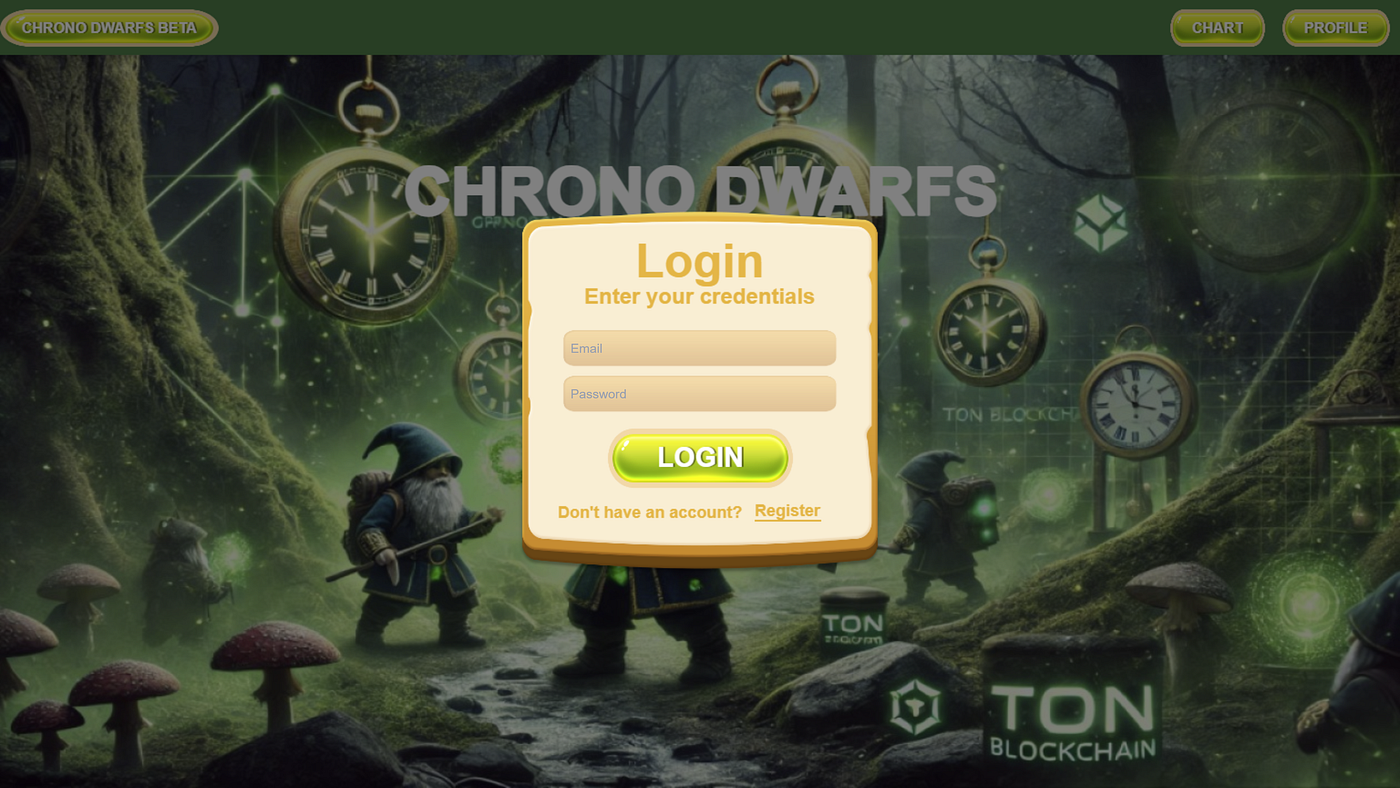
Full Screen and Responsive Game
To make your game look more nice, you can restrict users to one mode portrait or landscape. Read below for more details about phaser game development.
Conclusion
Building responsive games with Phaser.js requires careful planning and implementation of flexible layouts, scalable assets, and responsive UI components. By following the strategies outlined in this blog, you can create games that provide a consistent and enjoyable experience across all devices. Follow me for more tips and tricks about website and game development. Happy Coding!!!
메타데이터
- post_id
- e563c2d60eab
- slug
- full-screen-size-and-responsive-game-in-phaser-3-e563c2d60eab
- url
- https://medium.com/@tajammalmaqbool11/full-screen-size-and-responsive-game-in-phaser-3-e563c2d60eab
- canonical_url
- https://medium.com/@tajammalmaqbool11/full-screen-size-and-responsive-game-in-phaser-3-e563c2d60eab
- author_url
- https://medium.com/@tajammalmaqbool11
- status
- ok
- fetched_at
- 2026-07-16 22:04:15