Meet the MCP (Model Context Protocol) Team
Leveling up to know about MCP Host, Client, Server and Message Transport
Meet the MCP (Model Context Protocol) Team
Leveling up to know about MCP Host, Client, Server and Message Transport
Not a Medium Member? Read it for free here
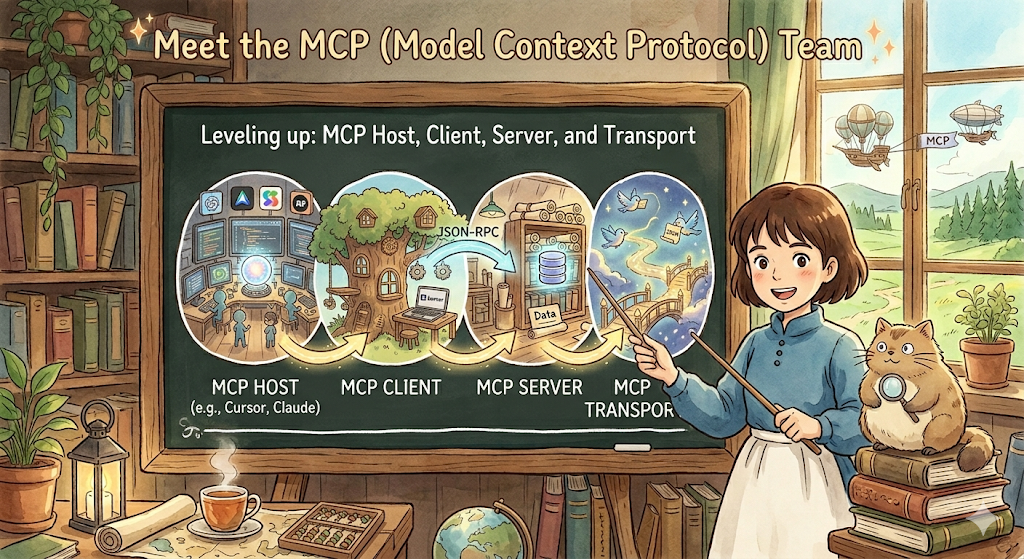
Image by Author
You read the beginner’s guide, and I guess…you understood the basics of MCP. Now, let’s go deeper and discover the MCP Team and how messages are transported
Before we go advanced, let’s recap few important things
As I said, most beginners read protocol and immediately think:
Oh, like HTTP? Like REST APIs? Like sockets?
Yes. And also… no. So, let’s slow down and reiterate.
A protocol is simply an agreed set of rules between two parties.
Photo by Marco Bianchetti on Unsplash
Let’s think about a normal meeting scenario. When you shake hands to greet, both parties agree to:
- extend right hand
- grip firmly
- release after 2–3 seconds
That’s a protocol. 🤝 (simple!)
MCP is the same idea. But between an AI model and an external system.
The agreed rules cover:
- how to say hello (handshake)
- how to ask “what can you do?” (capability discovery)
- how to make a request (tool call)
- how to return an answer (response format)
- how to say goodbye (shutdown)
That’s it. Everything else is built on top of those rules. Great? Now let’s go somewhat deeper and answer some questions that bother us! 🏹
Why Not Just Use REST APIs?
This is the most common question that people ask. I also pondered this at first. Let me answer it properly.
REST APIs are great. But they solve a different problem. Think of it this way:
REST API = a door into a specific room
MCP      = a universal key that opens any door,
           with a directory of all rooms,
           and a guard who checks permissions at each one of the room
With REST APIs:
- Every service has a different URL structure
- Every service has different authentication
- Every service has different error formats
- The AI model must be pre-programmed to know each one
So clumsy and maintenance is needed.
With MCP:
- Every service speaks the same language
- Discovery is automatic
- Authentication is handled uniformly
- The AI model learns what’s available at runtime
Struggling? If you are a complete beginner to MCP, you can read this first and come back to current page:
MCP Team: The Three Roles in Every MCP System
Every MCP interaction involves exactly three players
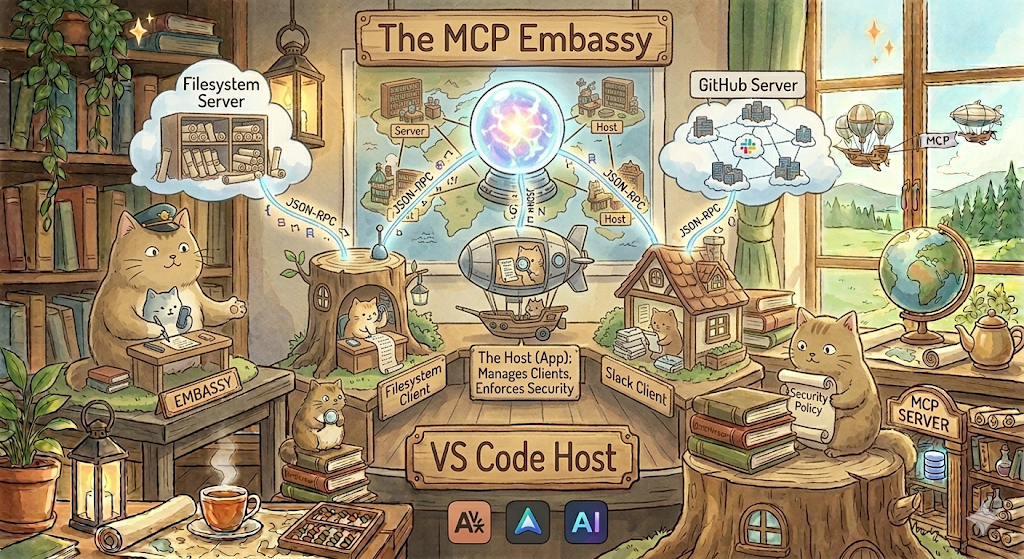
Image by Author
Host
It is the application that the user interacts with.
Like the Claude Desktop, Cursor IDE, your custom AI app which you use regularly.
The host basically manages clients (discussed below) and enforces the security policies.
Client
It is the technical component that lives inside the host and speaks to servers.
Each client maintains exactly one connection to one server.
Think of it as an embassy where one client per foreign country (server).
While the Host is the app, the Client is the protocol level implementation that translates the Host’s requests into the JSON RPC language used by MCP.(think of it as a communication language used between MCP Client and Host)
JSON RPC is a lightweight, language agnostic remote procedure call protocol that uses JSON to encode method calls and their responses across different systems. (donot struggle with the definition because I simplified it below)
So, in reality, if a host (like VS Code) wants to talk to three different servers (e.g., Filesystem, GitHub, and your Slack), it will instantiate three separate clients.
Server
It is a program that acts like a bridge between AI models and external tools. Server exposes tools, resources, and prompts and lives outside the host.
It can be local (in your machine) or remote (on cloud). Just think of it as a specialist who knows one domain very well.
So quick recap before we go ahead 🙃
One host can have many clients. Each client connects to one server. One server can serve many clients (from different hosts).
This many to many relationship is what makes MCP so powerful 💪
What MCP Is Built On?
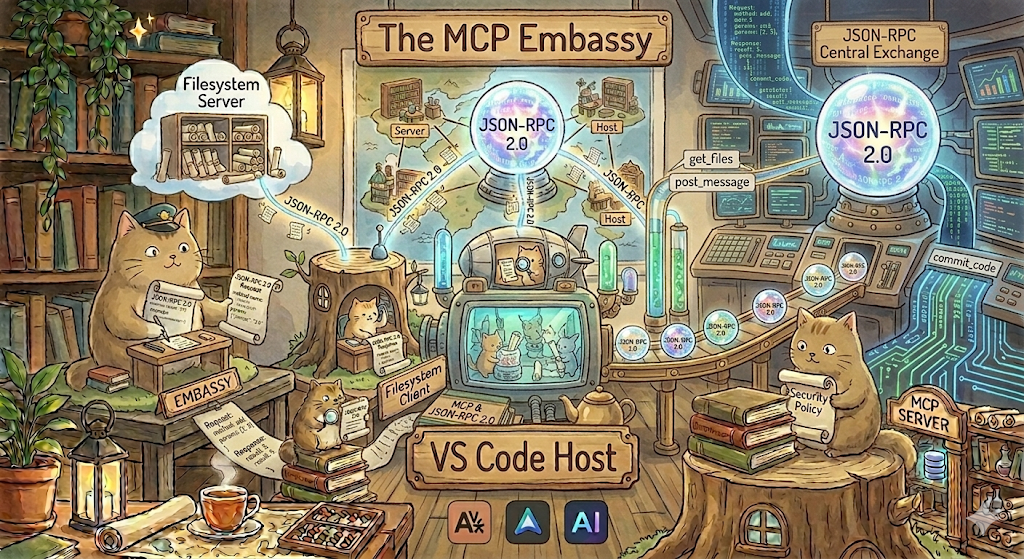
Image by Author
Let’s talk about JSON-RPC 2.0 now.
Inside every MCP message, there’s a very simple format called **JSON-RPC 2.0 **(yes, you have read the term before)
Don’t let the name scare you… It literally means:
Remote Procedure Call using JSON
Which in plain English means:
Call a function on another machine, using JSON to describe the call.
A request looks like this:
{
  "jsonrpc": "2.0",
  "id": 1,
  "method": "tools/call",
  "params": {
    "name": "get_weather",
    "arguments": {
      "city": "San Francisco"
    }
  }
}
A response looks like this:
{
  "jsonrpc": "2.0",
  "id": 1,
  "result": {
    "content": [
      {
        "type": "text",
        "text": "72°F, Sunny, light breeze"
      }
    ]
  }
}
That’s it. We are literally cake walking now (haha).
Every single MCP interaction is some variation of this pattern:
Request goes in, Response comes out.
How do messages travel?
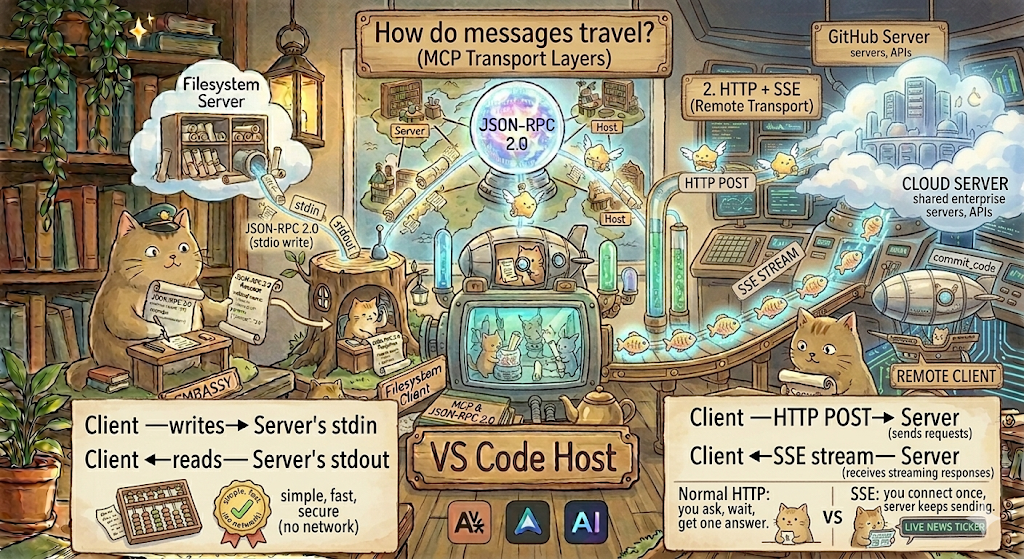
Image by Author
MCP messages (JSON-RPC) need to travel somehow. (The boat has to sail!) The way they travel is called the transport layer.
MCP currently supports two transports:
1. stdio (Standard Input / Output)
Client ──writes──► Server's stdin
Client ◄──reads──  Server's stdout
This is for local servers running on the same machine.
Your client literally runs a process and:
- writes JSON to its standard input
- reads JSON from its standard output
Like two people passing notes in class. This is simple, fast, and secure (no network involved).
Generally used by: filesystem servers, local tools, IDE integrations.
2. HTTP + SSE (Server Sent Events)
Client ──HTTP POST──► Server  (sends requests)
Client ◄──SSE stream─ Server  (receives streaming responses)
This is for remote servers running elsewhere.
SSE is not regular HTTP.
The difference you ask? here it is:
- Normal HTTP: you ask, you wait and you get one answer.
- SSE: you connect once, and the server keeps sending you messages.
It’s like subscribing to a live news ticker (sse) vs refreshing a page (http).
It is generally used by: cloud based tools, shared enterprise servers, APIs.
Here’s a quick tabular comparison between both:
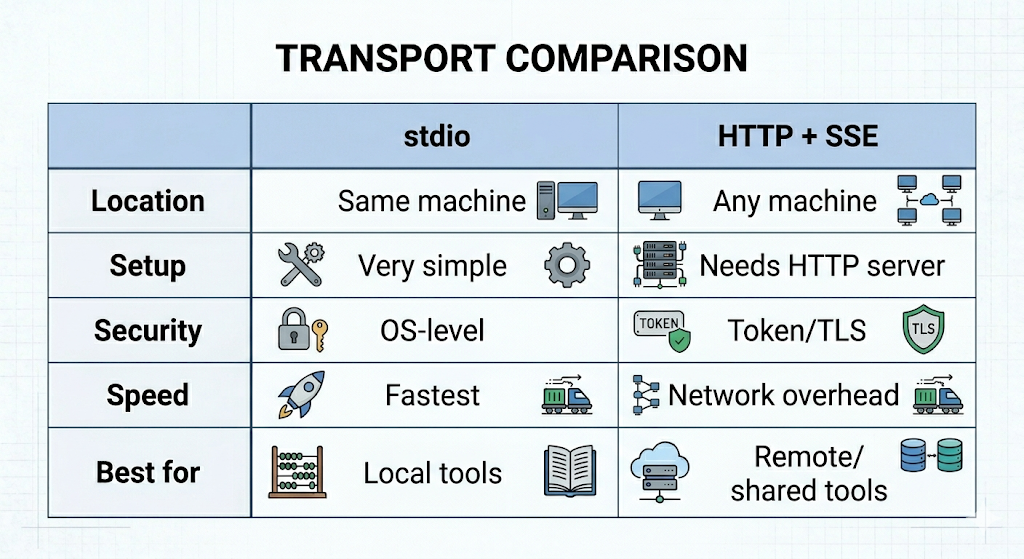
Image by Author
MCP is the missing link that turns isolated AI models into integrated teammates.
By standardizing how apps talk to data, we’re moving away from a world of walled gardens and into a future where your AI tools can finally see the full picture of your workflow.
More to come on MCP…
Until then, as a next step, you may try:
- Downloading an MCP ready host like Claude Desktop or Cursor whatever suits you, and connect your first server (like Google Drive or GitHub) today.
- Or, check out the official MCP documentation and try building your first local server using the Python or TypeScript SDK.
If you need more learning resources:
- Core Concepts & Architecture — The Official MCP Documentation
- Practical Implementation (Python/TypeScript/Java) — Build an MCP Server: Official Tutorial
- JSON-RPC 2.0 & Protocol Rules — The MCP Specification (Technical Deep Dive)
Now that you know how the MCP Team works, what’s the first tool you want to connect to your AI?
메타데이터
- post_id
- e5666cc185b9
- slug
- meet-the-mcp-model-context-protocol-team-e5666cc185b9
- url
- https://medium.com/the-tech-trek-by-tech-chick/meet-the-mcp-model-context-protocol-team-e5666cc185b9
- canonical_url
- https://medium.com/the-tech-trek-by-tech-chick/meet-the-mcp-model-context-protocol-team-e5666cc185b9
- author_url
- https://medium.com/@theipocmwanderer
- status
- ok
- fetched_at
- 2026-06-15 20:49:13