Version Upgrade Using Maven Plugin
In this blog, we will see how to upgrade dependency versions with the ‘versions-maven-plugin’.
Version Upgrade Using Maven Plugin
In this blog, we will see how to upgrade dependency versions with the ‘**versions-maven-plugin**’.
This Maven plugin helps developers discover, update, and manage dependency versions in their projects. With modernising applications, it is crucial to keep dependencies updated, but manually upgrading versions across multiple modules can be painful.
Background Story
Tools like GitHub Dependabot make single-version upgrades fairly simple. But sometimes in a multi-module project, it may be necessary to use two versions of the same dependency/library.
For instance, Application runtimes like Payara 5 and Payara 6. It is possible that in a project, some modules use Payara 5 version and others use Payara 6, so how will you upgrade both versions automatically?
Both application runtimes use the same groupId and artifactId but differ only by version. Dependabot can upgrade only one of the application runtime versions, not both at the same time. This limitation makes Dependabot less useful in such scenarios.
To solve this, we could use ‘versions-maven-plugin’ to automate version upgrades via GitHub workflow or directly from the mvn command line.
Note: The examples in this blog use **Payara Enterprise versions. If you’re working with the Community edition**, you’ll need to adjust the version numbers accordingly.
Prerequisite
Create a Java project with the Maven build tool, then add two child modules. The folder structure would be like this:
java-version-upgrade
├── payara5-module
│   ├── pom.xml
│   └── src
├── payara6-module
│   ├── pom.xml
│   └── src
└── pom.xml
Define Payara version properties in parent pom.xml(java-version-upgrade).
<?xml version="1.0" encoding="UTF-8"?>
<project xmlns="http://maven.apache.org/POM/4.0.0"
         xmlns:xsi="http://www.w3.org/2001/XMLSchema-instance"
         xsi:schemaLocation="http://maven.apache.org/POM/4.0.0 http://maven.apache.org/xsd/maven-4.0.0.xsd">
    <modelVersion>4.0.0</modelVersion>

    <groupId>com.raushan</groupId>
    <artifactId>java-version-upgrade</artifactId>
    <version>1.0-SNAPSHOT</version>
    <packaging>pom</packaging>
    <modules>
        <module>payara5-module</module>
        <module>payara6-module</module>
    </modules>

    <properties>
        <payara.version>6.30.0</payara.version>
        <payara5.version>5.71.0</payara5.version>
        <maven.compiler.source>21</maven.compiler.source>
        <maven.compiler.target>21</maven.compiler.target>
    </properties>
</project>
pom.xml(payara5-module)
<?xml version="1.0" encoding="UTF-8"?>
<project xmlns="http://maven.apache.org/POM/4.0.0"
         xmlns:xsi="http://www.w3.org/2001/XMLSchema-instance"
         xsi:schemaLocation="http://maven.apache.org/POM/4.0.0 http://maven.apache.org/xsd/maven-4.0.0.xsd">
    <modelVersion>4.0.0</modelVersion>
    <parent>
        <groupId>com.raushan</groupId>
        <artifactId>java-version-upgrade</artifactId>
        <version>1.0-SNAPSHOT</version>
    </parent>

    <artifactId>payara5-module</artifactId>

    <dependencies>
        <dependency>
            <groupId>fish.payara.extras</groupId>
            <artifactId>payara-micro</artifactId>
            <version>${payara5.version}</version>
        </dependency>
    </dependencies>
</project>
It uses Payara 5 version of payara-micro.
pom.xml (payara6-module)
<?xml version="1.0" encoding="UTF-8"?>
<project xmlns="http://maven.apache.org/POM/4.0.0"
         xmlns:xsi="http://www.w3.org/2001/XMLSchema-instance"
         xsi:schemaLocation="http://maven.apache.org/POM/4.0.0 http://maven.apache.org/xsd/maven-4.0.0.xsd">
    <modelVersion>4.0.0</modelVersion>
    <parent>
        <groupId>com.raushan</groupId>
        <artifactId>java-version-upgrade</artifactId>
        <version>1.0-SNAPSHOT</version>
    </parent>

    <artifactId>payara6-module</artifactId>

    <dependencies>
        <dependency>
            <groupId>fish.payara.extras</groupId>
            <artifactId>payara-micro</artifactId>
            <version>${payara.version}</version>
        </dependency>
    </dependencies>
</project>
Payara6-module uses Payara 6.30.0 payara-micro as here in properties, there is no tag of <payara.version> defined so it uses the <payara.version> tag from properties of parent pom.xml (java-version-upgrade).
Step-by-Step Guide
Now, to use the version-maven-plugin to upgrade <payara5.version> of Payara runtime, follow the steps below:
- Add plugin in parent pom.xml (java-version-upgrade)
<?xml version="1.0" encoding="UTF-8"?>
<project xmlns="http://maven.apache.org/POM/4.0.0"
         xmlns:xsi="http://www.w3.org/2001/XMLSchema-instance"
         xsi:schemaLocation="http://maven.apache.org/POM/4.0.0 http://maven.apache.org/xsd/maven-4.0.0.xsd">
    <modelVersion>4.0.0</modelVersion>

    <groupId>com.raushan</groupId>
    <artifactId>java-version-upgrade</artifactId>
    <version>1.0-SNAPSHOT</version>
    <packaging>pom</packaging>
    <modules>
        <module>payara5-module</module>
        <module>payara6-module</module>
    </modules>

    <properties>
        <payara.version>6.2025.1</payara.version>
        <payara5.version>5.2022.1</payara5.version>
        <maven.compiler.source>21</maven.compiler.source>
        <maven.compiler.target>21</maven.compiler.target>
    </properties>

    <build>
        <plugins>
            <plugin>
                <groupId>org.codehaus.mojo</groupId>
                <artifactId>versions-maven-plugin</artifactId>
                <version>2.19.1</version>
                <configuration>
                    <generateBackupPoms>false</generateBackupPoms>
                    <includes>
                        <include>fish.payara.extras:payara-micro</include>
                    </includes>
                    <properties>
                        <property>
                            <name>payara5.version</name>
                            <dependencies>
                                <dependency>
                                    <groupId>fish.payara.extras</groupId>
                                    <artifactId>payara-micro</artifactId>
                                </dependency>
                            </dependencies>
                        </property>
                    </properties>
                    <ruleSet>
                        <rules>
                            <rule>
                                <groupId>fish.payara.extras</groupId>
                                <artifactId>payara-micro</artifactId>

                                <!-- Ignore everything below 5.0.0 -->
                                <ignoreVersion>
                                    <type>range</type>
                                    <version>(,5.0.0)</version>
                                </ignoreVersion>

                                <!-- Ignore everything >=6.0.0 -->
                                <ignoreVersion>
                                    <type>range</type>
                                    <version>[6.0.0,)</version>
                                </ignoreVersion>
                            </rule>
                        </rules>
                    </ruleSet>
                </configuration>
            </plugin>
        </plugins>
    </build>
</project>
Here main goal here is to upgrade the payara5 version, which Dependabot is unable to do simply. So I added a plugin in parent pom.xml, and added a property name which I want to do a version upgrade, i.e.,<name>payara5.version</name>.
There are a few rules defined, like don’t upgrade the version of payara5 over 6.0.0 or below 5.0.0
For more details about configuration tags, please refer to the official documentation of versions-maven-plugin
- Now run the update-properties maven goal to upgrade the version for Payara 5.
java-version-upgrade> mvn versions:update-propertiesOutput is:
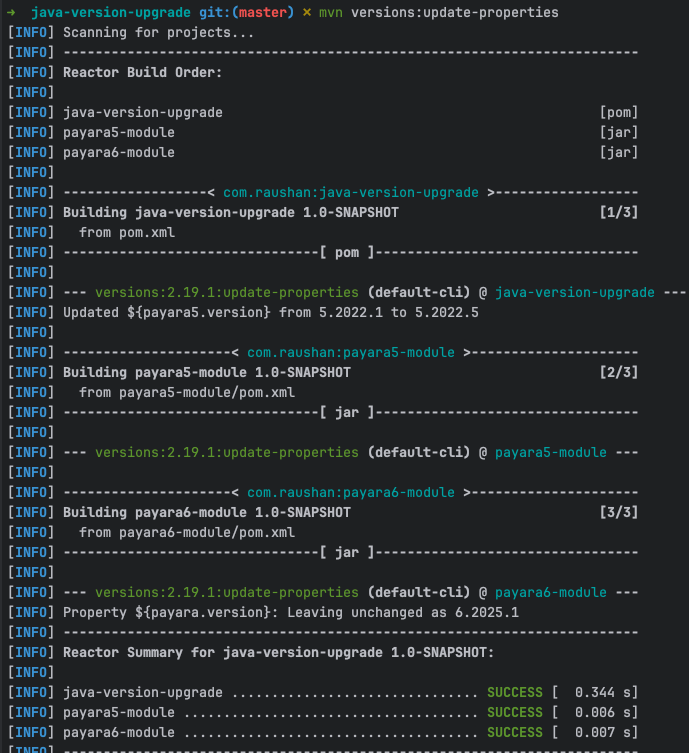
In the above output, Payara 5 version upgraded but below 6.x.y and Payara 6’s version is unchanged.
Conclusion
Overall, the versions-maven-plugin gives us much finer control over dependency upgrades compared to tools like Dependabot.
It lets us:
- Update specific properties in a controlled way.
- Define rules and version ranges to avoid breaking changes.
- Automate upgrades in CI/CD pipelines.
While I demonstrated this with Payara runtimes, the same technique applies to any dependency that you manage via Maven properties. This makes it a powerful option for modernising applications without the manual pain of chasing versions.
Thank you for reading!
메타데이터
- post_id
- e5ecbbbf449a
- slug
- version-upgrade-using-maven-plugin-e5ecbbbf449a
- url
- https://medium.com/@raushan606/version-upgrade-using-maven-plugin-e5ecbbbf449a
- canonical_url
- https://medium.com/@raushan606/version-upgrade-using-maven-plugin-e5ecbbbf449a
- author_url
- https://medium.com/@raushan606
- status
- ok
- fetched_at
- 2026-08-11 22:32:59