Huffman Coding
Step 1) Create a symbol and probability table for each character like for ‘C’ it comes once in total 14 characters(including space)…
Huffman Coding
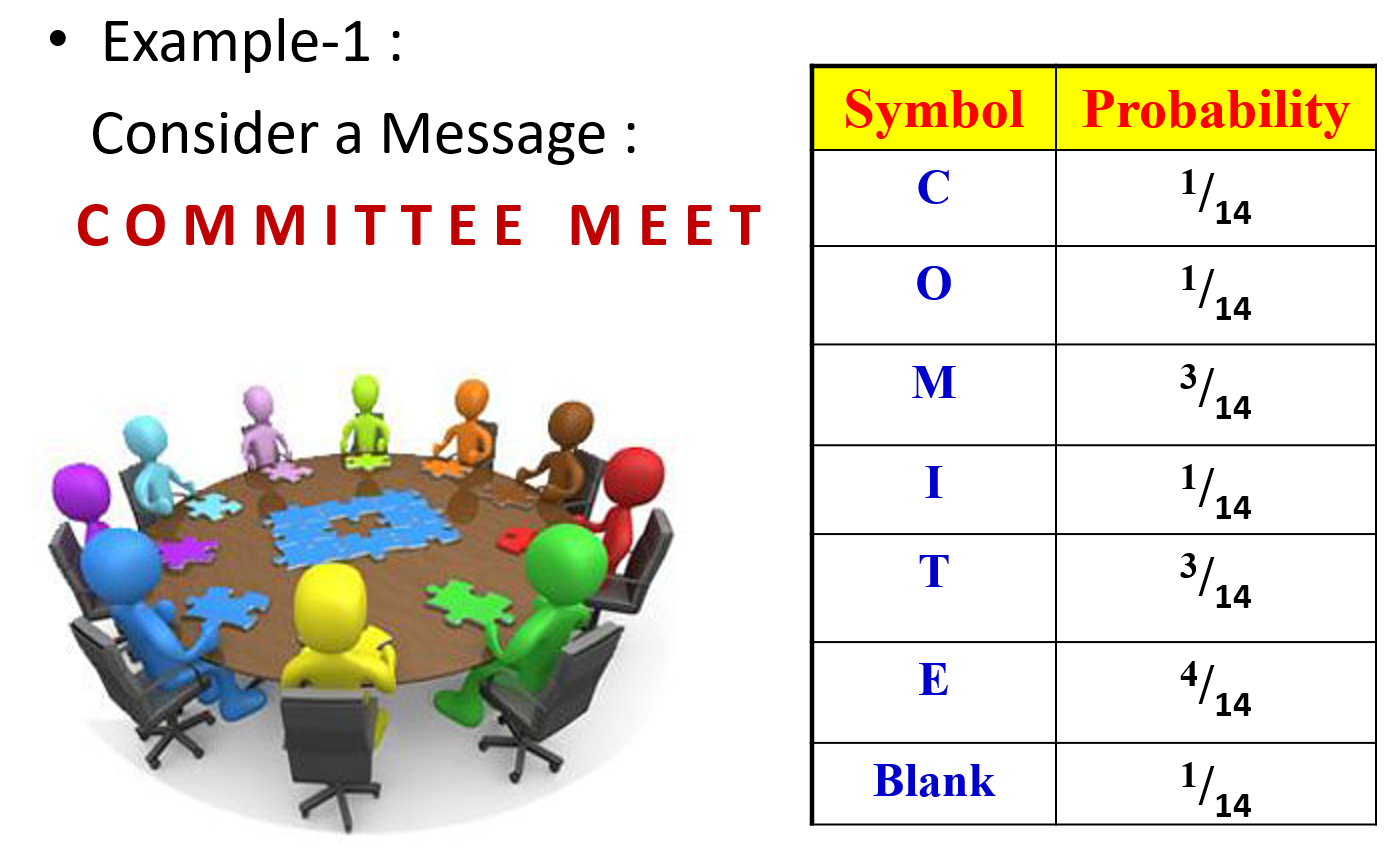
Step 1) Create a symbol and probability table for each character like for ‘C’ it comes once in total 14 characters(including space) therefore it’s probability is 1/14.
Similarly for ‘M’ it appears 3 times in the message so its probability is
3/14
after finding probability of each character sort it according to probability as shown in above figure.
Step 2)
i) Now arrange the characters in their order of probabilty as you can see in left part all characters are sorted according to decreasing order of it’s probability ii) Now after writing each character and it’s probability in descending order
follow steps till the table size reduces to 2(step a and step b)
a) Merge 2 smallest probabilites into one and then again sort the values and write to the right of it as shown in diagram like for example e.g [4/14 , 3/14, 3/14, 1/14,1/14, 1/14 ,1/14]
now 1st iteration take last 2 elements merget them(i.e add) and then put in the array and sort again
-
[4/14, 3/14, 3/14, 2/14, 1/14, 1/14 ( merged 1/14+1/14= 2/14)
-
4/14 , 3/14, 3/14, 2/14, 2/14 ( merged 1/14+1/14= 2/14)
-
4/14, 4/14 , 3/14, 3/14] (merged 2/14+ 2/14=4/14)
-
6/14, 4/14, 4/14 (merged 3/14 +3/14 = 6/14)
-
8/14 , 6/14 (merged 4/14+4/14= 8/14) now as array contains only 2 elements stop YOU CAN SEE THE SAME IN DIAGRAM GIVEN BELOW WHERE ARROW DENOTES THE MERGE OF ELEMENTS

STEP 3) Now starting from last elements give them label as ‘0’ and ‘1’
Now similarly just look at the arrow we draw when merging the elements They will help you label the each number

label 0 given to 8/14 and 6/14 to 1

whenever there is division of the arrow you again label 0 and 1 as shown above
STEP 4)
After starting from each character following till the last element to right you encounter 0 or 1 you will store it a string and at last reverse the string It will be code-word for the symbol.
For Example -> for E from starting from E and following E from table it will follow the arrow and reach 1 at last 2nd column and then 0 at last column . Hence string will have “10” reversing it we will have “01” i.e codeword for ‘E’
Similarly for BLANK it will encounter ‘1’ in first column then ‘1’ in 3rd column ‘0’ in last second column hence sting will be “1100” reversing it we get “0011” you can check for all the Symbols and get the final codeword table provided below

STEP 5)
Simply substitute the keyword for each Symbol(character) .

Step 6) Finding the evaluation metrices:
original size would be The original message had 14 characters each of 1 byte
so Original size= 14*8 =112 bits
size of compressed image= 36 bits hence compression ratio = ((112–36)/36) *100 %=67.85714

So in Conclusion in 6 easy steps you can compress using huffman coding
and decompress it too.
Now for practice you can solve below question provided Thanks Homework question :

try to solve it solution provided below


Author: Sumit Patel Acknowledgments: I would like to thank Dr Kiran Talele Sir for assigning this topic and for the valuable lecture materials that helped shape this blog. The concepts and visuals presented here were greatly inspired by their teaching.
메타데이터
- post_id
- e6103c2cc1a9
- slug
- huffman-coding-e6103c2cc1a9
- url
- https://medium.com/@sumit.patel22/huffman-coding-e6103c2cc1a9
- canonical_url
- https://medium.com/@sumit.patel22/huffman-coding-e6103c2cc1a9
- author_url
- https://medium.com/@sumit.patel22
- status
- ok
- fetched_at
- 2026-07-26 13:20:33



