Build a Local Coding Tutor with WebLLM: Discover CodexLocal
In the evolving world of AI, large language models (LLMs) have transformed how we interact with technology, from casual chats to complex…
Build a Local Coding Tutor with WebLLM: Discover CodexLocal
In the evolving world of AI, large language models (LLMs) have transformed how we interact with technology, from casual chats to complex coding tasks. But what if you could harness that power directly in your browser, without relying on cloud servers? Enter WebLLM, a groundbreaking runtime that brings high-performance LLM inference right to your web browser. Inspired by cloud-based tools like ChatGPT, WebLLM enables privacy-focused, on-device AI experiences. In this post, we’ll explore WebLLM’s capabilities and spotlight CodexLocal — a specialized service built on WebLLM that turns your browser into an offline coding tutor, complete with an integrated code editor and interactive learning features.
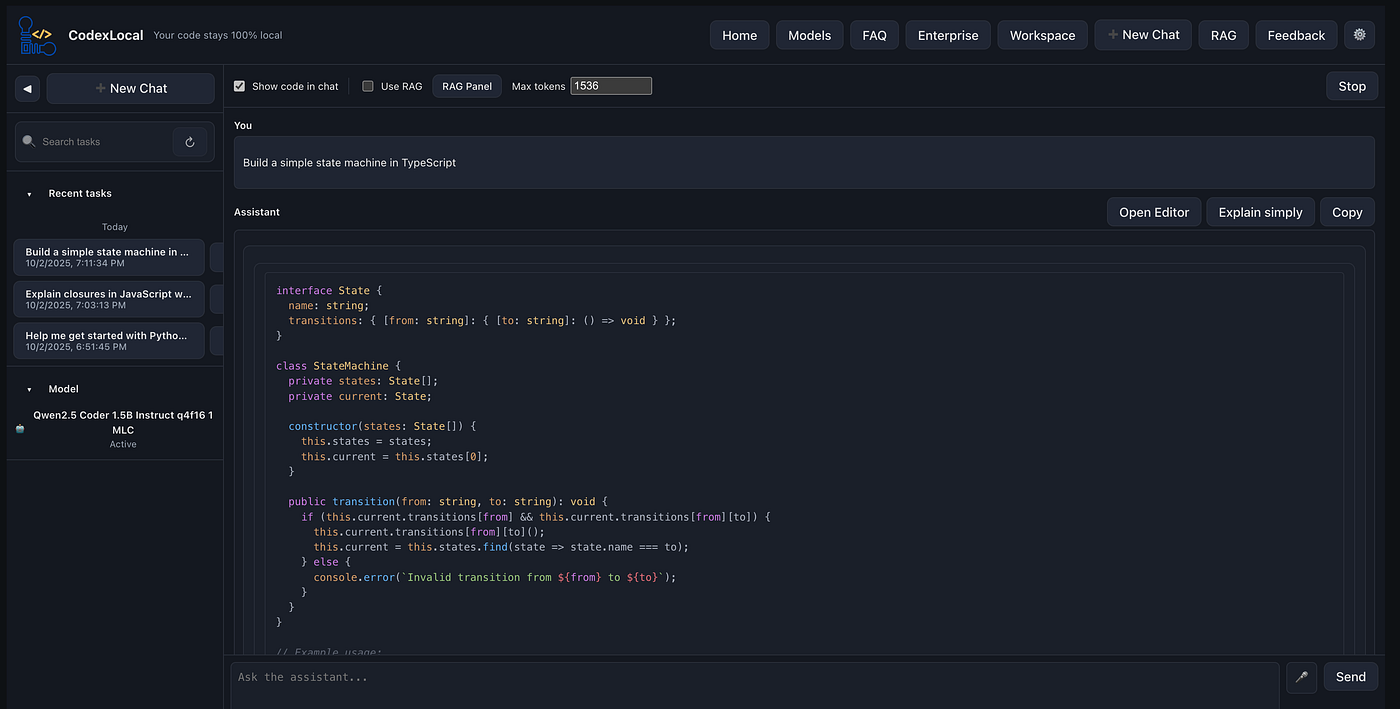
This is the first in a series on browser-based AI tools. We’ll draw from practical examples to show how you can build or integrate these technologies into your own projects. The code for a simple CodexLocal-inspired demo will be available on GitHub .
What is WebLLM?
WebLLM, developed by the MLC-AI team, is a high-performance in-browser inference engine for LLMs. It leverages WebGPU for hardware acceleration and WebAssembly for efficient CPU fallback, allowing models to run entirely client-side without any server dependency. This means your prompts, code, and data stay local — enhancing privacy since nothing is sent to external services for training or processing.
Key features include:
- Full OpenAI API Compatibility: Use familiar endpoints like chat.completions.create() for streaming responses, JSON mode, and even function calling (in progress).
- Multi-Model Support: Compatible with popular open-source models like Llama, Phi, Gemma, and Mistral. You can load custom models too.
- Offline Readiness: Models are downloaded once and cached using the browser’s Cache API, enabling seamless use without internet.
- Worker Integration: Offload computations to Web Workers or Service Workers to keep your UI responsive.
- Chrome Extension Friendly: Build AI-powered browser extensions with ease.
Browser support is solid: Chrome 113+, Edge 113+, Firefox 141+, and Safari 26+. Models range from lightweight 3B-parameter versions (around 1.4 GB) to more capable 7B ones (3.3 GB), quantized for faster loading and lower memory use.
WebLLM shines for developers building web apps where speed, privacy, and portability matter. Imagine a coding assistant that works on a plane or in a secure environment — no API keys or subscriptions required.
Introducing CodexLocal: Your Offline Coding Companion
CodexLocal takes WebLLM to the next level by transforming it into a dedicated coding tutor service. Designed for developers, educators, and learners, it combines WebLLM’s inference engine with an embedded code editor and tutor-like interactions — all fully offline once models are cached.
Core Features
- Integrated Code Editor: Powered by Monaco Editor (the tech behind VS Code), you can write, edit, and run code snippets directly in the browser. WebLLM analyzes your code in real-time for syntax checks, optimizations, or debugging.
- Tutor Mode: Ask questions like “Explain this Python function” or “How do I implement a binary search?” The LLM responds with step-by-step breakdowns, examples, and quizzes to reinforce learning. Use N-shot prompting to ground responses in your specific context, like a custom dataset of code samples.
- Offline-Ready Workflow: Download a coding-focused model (e.g., a fine-tuned CodeLlama variant) once, and everything runs locally. No internet needed for sessions, making it ideal for workshops, travel, or low-connectivity areas.
- Interactive Tools: Beyond chat, features include code completion suggestions, error highlighting, and even simple visualizations (like flowcharts for algorithms) generated via LLM prompts.
- Privacy First: All processing happens on-device, ensuring sensitive code or educational content never leaves your machine.
CodexLocal is essentially a progressive web app (PWA) you can install and use like a desktop tool. It’s perfect for self-paced learning or pair-programming simulations, bridging the gap between cloud-based IDEs like GitHub Copilot and fully local setups.
Getting Started with WebLLM for CodexLocal
To build or explore something like CodexLocal, start by integrating WebLLM into a web project. Here’s a step-by-step guide, modeled after simple chatbot setups but tailored for coding interactions.
1. Install WebLLM
Use npm to add the package:
text
npm install @mlc-ai/web-llmThis pulls in the core engine and dependencies for WebGPU support.
2. Select and Load a Model
Choose a model suited for code, like a quantized Llama-3.2 variant. Key concepts:
- Tokens and Context Window: Models process text in tokens; larger windows (e.g., 8K tokens) handle longer code snippets.
- Parameters and Quantization: A 3B model is quick but basic; 7B offers better code understanding at the cost of load time.
- Formats: Use q4f16 for a balance of speed and accuracy.
Initialize the engine:
javascript
import { CreateMLCEngine } from '@mlc-ai/web-llm';const engine = await CreateMLCEngine('Llama-3.2-3B-Instruct-q4f16_1-MLC', {
initProgressCallback: ({ progress }) => console.log(`Download progress: ${progress}%`),
});The first run downloads the model (~1.4 GB); subsequent loads use the cache for offline access.
3. Enable Offline Caching
WebLLM uses the Cache API to store models per origin. After download, inspect it in DevTools (Application > Storage > Cache Storage). This ensures CodexLocal works offline — critical for tutor sessions in the field.
For multi-origin apps, note that caches don’t share; redownload if testing across domains.
4. Set Up Coding Conversations
Structure prompts for tutor-like responses. Start with a system prompt to define the role:
javascript
const messages = [
  {
    role: "system",
    content: "You are CodexLocal, an expert coding tutor. Provide clear explanations, code examples, and quizzes. Focus on Python and JavaScript. Decline off-topic requests."
  },
  {
    role: "user",
    content: "Explain recursion with a factorial example and give me a practice problem."
  }
];
For N-shot examples, add prior user/assistant pairs to guide style.
5. Generate Responses
Stream completions for interactive feel:
javascript
const stream = await engine.chat.completions.create({
  messages,
  stream: true,
});
let fullReply = '';
for await (const chunk of stream) {
const delta = chunk.choices[0]?.delta?.content || '';
fullReply += delta;
// Update UI: e.g., append to code editor or tutor panel
document.getElementById('response').textContent += delta;
}
console.log('Full tutor response:', fullReply);Integrate this with your editor: On code save, pipe it into a prompt like “Debug this snippet: [code]”.
Why CodexLocal Matters
Tools like CodexLocal democratize coding education. No more waiting for API responses or worrying about data leaks — everything’s local and instant. For educators, it’s a game-changer: Students can experiment offline, with the AI adapting to their pace. Developers get a lightweight Copilot alternative that runs anywhere.
Try the Demo
Head to the CodexLocal to experience it yourself. Load a model, open the editor, and ask away: “Write a React hook for state management.” Watch as it generates, explains, and quizzes you — all in-browser.
WebLLM and services like CodexLocal are pushing AI toward a more accessible, private future. In the next post, we’ll dive deeper into custom model fine-tuning for specialized tutors. What’s your take — have you built something with WebLLM? Share in the comments!
This post is inspired by explorations in browser-based AI. For more on WebLLM, check the official docs at webllm.mlc.ai.
메타데이터
- post_id
- e69010fbb35d
- slug
- build-a-local-coding-tutor-with-webllm-discover-codexlocal-e69010fbb35d
- url
- https://medium.com/@codexlocalapp/build-a-local-coding-tutor-with-webllm-discover-codexlocal-e69010fbb35d
- canonical_url
- https://medium.com/@codexlocalapp/build-a-local-coding-tutor-with-webllm-discover-codexlocal-e69010fbb35d
- author_url
- https://medium.com/@codexlocalapp
- status
- ok
- fetched_at
- 2026-07-17 02:22:04