LetsDefend — Compromised Network Printer
Scenario: You are a DFIR Analyst for a corporation. A network printer running in the internal network has been compromised as it was…
LetsDefend — Compromised Network Printer
Scenario: You are a DFIR Analyst for a corporation. A network printer running in the internal network has been compromised as it was alerted by our IDS. You have been provided a packet capture to trace the attacker’s action and what data was stolen from the printer server.

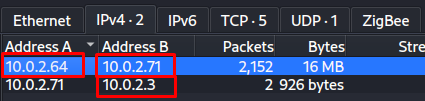
Q1: Identify the port scan activity performed by the attacker on the network. What was the NAT IP Address(Internal IP Address) assigned to the machine being used by the attacker on the internal network?
To find the port scan on the wireshark i need to move Statistic → Conversation and look at the Conversations.

I can see many conversation appear in this tab. It appears that there is communication across many ports from one internal IP address to another internal IP address. In this case we can say that a port scan is taking place from this IP address to the other IP address.
Q2: Which ports were open on the network printer? Identify the port used for printer exploitation.
On the wireshark to find just ACK packets i need to use this filter. Because when the send to TCP connection target machine take this request and
tcp.flags.syn == 1 and tcp.flags.ack == 1
Q3: Based on the abused port number, which printer language/method was being abused by the attacker for unattended malicious activity on the network printer?
I found abused port is 9100. Therfore i need to look about port 9100 packets im filtered by:
tcp.port == 9100And appear a lot packets, i need to follow stream. Im right click the top on the events.
Follow → TCP Stream and look at the stream flow.

Q4: Which Printer Name/Model was attacked?
To find printer name and model im move back the TCP Stream and looked at the Flow to solve this question.

Q5: The attacker has discovered a scheduled print job that is associated with an employee who is suspected of being an insider threat. What is the full path of the print job file?
Im investigate same TCP Stream because into this stream attacker did send many commands to printer.

Q6: What is the name of the targeted organization?

Q7: The attacker found information about RDP within the internal network. What is the directory path where this sensitive information was located?
Hint: One of the file name is “internal.rdp”. Find evidence of directory listing in different streams.
Because of this i filtered by:
tcp contains "internal.rdp"And i follow the TCP stream of the top packet.

Q8: What is the IP address of the Jumphost?
We already found internal.rdp file on the new other TCP stream. To find IP Address analyze contents of rdp file and try to find “full address”

Q9: What is the filename of the PowerShell script used by admins which was also found by the attacker?

Efe Ozel — SOC Analyst
메타데이터
- post_id
- e693e1b50036
- slug
- letsdefend-compromised-network-printer-e693e1b50036
- url
- https://medium.com/@efeqozel/letsdefend-compromised-network-printer-e693e1b50036
- canonical_url
- https://medium.com/@efeqozel/letsdefend-compromised-network-printer-e693e1b50036
- author_url
- https://medium.com/@efeqozel
- status
- ok
- fetched_at
- 2026-08-11 11:41:10