Argo Workflows with Gitlab CI
Simple adventures with Argo Workflows ecosystem.
Argo Workflows with Gitlab CI
Simple adventures with Argo Workflows ecosystem.
What we’re trying to solve:
- Easy pipeline recreation
- Store less sensitive data inside Gitlab CI jobs
- Creating a more flexible CI management process
Initially, we used pipelines based on Kubernetes jobs, and our pipeline looked like this:
run-migrations:
  extends: .base
  stage: migration
  needs: ["tests"]
  variables:
    DOCKER_IMAGE: ${CI_REGISTRY_IMAGE}:${CI_COMMIT_TAG}
    KUBERNETES_CPU_REQUEST: "100m"
    KUBERNETES_CPU_LIMIT: "500m"
    KUBERNETES_MEMORY_REQUEST: "128Mi"
    KUBERNETES_MEMORY_LIMIT: "512Mi"
    KUBERNETES_HELPER_CPU_REQUEST: "100m"
    KUBERNETES_HELPER_CPU_LIMIT: "500m"
    KUBERNETES_HELPER_MEMORY_REQUEST: "128Mi"
    KUBERNETES_HELPER_MEMORY_LIMIT: "512Mi"
  script:
    - cd ${CI_PROJECT_DIR}/${CI_JOB_ID}
    - aws eks update-kubeconfig --name cluster-name
    - envsubst < ci-template/job-db-migration.yaml > job-db-migration.yaml
    - kubectl --ignore-not-found=true delete -f job-db-migration.yaml
    - kubectl apply -f job-db-migration.yaml
    - kubectl -n namespace wait --for=condition=complete --timeout=600s job/db-upgrade
    - kubectl -n namespace logs job/db-upgrade
    - kubectl --ignore-not-found=true delete -f job-db-migration.yaml
  when: manual
  only:
    - tags
  tags:
    - stage
In the example above, we used some Bash tricks to run a simple Kubernetes job via GitLab. Each time, we had to clone a repository containing Kubernetes job templates and include pipeline templates through GitLab’s include mechanism. However, this approach has several issues:
- Each GitLab pipeline must clone a remote repository with job templates.
- We rely on the
includemechanism with CI templates. - Kubernetes cluster configurations are stored within the job.
In this approach, any changes to our templates require a pipeline recreation, which can cause delays. Additionally, storing sensitive credentials directly in the pipeline is risky, as developers could modify the pipeline to misuse these credentials.
Argo Workflows
With Argo Workflows, we can use a ClusterWorkflowTemplate where the GitLab CI’s role is limited to executing Argo CLI commands. This approach also provides more debugging and operational capabilities. Let's set up an Argo Workflows server and create a simple pipeline to run end-to-end tests.
Manifest:
singleNamespace: false

controller:
  parallelism: 20

  rbac:
    create: true
    secretWhitelist: ["docker-registry"]
    accessAllSecrets: false
    writeConfigMaps: false

  metricsConfig:
    enabled: true
  serviceMonitor:
    enabled: true

  workflowNamespaces:
    - argocd

  resources:
    limits:
      cpu: 200m
      memory: 128Mi
    requests:
      cpu: 100m
      memory: 64Mi

  tolerations:
  - key: "on-demand-arm"
    operator: "Exists"
    effect: "NoSchedule"
  - key: "system"
    operator: "Exists"
    effect: "NoSchedule"

server:
  tolerations:
  - key: "on-demand-arm"
    operator: "Exists"
    effect: "NoSchedule"
  - key: "system"
    operator: "Exists"
    effect: "NoSchedule"

  ingress:
    enabled: true
    ingressClassName: "nginx-internal"
    hosts:
      - workflows.stg
    annotations:
      nginx.ingress.kubernetes.io/backend-protocol: "HTTP"
      nginx.ingress.kubernetes.io/ssl-redirect: "true"
      nginx.ingress.kubernetes.io/force-ssl-redirect: "true"
      kubernetes.io/tls-acme: "true"
      cert-manager.io/cluster-issuer: "letsencrypt-development-alias"
    tls:
      - hosts:
          - workflows.stg
        secretName: workflows.stg-tls
  authModes:
    - sso
    - client
  sso:
    enabled: true
    issuer: https://oidc.stg/realms/staging
    redirectUrl: https://workflows.stg/oauth2/callback
    clientId:
      name: argo-server-sso
    clientSecret:
      name: argo-server-sso
    customGroupClaimName: "roles"
    scopes:
      - openid
      - email
      - profile
    rbac:
      enabled: false

extraObjects:
- apiVersion: external-secrets.io/v1beta1
  kind: ExternalSecret
  metadata:
    name: argo-server-sso
  spec:
    data:
    - secretKey: client_id
      remoteRef:
        key: /eks/cluster/argo-workflows/argo-workflows-keycloak-oidc-secret
        property: client_id
    - secretKey: client_secret
      remoteRef:
        key: /eks/cluster/argo-workflows/argo-workflows-keycloak-oidc-secret
        property: client_secret
    refreshInterval: 1m
    secretStoreRef:
      kind: ClusterSecretStore
      name: aws-css
    target:
      template:
        type: Opaque
        engineVersion: v2
        data:
          client-id: "{{`{{ .client_id }}`}}"
          client-secret: "{{`{{ .client_secret }}`}}"
- apiVersion: external-secrets.io/v1beta1
  kind: ExternalSecret
  metadata:
    name: argo-workflows-e2e-es
    annotations:
      replicator.v1.mittwald.de/replicate-to: review-.*
  spec:
    dataFrom:
    - extract:
        conversionStrategy: Default
        decodingStrategy: None
        key: /eks/cluster/gitlab-e2e
    refreshInterval: 1m
    secretStoreRef:
      kind: ClusterSecretStore
      name: aws-css
    target:
      creationPolicy: Owner
      deletionPolicy: Retain
      name: argo-workflows-e2e
- apiVersion: v1
  kind: ServiceAccount
  metadata:
    annotations:
      replicator.v1.mittwald.de/replicate-to: "review-.*"
    name: argo-workflows-executor
- apiVersion: rbac.authorization.k8s.io/v1
  kind: Role
  metadata:
    annotations:
      replicator.v1.mittwald.de/replicate-to: "review-.*"
    name: argo-workflows-executor-role
  rules:
  - apiGroups:
    - ""
    resources:
    - pods
    verbs:
    - get
    - watch
    - patch
  - apiGroups:
    - ""
    resources:
    - pods/log
    verbs:
    - get
    - watch
  - apiGroups:
    - argoproj.io
    resources:
    - eventsources
    - sensors
    - workflows
    - workfloweventbindings
    - workflowtemplates
    - cronworkflows
    verbs:
    - create
    - get
    - list
    - watch
    - update
    - patch
    - delete
- apiVersion: rbac.authorization.k8s.io/v1
  kind: RoleBinding
  metadata:
    annotations:
      replicator.v1.mittwald.de/replicate-to: "review-.*"
    name: argo-workflows-executor-rolebinding
  roleRef:
    apiGroup: rbac.authorization.k8s.io
    kind: Role
    name: argo-workflows-executor-role
  subjects:
  - kind: ServiceAccount
    name: argo-workflows-executor
In this manifest, a few notes about ExtraObjects:
- We’re using Keycloak authentication for UI access and client authentication for executing workflows via
argocli. - The
gitlab-e2esecret contains tokens for Allure, additional reporting servers, and user credentials. - We use simple RBAC for review app namespaces. As Argo Workflows doesn’t support RBAC replication in dynamically generated namespaces, we create RBAC rules in the
argocdnamespace and replicate them to review namespaces using the Kubernetes Replicator tool.
GitLab Runner Configuration
For communication with the Argo Workflows server, we use a token. This token is created via CLI and stored in a secret used by each GitLab Runner pod.
      environment = ["FF_USE_ADVANCED_POD_SPEC_CONFIGURATION=1"]
        [[runners.kubernetes.pod_spec]]
          name = "envfrom"
          patch = '''
            containers:
              - name: build
                envFrom:
                  - secretRef:
                      name: argo-workflows-token
          '''
Argo Workflows Cluster Template
apiVersion: argoproj.io/v1alpha1
kind: ClusterWorkflowTemplate
metadata:
  name: e2e-tests
spec:
  arguments:
    parameters:
      - name: BASE_URL
        value: https://local1
      - name: UPSTREAM_BRANCH
        value: master
      - name: CI_JOB_NAME
        value: job-name
      - name: CI_JOB_URL
        value: http://localhost:666
  templates:
    - name: e2e-tests
      container:
        name: "e2e-test"
        image: registry.gitlab.com/e2e-tests:latest
        command:
          - pytest
        args:
          - '--ci=true'
          - '--numprocesses=2'
        envFrom:
          - secretRef:
              name: app-secrets
          - secretRef:
              name: argo-workflows-e2e
        env:
          - name: MOON_HOST
            value: http://moon.moon.svc.cluster.local:4444/
          - name: BASE_URL
            value: '{{ workflow.parameters.BASE_URL }}'
        resources:
          requests:
            cpu: 100m
            memory: 128Mi
          limits:
            cpu: 500m
            memory: 512Mi
        volumeMounts:
        - name: reports
          mountPath: /allure/reports
        imagePullPolicy: Always
    - name: exit-handler
      steps:
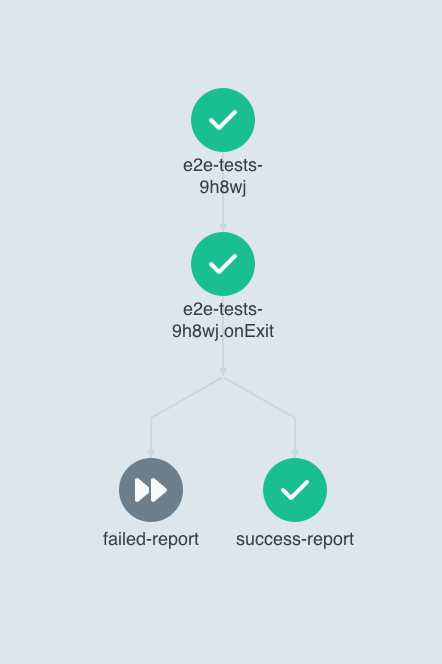
      - - name: success-report
          template: sending-report
          when: "{{workflow.status}} == Succeeded"
        - name: failed-report
          template: sending-report
          when: "{{workflow.status}} != Succeeded"
    - name: sending-report
      container:
        image: registry.gitlab.com/e2e-tests:latest
        command: ["/allure-helper/allure_script.sh"]
        volumeMounts:
        - name: reports
          mountPath: /allure/reports
        resources:
          requests:
            cpu: 50m
            memory: 64Mi
          limits:
            cpu: 100m
            memory: 128Mi
        env:
          - name: UPSTREAM_BRANCH
            value: '{{ workflow.parameters.UPSTREAM_BRANCH }}'
          - name: CI_JOB_NAME
            value: '{{ workflow.parameters.CI_JOB_NAME }}'
          - name: CI_JOB_URL
            value: '{{ workflow.parameters.CI_JOB_URL }}'
  volumeClaimTemplates:
  - metadata:
      name: reports
    spec:
      accessModes: [ "ReadWriteMany" ]
      storageClassName: "efs-sc"
      resources:
        requests:
          storage: 128Mi
  podGC:
    strategy: OnWorkflowCompletion
    deleteDelayDuration: 10s
  onExit: exit-handler
  entrypoint: e2e-tests
  serviceAccountName: argo-workflows-executor
  tolerations:
    - key: spot
      operator: Exists
      effect: NoSchedule
    - key: on-demand
      operator: Exists
      effect: NoSchedule
  imagePullSecrets:
    - name: docker-registry
That how it looks in Argo Workflows
Now our Gitlab pipeline job looks like this:
stages:
  - test

.base:
  stage: test
  variables:
    GIT_STRATEGY: none
    KUBERNETES_CPU_REQUEST: "100m"
    KUBERNETES_CPU_LIMIT: "500m"
    KUBERNETES_MEMORY_REQUEST: "128Mi"
    KUBERNETES_MEMORY_LIMIT: "512Mi"
    KUBERNETES_HELPER_CPU_REQUEST: "100m"
    KUBERNETES_HELPER_CPU_LIMIT: "500m"
    KUBERNETES_HELPER_MEMORY_REQUEST: "128Mi"
    KUBERNETES_HELPER_MEMORY_LIMIT: "512Mi"
    ARGO_SERVER: argo-workflows-server.argocd.svc.cluster.local:2746
  allow_failure: false
  script:
    - argo submit -n $OVERLAY --from=cwftmpl/${CLUSTER_TMPL_NAME} -p UPSTREAM_BRANCH=$OVERLAY_BRANCH -p CI_JOB_NAME=$CI_JOB_NAME -p CI_JOB_URL=$CI_JOB_URL -p BASE_URL=$BASE_URL --wait --log
  when: on_success
  tags:
    - tests-runner

e2e-tests:
  extends: .base
  stage: test
  variables:
    CLUSTER_TMPL_NAME: e2e-tests
  needs:
    - prepare-data
Conclusion
This example demonstrates how to use Argo Workflows for running end-to-end tests. Now, any changes within the GitLab job configuration do not require pipeline recreation since the job information is stored in the Argo Workflows template. Of course, this is a simple example and we could add more strict RBAC rules.
메타데이터
- post_id
- e6e9ce6d0d35
- slug
- argo-workflows-with-gitlab-ci-e6e9ce6d0d35
- url
- https://medium.com/@takebsd/argo-workflows-with-gitlab-ci-e6e9ce6d0d35
- canonical_url
- https://medium.com/@takebsd/argo-workflows-with-gitlab-ci-e6e9ce6d0d35
- author_url
- https://medium.com/@takebsd
- status
- ok
- fetched_at
- 2026-06-27 07:40:21



