NETWORK ENUMERATION WITH NMAP_HACK THE BOX
Short for synchronize, SYN is a TCP (transmission control protocol)
NETWORK ENUMERATION WITH NMAP_HACK THE BOX

Short for synchronize, SYN is a TCP (transmission control protocol)
How to scan the local host ?
[!bash!]$ sudo nmap -sS localhost
Host Discovery :
we can use various Nmap host discovery options. There are many options Nmap provides to determine whether our target is alive or not. The most effective host discovery method is to use ICMP echo requests, which we will look into.
Internet Control Message Protocol (ICMP)
Scan Network Range
[!bash!]$ sudo nmap 10.129.2.0/24 -sn -oA tnet | grep for | cut -d" " -f5[!bash!]$─[10.10.14.174]─[htb-ac-1085578@htb-giuedvc45d]─[~/Desktop][!bash!]$ sudo nmap 220.158.183.14/24 -sn -oA tnet | grep for | cut -d” “ -f5
Scan Multiple IPs
It can also happen that we only need to scan a small part of a network. An alternative to the method we used last time is to specify multiple IP addresses.
[!bash!]$ sudo nmap -sn -oA tnet 10.129.2.18 10.129.2.19 10.129.2.20| grep for | cut -d" " -10.129.2.1810.129.2.1910.129.2.20-iL
Performs defined scans against targets in provided ‘hosts.lst’ list.
If these IP addresses are next to each other, we can also define the range in the respective octet.
[!bash!]$ sudo nmap -sn -oA tnet 10.129.2.18-20| grep for | cut -d" " -f510.129.2.1810.129.2.1910.129.2.20
Scan Single IP
Before we scan a single host for open ports and its services, we first have to determine if it is alive or not. For this, we can use the same method as before.
[!bash!]$ sudo nmap 10.129.2.18 -sn -oA host

sudo nmap 10.129.2.49 -sn -oA host -PE --packet-trace1st off all we need which ip is active?
Another way to determine why Nmap has our target marked as “alive” is with the “--reason" option.
[!bash!]$ sudo nmap 10.129.2.18 -sn -oA host -PE --reason
We see here that Nmap does indeed detect whether the host is alive or not through the ARP request and ARP reply alone. To disable ARP requests and scan our target with the desired ICMP echo requests, we can disable ARP pings by setting the "--disable-arp-ping" option. Then we can scan our target again and look at the packets sent and received.
[!bash!]$ sudo nmap 10.129.2.18 -sn -oA host -PE --packet-trace --disable-arp-ping

TTL Value= 128
Starting Nmap 7.80 ( https://nmap.org ) at 2020–06–15 00:12 CEST
SENT (0.0107s) ICMP [10.10.14.2 > 10.129.2.18 Echo request (type=8/code=0) id=13607 seq=0] IP [ttl=255 id=23541 iplen=28 ]
RCVD (0.0152s) ICMP [10.129.2.18 > 10.10.14.2 Echo reply (type=0/code=0) id=13607 seq=0] IP [ttl=128 id=40622 iplen=28 ]
Nmap scan report for 10.129.2.18
Host is up (0.086s latency).
MAC Address: DE:AD:00:00:BE:EF
Nmap done: 1 IP address (1 host up) scanned in 0.11 seconds
Host and Port Scanning
Discovering Open TCP Ports
By default, Nmap scans the top 1000 TCP ports with the SYN scan (-sS). This SYN scan is set only to default when we run it as root because of the socket permissions required to create raw TCP packets. Otherwise, the TCP scan (-sT) is performed by default. This means that if we do not define ports and scanning methods, these parameters are set automatically. We can define the ports one by one (-p 22,25,80,139,445), by range (-p 22–445), by top ports ( — top-ports=10) from the Nmap database that have been signed as most frequent, by scanning all ports (-p-) but also by defining a fast port scan, which contains top 100 ports (-F).
Scanning Top 10 TCP Ports
Scanning Top 10 TCP Ports
[!bash!]$sudo nmap 10.129.2.210 — top-ports=10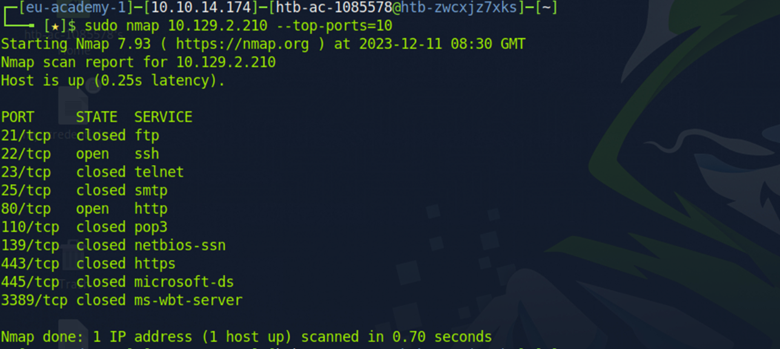
— top-ports=10
Scans the specified top ports that have been defined as most frequent.
We see that we only scanned the top 10 TCP ports of our target, and Nmap displays their state accordingly. If we trace the packets Nmap sends, we will see the RST flag on TCP port 21 that our target sends back to us. To have a clear view of the SYN scan, we disable the ICMP echo requests (-Pn), DNS resolution (-n), and ARP ping scan ( — disable-arp-ping).
Nmap — Trace the Packets


Connect Scan on TCP Port 443
Connect Scan on TCP Port 443
[!bash!] sudo nmap 10.129.2.210 -p 443 — packet-trace — disable-arp-ping -Pn -n — reason -sTStarting Nmap 7.80 ( https://nmap.org ) at 2020–06–15 16:26 CET
CONN (0.0385s) TCP localhost > 10.129.2.28:443 => Operation now in progress
CONN (0.0396s) TCP localhost > 10.129.2.28:443 => Connected
Nmap scan report for 10.129.2.28
Host is up, received user-set (0.013s latency).
PORT STATE SERVICE REASON
443/tcp open https syn-ack
Nmap done: 1 IP address (1 host up) scanned in 0.04 seconds

Filtered Ports
When a port is shown as filtered, it can have several reasons. In most cases, firewalls have certain rules set to handle specific connections. The packets can either be dropped, or rejected. When a packet gets dropped, Nmap receives no response from our target, and by default, the retry rate (--max-retries) is set to 1. This means Nmap will resend the request to the target port to determine if the previous packet was not accidentally mishandled.
Let us look at an example where the firewall drops the TCP packets we send for the port scan. Therefore we scan the TCP port 139, which was already shown as filtered. To be able to track how our sent packets are handled, we deactivate the ICMP echo requests (-Pn), DNS resolution (-n), and ARP ping scan (--disable-arp-ping) again.
Filtered Connect Scan on TCP Port 443
[!bash!]sudo nmap 10.129.2.28 -p 139 — packet-trace -n — disable-arp-ping -Pn
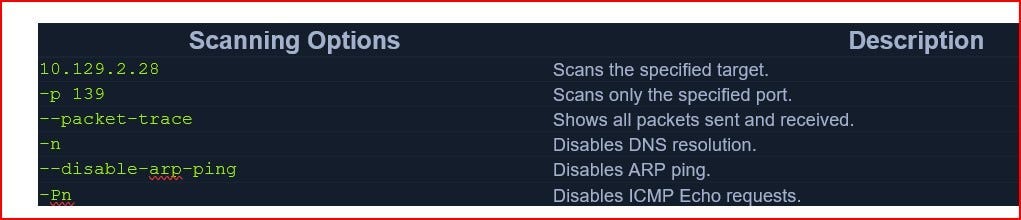
We see in the last scan that Nmap sent two TCP packets with the SYN flag. By the duration (2.11s) of the scan, we can recognize that it took much longer than the previous ones (~0.05s). The case is different if the firewall rejects the packets. For this, we look at TCP port 445, which is handled accordingly by such a rule of the firewall.
Just the Change port

Discovering Open UDP Ports
Some system administrators sometimes forget to filter the UDP ports in addition to the TCP ones. Since UDP is a stateless protocol and does not require a three-way handshake like TCP. We do not receive any acknowledgment. Consequently, the timeout is much longer, making the whole UDP scan (-sU) much slower than the TCP scan (-sS).
Let’s look at an example of what a UDP scan (-sU) can look like and what results it gives us.
UDP Port Scan
UDP Port Scan
ramim21@htb[/htb]$ sudo nmap 10.129.2.28 -F -sU
UDP Port Scan
[!bash!]sudo nmap 10.129.2.28 -sU -Pn -n — disable-arp-ping — packet-trace -p 137 — reason
If we get an ICMP response with error code 3 (port unreachable), we know that the port is indeed closed.
UDP Port Scan
[!bash!]sudo nmap 10.129.2.28 -sU -Pn -n — disable-arp-ping — packet-trace -p 100 — reason
For all other ICMP responses, the scanned ports are marked as (open|filtered).
UDP Port Scan
[!bash!]$ sudo nmap 10.129.2.28 -sU -Pn -n — disable-arp-ping — packet-trace -p 138 — reasonAnother handy method for scanning ports is the -sV option which is used to get additional available information from the open ports. This method can identify versions, service names, and details about our target.
Version Scan
[!bash!]$ sudo nmap 10.129.2.28 -Pn -n — disable-arp-ping — packet-trace -p 445 — reason -sV
Find all TCP ports on your target. Submit the total number of found TCP ports as the answer.
Just scan the IP..
#nmap 10.129.178.201 this command
Then answer

Enumerate the hostname of your target and submit it as the answer. (case-sensitive)
Answer:
NIX-NMAP-DEFAULT
eu-academy-1]─[10.10.14.201]─[htb-ac-1085578@htb-pqm8bazuec]─[~]
[!bash!]$sudo nmap -sV 10.129.178.201
Perform a full TCP port scan on your target and create an HTML report. Submit the number of the highest port as the answer.
Ans : 31337
┌─[✗]─[root@htb-et1dieasg0]─[/home/htb-ac-1085578]
[!bash!]$nmap 10.129.2.49 -oA target
Thank You
메타데이터
- post_id
- e75c5dd068ac
- slug
- network-enumeration-with-nmap-hack-the-box-e75c5dd068ac
- url
- https://medium.com/@VictorX0x/network-enumeration-with-nmap-hack-the-box-e75c5dd068ac
- canonical_url
- https://medium.com/@VictorX0x/network-enumeration-with-nmap-hack-the-box-e75c5dd068ac
- author_url
- https://medium.com/@VictorX0x
- status
- ok
- fetched_at
- 2026-08-02 21:32:20

