Azure Reserved Subnet Names and Recommended Sizes (Cheat Sheet)
Designing an Azure Virtual Network seems straightforward — until you start deploying services like Azure Firewall, Bastion, Virtual Network…
Azure Reserved Subnet Names and Recommended Sizes (Cheat Sheet)
Designing an Azure Virtual Network seems straightforward — until you start deploying services like Azure Firewall, Bastion, Virtual Network Gateway, or Private Endpoints.
Many Azure services require specific subnet names and have minimum subnet size recommendations. Choosing the wrong subnet size early can lead to deployment failures or force you to redesign your network later.
This cheat sheet summarizes the Azure reserved subnet names I frequently use while designing production environments.
Why Reserved Subnets Matter
Some Azure services don’t just recommend a subnet name — they require it.
For example:
- Azure Bastion must be deployed into AzureBastionSubnet.
- Azure Firewall must use AzureFirewallSubnet.
- Virtual Network Gateway requires GatewaySubnet.
Using incorrect names or undersized subnets can prevent deployments or limit future scalability.
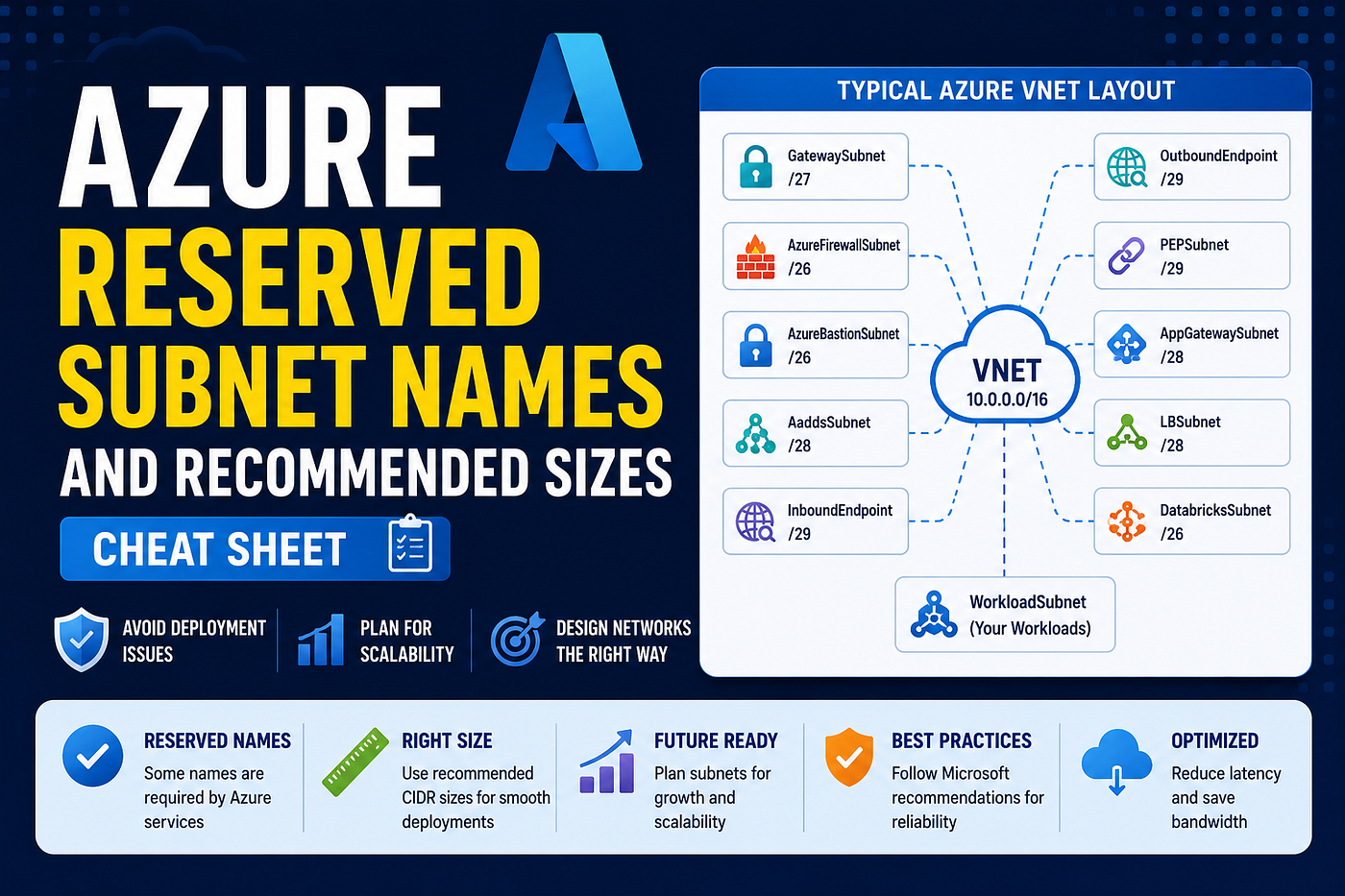
Typical Azure Virtual Network Layout
VNet (10.0.0.0/16)├── GatewaySubnet (/27)
├── AzureFirewallSubnet (/26)
├── AzureBastionSubnet (/26)
├── ApplicationGatewaySubnet (/28)
├── WorkloadSubnet (/24)
├── PrivateEndpointSubnet (/29)
├── DNSResolverInbound (/29)
├── DNSResolverOutbound (/29)
└── DatabricksSubnet (/26)GatewaySubnet
Never deploy virtual machines or other Azure resources inside GatewaySubnet. It should be reserved exclusively for Virtual Network Gateway resources.
Azure Firewall
Azure Firewall only deploys successfully when the subnet is named:
AzureFirewallSubnetAzure Bastion
Azure Bastion also requires a specific subnet name:
AzureBastionSubnetUsing a smaller subnet than recommended may limit future scaling.
Private Endpoints
Although a /29 subnet is commonly sufficient, plan for additional IP requirements if you expect many Private Endpoints in the future.
Application Gateway
Even though the recommended subnet size is /28, avoid sharing the subnet with unrelated workloads.
A dedicated subnet makes scaling and maintenance much easier.
Plan for Growth
One of the biggest Azure networking mistakes is designing subnets only for today’s requirements.
Expanding subnets later often requires recreating resources or redesigning the virtual network.
Whenever possible, allocate slightly larger address spaces than your immediate needs.
Final Thoughts
Subnet planning is one of the first decisions made during Azure network design — and one of the hardest to change later.
Understanding Azure’s reserved subnet names and recommended CIDR sizes can help you avoid deployment issues, simplify future expansion, and build a network that’s ready to scale.
I keep this cheat sheet handy whenever I’m designing Azure landing zones, hub-and-spoke architectures, or production virtual networks. Hopefully, it saves you a few trips to the documentation as well.
메타데이터
- post_id
- e7707a70e262
- slug
- azure-reserved-subnet-names-and-recommended-sizes-cheat-sheet-e7707a70e262
- url
- https://medium.com/@durgeshmishrablog/azure-reserved-subnet-names-and-recommended-sizes-cheat-sheet-e7707a70e262
- canonical_url
- https://medium.com/@durgeshmishrablog/azure-reserved-subnet-names-and-recommended-sizes-cheat-sheet-e7707a70e262
- author_url
- https://medium.com/@durgeshmishrablog
- status
- ok
- fetched_at
- 2026-07-19 13:52:23