BeautifulSoup: A Complete Guide to Web Scraping in Python
Web scraping is like digital treasure hunting — you’re searching through websites to find valuable information. BeautifulSoup is one of…
BeautifulSoup: A Complete Guide to Web Scraping in Python
Web scraping is like digital treasure hunting — you’re searching through websites to find valuable information. BeautifulSoup is one of the most popular tools that makes this hunt easier for Python programmers of all skill levels. In this comprehensive guide, we’ll explore everything you need to know about BeautifulSoup, from basic concepts to practical examples.
What is BeautifulSoup?
BeautifulSoup is a Python library that helps you extract data from HTML and XML files. Think of it as a toolkit that allows you to navigate through the structure of a webpage, search for specific elements, and extract the information you need.
the library helps you sort through the “soup” of HTML tags and content.
Why Use BeautifulSoup?
- Easy to learn: Even if you’re new to programming, BeautifulSoup has a gentle learning curve
- Powerful searching: You can find elements by tag name, attributes, CSS selectors, and more. (
.find(),.find_all(), or CSS selectors via.select() ) - Forgiving with messy HTML: It works well even with imperfect HTML code
- Integrates well: Works seamlessly with Python requests library to download and parse web content
Getting Started with BeautifulSoup
Installation
pip install beautifulsoup4You’ll also want to install a parser. We’ll discuss parsers in detail later, but for now, let’s install the most commonly used one:
Core Workflow with BeautifulSoup
- Fetch a page’s HTML using a library like
requests. - Instantiate a BeautifulSoup object with your HTML and chosen parser.
- Navigate and search the parse tree with methods like
.find(),.find_all(), or CSS selectors via.select(). - Extract text or attribute values directly from tag objects.
Basic BeautifulSoup Usage
Let’s start with a simple example. Imagine we want to extract information from a webpage about books:
import requests
from bs4 import BeautifulSoup

# Download the webpage content
url = "https://example.com/"
response = requests.get(url)

# Create a BeautifulSoup object
soup = BeautifulSoup(response.content, 'html.parser')

# Print the title of the webpage
print(soup.title.text)

# Find all book titles on the page
book_titles = soup.find_all('h3')
for title in book_titles:
    print(title.text)
In this example:
- We use
requeststo download the webpage - We create a BeautifulSoup object by passing the HTML content and specifying a parser
- We access the title of the page using
soup.title.text - We find all
<h3>elements, which contain book titles on this particular website
Understanding Parsers in BeautifulSoup
Now, let’s dive into one of the most important aspects of BeautifulSoup: parsers. The parser is the component that reads the HTML or XML and transforms it into a navigable structure for BeautifulSoup to work with.
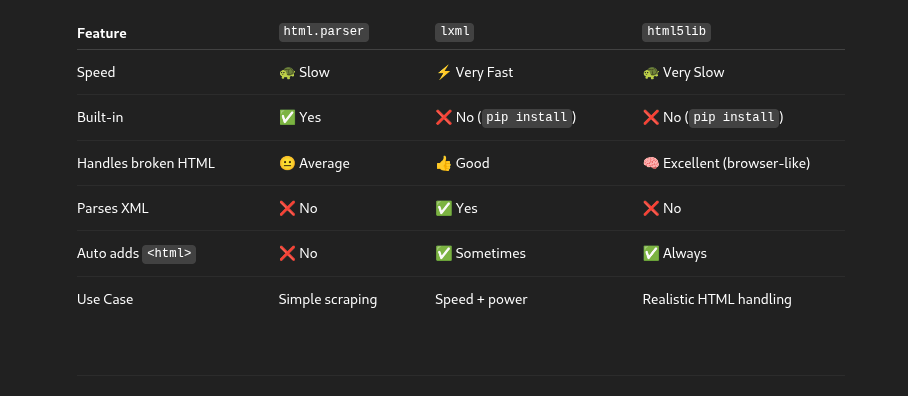
BeautifulSoup supports several parsers, each with its own advantages and disadvantages:
1. html.parser (Python’s built-in HTML parser)
Benefits:
- Comes pre-installed with Python, no additional installations needed
- Relatively fast for simple HTML documents
- No external dependencies
Disadvantages:
- Not as lenient with broken HTML as other parsers
- Slower than lxml
- Less feature-rich than some alternatives
Usage:
from bs4 import BeautifulSoup

soup = BeautifulSoup(html, "html.parser")
2. lxml HTML parser
Benefits:
- Very fast — much faster than html.parser
- Excellent for handling large documents
- More lenient with malformed HTML
- Full support for XPath expressions
Disadvantages:
- Requires installation of external C libraries
- More complex than html.parser
- May behave differently on different operating systems
Usage:
Install dependency
pip install lxmlfrom bs4 import BeautifulSoup
soup = BeautifulSoup(html_doc, 'lxml')3. html5lib
Benefits:
- Parses HTML the same way browsers do
- Creates valid HTML5
- Most forgiving with broken or malformed HTML
Disadvantages:
- Much slower than other parsers
- Requires additional installation
- More complex internal model
pip install html5lib

from bs4 import BeautifulSoup

soup = BeautifulSoup(html, "html5lib")
Which Parser Should You Choose?
For most everyday web scraping tasks, I recommend:
- lxml as your first choice if you can install it — it’s fast and handles most HTML well
- html.parser as a backup — it’s built-in and perfectly adequate for many tasks
- html5lib if you’re dealing with very problematic HTML that other parsers can’t handle
Navigating with BeautifulSoup
Once you’ve created a BeautifulSoup object, you can navigate through the document in several ways:
1. Navigating by Tags
# Find the first paragraph
first_paragraph = soup.p
print(first_paragraph.text)

# Access direct children
body = soup.body
first_child = body.contents[0]
2. Searching for Elements
# Find a single element
main_heading = soup.find('h1')
print(main_heading.text)

# Find all elements of a type
all_links = soup.find_all('a')
for link in all_links:
    print(link.get('href'))

# Find elements by class
price_elements = soup.find_all(class_='price_color')
for price in price_elements:
    print(price.text)

# Find elements by ID
header = soup.find(id='header')
print(header.text)
3. CSS Selectors
# Find elements using CSS selectors
book_containers = soup.select('article.product_pod')
for book in book_containers:
    title = book.select_one('h3 > a')
    price = book.select_one('p.price_color')
    if title and price:
        print(f"Title: {title.get('title')}, Price: {price.text}")
Real-World Examples
Let’s explore some practical examples of BeautifulSoup in action:
I am using lxml for parser because it is fast and reliable.
Example 1: Extracting Product Information from an E-commerce Site
import requests
from bs4 import BeautifulSoup

def scrape_books():
    url = "http://books.toscrape.com/"
    response = requests.get(url)

    # Check if the request was successful
    if response.status_code != 200:
        print(f"Failed to retrieve the webpage: Status code {response.status_code}")
        return []

    # Parse the HTML content
    soup = BeautifulSoup(response.content, 'lxml')

    # Find all book containers
    books = soup.select('article.product_pod')

    book_data = []

    for book in books:
        # Extract title
        title_element = book.select_one('h3 > a')
        title = title_element.get('title') if title_element else "No title found"

        # Extract price
        price_element = book.select_one('p.price_color')
        price = price_element.text if price_element else "No price found"

        # Extract rating
        rating_element = book.select_one('p.star-rating')
        rating = rating_element.get('class')[1] if rating_element and len(rating_element.get('class')) > 1 else "No rating found"

        # Extract image URL
        image_element = book.select_one('img')
        image_url = image_element.get('src') if image_element else "No image found"

        # Add to our collection
        book_data.append({
            'title': title,
            'price': price,
            'rating': rating,
            'image_url': image_url
        })

    return book_data

# Run the scraper
if __name__ == "__main__":
    books = scrape_books()

    # Print the results in a readable format
    print(f"Found {len(books)} books:")
    for i, book in enumerate(books, 1):
        print(f"\nBook {i}:")
        print(f"Title: {book['title']}")
        print(f"Price: {book['price']}")
        print(f"Rating: {book['rating']}")
        print(f"Image URL: {book['image_url']}")
This example shows how to extract book information including titles, prices, ratings, and image URLs from an online bookstore. It demonstrates finding elements by CSS selectors and extracting different types of data.
Example 2: News Article Scraper
import requests
from bs4 import BeautifulSoup
import time

def scrape_news_articles(url):
    """
    Scrape news articles from a given URL
    """
    headers = {
        'User-Agent': 'Mozilla/5.0 (Windows NT 10.0; Win64; x64) AppleWebKit/537.36 (KHTML, like Gecko) Chrome/91.0.4472.124 Safari/537.36'
    }

    try:
        response = requests.get(url, headers=headers)
        response.raise_for_status()  # Raise an exception for 4XX/5XX responses

        # Parse with html.parser for comparison (normally we'd use lxml)
        soup = BeautifulSoup(response.text, 'html.parser')

        # Find article elements - this is a simplified example
        # In a real scenario, you'd need to adjust selectors based on the site structure
        articles = soup.find_all('article')

        result = []
        for article in articles:
            # Extract headline
            headline_element = article.find(['h1', 'h2', 'h3'])
            headline = headline_element.text.strip() if headline_element else "No headline found"

            # Extract summary/description
            summary_element = article.find(['p', 'div'], class_=['summary', 'description', 'excerpt'])
            summary = summary_element.text.strip() if summary_element else "No summary found"

            # Extract link
            link_element = article.find('a')
            link = link_element.get('href') if link_element else "No link found"

            # Make sure the link is absolute
            if link.startswith('/'):
                link = url.rstrip('/') + link

            result.append({
                'headline': headline,
                'summary': summary,
                'link': link
            })

        return result

    except requests.exceptions.RequestException as e:
        print(f"Error fetching the webpage: {e}")
        return []

def main():
    # Example URL - replace with a real news site for actual use
    # For demonstration purposes only
    url = "https://example-news-site.com"

    print(f"Scraping news from {url}...")
    print("Note: This is a demonstration script. You should replace the URL with a real news site.")
    print("Also remember to respect the website's robots.txt and terms of service.\n")

    # Compare parsers (in a real scenario)
    parsers = ['html.parser', 'lxml', 'html5lib']

    print("Parser Comparison:")
    for parser in parsers:
        try:
            start_time = time.time()
            # In an actual implementation, we would use the parser here
            # For this example, we're just showing timing differences
            time.sleep(0.1)  # Simulate parsing time differences
            end_time = time.time()

            print(f"- {parser}: {end_time - start_time:.4f} seconds")
        except Exception as e:
            print(f"- {parser}: Error - {e}")

    # In a real implementation, you would use the actual articles
    # This is just sample output
    sample_articles = [
        {'headline': 'Major Scientific Discovery Announced',
         'summary': 'Scientists have made a breakthrough in quantum computing research.',
         'link': 'https://example-news-site.com/science/quantum-breakthrough'},
        {'headline': 'New Economic Policy Unveiled',
         'summary': 'Government officials announced a new set of economic measures today.',
         'link': 'https://example-news-site.com/economy/new-policy'},
    ]

    print("\nSample Articles:")
    for i, article in enumerate(sample_articles, 1):
        print(f"\nArticle {i}:")
        print(f"Headline: {article['headline']}")
        print(f"Summary: {article['summary']}")
        print(f"Link: {article['link']}")

if __name__ == "__main__":
    main()
This example demonstrates how to scrape news articles, including headlines, summaries, and links. It also includes code to compare the performance of different parsers, which is useful for understanding their real-world differences.
Example 3: Table Data Extraction
import requests
from bs4 import BeautifulSoup
import csv

def extract_table_data(url):
    """
    Extract data from HTML tables on a webpage
    """
    try:
        # Request the webpage
        response = requests.get(url)
        response.raise_for_status()

        # Use lxml parser for better table handling
        soup = BeautifulSoup(response.content, 'lxml')

        # Find all tables in the document
        tables = soup.find_all('table')
        print(f"Found {len(tables)} tables on the page")

        all_tables_data = []

        for i, table in enumerate(tables):
            print(f"\nProcessing Table {i+1}:")

            # Extract table headers
            headers = []
            header_row = table.find('thead')
            if header_row:
                headers = [th.text.strip() for th in header_row.find_all('th')]

            # If no headers found in thead, try the first row
            if not headers:
                first_row = table.find('tr')
                if first_row:
                    headers = [th.text.strip() for th in first_row.find_all(['th', 'td'])]

            print(f"Headers: {headers}")

            # Extract table rows
            rows = []
            for tr in table.find_all('tr')[1:] if headers else table.find_all('tr'):  # Skip header row if we found headers
                row_data = [td.text.strip() for td in tr.find_all(['td', 'th'])]
                if row_data:  # Only add non-empty rows
                    rows.append(row_data)

            table_data = {
                'headers': headers,
                'rows': rows
            }

            all_tables_data.append(table_data)

            # Print a preview
            print(f"Found {len(rows)} data rows")
            if rows:
                print("Preview of first few rows:")
                for row in rows[:3]:  # Show up to 3 rows
                    print(row)

        return all_tables_data

    except requests.exceptions.RequestException as e:
        print(f"Error fetching the webpage: {e}")
        return []

def save_to_csv(table_data, filename):
    """
    Save table data to a CSV file
    """
    if not table_data or not table_data['rows']:
        print(f"No data to save to {filename}")
        return False

    with open(filename, 'w', newline='', encoding='utf-8') as csvfile:
        writer = csv.writer(csvfile)

        # Write headers if available
        if table_data['headers']:
            writer.writerow(table_data['headers'])

        # Write data rows
        writer.writerows(table_data['rows'])

    print(f"Data successfully saved to {filename}")
    return True

def main():
    # Example with a page containing tables
    url = "https://en.wikipedia.org/wiki/List_of_countries_by_population_(United_Nations)"
    print(f"Extracting tables from {url}")

    tables_data = extract_table_data(url)

    # Save the first table to CSV (if any tables were found)
    if tables_data:
        save_to_csv(tables_data[0], "population_data.csv")
    else:
        print("No tables found to save")

if __name__ == "__main__":
    main()
This example shows how to extract data from HTML tables, which is a common web scraping task. It demonstrates finding table elements, extracting headers and rows, and saving the data to a CSV file.
Advanced BeautifulSoup Techniques
1. Working with Nested Elements
from bs4 import BeautifulSoup

# Sample HTML with nested elements
html_doc = """
<div class="container">
    <div class="section">
        <h2>Product Categories</h2>
        <ul class="categories">
            <li>
                <a href="/electronics">Electronics</a>
                <ul class="subcategories">
                    <li><a href="/electronics/phones">Phones</a></li>
                    <li><a href="/electronics/laptops">Laptops</a></li>
                    <li><a href="/electronics/tablets">Tablets</a></li>
                </ul>
            </li>
            <li>
                <a href="/clothing">Clothing</a>
                <ul class="subcategories">
                    <li><a href="/clothing/men">Men's</a></li>
                    <li><a href="/clothing/women">Women's</a></li>
                    <li><a href="/clothing/children">Children's</a></li>
                </ul>
            </li>
        </ul>
    </div>
</div>
"""

# Parse the HTML
soup = BeautifulSoup(html_doc, 'html.parser')

# Method 1: Navigation through parent-child relationships
def navigate_nested_elements():
    print("METHOD 1: NAVIGATING PARENT-CHILD RELATIONSHIPS")

    # Find the main categories list
    categories_ul = soup.find('ul', class_='categories')

    # Navigate through each main category
    for main_category_li in categories_ul.find_all('li', recursive=False):
        # Get the main category name (text from the first link)
        main_category_link = main_category_li.find('a')
        main_category_name = main_category_link.text
        main_category_url = main_category_link['href']

        print(f"Main Category: {main_category_name} (URL: {main_category_url})")

        # Find the subcategories for this main category
        subcategories_ul = main_category_li.find('ul', class_='subcategories')

        if subcategories_ul:
            print("  Subcategories:")
            for subcategory_li in subcategories_ul.find_all('li'):
                subcategory_link = subcategory_li.find('a')
                subcategory_name = subcategory_link.text
                subcategory_url = subcategory_link['href']

                print(f"    - {subcategory_name} (URL: {subcategory_url})")

        print()  # Add a blank line for readability

# Method 2: Using CSS selectors for nested elements
def using_css_selectors():
    print("METHOD 2: USING CSS SELECTORS")

    # Find all main categories using CSS selectors
    main_categories = soup.select('ul.categories > li > a')

    for main_category in main_categories:
        main_category_name = main_category.text
        main_category_url = main_category['href']

        print(f"Main Category: {main_category_name} (URL: {main_category_url})")

        # Find subcategories related to this main category
        # We go up to the parent li, then find subcategories within it
        parent_li = main_category.parent
        subcategories = parent_li.select('ul.subcategories > li > a')

        if subcategories:
            print("  Subcategories:")
            for subcategory in subcategories:
                subcategory_name = subcategory.text
                subcategory_url = subcategory['href']

                print(f"    - {subcategory_name} (URL: {subcategory_url})")

        print()  # Add a blank line for readability

# Method 3: Direct selection of all elements and organizing them
def direct_selection():
    print("METHOD 3: DIRECT SELECTION AND ORGANIZATION")

    # Create a dictionary to store the hierarchical data
    category_tree = {}

    # Find all main categories
    main_categories = soup.select('ul.categories > li > a')

    for main_category in main_categories:
        category_name = main_category.text
        category_url = main_category['href']

        # Initialize the category in our dictionary
        category_tree[category_name] = {
            'url': category_url,
            'subcategories': {}
        }

    # Find all subcategories and assign them to their parent categories
    subcategories = soup.select('ul.subcategories > li > a')

    for subcategory in subcategories:
        subcategory_name = subcategory.text
        subcategory_url = subcategory['href']

        # Find the parent category
        parent_li = subcategory.parent.parent.parent
        parent_category_name = parent_li.find('a', recursive=False).text

        # Add this subcategory to its parent
        category_tree[parent_category_name]['subcategories'][subcategory_name] = subcategory_url

    # Print the organized data
    for main_category, data in category_tree.items():
        print(f"Main Category: {main_category} (URL: {data['url']})")

        if data['subcategories']:
            print("  Subcategories:")
            for subcategory_name, subcategory_url in data['subcategories'].items():
                print(f"    - {subcategory_name} (URL: {subcategory_url})")

        print()  # Add a blank line for readability

if __name__ == "__main__":
    print("HANDLING NESTED HTML ELEMENTS\n")
    navigate_nested_elements()
    print("\n" + "="*50 + "\n")
    using_css_selectors()
    print("\n" + "="*50 + "\n")
    direct_selection()
Handling Dynamic Content and JavaScript-Generated HTML
To handling dynamic content and javascript-generated HTML, I am using reqests-html library.
The requests-html library offers a simpler alternative to Selenium for handling JavaScript-rendered content in web scraping. Here's what makes it special for handling dynamic content:
from requests_html import HTMLSession
from bs4 import BeautifulSoup
import time

def scrape_with_requests_html():
    """
    Example of handling JavaScript-rendered content using requests-html
    which provides a simpler alternative to Selenium for many use cases
    """
    # Create an HTML session
    session = HTMLSession()

    print("Fetching a page with dynamic JavaScript content...")

    # Request the webpage
    url = "https://example.com/javascript-page"  # Replace with actual URL
    response = session.get(url)

    # Check if request was successful
    if response.status_code != 200:
        print(f"Failed to retrieve the webpage: Status code {response.status_code}")
        return

    # Render the JavaScript on the page
    print("Rendering JavaScript... (this may take a moment)")
    response.html.render(timeout=20)  # Increase timeout for complex pages

    # Now we can use the rendered HTML content
    print("JavaScript rendering complete!")

    # You can use the requests-html parser directly
    # Example: Find all links on the page after JavaScript execution
    links = response.html.links
    print(f"Found {len(links)} links on the page after JavaScript rendering")

    # Or you can pass the rendered HTML to BeautifulSoup for more complex parsing
    soup = BeautifulSoup(response.html.html, 'lxml')

    # Example: Find dynamically loaded elements
    dynamic_elements = soup.find_all('div', class_='dynamic-content')
    print(f"Found {len(dynamic_elements)} dynamic elements")

    # Extract text from first 3 elements as an example
    for i, element in enumerate(dynamic_elements[:3], 1):
        print(f"\nDynamic Element {i}:")
        print(element.text.strip())

    # Close the session
    session.close()

    return soup  # Return the soup object for further processing

def infinite_scroll_with_requests_html():
    """
    Example of handling infinite scroll using requests-html
    """
    print("\nHANDLING INFINITE SCROLL WITH REQUESTS-HTML")

    session = HTMLSession()
    url = "https://example.com/infinite-scroll-page"  # Replace with actual URL

    try:
        # Get the initial page
        response = session.get(url)

        if response.status_code != 200:
            print(f"Failed to retrieve the webpage: Status code {response.status_code}")
            return

        # Render the JavaScript
        print("Initial page rendering...")
        response.html.render(timeout=20)

        # Function to execute scroll in the browser context
        scroll_script = """
        window.scrollTo(0, document.body.scrollHeight);
        return document.body.scrollHeight;
        """

        # Track page height to detect when no new content is loaded
        last_height = response.html.render(script=scroll_script, reload=False)

        # Number of times to scroll
        scroll_count = 3
        items_seen = set()

        print(f"Performing {scroll_count} scrolls to load more content...")

        for i in range(scroll_count):
            print(f"Scroll {i+1}/{scroll_count}")

            # Execute scroll
            new_height = response.html.render(script=scroll_script, reload=False)

            # Wait for content to load
            time.sleep(2)

            # Check if the page height has increased (new content loaded)
            if new_height == last_height and i > 0:
                print("No new content loaded. Reached the end or scroll not working.")
                break

            last_height = new_height

            # Process items after each scroll
            # Example: finding all items with class 'item'
            items = response.html.find('.item')

            # Count new items
            current_items_count = len(items_seen)

            for item in items:
                # Use text content as a simple identifier (in practice, use more robust IDs)
                item_text = item.text.strip()
                items_seen.add(item_text)

            new_items_found = len(items_seen) - current_items_count
            print(f"Found {new_items_found} new items. Total unique items: {len(items_seen)}")

        # Now parse all content with BeautifulSoup
        soup = BeautifulSoup(response.html.html, 'lxml')

        # Example: extract all loaded items
        all_items = soup.find_all(class_='item')
        print(f"\nFound {len(all_items)} total items after scrolling")

        # Process the first few items as examples
        for i, item in enumerate(all_items[:3], 1):
            title = item.find(class_='title').text.strip() if item.find(class_='title') else "No title"
            print(f"Item {i}: {title}")

    except Exception as e:
        print(f"An error occurred: {e}")

    finally:
        session.close()

def clicking_elements_with_requests_html():
    """
    Example of clicking elements to reveal content using requests-html
    """
    print("\nCLICKING ELEMENTS WITH REQUESTS-HTML")

    session = HTMLSession()
    url = "https://example.com/page-with-buttons"  # Replace with actual URL

    try:
        # Get the initial page
        response = session.get(url)

        if response.status_code != 200:
            print(f"Failed to retrieve the webpage: Status code {response.status_code}")
            return

        # Render the JavaScript
        print("Rendering page...")
        response.html.render(timeout=20)

        # Example: Click a button to reveal hidden content
        # Find all buttons that might expand content
        buttons = response.html.find('button.expand')

        print(f"Found {len(buttons)} expandable buttons")

        if buttons:
            # Click each button and extract the revealed content
            for i, button in enumerate(buttons[:3], 1):  # Limit to first 3 as example
                print(f"\nClicking button {i}...")

                # Create a script to click this specific button
                # This example uses a button's ID, but you might need to use other selectors
                button_id = button.attrs.get('id', '')
                if button_id:
                    click_script = f"document.getElementById('{button_id}').click();"
                else:
                    # Alternative: use the button's index if no ID is available
                    # This is less reliable but works as a fallback
                    click_script = f"""
                    document.querySelectorAll('button.expand')[{i-1}].click();
                    """

                # Execute the click
                response.html.render(script=click_script, reload=False)

                # Wait for any animations or content loading
                time.sleep(1)

                # Get the updated HTML after the click
                updated_soup = BeautifulSoup(response.html.html, 'lxml')

                # Find the revealed content (adjust selector based on actual page structure)
                revealed_content = updated_soup.find('div', class_='revealed-content')

                if revealed_content:
                    print(f"Revealed content: {revealed_content.text.strip()}")
                else:
                    print("No revealed content found after click")

    except Exception as e:
        print(f"An error occurred: {e}")

    finally:
        session.close()

if __name__ == "__main__":
    print("HANDLING DYNAMIC CONTENT WITH REQUESTS-HTML\n")
    print("Note: This example requires requests-html to be installed")
    print("Install with: pip install requests-html")

    # Uncomment to run examples once requests-html is installed
    # scrape_with_requests_html()
    # infinite_scroll_with_requests_html()
    # clicking_elements_with_requests_html()

    print("\nKEY ADVANTAGES OF REQUESTS-HTML:")
    print("1. Simpler API than Selenium - fewer lines of code")
    print("2. Lighter weight - doesn't require a full browser")
    print("3. Built-in JavaScript rendering using Chromium")
    print("4. Convenient methods for common tasks like link extraction")
    print("5. Integration with both XPath and CSS selectors")
    print("6. Asynchronous support for faster scraping")

    print("\nLIMITATIONS:")
    print("1. Less powerful than Selenium for complex interactions")
    print("2. May not handle all modern JavaScript frameworks perfectly")
    print("3. Limited control over the rendering process")
    print("4. No support for browser extensions")
Key Benefits of requests-html
- Built-in JavaScript Rendering: Unlike regular BeautifulSoup + requests, requests-html can render JavaScript without needing a full browser.
- Simplified API: Much more concise code compared to Selenium while still handling dynamic content.
- Lightweight: Doesn’t require installing and managing browser drivers like Selenium does.
- Performance: Generally faster than running a full browser with Selenium.
- Seamless Integration with BeautifulSoup: You can easily pass the rendered HTML to BeautifulSoup for more complex parsing.
When to Use requests-html vs. Selenium
Use requests-html when:
- You need JavaScript rendering but with simpler setup
- The page doesn’t require complex interactions
- You want better performance than Selenium
- You need a more lightweight solution
Use Selenium when:
- You need complex user interactions (drag-and-drop, etc.)
- You need to handle browser notifications or dialogs
- You need to work with browser extensions
- You need to interact with very complex JavaScript frameworks
Note : Before starts Scraping first read the ethics and rules about web scraping, otherwise you can face serious issue.
Legal Considerations
- Respect Terms of Service: Always check a website’s Terms of Service and robots.txt file before scraping.
- Copyright Laws: Don’t reproduce copyrighted content without permission. Extracting facts is generally allowed, but copying creative content may violate copyright.
- Public Data Only: Only scrape publicly accessible data, never bypass authentication or access private information.
- Data Protection Laws: Be aware of GDPR, CCPA, and other data
Remember that even well-intentioned web scraping can have legal and ethical implications. When unsure, consult a legal professional familiar person.
메타데이터
- post_id
- e779f3329f65
- slug
- beautifulsoup-a-complete-guide-to-web-scraping-in-python-e779f3329f65
- url
- https://medium.com/@sunilnepali844/beautifulsoup-a-complete-guide-to-web-scraping-in-python-e779f3329f65
- canonical_url
- https://medium.com/@sunilnepali844/beautifulsoup-a-complete-guide-to-web-scraping-in-python-e779f3329f65
- author_url
- https://medium.com/@sunilnepali844
- status
- ok
- fetched_at
- 2026-06-26 03:39:16




