OpenWorker: Andrew Ng and Rohit Prasad’s Answer to AI Agents That Only Talk
An open source, local first desktop coworker that hands back a finished document, a sent message, or an updated calendar instead of…
OpenWorker: Andrew Ng and Rohit Prasad’s Answer to AI Agents That Only Talk
An open source, local first desktop coworker that hands back a finished document, a sent message, or an updated calendar instead of another chat reply
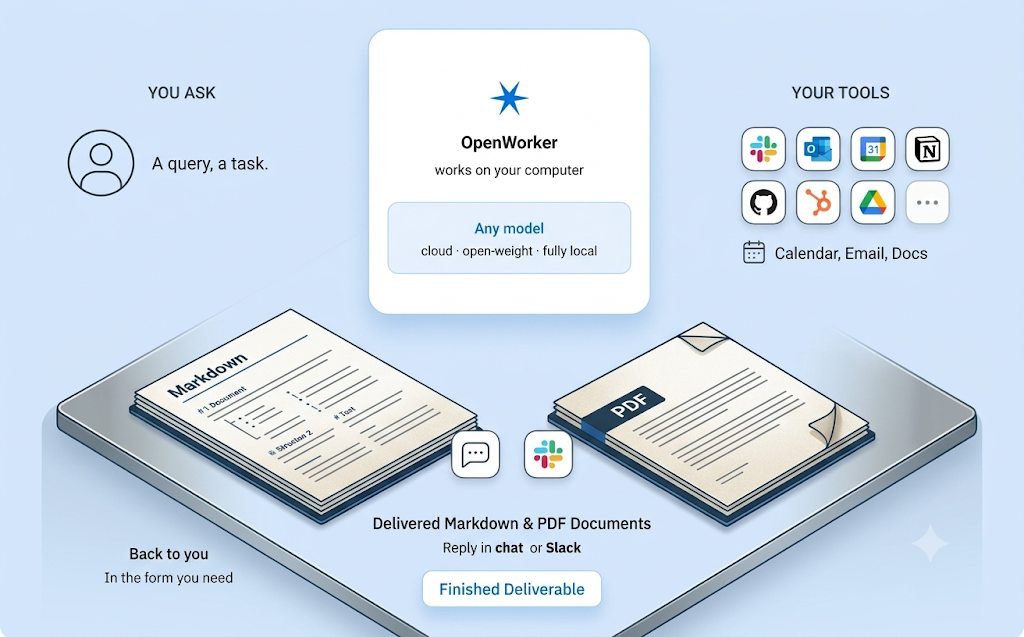
Most AI assistants are built to answer questions. OpenWorker was built to finish tasks. Released in open beta by Andrew Ng, founder of DeepLearning.AI and AI Fund, alongside Rohit Prasad, the project sets out to give knowledge workers something considerably more useful than a conversation: an actual deliverable, produced by an agent that runs entirely on the user’s own machine, under a model of the user’s own choosing, with every consequential action gated behind explicit approval.
The timing matters as much as the design. Concern over vendor lock in and the handling of sensitive corporate data has been rising steadily across organizations experimenting with AI agents, and OpenWorker positions itself directly against that anxiety. Rather than routing a company’s files, messages, and calendar through a hosted, centrally controlled service, it runs locally, keeps data on the user’s device by default, and lets that user choose exactly which model provider ever sees a given piece of information.
What OpenWorker Actually Delivers
The core distinction OpenWorker draws is between chat and finished work. A typical conversational assistant, asked to prepare a customer brief, might return a summary or an outline inside a chat window, leaving the actual document, spreadsheet, or message still to be produced by hand. OpenWorker is built to hand back the artifact itself: a polished document ready to open and share, a Slack reply that already contains the requested numbers, a calendar that has genuinely been reorganized, or an inbox that has already been triaged.
This works through a straightforward interaction pattern. A user describes the outcome they want, phrased as a real request rather than a carefully engineered prompt, something like preparing a customer brief, untangling a messy calendar, drafting a report, or checking where a release stands across Jira and GitHub. OpenWorker then breaks that request down into a sequence of steps and works through them across the desktop, local files, and whatever applications are connected. Before taking any action with real consequences, such as sending a message, modifying a calendar entry, or running a command, it pauses and checks in, waiting for explicit approval or a redirection rather than proceeding unilaterally. What comes back at the end is the deliverable itself, not a list of suggested next steps.
A Structural Approach to Safety
What sets OpenWorker apart from a system that simply asks for blanket permission before doing anything is a more structured, tiered approach to risk. Rather than treating every tool call as equally sensitive, or leaving an agent free to act without any oversight at all, OpenWorker classifies each action it might take into one of several distinct risk tiers, generally described as reading data, writing to local files, executing code, and reaching out to external services. A user grants approval at the level of a tier rather than approving every microscopic action individually, giving the agent room to work efficiently within clearly defined boundaries while still keeping a human firmly in control of anything that could meaningfully affect files, systems, or the outside world.
This risk tiered design reflects a broader philosophy: a genuine coworker needs to touch the file system, call external APIs, and occasionally run scripts to actually get work done, and a system that either blocks all of that by default or approves all of it unconditionally both miss the practical middle ground most users actually want. By sorting actions into meaningful categories of risk and gating each category independently, OpenWorker aims to let an agent operate productively without requiring constant, exhausting babysitting, while still refusing to hand over unrestricted control.
How OpenWorker Is Built
Under the hood, OpenWorker is organized into a small number of clearly separated layers, all running on the user’s own machine rather than depending on any OpenWorker hosted backend service.
+--------------------------------------------------+
|              OpenWorker desktop app               |  native shell and GUI
+--------------------------------------------------+
|           local agent server (Python)             |  engine, tools, connectors, built on aisuite
+---------------+------------------+----------------+
|  your files   |    your tools     |  your model    |  everything runs with your keys,
|  and terminal |   25+ connectors  |  any provider  |  on your machine
+---------------+------------------+----------------+
The desktop shell itself is built on Tauri 2, wrapping a React based user interface, with the shell responsible for launching and supervising the underlying Python server directly. That local agent server runs on Python 3.10 or later, built on FastAPI and uvicorn, binding by default to a local address on port 8765. According to independent reporting on the project’s codebase, the backend spans roughly 32,400 lines of Python across 119 files inside a directory named coworker, alongside 149 TypeScript and TSX files powering the graphical interface and 78 dedicated backend test modules, a footprint considerably closer to a production grade system than a quick weekend prototype.
The agent engine itself is built on aisuite, a lightweight Python library providing a single, unified chat completions interface across many different language model providers, along with an agents layer covering tools, toolkits, and Model Context Protocol support. Anyone interested in building an entirely custom agent harness rather than using OpenWorker directly is pointed toward aisuite itself as a starting point, with OpenWorker serving as a genuine, working reference for what that underlying library can support in practice. OpenWorker was in fact originally developed inside the aisuite repository before being given its own dedicated home, a detail the project credits directly to the aisuite contributors whose earlier work it continues to build on.
Everyday Capabilities
OpenWorker’s practical value comes from the breadth of what it can actually produce and where it can operate. It generates real deliverables directly as files, including documents, spreadsheets, reports, and web pages, all landing in a form that can be opened and shared immediately rather than requiring further manual assembly.
It also works directly from Slack. Mentioning the agent inside a channel opens a corresponding session on the user’s own desktop, where the actual work happens using the user’s own connected tools, with the finished answer returned as a reply directly inside the original thread. This effectively turns a familiar team communication channel into a lightweight interface for triggering real desktop work, without requiring anyone to leave the conversation they are already having.
Integration depth is one of OpenWorker’s clearer strengths. The project ships with more than twenty five native connectors, spanning GitHub, Slack, Jira, Notion, Linear, HubSpot, Microsoft Outlook, monday.com, Gmail, and Google Calendar, alongside direct access to a user’s own terminal and local files. Any additional tool reachable over the Model Context Protocol can be plugged in as well, with per tool control available over exactly what each connected capability is allowed to do.
Recurring work can be automated through scheduled runs, covering things like a recurring morning brief, a standing weekly report, or an ongoing watch kept over a particular channel for relevant activity. These scheduled runs land directly inside the app with a full transcript of what happened, rather than operating invisibly in the background. And because writes, message sends, and shell commands are all gated behind approval, an unattended scheduled run does not simply act on its own when it encounters something consequential. Instead, it parks that pending decision inside an inbox for a person to review and approve later, rather than proceeding without oversight or silently failing.
Choosing a Model on Your Own Terms
OpenWorker deliberately avoids tying a user to any single model provider. Instead, it supports bringing an existing API key from a wide range of providers, switching between them freely at any time. Supported providers include OpenAI, Anthropic, Google Gemini, Inkling from Thinking Machines, GLM from Z.ai, DeepSeek, Kimi from Moonshot, Qwen, MiniMax, Mistral, and Grok from xAI, alongside open weight models accessible through Together and Fireworks, and fully local models run entirely through Ollama for anyone who wants zero dependency on any external network connection whatsoever.
A curated list specifically marks which models the project has verified for reliable tool calling behavior, since not every model handles structured tool use with the same consistency. Any other model string can still be entered and used directly, though doing so falls outside that verified list and is left entirely to the user’s own judgment and risk tolerance.
Privacy as a Design Principle, Not a Policy Promise
OpenWorker describes itself as local first, and that description extends to essentially everything the application handles. The agent’s core reasoning loop, full conversation history, connector authentication tokens, and model API keys all live on the user’s own machine, stored inside the application’s local secret store rather than any remote database. The only piece of the system that touches the cloud at all is a small service specifically responsible for brokering OAuth handshakes for connected integrations, a narrow, well defined function rather than a general purpose backend collecting or processing user data.
Notably, using OpenWorker does not even require creating an account or signing in at all. Connectors can instead be configured directly through manually created credentials or API keys, for anyone who prefers to avoid any account based flow whatsoever. Combined, this design means an organization’s sensitive data, customer briefs, internal reports, calendar details, and messages, never has to leave that organization’s own infrastructure except through the specific model provider and integrations a user has explicitly chosen to connect.
Getting Started
OpenWorker is currently available as a signed and notarized build for Apple Silicon Macs running macOS 12 or later, with automatic updates handled directly by the application itself. A Windows 10 and 11 build is also available, though it is not yet code signed at this stage, meaning Windows SmartScreen will display a warning during installation while code signing work continues.
Getting up and running involves opening the application, adding an API key for a chosen model provider, or pointing the app at a locally running Ollama instance instead, and then simply describing a real task.
Running OpenWorker From Source
For developers who want to build and run OpenWorker directly rather than using a packaged release, the project is fully open on GitHub under an MIT license. Getting a development environment running requires Python 3.10 or later, Node 20 or later, and the Rust toolchain, installed through rustup, for building the desktop shell.
git clone https://github.com/andrewyng/openworker
cd openworker
bash packaging/setup_dev_env.sh
This bootstrap script creates a Python virtual environment at a local .venv directory, and on Windows should be run from Git Bash or WSL rather than a standard command prompt. With that environment in place, the local agent server can be started directly, pointed at whichever project directory should serve as its working context.
.venv/bin/openworker-server --cwd ~/some/project --port 8765On Windows, the equivalent executable lives inside the virtual environment’s Scripts directory instead.
.venv\Scripts\openworker-server.exeWith the server running, a separate terminal starts the browser based user interface.
cd surfaces/gui
npm install
npm run dev
The standalone server generates a fresh, per launch authentication token stored inside a state directory, and the development UI reads that token automatically on startup. For anyone making direct API calls against the running server rather than going through the bundled interface, that same token value needs to be included in a dedicated request header. The full desktop application, rather than the browser based development interface, uses a similar in memory launch token instead, one that is never written to disk at all, with the Tauri shell launching the application window and supervising the underlying server process directly.
npm run tauri devRunning this command from inside the graphical interface’s source directory launches the full desktop experience in place of the plain browser UI.
Testing the backend and frontend separately follows familiar conventions for each respective language.
.venv/bin/pytest
npm test
npm run e2e
Building distributable installers for macOS and Windows is handled through dedicated packaging scripts included in the repository.
Repository Structure
The project’s source is organized into a handful of clearly separated directories. A coworker directory holds the Python backend, covering the agent engine, model provider integrations, connectors, the MCP client, memory handling, and scheduled automations. A surfaces/gui directory holds the desktop application itself, combining a React based interface with the Tauri shell responsible for supervising the underlying server.
A dedicated stt directory contains a Rust based speech to text sidecar supporting voice input. A packaging directory holds the logic for building macOS DMG and Windows installers, along with the auto update manifest and development environment bootstrap script. Design specifications and decision logs live under docs, while the backend’s test suite lives under a dedicated tests directory.
Early Reception and Current State
OpenWorker launched into open beta on July 23, 2026, and quickly drew significant attention, crossing well over six thousand GitHub stars within its first days, a fast pace of adoption that reflects both Andrew Ng’s existing standing in the AI education and research community and genuine interest in the specific problem the project addresses. Coverage of the release has consistently emphasized the same core theme: a credible, well known figure in AI releasing a local first, genuinely model agnostic tool signals that the broader idea of an agent functioning as a real coworker, rather than a chat demo, is maturing into something considerably more production ready.
The project remains explicitly framed as an open beta rather than a finished, polished product. It is described as fully usable while updates continue to refine rough edges, and the team behind it has stated they welcome issues and feedback directly through the project’s GitHub repository as that polishing process continues.
Where OpenWorker Fits and Where It Does Not
OpenWorker is aimed squarely at knowledge workers, developers, and small teams who want genuine, tangible output from an agent running on hardware they control. Its combination of broad connector support, local first data handling, and bring your own model flexibility make it a particularly strong fit for anyone who wants meaningful automation without surrendering control over sensitive files or committing permanently to a single model provider’s pricing and terms.
At the same time, OpenWorker is not necessarily the right fit for every scenario. Anyone specifically looking for a personal assistant embedded directly inside their everyday text messages, rather than a coworker producing standalone files and documents, may find a messaging native agent product a closer match to that particular need. Larger organizations that specifically require a vendor managed, centrally governed deployment, with the kind of formal support and compliance tooling that implies, are likely better served evaluating a dedicated hosted enterprise platform instead, since OpenWorker’s local first design is built around individual control rather than centralized organizational governance.
Conclusion
OpenWorker reframes what people should expect from an AI agent working inside their daily routine, moving away from another conversational interface and toward something that actually finishes the task in front of it, whether that means a polished document, a Slack reply already containing the right numbers, or a calendar that has genuinely been reorganized. Its structured, risk tiered approach to approving consequential actions offers a practical middle ground between blindly trusting an agent and exhausting a user with constant confirmation prompts, while its local first architecture and broad, provider agnostic model support directly address the mounting concern many organizations feel about handing sensitive data over to a centralized, vendor controlled AI service.
Backed by Andrew Ng’s standing in the field and built in close collaboration with Rohit Prasad, OpenWorker enters its open beta as a genuinely substantial, production scale codebase rather than a proof of concept, and its early reception suggests real appetite for exactly the kind of agent it set out to build: one that works quietly in the background and hands back something finished, not just another reply.
The repository is available at: https://github.com/andrewyng/openworker
메타데이터
- post_id
- e7809014c856
- slug
- openworker-andrew-ng-and-rohit-prasads-answer-to-ai-agents-that-only-talk-e7809014c856
- url
- https://medium.com/open-intelligence/openworker-andrew-ng-and-rohit-prasads-answer-to-ai-agents-that-only-talk-e7809014c856
- canonical_url
- https://medium.com/open-intelligence/openworker-andrew-ng-and-rohit-prasads-answer-to-ai-agents-that-only-talk-e7809014c856
- author_url
- https://medium.com/@eng.fadishaar
- status
- ok
- fetched_at
- 2026-08-09 22:03:48